KE2010.Instruction Manual.Ver.2.01,Rev.08.pdf - 第657页
9 − 3 (2) Set ting t he pause time and number of t imes - Set t he time spent f or st opping warming- up operation and t he number of times you are to perf orm warming- up operations. - T he available values v ary depend…
9 − 2
9.2 Warming up
9.2.1 Warm-up initial screen
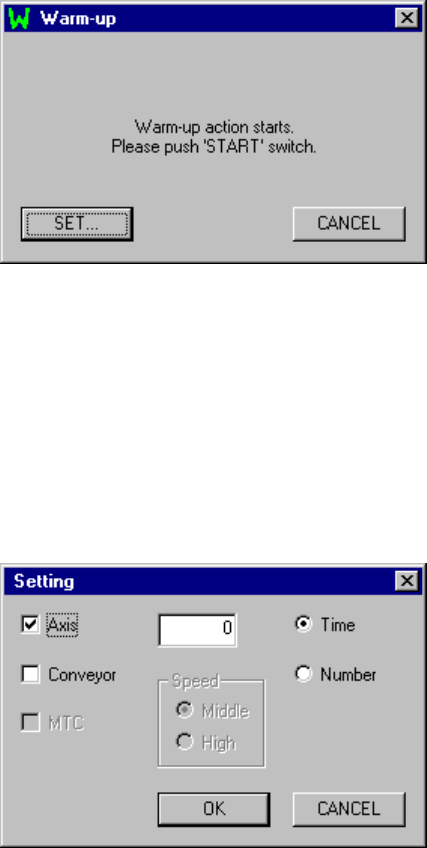
When you select the [Warming Up] command on the [Maintenance] menu invoked
from the menu bar of the main menu, the following Warm-up initial screen appears.
Figure 9.2.1 Warm-up dialog box
- When you press the <START> switch, the warm-up operation starts.
9.2.2 Setting the conditions for warming-up operation
When you click the <SET> button, the following "Setting" dialog box appears on the
screen.
Figure 9.2.2.1 Setting dialog box
(1) Device to be warmed up
- Select the device to be warmed up: Axis, Conveyor and/or MTC.
- If the MTC is not checked on the "Device enable" menu invoked from the
Machine Setup menu, the item "MTC" is disabled, and you cannot select it.
- Any of these devices is not selected, the <OK> button is disabled.
− Initial setting: Axis

9 − 3
(2) Setting the pause time and number of times
- Set the time spent for stopping warming-up operation and the number of times
you are to perform warming-up operations.
- The available values vary depending on the warming-up operation terminating
conditions.
- Time: 0 to 9999 (minutes)
Note: When "0" is set, warming-up operation will not finish until you suspend it.
- Number: 1 to 999999
− Initial value: 0
(3) Setting the condition for terminating warming-up operation
- Select the condition for terminating warming-up operation: Time or Number.
− Initial setting: Time
(4) Setting the speed
- Set the speed of an axis.
- You can select high speed (High) or middle speed (Middle).
− Initial setting: Middle
Note: The axis speed is fixed to “Middle” for the standard specifications
(see Figure 10.2.2.1.)
Contact us or your dealer for the details on the speed setting (variable).
9 − 4
9.2.3 Warming-up operation
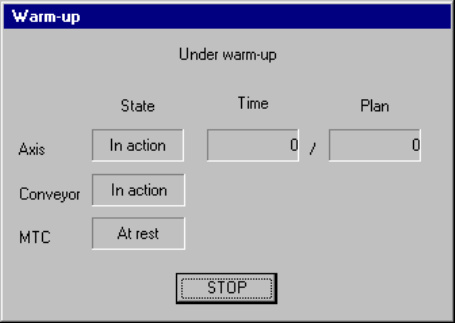
During warming-up, a screen shown below appears.
Figure 9.2.3.1 "Under warm-up" dialog box
(1) Axis
The X, Y Z and theta axes motors and the ATC slide plate operate.
Note that warming-up operation finishes when the ATC slide plate opens and
closes ten times.
(2) Conveyor
The PWB transfer motor, back-up table, stopper pin, edge reference cylinder
(option), and PWB check cylinder (only for a KE-2030) operate.
Note that warm-up operation finishes when each of the stopper pin, edge
reference cylinder and PWB check cylinder turns on, then off four times.
(3) MTC
The shuttle operates.
− When you press the <STOP> switch or click the <STOP> button displayed on
the dialog box above, the confirmation dialog box appears on the screen.
When you click the <Yes> button, warming-up operation terminates.
When you click the <No> button, warming-up operation restarts.