KE2010.Instruction Manual.Ver.2.01,Rev.08.pdf - 第687页
10 − 3 10.2 XY A xis Correction Coefficients W hen y ou select the [ Set-up g roup] on t he menu bar , t hen the [Corr ect coeff icient of XY axis] on the displayed menu, t he following ”Cor rect coeff icient of XY axis”…
10 − 2
(2) Commands
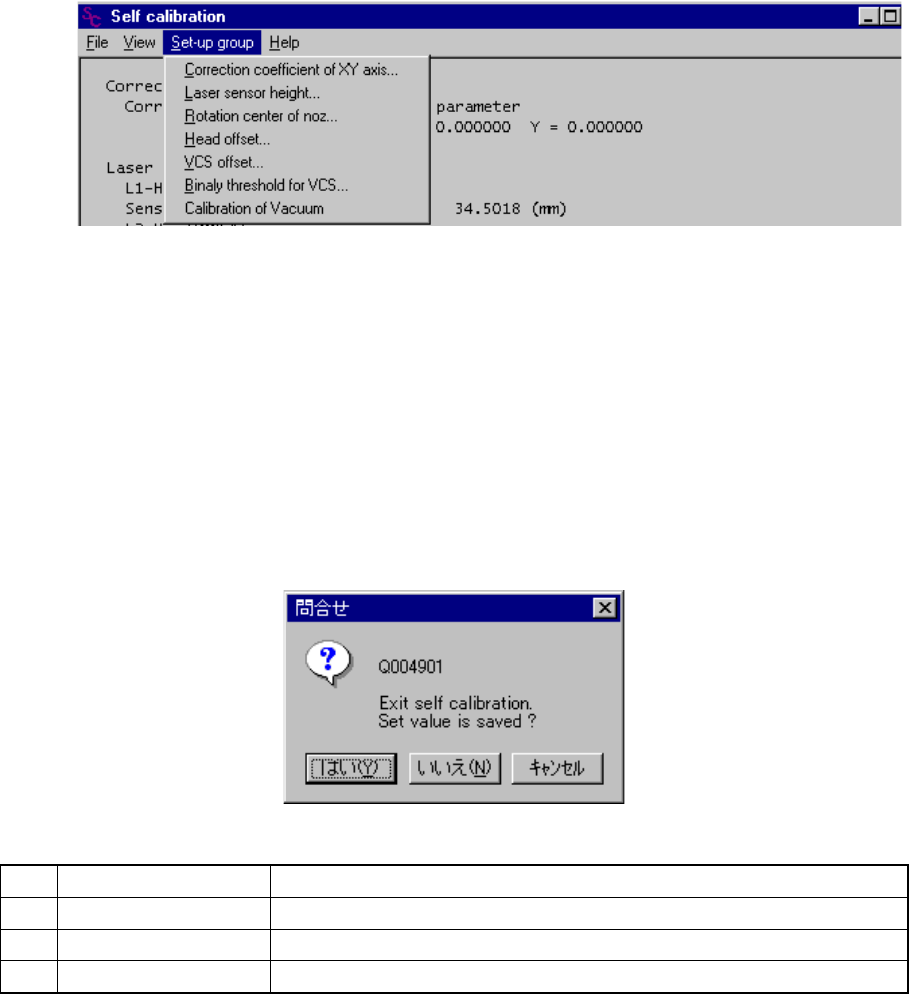
When you select one of the items displayed above, the corresponding dialog box
appears on the screen.
− Set-up group
If a unit is not checked on the "Option" menu provided by the MS parameters
(that is, not installed), you cannot select it.
Figure 10.1.2 Set-up group items
(3) Saving the settings
The <OK> button and the <CANCEL> button are provided on each dialog box.
Even though you click the <OK> button, your setting is not at this point.
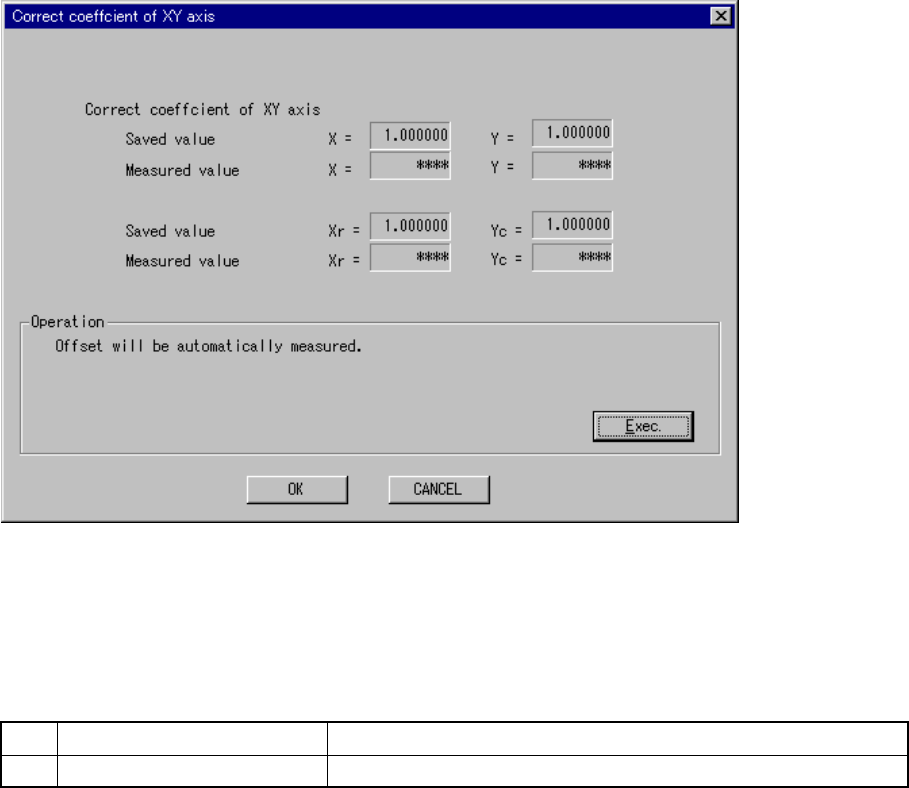
When you select the [File] command on the menu bar, then the [Exiting
Application] command on the File menu, the Save confirmation dialog box
appears on the screen. When you click the <Yes> button on this dialog box,
your setting is saved.
No. Button you can click Action
1 Yes Saves the settings, then exits from Self-calibration mode.
2 No Cancels your settings, then exits from Self-calibration mode.
3 Cancel Cancels the [Exiting Application] command.
10 − 3
10.2 XY Axis Correction Coefficients
When you select the [Set-up group] on the menu bar, then the [Correct coefficient of
XY axis] on the displayed menu, the following ”Correct coefficient of XY axis” dialog
box appears.
Figure 10.2.1 “Correct coefficient of XY axis” dialog box
(Screen example when a KE-2030 is used)
(1) Setting items
No. Item Description
1 Correct coefficient of XY axis Sets the XY stop accuracy correction parameter
(2) How to set
− Set each parameter with following the instructions displayed on the dialog box
above.
− When you click the <OK> button, your settings become valid (but, are not
saved at this point).
− When you click the <CANCEL> button, your settings become invalid.
(Corrective coefficient
already set)
(Corrective coefficient
measured)
* Displayed with a
KE-2030 only.
(Xr, Yc)
10 − 4
− How to operate
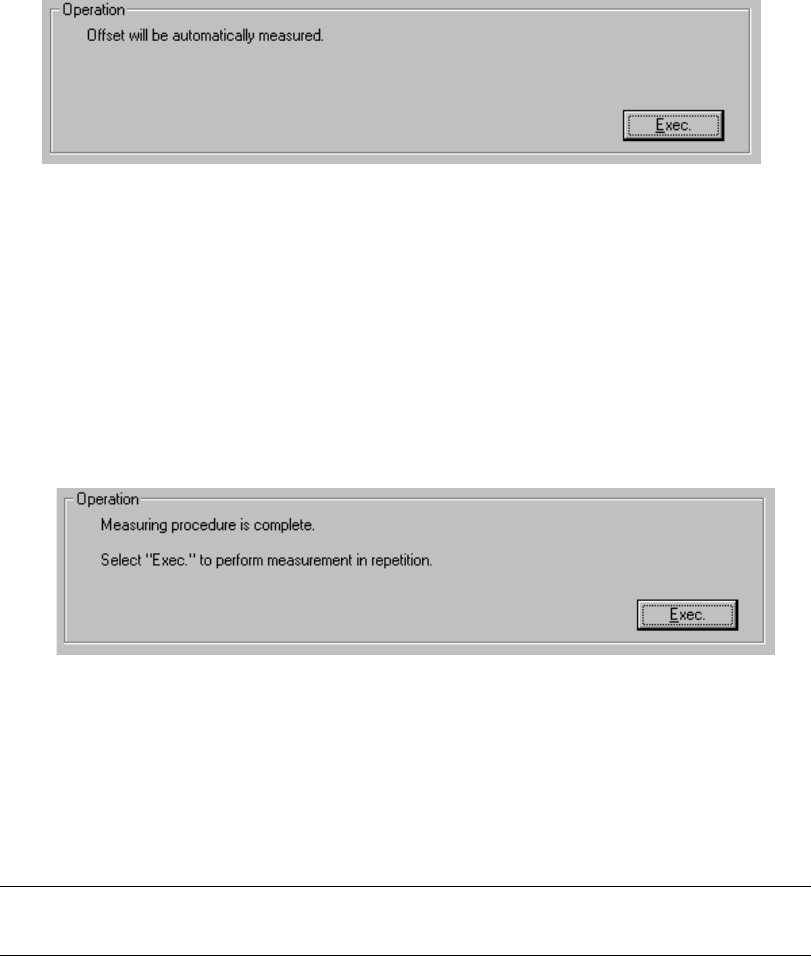
When you follow the instructions displayed on the dialog box, the appropriate
values are automatically obtained.
Click the <Exec.> button.
When you click the <Exec.> button, the XY axes stop accuracy correction
parameters are automatically obtained.
− Measurement
① The machine obtains the temperature of the XY axes base frame, then
calculates the correction parameters.
When calculation is done, the message above appears on the screen.
To repeat this calculation, click the <Exec.> button.
When you click the <Exec.> button, the previous screen reappears.
To exit from this dialog box, click the <OK> button.
Note: If you change the XY axes stop accuracy correction parameters, you have
to zero the XY axes.