KE2010.Instruction Manual.Ver.2.01,Rev.08.pdf - 第720页
11 − 11 ⑧ Sequential st art on arr ival [displayed on a KE-2030 only] − Check the check box “Sequential st art on arr ival”. − W hen you check this check box, the system places components in or der they are sent in the s…
11 − 10
③ Begin production after conveyor.
− Using the check box, allow the system to start production only after a
board is transferred.
− When this option is checked, production does not start until a board is
clamped completely.
− When this option is not checked, production starts before a board is
clamped completely.
④ Simultaneous Nozzle Change.
− Using the check box, allow the nozzles to be replaced simultaneously.
− When this option is checked, the nozzles are replaced simultaneously.
− When this option is not checked, the nozzles are not replaced
simultaneously.
⑤ Check fiducials before bad circuit marks.
− Using the check box, specify whether to recognize a BOC mark prior to a
bad mark.
− When you check the check box of this item, the machine recognizes a
BOC mark prior to a bad mark.
⑥ When production interrupts, resume mode.
- When the current production is aborted due to an asynchronous event (an
asynchronous event occurs or production error occurs), the system always
creates a continuous production file.
- When you check this check box, the system creates a continuous
production file when the current production is interrupted.
- See Section 6.4.9 (for a KE-2010), 6.4.10 (for a KE-2030) or 7.4.10 (for a
KE-2020/2040) “Continuous Production” for the procedure for resuming the
suspended production.
⑦ Measure direction while installing nozzles
− Check the “Measure direction while installing nozzles” check box to
measure the nozzle direction when it is attached on a head.
− When you check this check box, the system measures the nozzle
attachment direction when you attaches a nozzle to a head, then corrects
the component angle by the measured angle when the system picks up,
recognizes or places a component.
11 − 11
⑧ Sequential start on arrival [displayed on a KE-2030 only]
− Check the check box “Sequential start on arrival”.
− When you check this check box, the system places components in order
they are sent in the system to produce a PWB.
⑨ Stop production when all circuits are bad.
- When you check this option, the machine aborts production although it has
not produced the preset number of PWBs possibly because an error
occurs: the wrong bad mark information, sensor adjustment failure or
malfunction and so on.
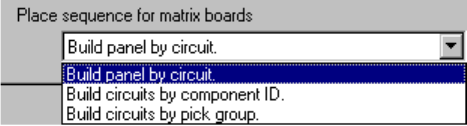
⑩ Place sequence of matrix boards
- Select the component placement order in the combo box.
a. Build panel by circuit : Places a component on each circuit of a matrix or
non-matrix board one by one to complete a board.
b. Build circuit by component ID.: Places the first component on
each circuit in Placement data order, then the second component on each
circuit. In this way, components are placed on each circuit in Placement
data order.
c. Build circuit by pick group : Picks up a pair of components (according to
the number of nozzles installed) which can be picked up simultaneously,
then places them on each circuit sequentially.
When you validate the selected item(s), click the <OK> button. If you do not want to
set any option, click the <CANCEL> button.
11 − 12
11.4.4 Setting the Production (Function2) option
When you select the [Options] command on the menu bar, then the [Option Setting]
command on the Options menu, the Operation option setting dialog box appears on
the screen.
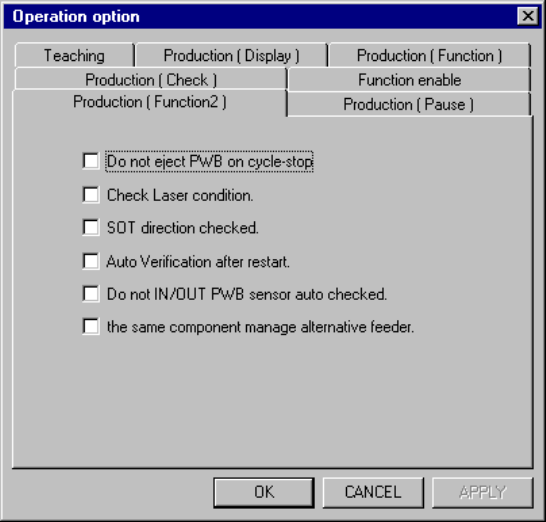
When you click the <Production (Function2)> tab, the “Production (Function2)” option
setting screen appears as shown in Figure 11.4.4.
Figure 11.4.4 Production (Fucntion2) option setting screen.
(1) How to set the item
① Do not eject PWB on cycle-stop
− Using the check box, select whether the system should eject a PWB at
cycle-stop.
− When you check this check box, the system enters Cycle-Stop mode.
When you press the <Stop> key, the system finishes the current
production after releasing a clamped PWB.
When you press the <Start> key, the system restarts the current
production.
− When you do not check this check box, the system finishes production
after ejecting a PWB to the post-production process.
② Check Laser condition.
− Using the check box, select whether the system should check to see if
laser head(s) is (are) stained when a board is sent into the machine.
− When you check this check box, the system checks to see if laser head(s)
is (are) stained after the head(s) move(s) to the waiting position when a
board is sent into the machine.