1OM-1603-006_w.pdf - 第131页
1OM-1603 3-6 1. Automatic Operation : Chap.3 1 108-005 1.2.2 Preparation for Components Procedure (1) Detach the bank feeder change cart. Reference Refer to "2.2.5 Feeder Bases and Bank Feeder Change Cart" in C…
1OM-1603
3-5
1. Automatic Operation : Chap.3
1003-003
1.2 Preparation before Automatic Operation
1.2.1 Power ON
Procedure
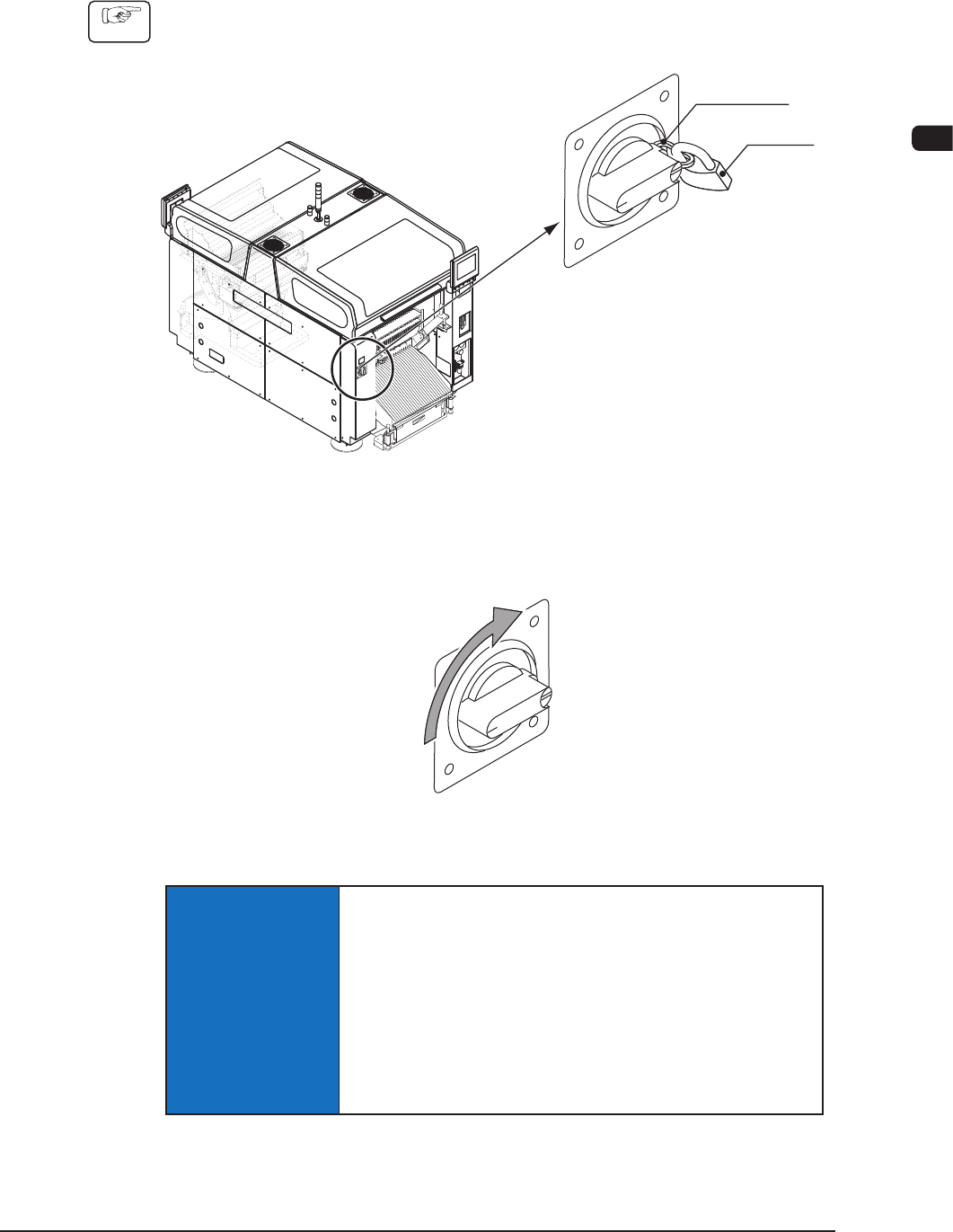
(1) Remove the padlock from the lock lever of the power breaker located on the
front side of the machine.
Power Breaker
Lock Lever
Padlock
F1C4
(2) Set the power breaker to "ON".
(Power is supplied to the machine.)
Power Supply
F1C5
NOTICE
When the power must be supplied again, wait for
approximately 10 seconds after the power breaker is
set to "OFF", then set the breaker to "ON".
If the power breaker is set to "ON" soon after being set
to "OFF", the data collected before the power is turned
off will not be reset, causing the machine to malfunction
occasionally.
1OM-1603
3-6
1. Automatic Operation : Chap.3
1108-005
1.2.2 Preparation for Components
Procedure
(1) Detach the bank feeder change cart.
Reference
Refer to "2.2.5 Feeder Bases and Bank Feeder Change Cart" in Chapter 3
for details.
(2) Install the feeders in the feeder base.
Note
Before installing the feeders, check which types of feeders should be
installed in which feeder slot Nos. (Fdr No.).
Reference
Refer to "Attachment and Detachment of Tape Feeders" in the tape feeder
instruction manual for details.
WARNING
Those who wear implanted pacemakers are not
allowed to handle the tape feeders.
The pacemaker may be affected by the magnetism
and a serious accident will result.
NOTICE
Install the feeders correctly such that they are seated
properly.
Otherwise, they may collide with the head sections or a
pickup error will occur.
Be sure to install a feeder to the correct feeder slot
(Fdr No.).
Otherwise, some components may be trapped between the
heads.
(3) Attach the bank feeder change cart to the machine.
Reference
Refer to "2.2.5 Feeder Bases and Bank Feeder Change Cart" in Chapter 3
for details.
1.2.3 Preparation for PCBs
In the case of normal automatic operation, conrm that PCBs are prepared in the
input machine.
•
When this machine is operated singly (for an actual mounting test, etc.,),
follow the steps below.
Procedure
(1) Open the transparent covers located over the beams.
(2) Put a PCB on the PCB input section.
(Set the PCB on the position where the transferred PCB detection sensor is
turned ON (red light) when a PCB is set on the PCB input section.)
1OM-1603
3-7
1. Automatic Operation : Chap.3
1003-003
1.3 Start of Automatic Operation
1.3.1 Starting the System Program
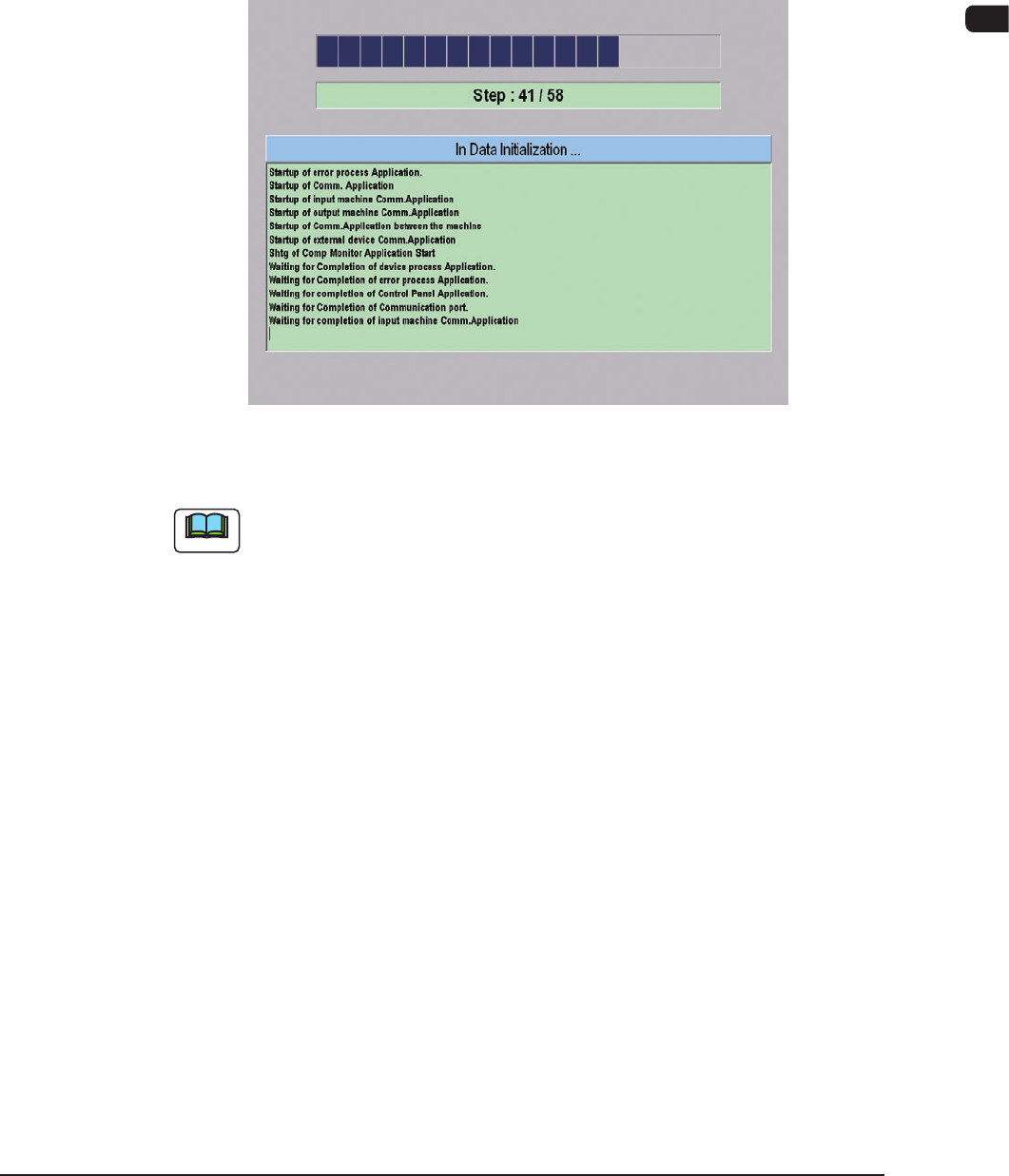
Conrm that the machine is powered. After the con rmation, hold down the
[POWER ON] button for more than 1 second.
The [POWER ON] button illuminates in red, the system program starts, and the
machine executes the self-diagnostics program.
"Self-Diagnostics (In Data Initializing ...)" Window
F1C6
Note
It takes about 2 to 3 minutes for the machine to make a self-diagnostics.
Please wait until another window appears.