1OM-1603-006_w.pdf - 第167页
1OM-1603 3-42 3. Component Replenishment : Chap.3 3.4.2 Component Reload Procedure Procedure (1) The image display section for the feeder with component shortage, is displayed in red. (2) Press the Feeder Ready switch an…
1OM-1603
3-41
3. Component Replenishment : Chap.3
3.4 Component Reload using the Feeder Hot Swap Function
The components can be reloaded onto the feeder without stopping the automatic
operation using the feeder hot swap function.
3.4.1 Feeder Hot Swap Function Setting
Procedure
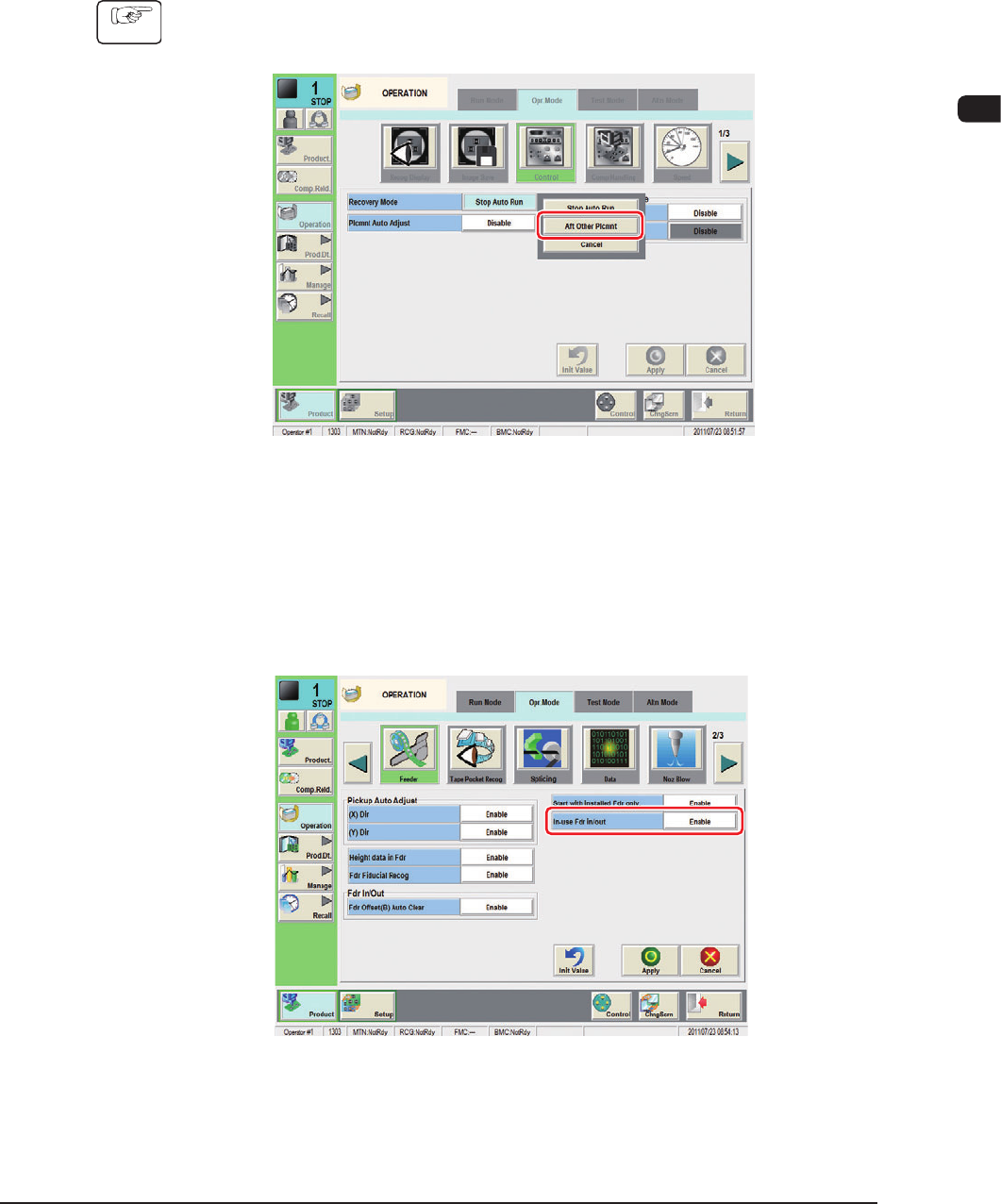
(1) Press the [Control] button on the "Opr. Mode" tab sheet in the
"OPERATION" window to display the "Control" window.
F1C27-1
(2) Select "Aft Other Plcmnt" in the "Recovery Mode" selection box in the
"Control" window.
(3) Select the [Feeder] button on the "Opr. Mode" tab sheet to open the "Feeder"
window.
F1C27-2
(4) Select "Enable" in the "In-use Fdr in/out" selection box and press the [Apply]
button.
1108-001
1OM-1603
3-42
3. Component Replenishment : Chap.3
3.4.2 Component Reload Procedure
Procedure
(1) The image display section for the feeder with component shortage, is
displayed in red.
(2) Press the Feeder Ready switch and within 5 seconds, remove the feeder
where the components have been used up, from the feeder base.
(The Feeder Ready switch lamp will ash).
CAUTION
When a tape feeder is attached or detached, be sure
not to drop it.
Otherwise, a foot injury will result or the feeder itself may
be damaged.
Carefully handle each feeder one by one and do not drop
any
.
(3) Set the new components onto the feeder, press the Feeder Ready switch and
attach the feeder onto the feeder base.
NOTICE
Be sure to install a feeder to the correct feeder slot
(Fdr No.).
Otherwise, some components may be trapped between the
heads.
Be sure to insert the feeder deep inside.
Otherwise, if the suppressor is unhooked or lifted aoat,
it cannot be detected, causing the suppressor to interfere
with a head.
Install the feeders correctly such that they are seated
properly.
Otherwise, they may collide with the head sections or a
pickup error will occur.
1108-001
1OM-1603
3-43
3. Component Replenishment : Chap.3
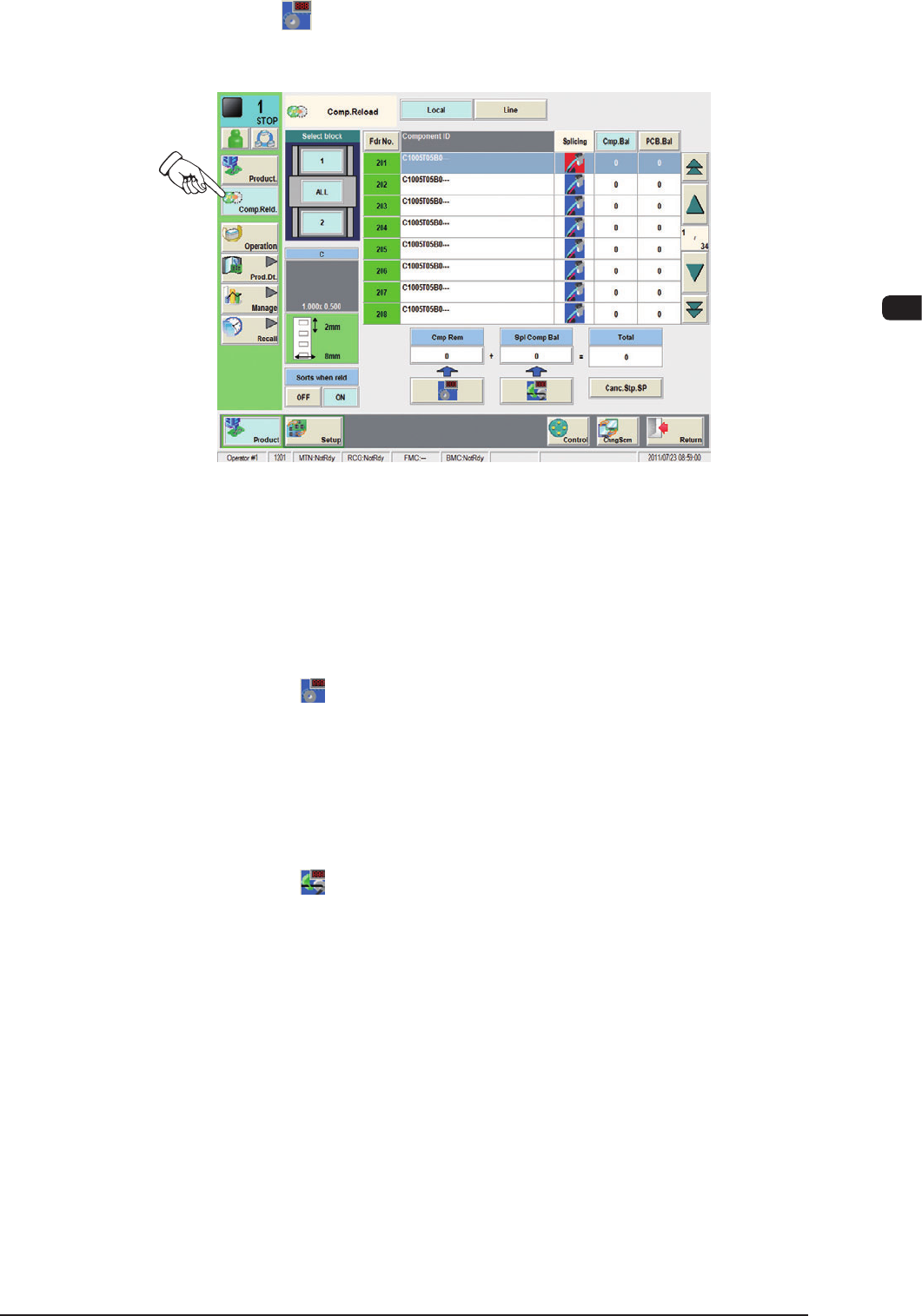
(4) Press the [ ] (Component Replenish) button in the "Product" menu. The
"Comp.Reload" window opens.
F1C27-3
(5) Press the "Fdr No." button corresponding to component-replenished feeder
base.
(6) Set the number of reloaded components.
•
Replenishment of New Tape
Press the [
] (Component Replenish) button.
Check the remaining number of components in the feeder list and conrm
that the feeder is replenished with components.
•
Replenishment of Used Tape
(when the number of taped components differs from the number of
componentsspeciedinthecomponentlibrarydata)
Press the [
] (Splicing Component Remainder) button. The "Splicing
Component Remainder" window opens.
Enter the number of reloaded components.
Check the remaining number of components in the feeder list and conrm
that the feeder is replenished with components.
1108-001