00193790-01.pdf - 第106页
2 English Installat ion and Getting Started with CACCIA 2.10 Overview of the J umper Settings for Individual Subsyst ems Issue 07/2004 40 2.10 Overview of the J umper Settings for I ndividual Subsystems 2.10.1 SIPLACE HF…

Installation and Getting Started with CACCIA 2 English
Issue 07/2004 2.9 Online Help
39
2.9 Online Help
The Online Help tool provides detailed information about using CACCIA. CACCIA has the
following information access options.
2.9.1 Knowledge-Based Online Help
Open the submenu Contents and Index from the Help menu.
You can either jump directly to a specific topic via Contents and Index or use the Search
functions.
Key information about using CACCIA is listed here.
2.9.2 Help Buttons
A Help button is provided for each dialog.
Click on the Help button to open the corresponding help information for the whole dialog.
2 English Installation and Getting StartedwithCACCIA
2.10 Overview of the Jumper Settings for Individual Subsystems Issue 07/2004
40
2.10 Overview of the Jumper Settings for Individual
Subsystems
2.10.1 SIPLACE HF3: Gantry
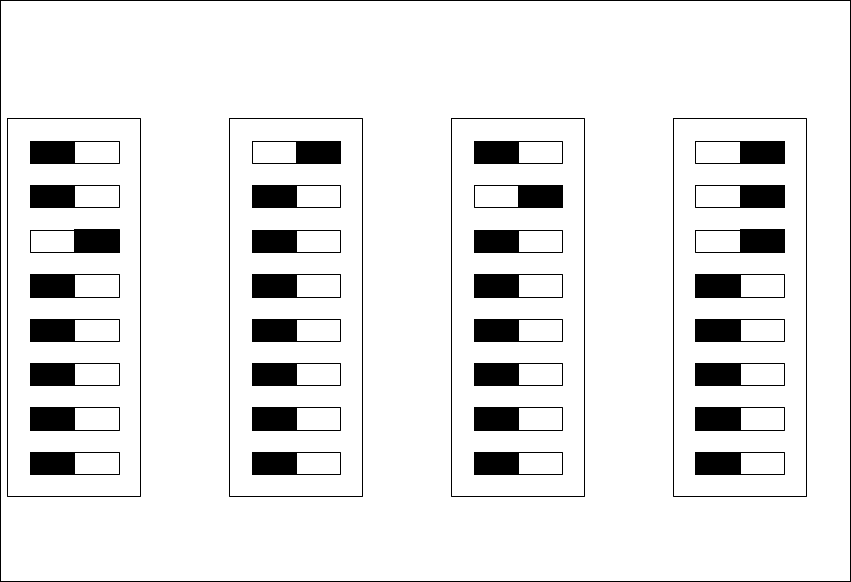
2.10.1.1 DIP Switches on the Head Interface
Legend
(1) P0 - Gantry address switch 1
(2) P1 - Gantry address switch 2
(3) CAN R - CAN terminator (at Twin option always OFF)
(4) Boot - CAN Processor 16 Bit not mounted
(5) Reset - CAN Processor 16 Bit not mounted
(6) C0 - CAN Address switch
(7) C1 - CAN Address switch
(8) WPE - Write protect enable at the moment OFF
DIP Switch
ON
78123456
ON
78123456
ON
78123456
ON
78123456
Gantry 1
Gantry 2
not used
Gantry 3 Gantry 4
C&P Head
C&P Head
Twin Head
Installation and Getting Started with CACCIA 2 English
Issue 07/2004 2.10 Overview of the Jumper Settings for Individual Subsystems
41
CAUTION
With head modularity has to be paid attention that terminating CAN resistor is set correctly. That
means, at the C & P heads switch ON and at the Twin head switch OFF.
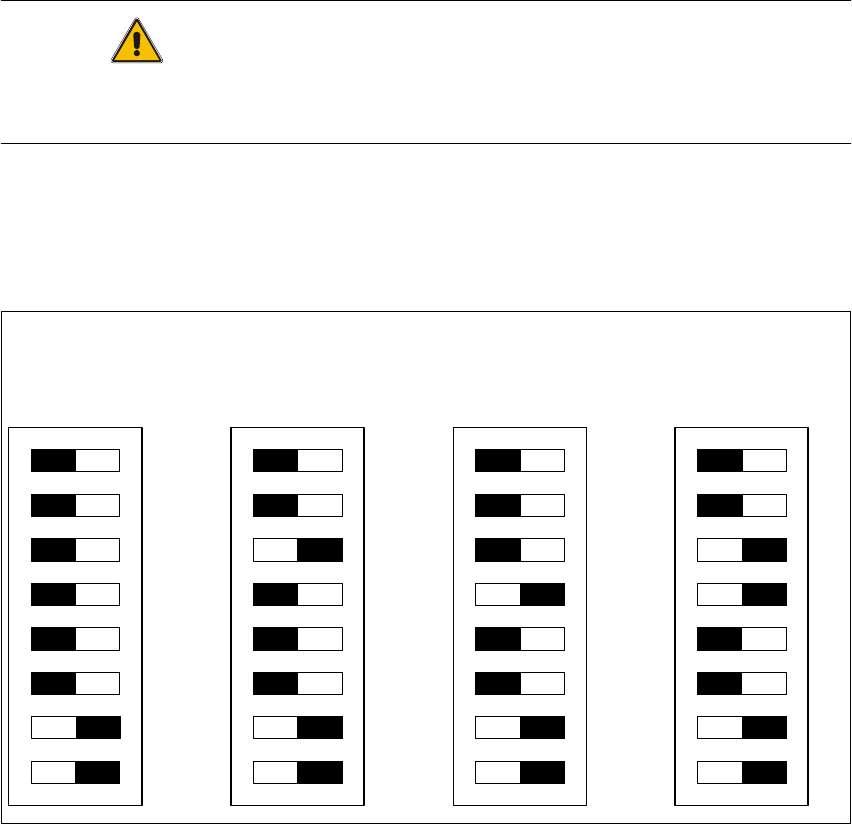
2.10.1.2 DIP Switches on the Vision Board
Legend
(1) Boot - CAN Processor 16 Bit at Sub board
(2) Reset - CAN Processor 16 Bit at Sub board
(3) P0 - Gantry address switch 1
(4) P1 - Gantry address switch 2
(5) WPE - Write protect enable at the moment OFF
(6) CANR-CANterminator
(7) Test 1 - CAN 1MBit/s ON
(8) Test 0 - CAN group ON
DIP Switch
ON
78123456
ON
78123456
ON
78123456
ON
78123456
Gantry 1
Gantry 2
not used
Gantry 3 Gantry 4