00197044-02_IM_706_1_DE_EN.pdf - 第12页
Station S oftware 706. 1 / Install ation Man ual Ausgabe 11/2012 E dit ion 12 3.6 Upgradi ng from 60x S of tw are V ersions (X -S eri es P lacement M achines) By upgradi ng fr om 60x station sof tware versions , a com pl…
Station Software 706.1 / Installation Manual Ausgabe 11/2012 Edition
11
3.4.2 X-Series Placement Machines
► Install the 706.1 machine computer software for two-computer operation, see chapter 5.
► Install the Vision computer software, see chapter 6.
► Shut down the machine.
► Remove the tables.
► Switch on the machine again and perform the eSW download.
► Reboot the machine.
► Place the tables. The eSW download for the feeders starts automatically.
► Save the calibration data for the placement heads in the EEPROM (see section 7.9).
► Perform a component sensor calibration if a CPP placement head is used for 0201/01005
placement.
► Perform the closed vacuum calibration if Twin Heads are used.
► Start the production.
3.5 Upgrading from 701.xx Software Versions (X4I Placement
Machine)
► Download the SIPLACE_UpgradePreparation.exe file (directory Upgrade_Preparation) from the
installation CD and execute the file.
► Reboot the machine and perform an eSW download for the placement heads.
► Install the 706.1 machine computer software for two-computer operation, see chapter 5.
► Install the Vision computer software, see chapter 6.
► Shut down the machine.
► Remove the tables.
► Switch on the machine again and perform the eSW download.
► Reboot the machine.
► Place the tables.
The eSW download for the feeders starts automatically.
► Save the calibration data for the placement heads in the EEPROM (see section 7.9).
► Perform a component sensor calibration if a CPP placement head is used for 0201/01005
placement.
► Perform the closed vacuum calibration if Twin Heads are used.
► Calibrate the nozzle changer.
► Calibrate the conveyor.
► Start the production.

Station Software 706.1 / Installation Manual Ausgabe 11/2012 Edition
12
3.6 Upgrading from 60x Software Versions (X-Series Placement
Machines)
By upgrading from 60x station software versions, a complete reinstallation/recalibration and mostly
also a hardware rebuilding will be necessary. For this, a corresponding upgrade package is
available, that can be installed by the SIPLACE Service if required.
– Ser.No. B001 – B325: cannot be upgraded to the 70x software.
– Ser.No. B326 – B599: can only be upgraded to the 70x software by a service team from
Munich.
– Ser.No. B600 – B751: Update of CAN node and upgrade of the C&P20 nozzle changer to the
-04 version required.
– As of Ser.No. B752 the software upgrade to the 70x software can be performed without any
hardware rebuildings.
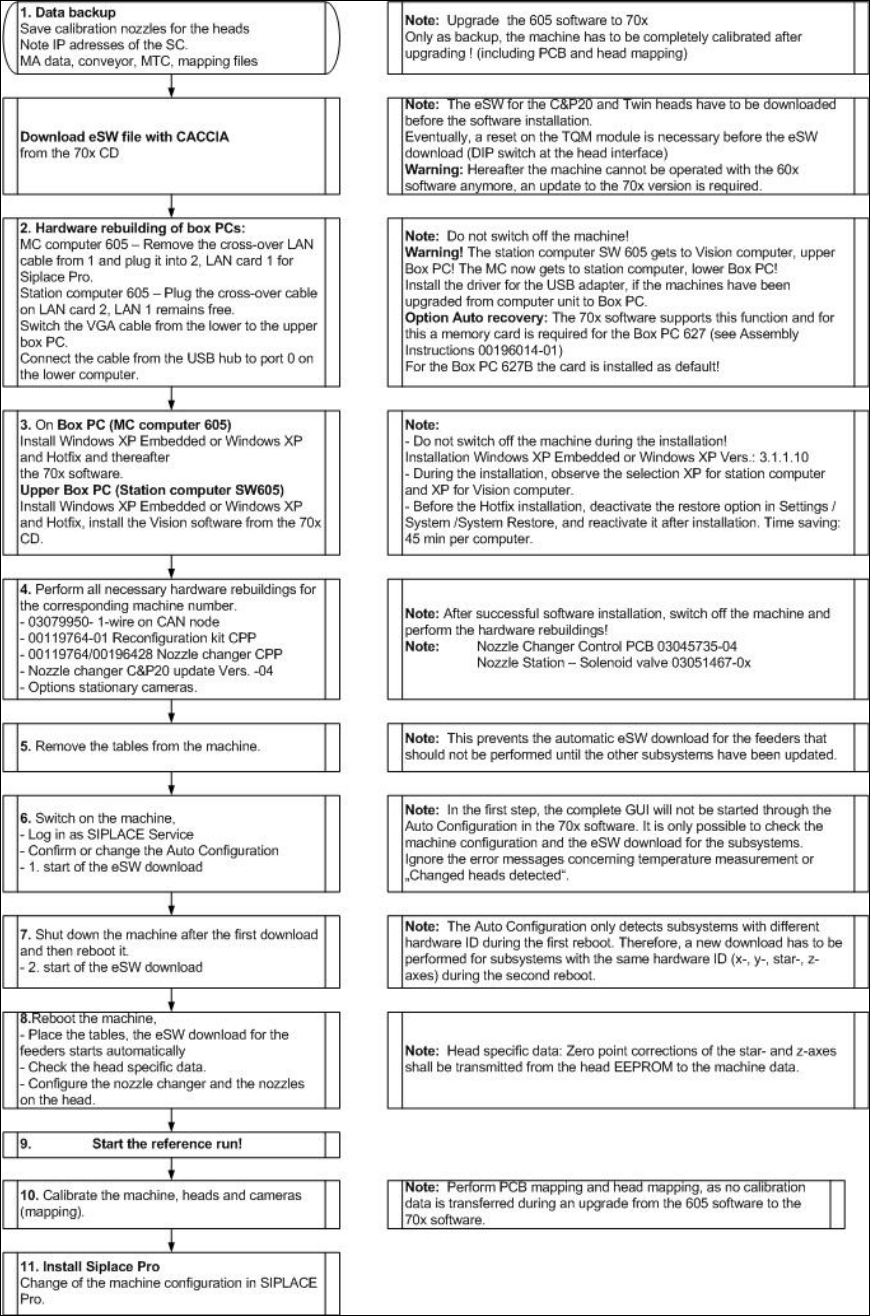
In the following flowchart all steps are described that have to be performed for the upgrade. At a
glance, these are:
– Downloading the eSW file from the installation CD (directory Upgrade_Preparation) and
executing an eSW download for the placement heads (TQM) with CACCIA from a service PC
(not for C&P6/12 placement heads)
– Preparing Box PCs and hardware (see flowchart)
– Installing Windows XP Embedded (recommended) or Windows XP on both Box PCs
– Installing the 706.1 machine computer software for two-computer operation, see chapter 5
– Installing the Vision computer software, see chapter 6
– Shutting down the machine
– If necessary, performing hardware re-buildings
– Removing the tables
– Switching on the machine again
– Performing an eSW download (see flowchart)
– Performing complete calibration with PCB and head mapping
NOTICE
It is also possible to send the mapping files that you have saved before to the SIPLACE
Service. The files will be converted and resent to you. If you re-import the converted
mapping files, no PCB/head mapping has to be performed.
– Starting the production
Station Software 706.1 / Installation Manual Ausgabe 11/2012 Edition
13
Flowchart: Upgrading from 60x Software Versions
Figure 3-1: Upgrading from 60x software versions