00197044-02_IM_706_1_DE_EN.pdf - 第23页
Station S oftware 706. 1 / Install ation Man ual Ausgabe 11/2012 E dit ion 23 5.2 Preparat i ons for I nstal ling the S of tw are 5.2.1 Requireme nts Requirem ents f or install ing the SIPLAC E soft ware and the Visi on …

Station Software 706.1 / Installation Manual Ausgabe 11/2012 Edition
22
5 Installing the Machine Computer
5.1 Installation Sequence
Back up the machine data
Install Windows XP/Windows XP
Embedded operating system for the
machine computer
(including installation of the touchscreen)
BIOS settings on the
machine computer
Perform BIOS settings
Install SIPLACE Software
(station software incl. additional programs)
BIOS update on the
machine computer
Perform BIOS update
Finish the installation
See separate Installation Manuals for details on
installing the Windows XP, Windows XP Embedded
or Windows 7 operating system (item no. 00196151-
xx, 00196737-xx and 00197366-xx respectively)
For details on calibrating the touchscreen, see section
5.2.3.
See section 5.3.
See section 5.3.
See section 5.4.
See section 5.4.7.
Figure 5-1: Installation sequence

Station Software 706.1 / Installation Manual Ausgabe 11/2012 Edition
23
5.2 Preparations for Installing the Software
5.2.1 Requirements
Requirements for installing the SIPLACE software and the Vision computer software:
– The Windows XP embedded operating system with Service Pack 2 / Windows Embedded
Standard (XPe SP3) / Windows Embedded Standard 7 SP1 must be installed on the
machine computer and in two-computer operation on the Vision computer (see "Installation
Manual Operating System Windows XP Embedded SP2", item number [00196737-xx] or
Installation Manual Operating System Windows Embedded Standard 7,
item number [00197366-xx])
NOTICE
Error message after installation of the operating system
After installation of the operating system an error message
Windows Out of Virtual
Memory might appear after the station computer is booted.
► In this case, perform the steps that are described in the Technical Information
TI2011-02C06.pdf.
Or
– The Windows XP Professional operating system with Service Pack 3 and all current
hotfixes (SIPLACE Hotfix CD) must be installed on the machine computer and in two-computer
operation on the Vision computer (see the Installation Manual for the Windows XP operating
system, item number [00196151-xx]).
NOTICE
The Windows XP Embedded / Windows Embedded Standard operating system is
only used for new installations. On upgrading to station software version 704 or higher,
there will be no operating system change from Windows XP Professional to Windows
XP Embedded / Windows Embedded Standard.
Windows Embedded Standard 7 SP1 is only used on the SIPLACE X3S, X4S and
X4Si placement machines which are delivered with the 627C and 827C BoxPC models.
Under Windows XP Professional the default Windows display settings have to be changed and
the touch screen has to be calibrated. Under Windows XP Embedded / Windows Embedded
Standard only the touch screen has to be calibrated. You must be logged in as Administrator in
order to be able to carry out this work.
Station Software 706.1 / Installation Manual Ausgabe 11/2012 Edition
24
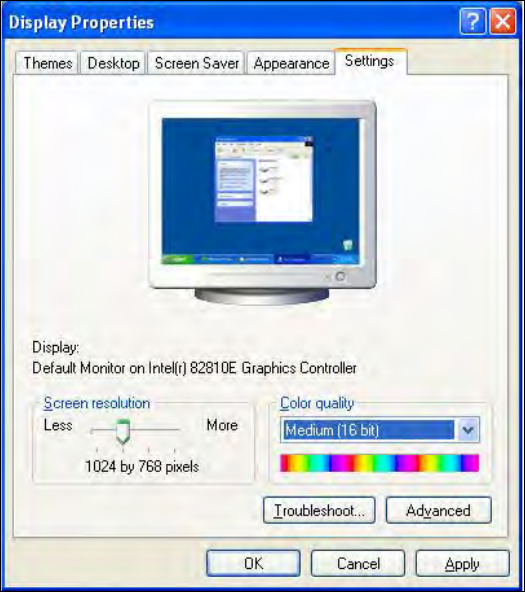
5.2.2 Changing the Display Settings
► Select Start
Settings
Control Panel
Display.
► Click the Settings tab.
► Set the Screen resolution slider to 1024 by 768 pixels.
Figure 5-2: Screen settings
► Confirm the settings by clicking OK.