00192375-01.pdf - 第30页
SIPLACE GEM for S25, HS50 SW Version GEM 502.01 HOST Inter face Manual Page 30 of 236 ©Siem ens AG, all rights reser ved 3URFHVV6WDWHV The Proc ess State D iagram illustrates in detail the proces sing at the SIPLAC…

SIPLACE GEM for S25, HS50 SW Version GEM 502.01
HOST Interface Manual
©Siemens AG, all rights reserved page 29 of 236
Variable Name VID
ONLINEFAILED 1002008
ONLINESUBSTATE 1002009
CONTROLSTATE 1002006
PREVIOUSCONTROLSTATE 1002007
5HODWHG(YHQWV
The following lists the collection events (CEIDs) which are relevant to the Control State.
For a more complete description of these events, see "Appendix B -- Collection Events" or
the description in this chapter.
Collection Event CEID
GemControlStateLOCAL 1000003
GemControlStateREMOTE 1000004
GemEquipmentOFFLINE 1000005
5HVWULFWLRQ
In this software version the mechanism of the Control State is fully implemented, however
Remote Commands will not be available until a later version.
SIPLACE GEM for S25, HS50 SW Version GEM 502.01
HOST Interface Manual
Page 30 of 236 ©Siemens AG, all rights reserved
3URFHVV6WDWHV
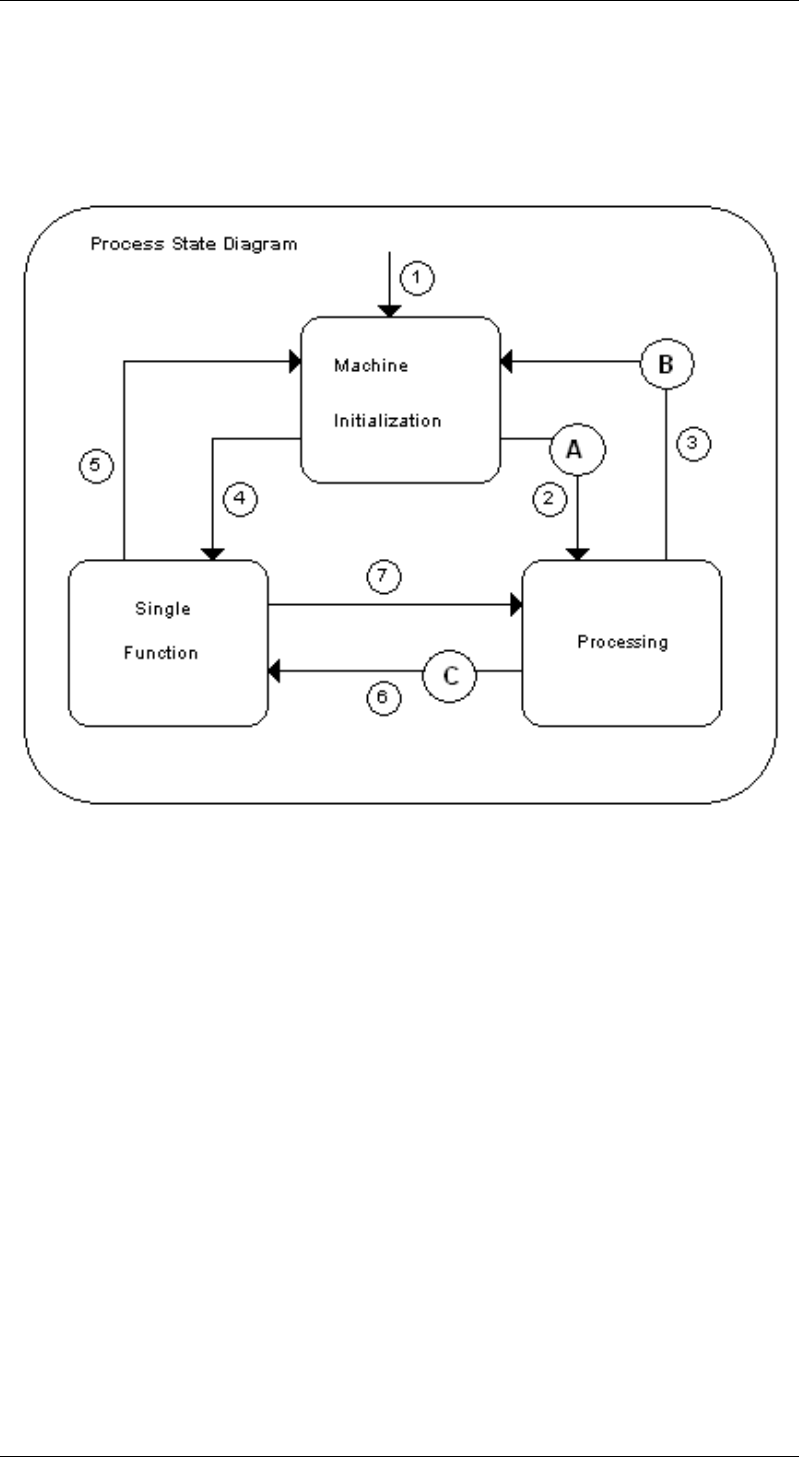
The Process State Diagram illustrates in detail the processing at the SIPLACE.
In some state transitions there will be an intermediate state (A, B, C) for a short time (see
charpter intermediate states).

SIPLACE GEM for S25, HS50 SW Version GEM 502.01
HOST Interface Manual
©Siemens AG, all rights reserved page 31 of 236
6,3/$&(3URFHVV6WDWH7UDQVLWLRQV
# From Trigger To Description
1 Unknown Power-Up Machine
Initialization
At power-up, the Equipment
defaults to the 0DFKLQH
LQLWLDOL]DWLRQ state.
2 Machine
Initialization
Machine is
ready
Processing All data is available to
produce a board. All
peripheral equipment like
the Vision system is
initialized and the machine
has finished the reference
runs correctly. In this state
the machine will start its
work, when a PCB is put on
the input conveyor
3 Processing new Data from
the Host
Machine
Initialization
New production data is sent
while the machine is
processing a board. The
board will be finished and
the machine will go to the
0DFKLQHLQLWLDOL]DWLRQ state
4 Machine
Initialization
a) Fatal Error
during machine
initialization
b) Stop-Button
on GUI
Single
Function
When a fatal error occurs
during machine initialization
it will automatically switch to
VLQJOHIXQFWLRQ mode.
In the case that the
operator presses the Stop-
Button on the GUI, the
machine will first end the
board in the center
conveyor (if there is one)
and will then enter the
VLQJOHIXQFWLRQ mode.
5 Single
Function
Start-Button on
GUI
Machine
Initialization
When the machine is in
single function mode, the
operator press the Start-
button and the Prestate
was machine Initialization
the machine will return to
the 0DFKLQHLQLWLDOL]DWLRQ
state.
6 Processing a) Fatal Error
during machine
initialization
b) Stop-Button
on GUI
Single
Function
When a fatal error occurs
during processing the
machine will automatically
switch to VLQJOHIXQFWLRQ
mode.
In the case that the
operator press the Stop-
Button on the GUI, the
machine will first end the
board in the center
conveyor (if there is one)
and will then enter the
VLQJOHIXQFWLRQ mode.