00194440-10_SM_X-Series_Customer_en.pdf - 第212页
Service Work Cutter 3.9.1 Replacing the Cutter [03052900-xx] on the R2 COT Insert 212 Service Manua l SIPLACE X Series Removing the cutter Installing the cutter ► Carefully lift the cutter onto t he spacer sleeves. Use t…
Service Work
3.9.1 Replacing the Cutter [03052900-xx] on the R2 COT Insert Cutter
Service Manual SIPLACE X Series 211
3.9.1
3.9.1 Replacing the Cutter [03052900-xx] on the R2 COT Insert
Replacing the Cutter [03052900-xx] on the R2 COT Insert
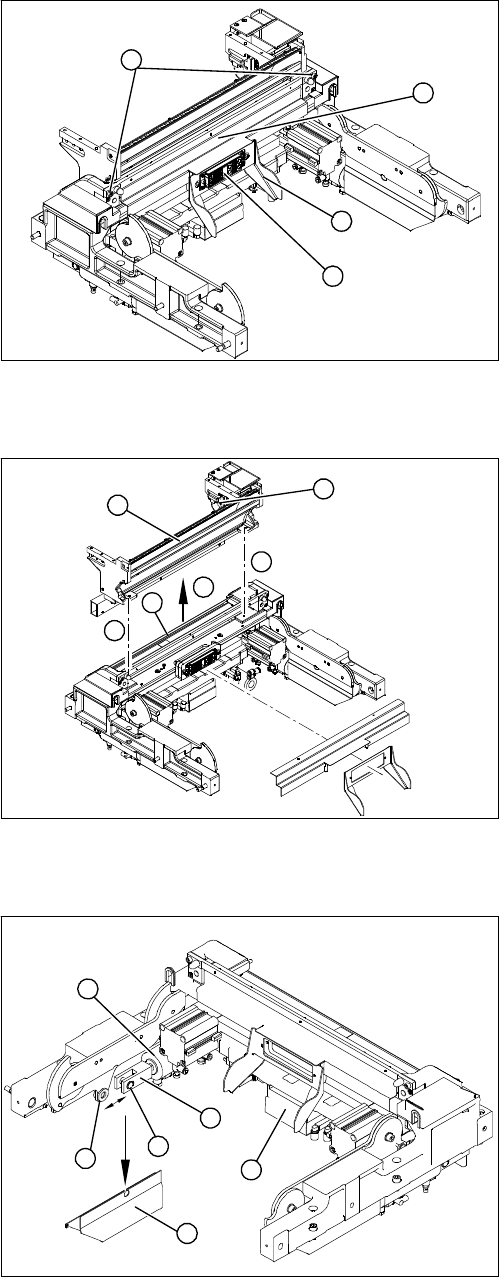
Removing the ODU connector and centering bar
Removing the empty-tape duct assembly
Dismantling the round cylinder
► Remove the slider (2) on the ODU connector (1).
Make sure you do not lose the spacer bolts.
► Loosen the screws fastening (4) the centering bar (3).
► Remove the centering bar (3).
1
2
3
4
► Loosen the screws (1) holding the empty-tape duct
assembly (2).
► Carefully lift the empty-tape duct out of the COT in-
sert (3).
► Mark the position of the sensors (4) (reed contacts)
and remove these from the reject container.
► Remove the rear baffles (5).
1
1
3
5
4
2
► Remove the left (viewed from the front) cylinder cov-
ers (1) and perform the following steps to the left
round cylinder (5):
► Undo the circlip (2) on the fork head (3) with a suitable
pair of circlip pliers.
► Carefully knock the shaft out of the guidance. Pay at-
tention to the two shim rings (4).
The round cylinder (5) is now hanging on the back
shaft.
► Loosen the compressed air connections for the short-
stroke cylinder at the coupling.
► Remove the cover on the control unit (6) and unplug
the electrical connections from the control unit (6)
(CAN bus and supply voltage).
5
6
1
4
3
2
Service Work
Cutter 3.9.1 Replacing the Cutter [03052900-xx] on the R2 COT Insert
212 Service Manual SIPLACE X Series
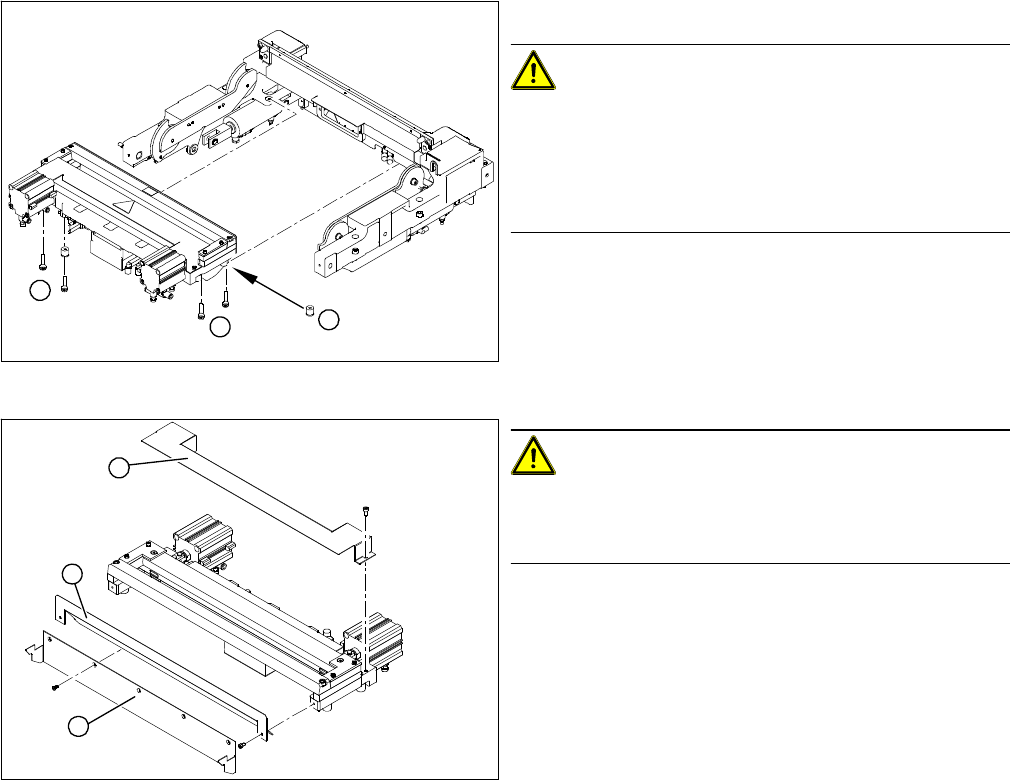
Removing the cutter
Installing the cutter
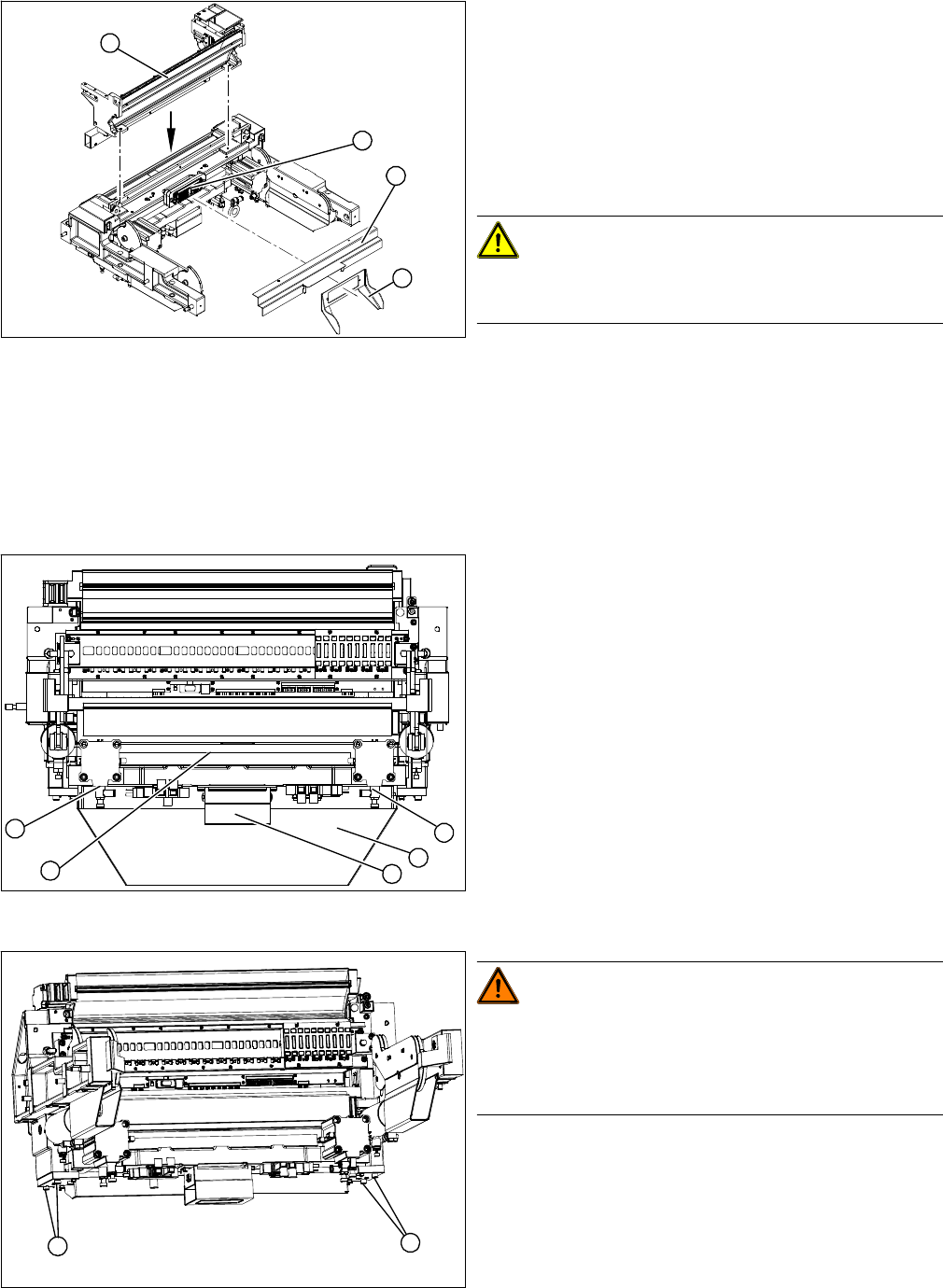
► Carefully lift the cutter onto the spacer sleeves. Use the spacer disks if provided.
► Tighten all four fastening screws.
► Reconnect to the electrical and compressed air systems.
► Fit the round cylinder and cylinder cover.
► Loosen the four screws (1) fastening the cutter.
CAUTION!
Make sure that assembly is performed correctly!
Please note that spacer sleeves may be used under the
rear fastening screws (2), if necessary. There may also
be other shims in-between, which will then need to be fit-
ted back in the correct position after service work.
The spacer sleeves and the fastening screw are secured
with free rotation in groove. This prevents the screw and
spacer sleeve from falling out and facilitates easier rein-
stallation of the cutter.
► Carefully lift the cutter out of the machine.
CAUTION!
There is a risk of injuring yourself on the cutting edge of
the blades. For this reason, the deflector plate (2), cover
(1) and protective sheet (3) must be left mounted in place.
1
1
2
1
3
2
Service Work
3.9.2 Replacing the Cutter [03052900-xx] on the X-Series COT Insert Cutter
Service Manual SIPLACE X Series 213
3.9.2
3.9.2 Replacing the Cutter [03052900-xx] on the X-Series COT Insert
Replacing the Cutter [03052900-xx] on the X-Series COT Insert
Removing the cutter
► Install the empty-tape duct (1). Align the empty-tape
duct in the center.
► Clamp the back cover plate into the duct. When
closed, it should prevent components from falling
through.
► Install the centering bar (2) and the bracket (3) with
the ODU connector (4). Make sure you do not dam-
age the cables and hoses.
CAUTION!
Make sure that assembly is performed correctly!
You must be able to move the ODU connector.
► Fit the complete COT insert into the machine again.
► Calibrate the nozzle changer, including its pickup
height.
1
3
4
2
1. Cutter
2. Pneumatic cylinder
3. Waste tape container
4. Control unit
The cutter (1) can be removed without dismantling the
COT insert.
► Loosen the compressed air connections for the short-
stroke cylinder (2) at the coupling.
► Remove the cover on the control unit (3) and unplug
the electrical connections leading to the control unit
(3).
► Loosen the four screws fastening the waste tape con-
tainer (4) and remove this container.
WARNING!
Risk of injury when releasing the fixtures!
The cutter is only held by the fastening screws and is not
supported by other parts. If the four fastening screws are
loosened, the cutter will fall down and out of the machine.
► Make sure that no one is under the cutter!
► Support the cutter by placing a suitable object
(height-adjustable support or chair) under it.
► Loosen the four fastening screws (1) on the cutter
mount.
► Carefully lower the cutter and lift it out of the machine.
2
3
4
1
2
1
1