00194440-10_SM_X-Series_Customer_en.pdf - 第329页
Settings 5.4.3 Setting the Fixed Conveyor Edge (from SW701) Conveyor Settings Service Manual SIPLACE X Series 329 5.4.3.2 5 . 4 . 3 . 2 C o n n e c t in g t h e D u a l C o n v e y o r L if t in g T a b le s Connecting t…
Settings
Conveyor Settings 5.4.3 Setting the Fixed Conveyor Edge (from SW701)
328 Service Manual SIPLACE X Series
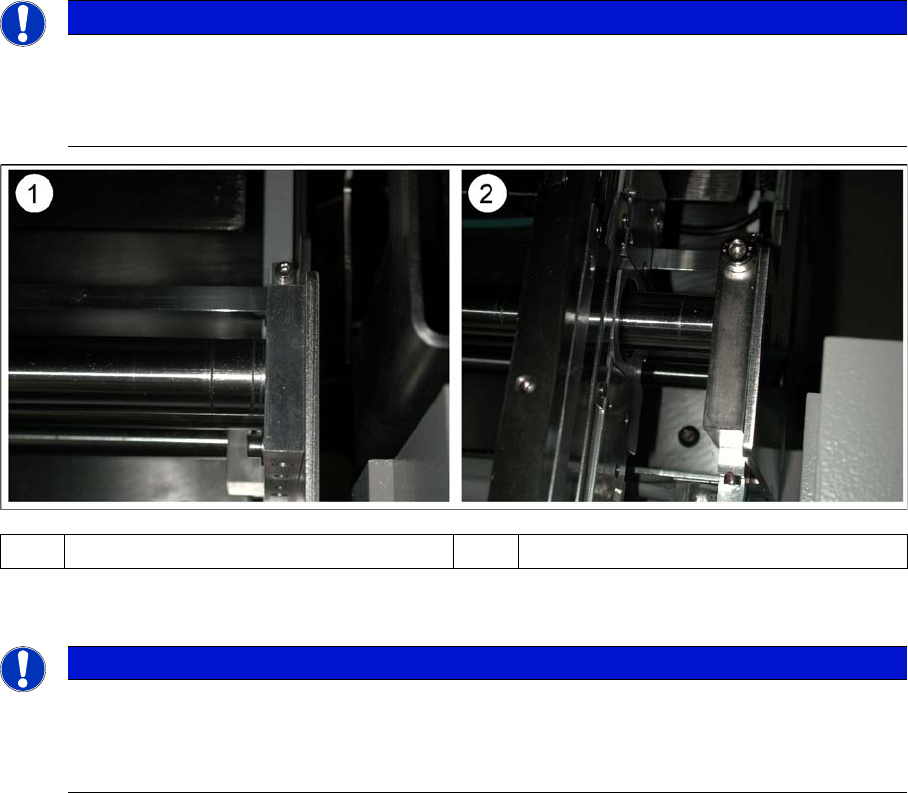
Shaft fixtures (bearing flange)
▪ After teaching the fixed conveyor side, you need to recalibrate the PCB reference corner, to prevent
fiducial errors during placement.
NOTICE
Versions
Since July 2007, X machines with single conveyors use a new version of the shaft fixtures
(bearing flange) with a width of 15 mm, instead of 12 mm. The setting for standard single con-
veyors changes with this new version, to 40 mm.
(1) Bearing flange – first version 12 mm (2) Bearing flange – new version 15 mm
NOTICE
Only with software
The fixed conveyor side may only be adjusted via software and with the width adjustment de-
vices. This ensures that the conveyor sides are in their correct positions (parallel) i.e. that the
conveyor runs straight.
Settings
5.4.3 Setting the Fixed Conveyor Edge (from SW701) Conveyor Settings
Service Manual SIPLACE X Series 329
5.4.3.2
5.4.3.2 Connecting the Dual Conveyor Lifting Tables
Connecting the Dual Conveyor Lifting Tables
► Remove the lifting table plate on conveyor lane 2 in PA1 and on lane 1 in PA2.
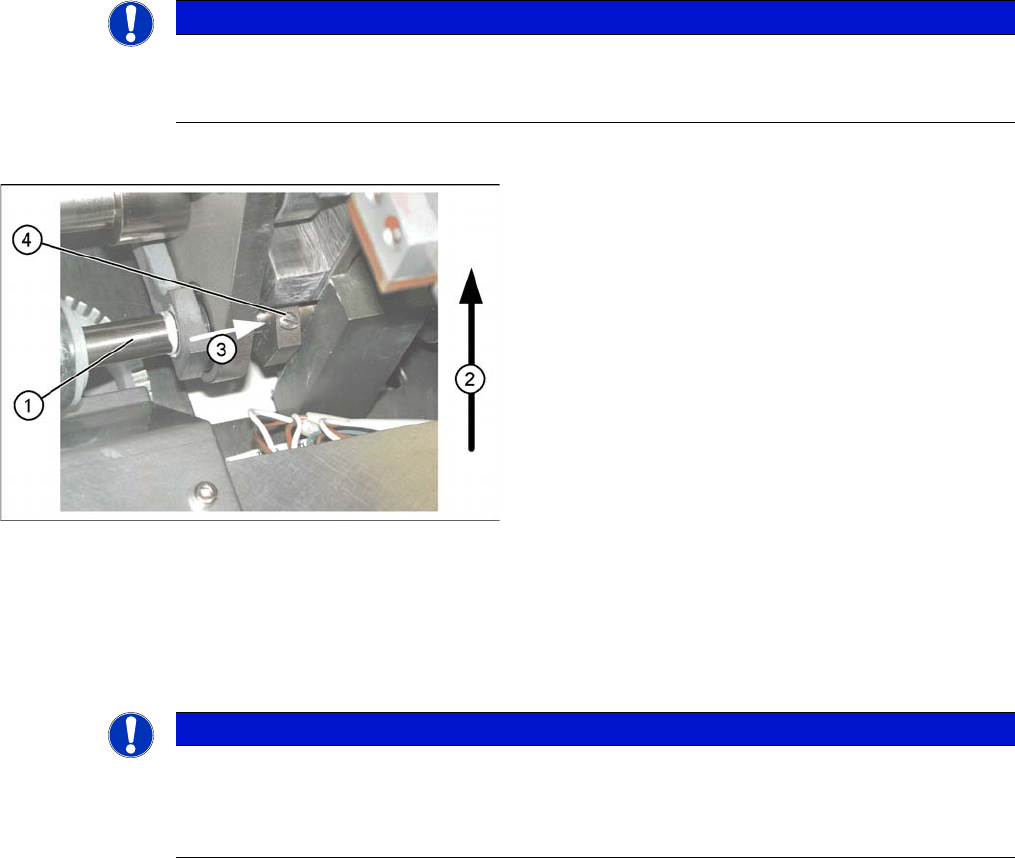
► Loosen the lockscrew(s) (4) and use a screwdriver to push the hexagonal circlip over the shaft on
lifting table 1.
► Perform lifting table connection for all placement areas (arrangement rotated by 180°.)
► Configure the new conveyor mode in SIPLACE Pro
NOTICE
Why is “Alternative Components” a topic for our customers?
This option is a mechanical necessity when you use the dual conveyor as a single conveyor.
The two lifting tables move parallel when they are connected.
Connecting lifting tables (e.g. PA1 conveyor lane 2
▪ The drive shaft (1) is connected to the piston rod of
the pneumatic cylinder. This shaft is connected with
the shaft of the lifting table from conveyor lane 1. The
lifting table drive shaft also has an additional rod with
a hexagonal circlip. This rod is pushed over the shaft
of lifting table 1.
▪ Direction of transport (2).
▪ Direction (3) in which the hollow shaft from lifting ta-
ble 2 (1 in PA 2) is to be moved to lifting table 1 (2 in
PA 2).
▪ Lock screws (4).
NOTICE
Station software
When converting the dual conveyor to a single conveyor (flexible dual conveyor), connect and
disconnect the lifting tables when requested to do so by the station software. This function is
supported by SIPLACE Pro .
Settings
Conveyor Settings 5.4.4 Checking the Limit Switch Position
330 Service Manual SIPLACE X Series
5.4.4
5.4.4 Checking the Limit Switch Position
Checking the Limit Switch Position
► Check the minimum and maximum width and ensure that the conveyor edges are parallel.
Values
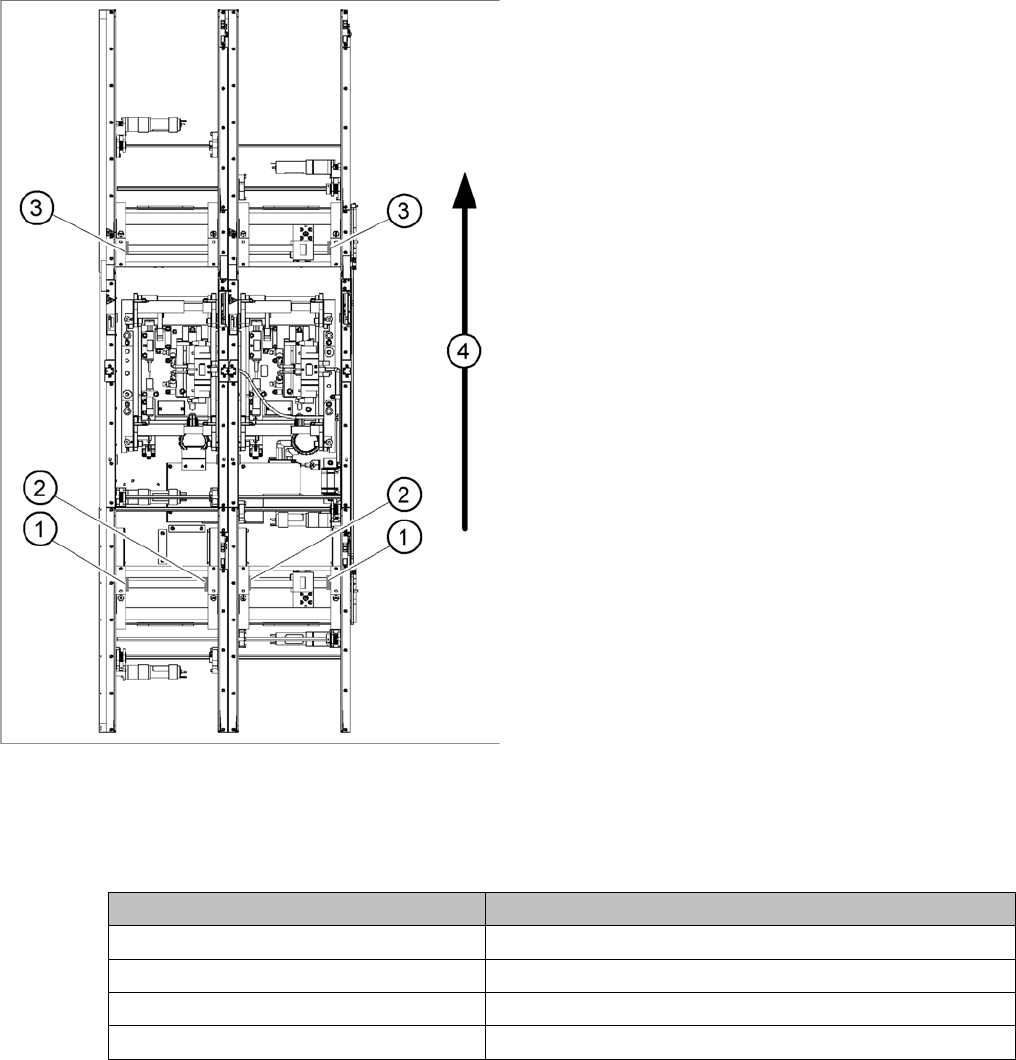
Position of the width adjustment and conv. side limit
switches (symbolic draw)
1. Limit switch on the input conveyor - fitted below the
conveyor edge
2. Limit switch on the input conveyor - fitted below the
conveyor edge
3. Limit switch for the width adjustment unit
4. Transport direction
▪ Limit switches in input conveyor:
There are five limit switches below the conveyor edg-
es near the input conveyor. The limit switch is de-
signed to prevent the conveyor edges hitting one
another or the conveyor frame.
▪ Limit switch in output conveyor:
In the vicinity of the output conveyor there are two
limit switches for the adjustment unit. They serve to
protect the traveling range and initialize (right side)
the adjustment unit for the width adjustment.
Setting Value
Minimum width: 49.7 mm
Maximum width single conveyor: 508.5 mm
Maximum width of dual conveyor 216.5 mm (standard)
Maximum width of dual conveyor 242.5 mm (Standard)