00194440-10_SM_X-Series_Customer_en.pdf - 第333页
Settings 5.4.6 Board Clamping Functions Conveyor Settings Service Manual SIPLACE X Series 333 5.4.6 5 . 4 . 6 B o a r d C la m p in g F u n c t io n s Board Clamping Functions Function description: ▪ The PCB moves int o …
Settings
Conveyor Settings 5.4.5 Setting the Laser Light Barrier for the Stopper Position
332 Service Manual SIPLACE X Series
Overview
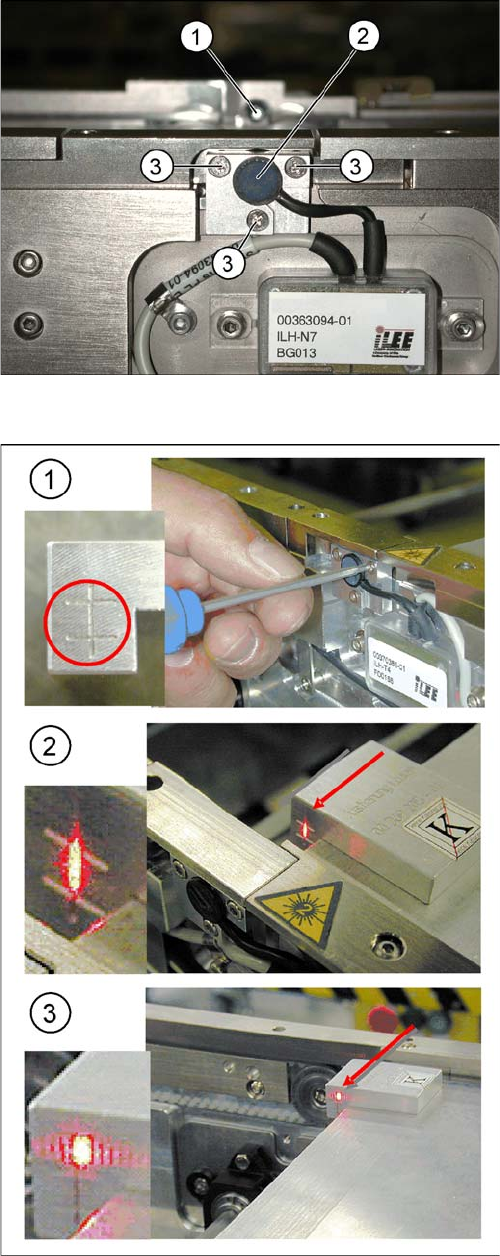
Laser light barrier
1. Laser receiver
2. Laser diode
3. Setting screws (3x)
Focussing the laser beam
1. Setting the laser light barrier
2. Minimum width
3. Maximum width
Procedure
► Set the maximum conveyor width.
► Select Enable safety mode.
► Activate the relevant laser diode using the input/out-
put functions in the station software.
► Check the path of the laser beam with the help of the
gauge.
► With the help of the three setting screws, adjust the
laser beam to the center of the gauge cross (1).
► Now position the conveyor to minimum width (2) and
check the setting.
► Check the PCB reference corner and reteach, if nec-
essary.
Settings
5.4.6 Board Clamping Functions Conveyor Settings
Service Manual SIPLACE X Series 333
5.4.6
5.4.6 Board Clamping Functions
Board Clamping Functions
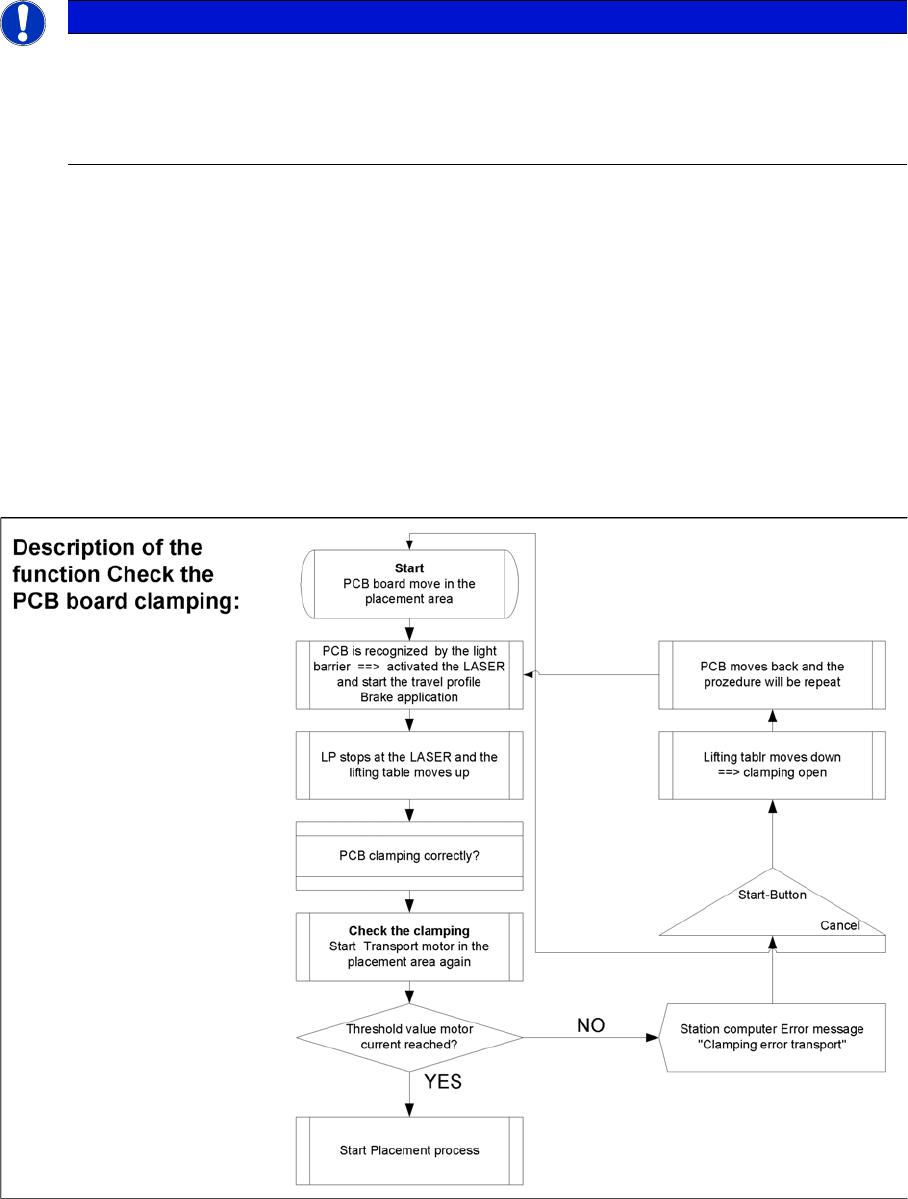
Function description:
▪ The PCB moves into the placement area, it is recognized by the light barrier, stops at the laser and
the lifting table moves up.
▪ Check PCB clamping: The transport motor in the placement area start again. If the PCB is clamped
correctly the motor current will rise up and reach a defined threshold value. Once the board has been
correctly clamped into place, the placement process will begin.
▪ If this threshold is not reached, the system assumes that the board is on its way to the intermediate
or output conveyor and has therefore not been correctly clamped into place.
▪ The station computer will issue the message "PCB not correctly clamped PA1 (PA2)". The process
can be repeated by pressing the "start button".
▪ The lifting table will move downwards, the board will be transported back and the stopper position
will be approached again.
NOTICE
The check whether a PCB is clamping correctly, is controlled with a motor current check of the
transport motor if the PCB board is clamped (Lifting table up). To check the function you could
put a distance plate under the conveyor side edge, so that the lifting table can not move to the
upper position.
The check is not performed if the option "Vacuum Tooling" is installed.
Settings
Conveyor Settings 5.4.6 Board Clamping Functions
334 Service Manual SIPLACE X Series
5.4.6.1
5.4.6.1 Setting Board Clamping
Setting Board Clamping
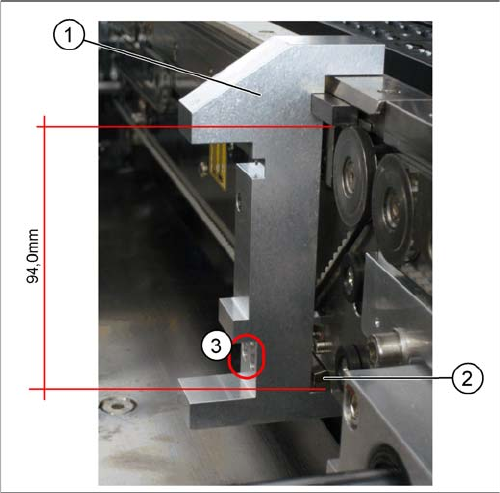
Setting actuator
1. Setting Gauge for Actuator [03049740-xx]
2. Actuator
3. Drilling, for fixing the actuator screws, when the
gauge is fitted
If the conveyor control issues the error Clamping error
conveyor, you need to check the distance from the lifting
table actuator to the upper edge of the conveyor belt.
Use the setting gauge to check and set the actuator. The
distance from the clamping actuator (lifting table) to the
top edge of the belt should be 94.0 mm at all four contact
points. (see diagram)