00194440-10_SM_X-Series_Customer_en.pdf - 第347页
Settings 5.5.1 Setting the Actuator on the Component Trolley Settings on the Component Trolley Service Manual SIPLACE X Series 347 5.5 5 . 5 S e t t in g s o n t h e C o m p o n e n t T r o lle y Settings on the Componen…
Settings
Conveyor Settings 5.4.9 Checks After Mechanical Work on the Conveyor
346 Service Manual SIPLACE X Series
Troubleshooting
See also
3.6.21 Replacing and Setting the Stopper (QC) [03069271-xx] [ ➙ 189]
5.4.9
5.4.9 Checks After Mechanical Work on the Conveyor
Checks After Mechanical Work on the Conveyor
Check: The distance between the top edge of the conveyor belt and the top stop should be 6 mm.
Compensation of an overlarge clearance
If the clearance exceeds 0.1 mm at one point, this can be
compensated for at the actuator. For this purpose, per-
form the following steps:
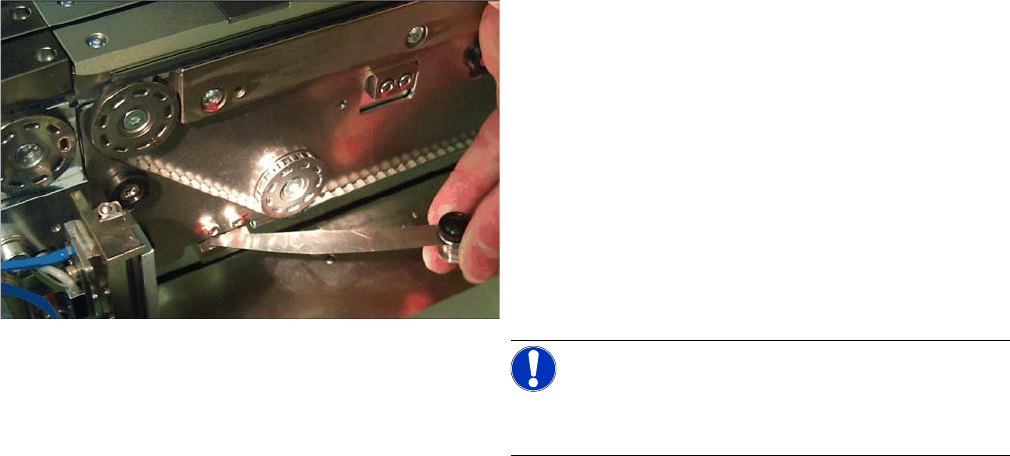
► Determine the clearance between belt and clamping
edge. (e. g. 0.4 mm – This corresponds to a misad-
justment of 0.3 mm)
► Determine the distance between actuator and clam-
ing plate (see the picture). (e. g. 0.3 mm)
► Readjust the distance between actuator and clamp-
ing plate using the feeler gauge. (0.6 mm in the ex-
ample)
NOTICE!
Use feeler gauges or thin plates in the size of the actua-
tor.
► Clamp the lifting table and recheck the clearance on
all four actuators.
Settings
5.5.1 Setting the Actuator on the Component Trolley Settings on the Component Trolley
Service Manual SIPLACE X Series 347
5.5
5.5 Settings on the Component Trolley
Settings on the Component Trolley
5.5.1
5.5.1 Setting the Actuator on the Component Trolley
Setting the Actuator on the Component Trolley
Parts, equipment and tools
▪ Allen key
Setting
See also
3.10.6 Replacing the Actuator/Protective Bracket [ ➙ 231]
5.5.2
5.5.2 Component Trolley - Setting the Basic Height
Component Trolley - Setting the Basic Height
5.5.2.1
5.5.2.1 Parts, equipment and tools
Parts, equipment and tools
The following tools and equipment are needed to adjust the height of the component trolley:
▪ Set of Allen keys, size 5
▪ Eyebolt with M12 thread to raise the component trolley table,
DIN 580 M12-St [00048350-xx]
▪ Leverage device for raising the component trolley table, must be able to carry at least 80 kg
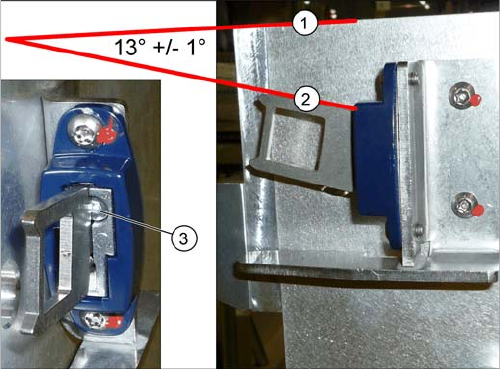
► Set the actuator with the help of the grub screw (3).
Between the upper edge (1) of the table and the
actuator (2) you need to set an angle of 13° +/- 1°.
The actuator must be able to slide into the safety
switch without rubbing against the plastic.
Settings
Settings on the Component Trolley 5.5.2 Component Trolley - Setting the Basic Height
348 Service Manual SIPLACE X Series
5.5.2.2
5.5.2.2 Adjusting the Component Trolley to the Board Transport Height
Adjusting the Component Trolley to the Board Transport Height
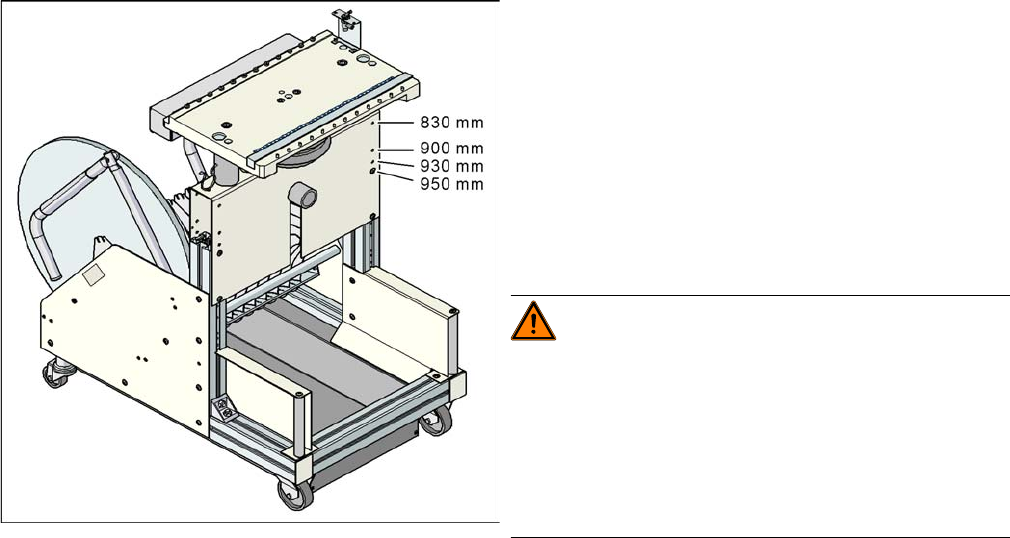
Component trolley with a PCB conveyor height of
950 mm
▪ Holes drilled for board transport heights 830 -
950 mm in the guidance bars
The component trolley for the S feeder modules can be
easily and quickly adjusted to the following board trans-
port heights:
▪ 830 mm ±15 mm standard height
▪ 900 mm ±15 mm SMEMA height
▪ 930 mm ± 15 mm SMEMA height
▪ 950 mm ±15 mm SMEMA height
WARNING!
The component trolley height may only be set by
SIPLACE technicians or other qualified and officially au-
thorized (certified) personnel.
Observe the applicable accident prevention regulations.
Remove all feeder modules from the changeover table
plate, before you adjust the height of the changeover ta-
ble.