YS100_Mainte_E.pdf - 第109页
3-44 3 Periodic maintenance items 4 Clean the inside of the filter cup. 1. Lightly clean the filter cup with water . 2. Pour water-diluted neutral detergent into the filter cup and clean the inside. 3. After blowing air …
3-43
3
Periodic maintenance items
4.6 Inspecting and replacing the air and oil mist filter
The air filter and oil mist filter are used in this unit to prevent oil, water, impure objects in the air compressor
from entering into the machine. In this section, inspection and cleaning of these filters, and replacing method
of the inside filter element are shown below. In order to perform this work safely, always remove the air
coupler at the air supply connection unit.
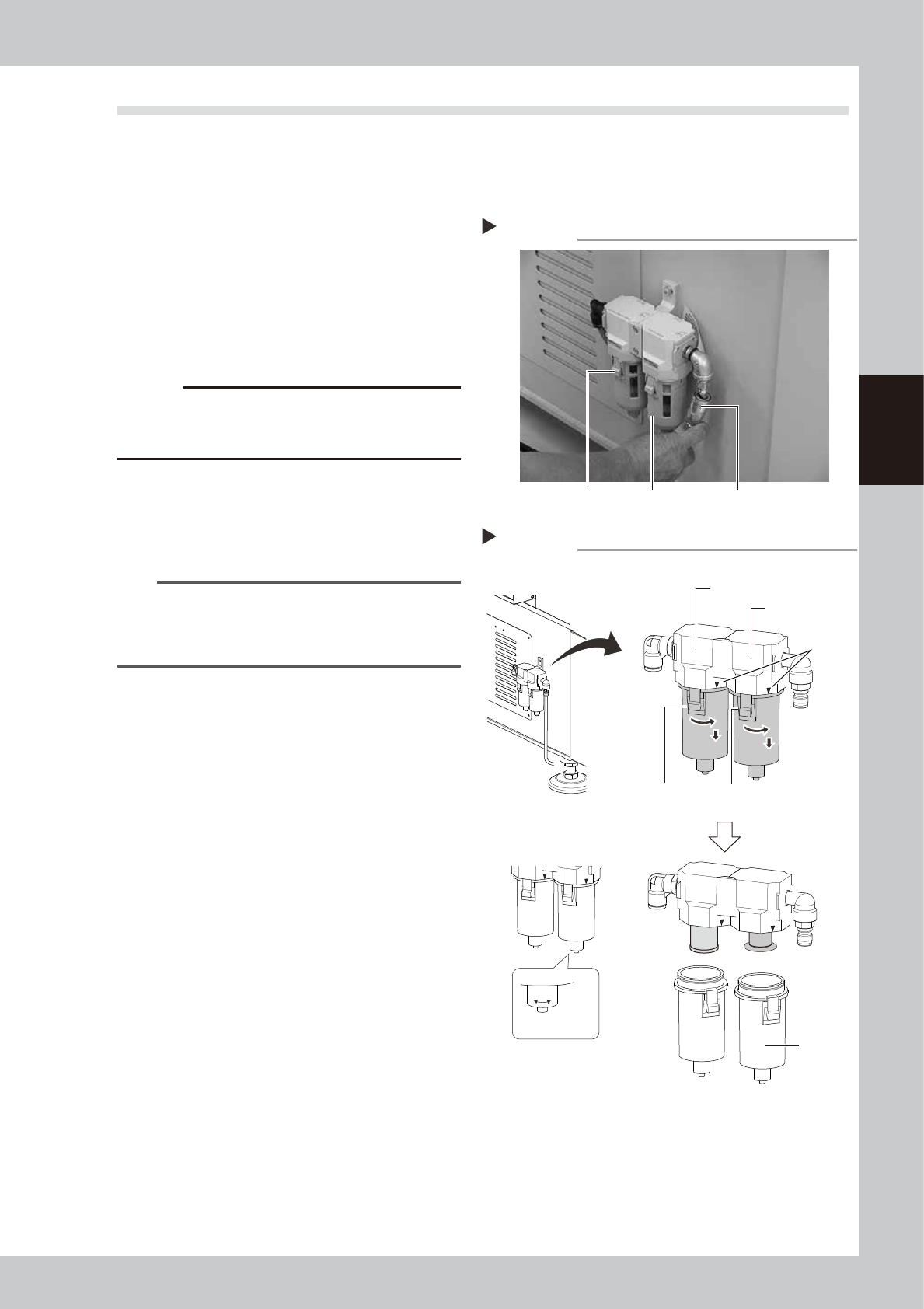
1
Remove the air coupler of air
supply.
1. Turn the “Air supply/exhaust” switch
clockwise to turn air supply OFF.
2. Remove the air coupler on the air supply
connection unit.
53367-L1-00
c
CAUTION
Be aware that a loud air exhaust sound is heard when
disconnecting the air coupler. Use care to prevent oil,
water, and impurities, etc., from being sprayed out.
2
Check the inside of the filer cup.
Check if oil or water is in the cup. When oil
or water is dirty, clean it by following Step 3
to 4.
TIP
This machine’s cup is not the auto-draining type. The
filled water can be discharged by loosening the nut on
the bottom of the cup, which should be performed
every time the air supply coupler is removed.
3
Remove the cup.
1. While pressing the button on the filter
cup, turn the cup clockwise.
2. Match the button of the cup with the
mark on the filter housing, and pull the
cup downward.
53368-L1-00
Removing the air coupler
Step 1
Filter cup Air couplerButton
O : Open
S : Shut
O S
Removing the filter cup
Step 3
Button
Air filter
Oil mist filter
Mark
Button
Drain cock
Filter cup
3-44
3
Periodic maintenance items
4
Clean the inside of the filter cup.
1. Lightly clean the filter cup with water.
2. Pour water-diluted neutral detergent into
the filter cup and clean the inside.
3. After blowing air to the filter cup, wipe
away any moisture with cloth.
53359-L1-00
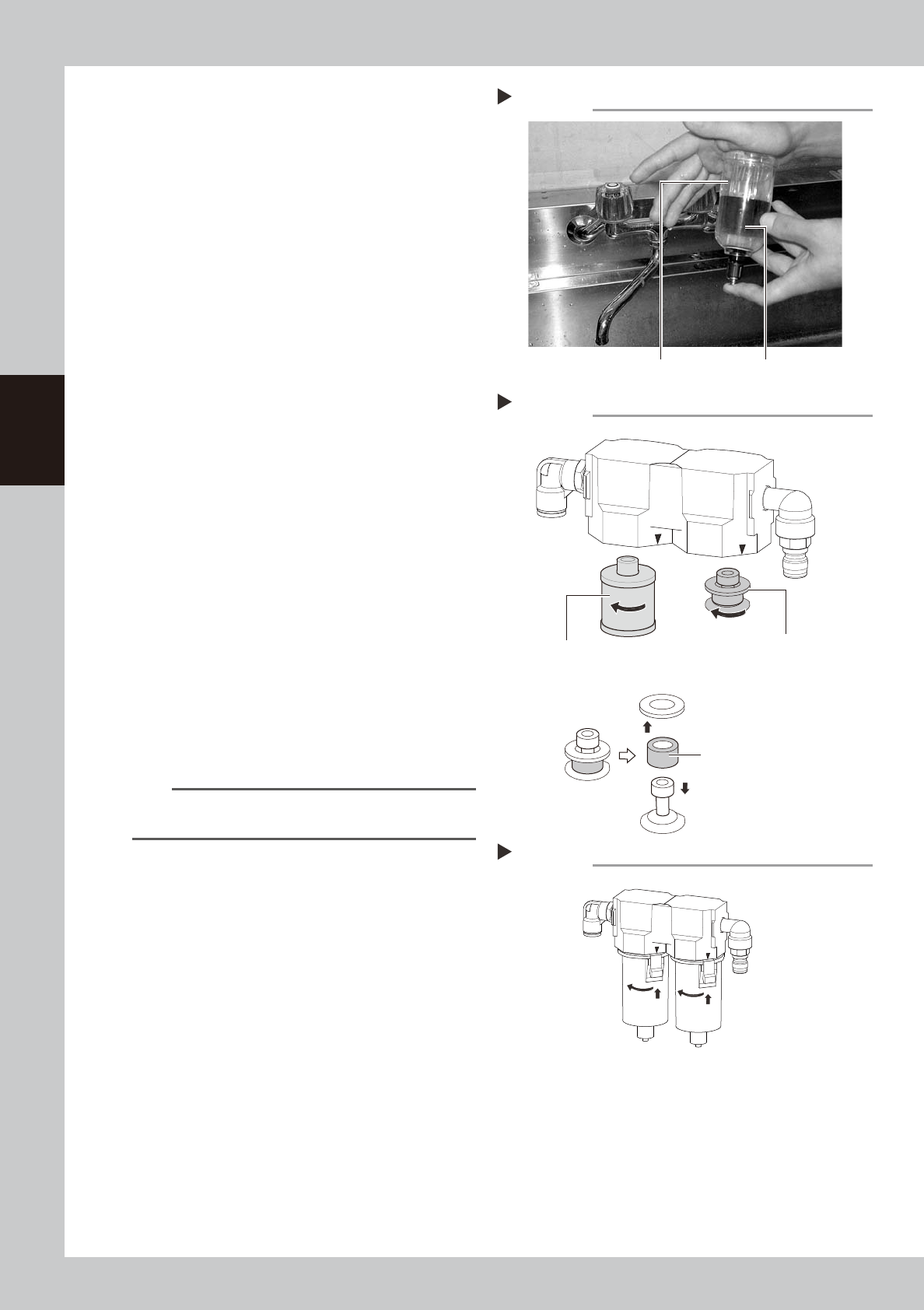
5
Remove the filter element.
Air filter:
Turn the element ASSY counterclockwise
to remove.
The filter element is set between the top
and bottom adapters.
Oil mist filter:
Turn the filter element counterclockwise
to remove.
53369-L1-00
6
Check the state of element.
Check there is no dirt and clogging in the
filter element. If dirt and clogging are found,
replace with a new filter element.
7
Attach the filter element.
Follow the reverse order of removing the
element to remove the filter element.
8
Attach the cup.
1. Match the button of the cup with the
mark on the filter housing, and push the
cup upward.
2. Turn the cup 45 degrees to left.
53370-L1-00
TIP
When the cup is in place correctly, you hear a clicking
sound.
9
Reconnect the air coupler.
1. After reconnecting the air coupler, check
that no air is leaking.
2. Turn the “Air supply/exhaust” switch
counterclockwise to restart air supply.
Cleaning the filter cup
Step 4
Filter cup
Water-diluted
neutral detergent
Removing the filter element
Step 5
Mist filter element
(Air) filter element
Filter element ASSY
Reattaching the cup
Step 8
3-45
3
Periodic maintenance items
5. Six-month inspection
5.1 Cleaning the fiducial camera
The fiducial mark recognition camera is mounted on the right of the head unit.
The camera unit may become dirty with dust due to the long-term use of the machine. Periodic cleaning is
recommended.
c
CAUTION
Do not apply strong force or shock to the camera unit and lighting unit during cleaning. Optical axis adjustment might
become unreliable.
c
CAUTION
If trouble occurs with the lighting unit, then contact YAMAHA sales representative. Disassembly and cleaning of the
lighting unit by the user will void the warranty.
e
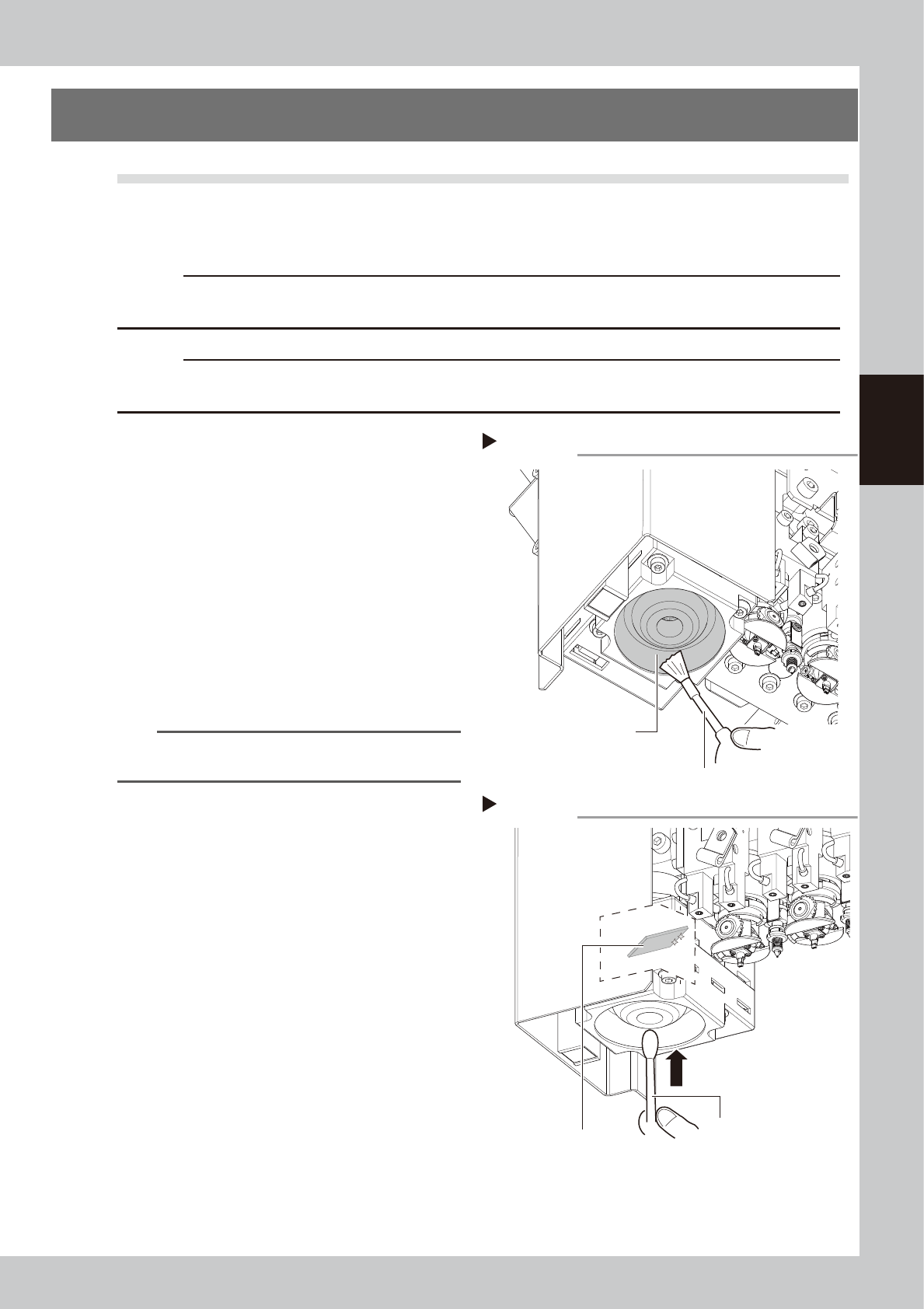
1
Move the head unit.
1. Press the emergency stop button to open
the machine safety cover.
2. Move the head unit forward.
2
Clean around the lens.
Remove dust around the lens with the
blower brush.
53386-L1-00
3
Clean the lens.
Apply a small amount of lens cleaner on a
cotton swab, and clean the lens.
53387-L1-00
TIP
The blower brush and lens cleaner are optional
purchase items.
Step 2
Using a blower brush to remove dust
Fiducial camera lighting unit
Blower brush
Step 3
Cotton swab dampened
with lens cleaner
Cleaning the reflector plate
Reflector plate