00192299-02.pdf - 第80页
2 Retrofitting Instructions: Mechanical Ceramic Substrate Centering HS -50 SIPLACE HS -50 2.5 Sequence of Retrofitt ing 01/01 Issue 80 ,QVW DOOLQJWKH/LI WLQJ7 D EOH CAUTION During the su bsequ ent installati on…
SIPLACE HS-50 2 Retrofitting Instructions: Mechanical Ceramic Substrate Centering HS-50
01/01 Issue 2.5 Sequence of Retrofitting
79
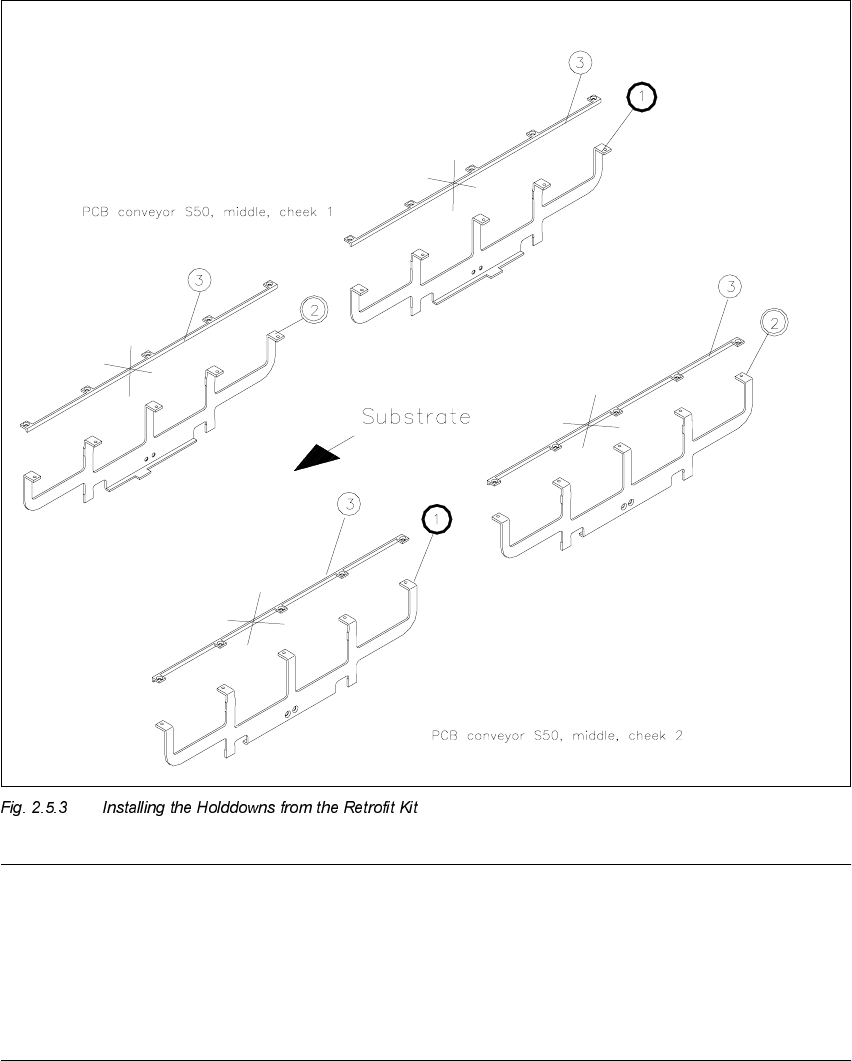
NOTE:
The PCB holddown brackets from the retrofit kit are not installed while the mechanical substrate
centering unit is being worked on.
Store the PCB holddown brackets as well as the remaining stop units and stop rails in such a man-
ner that they are available for a later reinstallation (see Section 2.8) or adapting of the substrate
size (see Section 2.5.9).

2 Retrofitting Instructions: Mechanical Ceramic Substrate Centering HS-50 SIPLACE HS-50
2.5 Sequence of Retrofitting 01/01 Issue
80
,QVWDOOLQJWKH/LIWLQJ7D EOH
CAUTION
During the subsequent installation of the lifting table plate there is a slight risk of fingers and hands
being pinched, crushed or cut off, e.g., between the outer edges of the lifting table plate and the
conveyor assemblies.
Å If a dual conveyor is installed, restore the conveyor to maximum width by moving the toothed
belt of the conveyor width adjustment assy to maximum width.
During this process, exert just a little force and do so only in the direction in which the toothed
belt is moving.
Å Make certain that the transmission lever on the pertinent lifting table motor is folded down on
the lifting curve.
Å Holding the lifting table with both hands, place it into the guiding tubes with the guide pillars
vertical.
Å Let the lifting table plate slide down slowly.
Å Check whether the lifting table plate is completely seated on the lifting curve.
Å Install the pertinent ball bearing on each rocking lever (see Fig. 2.5.2 -> 2).
While doing so, put the spacer disk back in.
SIPLACE HS-50 2 Retrofitting Instructions: Mechanical Ceramic Substrate Centering HS-50
01/01 Issue 2.5 Sequence of Retrofitting
81
$V VHPEOLQJWKH&H UDPLF6XEVW UDWH &HQWHULQJ8QLW
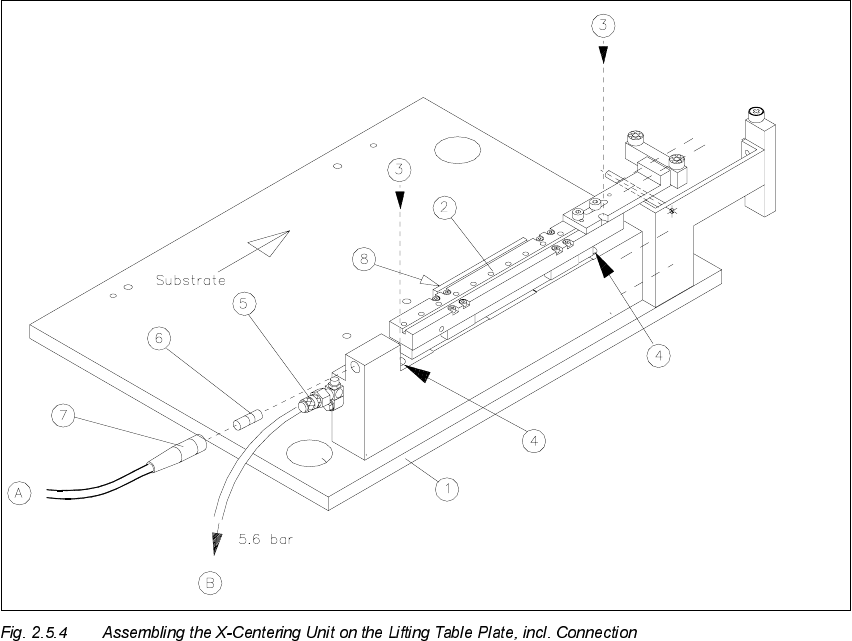
Å Install the mechanical ceramic substrate centering unit on the fixed conveyor side.
The pins on the bottom of the body of this unit have to fit into the centering holes in the lifting
table plate.
.H\
1. Lifting table plate
2. Mechanical ceramic substrate centering unit
3. 2 socket hex head cap screws M4 x 45
4. Holes for fastening screws (in the body of the centering unit)
5. Connection for pneumatic hose and restrictor (opening speed)
6. Proximity switch
7. Proximity switch cable with connector
8. Flat cylinder of compressed air, with tension spring
Å Move the X-slide unit such that the holes in the body of the centering unit are accessible one
after the other.