00192299-02.pdf - 第90页
2 Retrofitting Instructions: Mechanical Ceramic Substrate Centering HS -50 SIPLACE HS -50 2.5 Sequence of Retrofitt ing 01/01 Issue 90 - X34 am /ap or am/ ao and X35 am/ap o r am/ao an d, if neede d, - C1 /C2 (for convey…
SIPLACE HS-50 2 Retrofitting Instructions: Mechanical Ceramic Substrate Centering HS-50
01/01 Issue 2.5 Sequence of Retrofitting
89
Å Unplug the plug-in connection of the movable component changeover table on the machine
frame.
Å Open the doors of the machine frame (see Fig. 2.5.11).
NOTE:
During the following steps, do not pull on the grounding cable that is attached to the inside of the
side panel (see Fig. 2.5.11).
Å The safety hood above the conveyor control must be open. Undo the 6 socket hex head cap
screws on the side panel (just loosen the 3 screws at the bottom!). Lift the side panel of the
machine frame up and out and place it to the side such that the conveyor control is accessible
and the grounding cable is not damaged.
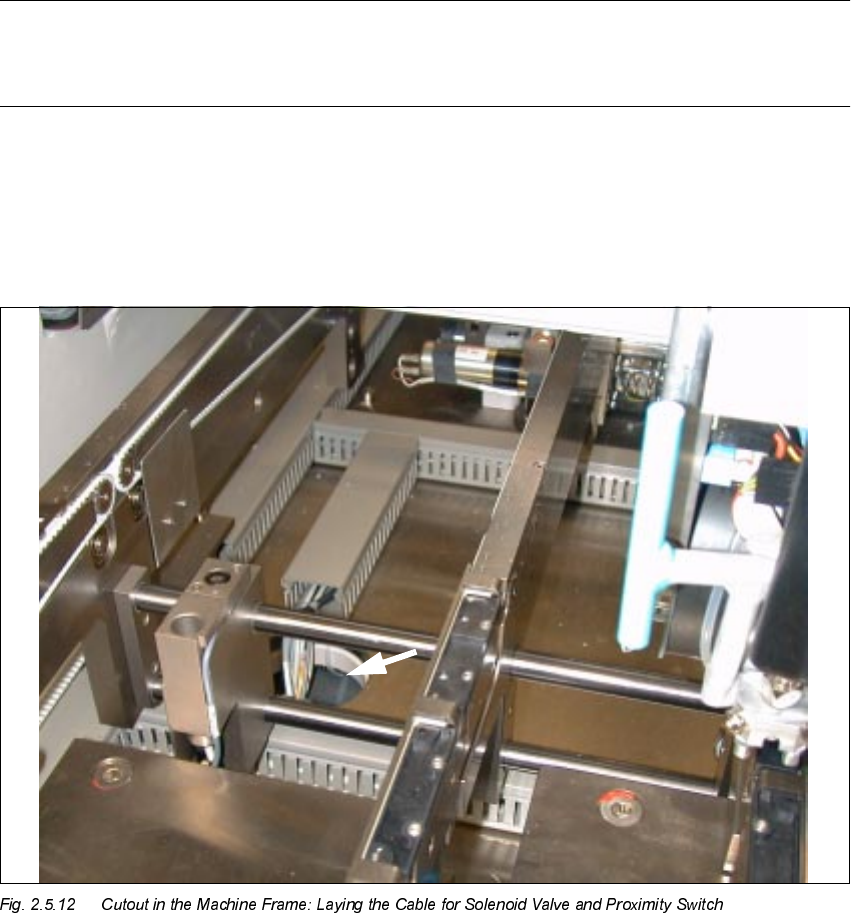
Å Remove the cover over the cable pits running from the processing area to the circular cutout
(arrow).
Å Use the long cables from the retrofit kit (Item no. 00357281-01).
Use a waterproof marker to indicate the allocation to the processing area on the pertinent cable
of proximity switch and solenoid valve: In accordance with the layout plan in Fig. 2.9.1 and Fig.
2.9.3, as appropriate, mark the pertinent connector designation,

2 Retrofitting Instructions: Mechanical Ceramic Substrate Centering HS-50 SIPLACE HS-50
2.5 Sequence of Retrofitting 01/01 Issue
90
- X34 am/ap or am/ao and X35 am/ap or am/ao and, if needed,
- C1 /C2 (for conveyor 1 / conveyor 2),
on the label of the pertinent connector.
Å Starting from the pertinent X-centering unit and from the solenoid valve lay the long cables to
the cable pit leading to the circular cutout (see Fig. 2.5.12) -> downward in the cutout -> con-
tinuing through the inside of the machine frame to the rectangular cutout at the bottom left,
alongside the conveyor control (see Fig. 2.5.11) and to the outside to the conveyor control.
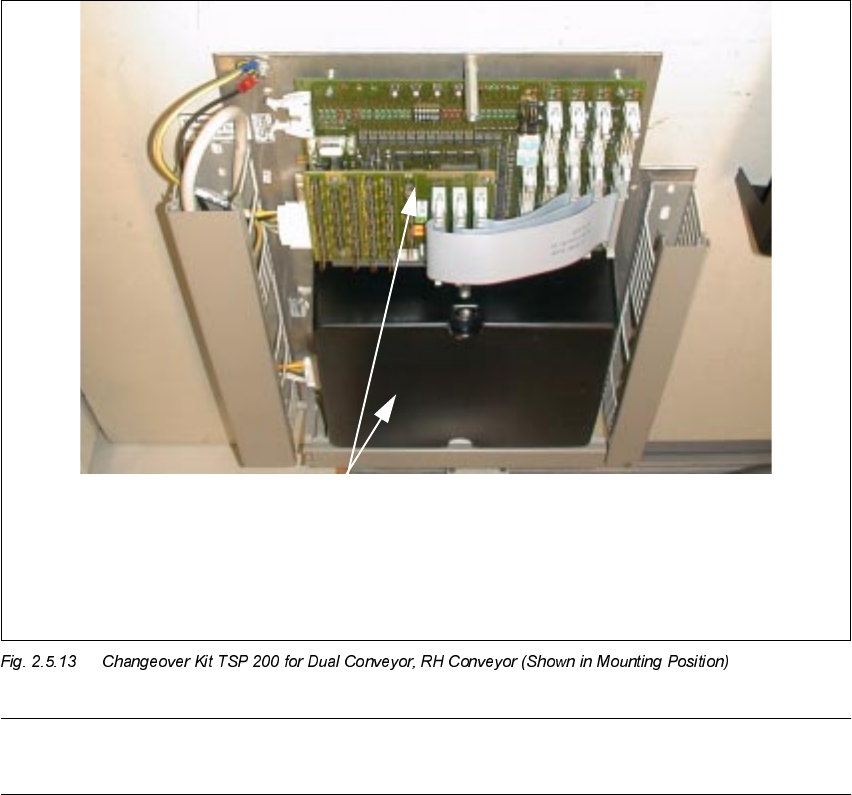
Å Remove the covers over the cable pits and the conveyor control for conveyor 1 / 2 in the ma-
chine frame (changeover handling: see Fig. 2.5.13).
Å Lay the cables for conveyor 1 or 2 to the pertinent conversion board ("piggyback board") of the
TSP 200 in the machine frame.
NOTE:
The conversion board ("piggyback board") of changeover handling unit TSP 200 in the machine
frame (see Fig. 2.9.5) and the conversion board of the series handling unit TSP 200 in the PCB
conveyor are identical.
SIPLACE HS-50 2 Retrofitting Instructions: Mechanical Ceramic Substrate Centering HS-50
01/01 Issue 2.5 Sequence of Retrofitting
91
NOTE:
In the case of a single conveyor, only the conveyor control "Conveyor 1" at the bottom is installed.
Å Lay the long cable for the solenoid valve and proximity switch for all other retrofitted X-center-
ing units, from the pertinent processing area to the corresponding "piggyback board" (see Fig.
2.5.13), as described above.
Å Make the plug-in connections of the cables for the solenoid valve and proximity switch on the
"piggyback board" with the correct allocation (see Fig. 2.9.1 and/or Fig. 2.9.3).
Å Resume the work with Section 2.5.13.
817(1
&RQYH\RU
&RQYH\R U
Conversion board PCB conveyor HS-50
PCB 893
("Piggyback board")
TOP