00193356-02.pdf - 第38页
2 Assembly Instructions: Component Sensor (Opti on) for RV12-DLM1 Placement Head SIPLACE S-25 HM 2.6 Work Sequence 04/2007 Edition 38 : First, screw the two short socket he x head cap screws M3 into the side of the com p…
SIPLACE S-25 HM 2 Assembly Instructions: Component Sensor (Option) for RV12-DLM1 Placement Head
04/2007 Edition 2.6 Work Sequence
37
: Undo the screw fastening the blast air unit (see Abb. 2.6.2 -> 1), to create access to the side
mounting holes (-> 3) for the component sensor:
Undo 1 socket hex head cap screw M 3 (-> 2).
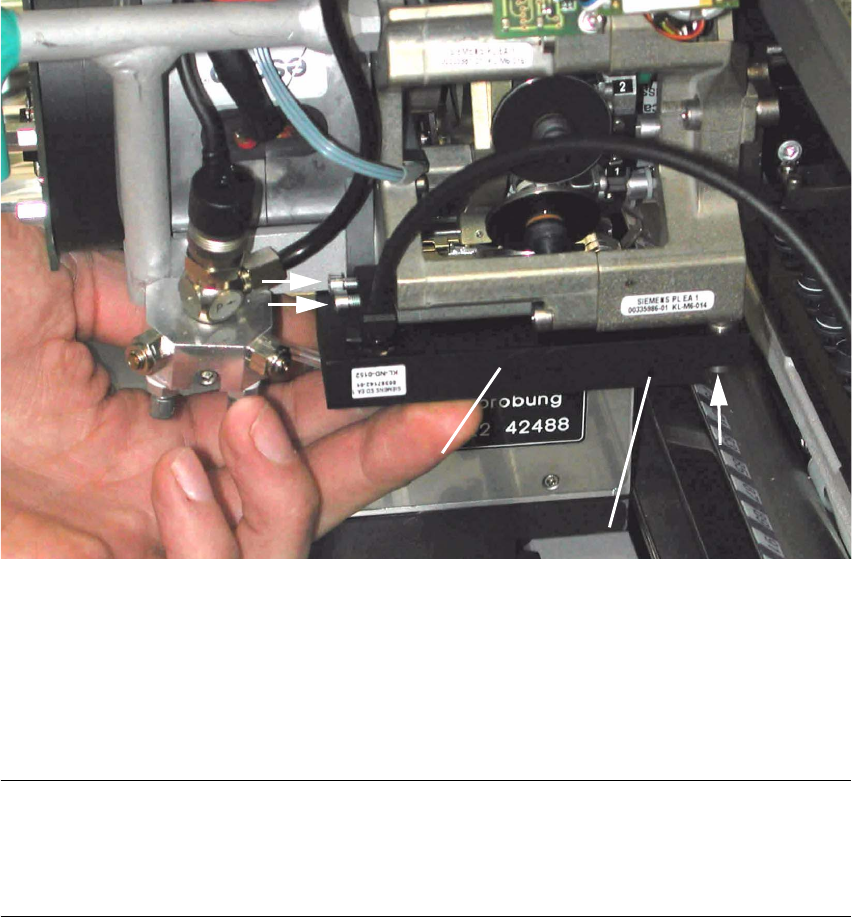
Abb. 2.6.3 Fastening the Component Sensor (HS-50 / S-25 HM)
Key:
1. Component sensor
2. 2 socket hex head cap screws M3 (short), from assembly kit (do not tighten yet)
3. 1 socket hex head cap screw M3 (long), from assembly kit (do not tighten yet)
NOTE:
In the hole for the component sensor (see Abb. 2.6.3 -> 3) there is a sleeve that is flexible in a
longitudinal direction. It is used together with the assembling gauge for a strain-free assembly
(see Abb. 2.6.4 -> 2). 2
: Holding the component sensor as shown above, place it on the placement head to the stop
from below.
: Pull the blast air unit away slightly with one hand. The silicone hose on the bottom is not to kink
during this process.
2
3
2
1
1
3
2
(Control LED)
2 Assembly Instructions: Component Sensor (Option) for RV12-DLM1 Placement Head SIPLACE S-25 HM
2.6 Work Sequence 04/2007 Edition
38
: First, screw the two short socket hex head cap screws M3 into the side of the component sen-
sor (see Abb. 2.6.3 -> 3), but do not tighten the screws all the way yet.
: If the head crash protection unit has been installed, move the placement head (by the handle)
until it is over the gap between the protection unit and the empty-tape duct so that you can in-
sert the screw from the bottom of the sensor (see Abb. 2.6.3 -> 3).
: From the bottom, screw in the long socket hex head cap screw M3 (see Abb. 2.6.3 -> 2), but
do not tighten the screw all the way yet.
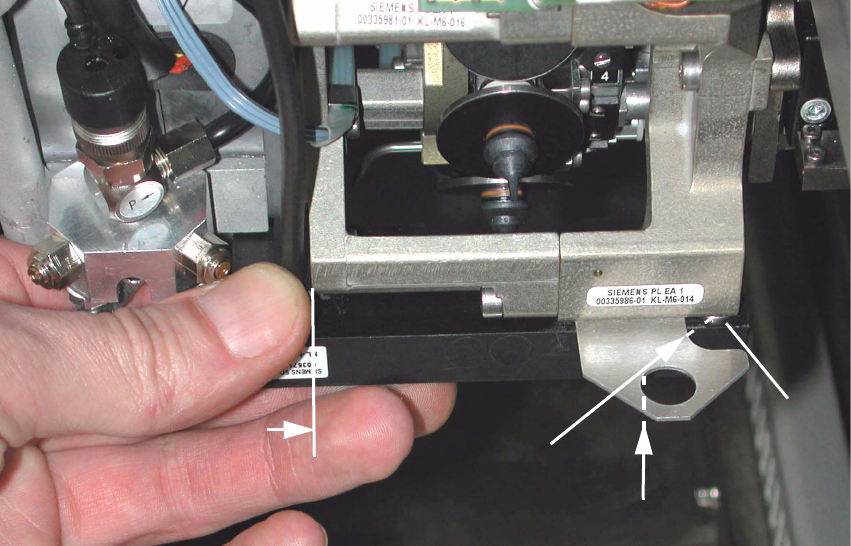
Abb. 2.6.4 Inserting the Assembling Gauge and Tightening the Component Sensor Screws
Key:
1. Component sensor, on the side, on the stop on the placement head
2. Sleeve in the component sensor, mounted such that it is axially flexible
3. Direction in which the assembling gauge (from the assembly kit) is slide in diagonally
4. Component sensor, contacted by a slight upward pressure at the middle of assembling gauge
: Now slide the assembling gauge between placement head and component sensor to the
sleeve as far as the stop (-> see figure above, position 3), such that the radius of the gauge is
in complete contact around the circumference of the sleeve.
2
2
1
4
3
SIPLACE S-25 HM 2 Assembly Instructions: Component Sensor (Option) for RV12-DLM1 Placement Head
04/2007 Edition 2.6 Work Sequence
39
Now proceed as follows to ensure that the component sensor is not subjected to any strain when
installed: 2
: From the bottom of the sensor, exert a slight upward pressure in the position at the middle of
the assembling gauge (see Abb. 2.6.4 -> 3) such that the sensor incl. the assembling gauge is
in contact with the machined surface of the placement head. While doing so, slide the sensor
against the side mounting surface of the placement head to the stop and hold the sensor in this
position.
: In this position first tighten the screws on the side, then the screw on the bottom of the sensor.
In each case, follow the instructions regarding the torque (see Abschn. 2.5.6).
: Afterwards, while you are pulling out the assembling gauge, check how it moves (quickly, too
easily, with too much difficulty) to tell whether you installed the sensor correctly, i.e., it is not
under any strain:
– Correct installation:
The gauge can be pulled out quickly and evenly at all points, i.e., with noticeable vertical
clearance. Max. clearance = 0.1 mm
– Incorrect installation:
- There is a noticeable vertical clearance (> 0.1 mm) when the gauge is pulled out.
- The gauge clamps while being pulled out = vertical clearance is too small everywhere or
at some points.
: If, while pulling out the assembling gauge, you notice that the sensor is installed such that it is
being subjected to strain (has too much or too little clearance), loosen all 3 of the screws on
the sensor and repeat the entire adjustment process, as described above.
: Refasten the blast air unit onto the placement head:
1 socket hex head cap screw M3 (size 2.5).
Follow the instructions regarding to the torque (see Abschn. 2.5.6).