Formflex Manual.pdf - 第22页
TECHNI CAL R EFEREN CE PREVENTIV E MAINTEN ANCE Chapter Issue 4 Jun 04 FormFlex Tooling M anual 1.15 PREVENTIVE MAINTENANCE Daily Maintenance Program NOTE This procedure is to be carried out in conjunct ion with the mach…
1.14 FormFlex Tooling Manual Chapter Issue 4 Jun 04
TECHNICAL REFERENCE
FAULT FINDING
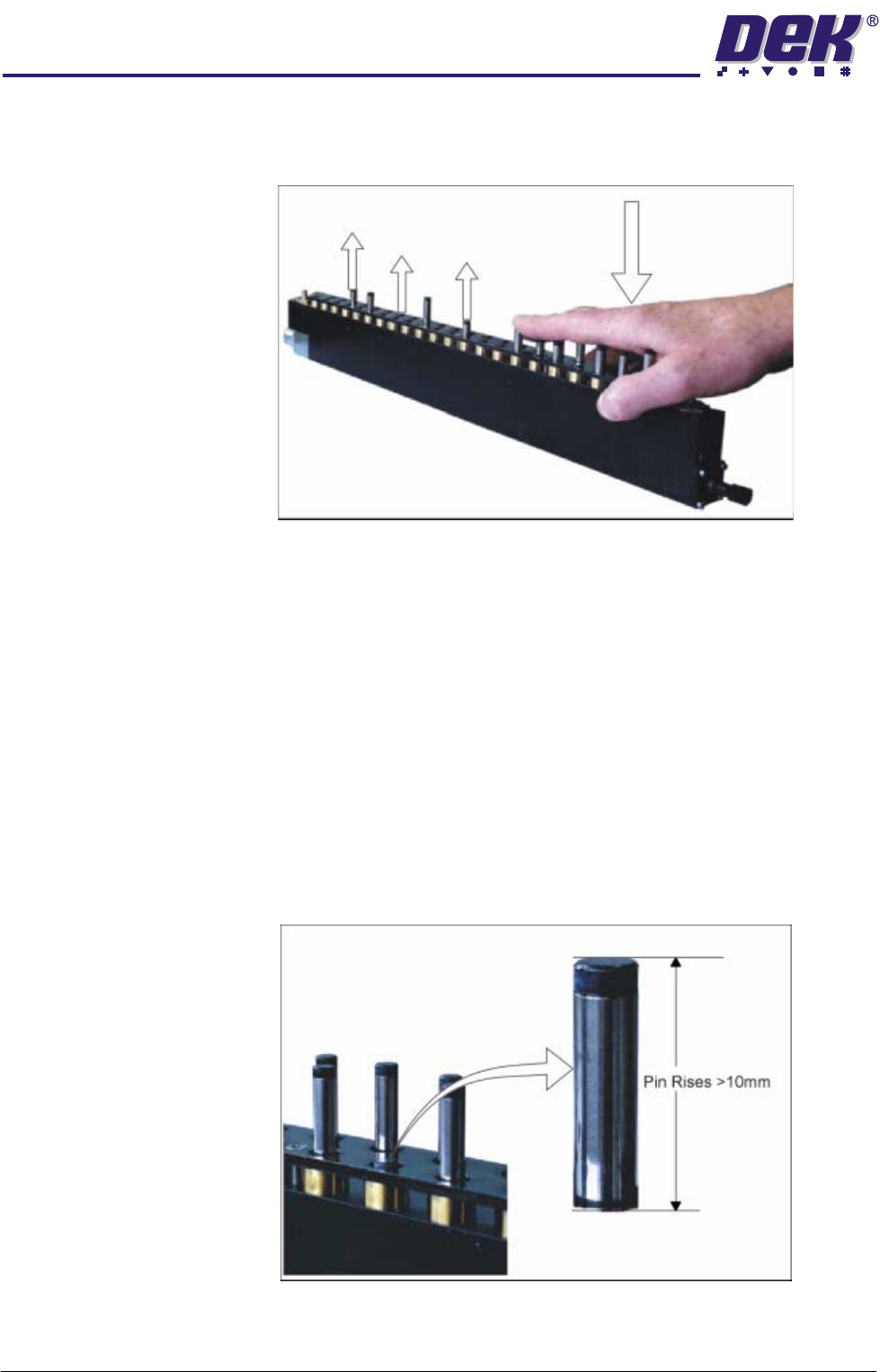
3. Wait until the system has fully completed its setup cycle (continuous amber
light on the operator button). Manually depress the raised FormFlex pins on
affected tooling modules, forcing the lowered pins to raise.
4. Repeat Steps 2 and 3 until all FormFlex pins raise during tooling setup.
5. Press the green reset button.
6. Press the black exercise button to cycle the pins and fluid cut-off valves of
the tooling modules.
7. If one or more pins remain lowered after this procedure, replace the tooling
module.
Module Air Check Carry out this procedure if print process issues are being caused by the board
not being fully supported by a tooling module.
1. Gain access to the manual tooling plate.
2. During FormFlex setup, hold down 1 pin on the suspect tooling module until
the setup is complete.
3. Release the pin. If it rises more than 10mm there is excessive amount of
air in the tooling module.
4. Replace the the tooling module if it is causing print process issues and
contact DEK.
TECHNICAL REFERENCE
PREVENTIVE MAINTENANCE
Chapter Issue 4 Jun 04 FormFlex Tooling Manual 1.15
PREVENTIVE MAINTENANCE
Daily Maintenance
Program
NOTE
This procedure is to be carried out in conjunction with the machine’s Daily
Maintenance Program.
WARNING
HARMFUL SUBSTANCES. CLEANING WIPES AND CLEANING SOLUTIONS MAY
CONTAIN SUBSTANCES HAZARDOUS TO HEALTH. OBSERVE ALL
MANUFACTURERS’ HEALTH AND SAFETY GUIDELINES. ALWAYS WEAR
APPROVED PROTECTIVE CLOTHING WHEN CLEANING THE MACHINE.
CAUTION
COMPRESSED AIR.
Compressed air must not be used to clean FormFlex
tooling modules otherwise damage to oil seals within the unit may occur
causing leaks.
Preparation The machine must be isolated from electrical power and air pressure.
Procedure
Monthly
Maintenance
Program
NOTE
This procedure is to be carried out in conjunction with the machine’s Monthly
Maintenance Program.
WARNING
HARMFUL SUBSTANCES. CLEANING WIPES AND CLEANING SOLUTIONS MAY
CONTAIN SUBSTANCES HAZARDOUS TO HEALTH. OBSERVE ALL
MANUFACTURERS’ HEALTH AND SAFETY GUIDELINES. ALWAYS WEAR
APPROVED PROTECTIVE CLOTHING WHEN CLEANING THE MACHINE.
CAUTION
COMPRESSED AIR.
Compressed air must not be used to clean FormFlex
tooling modules otherwise damage to oil seals within the unit may occur
causing leaks.
Preparation 1. Ensure that there is no board or screen in the machine.
2. Press the amber FormFlex operator button to raise all the pins.
3. Shut down the machine and isolated from electrical power and air pressure.
Procedure
The FormFlex Pin Pressure check in the Adjustments and Settings section of
this manual must be carried out after this procedure.
No. Task Tools Completed Comments
1 Inspect the FormFlex tooling modules
for signs of leaks. If leak found, replace
tooling module.
2 Remove any debris from the FormFlex
tooling module and clean.
Spatula,
IPA Impregnated
Wipes
No. Task Tools Completed Comments
1 Wipe all the pins of the tooling modules
to remove any residue.
IPA Impregnated
Wipes

1.16 FormFlex Tooling Manual Chapter Issue 4 Jun 04
TECHNICAL REFERENCE
PREVENTIVE MAINTENANCE
Material Safety Data Sheet
Material Safety Data Sheets (MSDS) listing the health and safety aspects
applicable to consumables such as cleaning materials, oils and greases are
available on request from the purchase source.
If difficulty is experienced in obtaining any MSDS, assistance is available from
DEK.
Contact your local DEK agent.
Disposal of Waste Materials
All waste materials including fluids and contaminated materials must be dis-
posed of in accordance with current federal regulations and local state legisla-
tion.