stopper for HF-series for processing area 1.pdf - 第28页
1 Assembly instructions Special design Stopper for pl acement are a 1 (00166322-01) SIPLACE HF-series SIPLACE 06/2007 Edition 28 1.13 Possible causes of error 1. The PCB camera does not find the fiducial or moves to the …
SIPLACE 1 Assembly instructions Special design Stopper for placement area 1 (00166322-01) SIPLACE HF-series
06/2007 Edition
27
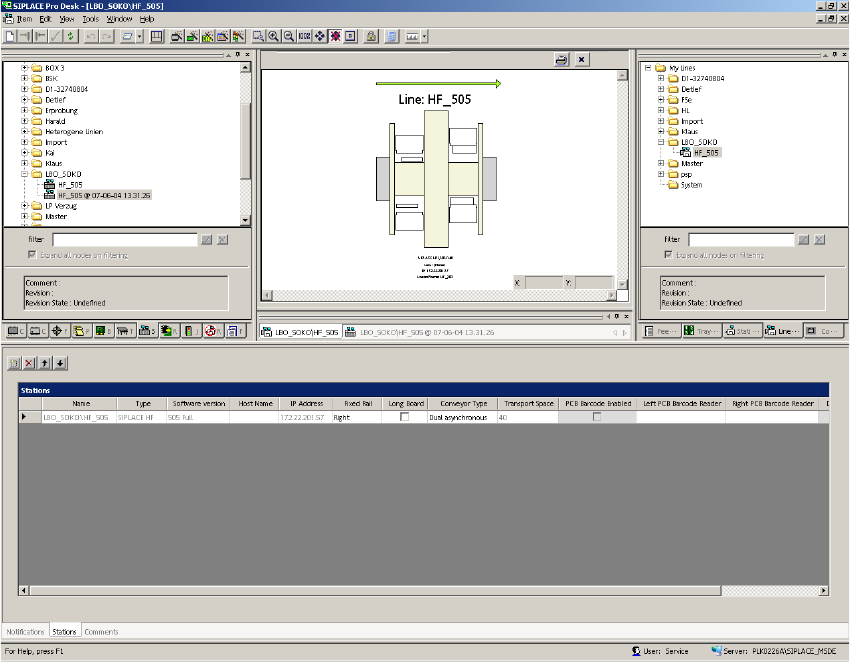
: Change back to the view "Line" and disable the flag "Long board".
1
1
: Start the optimization and send the job to the SIPLACE machines.
1
1
1
1 Assembly instructions Special design Stopper for placement area 1 (00166322-01) SIPLACE HF-series SIPLACE
06/2007 Edition
28
1.13 Possible causes of error
1. The PCB camera does not find the fiducial or moves to the wrong position.
– Cause: The PCB reference corner was not recalibrated after the stopper was installed or its
position was changed.
1
2. The stopper does not move out.
– Causes:
- No compressed air connection or no compressed air available. A “Temporary drop in
compressed air supply” error message may appear on screen.
- The sensor on the stopper is defective.
3. The PCB is not detected.
– Cause: The sonar sensor is defective, was not calibrated or was incorrectly calibrated.
1.14 Removal
: Detach the plug-in connections on the conversion board and the compressed air connection.
: Remove the stopper module, assembly rail and the adapter plate.
: At the station, download the default conveyor firmware.
: Restart the placement machine.
1
1