SIPLACE-SX4-DX4-用户手册.pdf - 第103页
Service Work 3.6.4 Replacing the Lifting Table Unit Conveyor Service Manual SIPLACE SX4/DX4 103 3.6.4.1 3 . 6 . 4 . 1 M a n u a lly L o w e r in g t h e L if t in g T a b le Manually Lowering the Lifting Table If the lif…

Service Work
Conveyor 3.6.4 Replacing the Lifting Table Unit
102 Service Manual SIPLACE SX4/DX4
► Loosen the four screws (1) fastening the conveyor control mounting frame and push this frame to
one side.
► Unplug all electrical connections to the lifting table motor.
► Mark the direction of transport for the lifting table. This helps you avoid unintentionally fitting the lifting
table at the wrong angle later on (turned by 180 degrees).
► Loosen the four screws fastening the lifting table.
► Carefully lift the lifting table out of the machine.
Installation
► Follow the removal instructions in reverse order for installation. Also observe the following instruc-
tions:
See also
3.6 Conveyor [ ➙ 95]
CAUTION
Make sure that you do not loosen any other screws!
CAUTION
Heavy machine part!
When removing the lifting table, remember it is heavy. You may need to enlist the help of a sec-
ond person.
CAUTION
Installation instructions
► Make sure that the lifting table is aligned correctly in the direction of transport.
► Before you finally fix the lifting table into place, push it up to the stop in the direction of the
machine outer side (away from the center). This ensures that the lifting table is parallel.
Service Work
3.6.4 Replacing the Lifting Table Unit Conveyor
Service Manual SIPLACE SX4/DX4 103
3.6.4.1
3.6.4.1 Manually Lowering the Lifting Table
Manually Lowering the Lifting Table
If the lifting table stays in the top position, it can be manually lowered in the event of an emergency.
Overview
Procedure
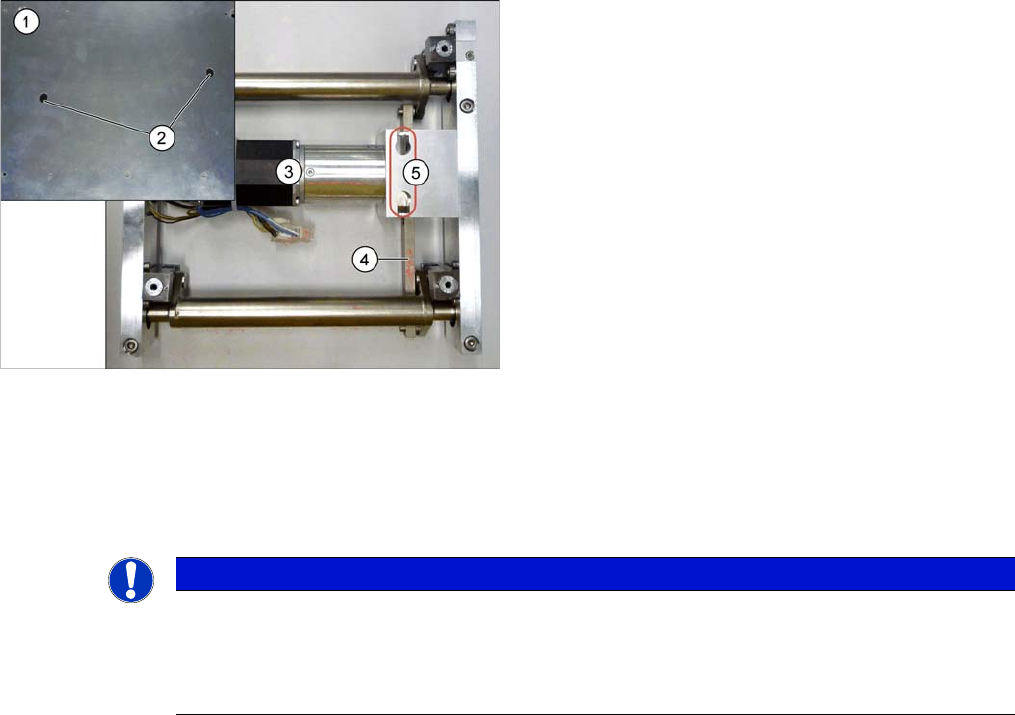
► Loosen the screw connecting the rods with the motor, through the holes in the lifting table plate.
► You can now manually move the lifting table downwards.
► When refitting the lifting table, observe the following instructions:
1. Lifting table plate
2. Holes in the lifting table plate
3. Lifting table motor
4. Rods
5. Access to connection screw between rods and motor
NOTICE
Installation instructions
► When refitting the lifting table, make sure that the connection screw is retightened.
► Perform a reference run for the lifting table motor. (See also "5.5.4 Calibrating the Motors
in the SX Conveyor" [ ➙ 260])
Service Work
Conveyor 3.6.5 Replacing the Lifting Table Motor [03064983-xx] (EC only)
104 Service Manual SIPLACE SX4/DX4
3.6.5
3.6.5 Replacing the Lifting Table Motor [03064983-xx] (EC only)
Replacing the Lifting Table Motor [03064983-xx] (EC only)
Parts, equipment and tools
▪ BLDC (brushless DC) motor with PLG (planetary gear) and brake [03064983-xx]
Removal
CAUTION
Only on the single conveyor!
The lifting table motor may only be replaced on single conveyors.
The lifting table motor may not be replaced on dual or quad lane conveyors. In these cases,
you may need to replace the entire lifting table.
CAUTION
Do not loosen the lifting table mechanism
The lifting table mechanism has been factory fitted with adjustment shims. Do not remove
these.
The only exception is the lifting table motor on the single conveyor.
NOTICE
Lifting table plate fixtures
► Mark the positions of the lifting table plate fixtures.
If these are still mistakenly exchanged, you will need to reset the parallelism of the lifting
table plates after installation.
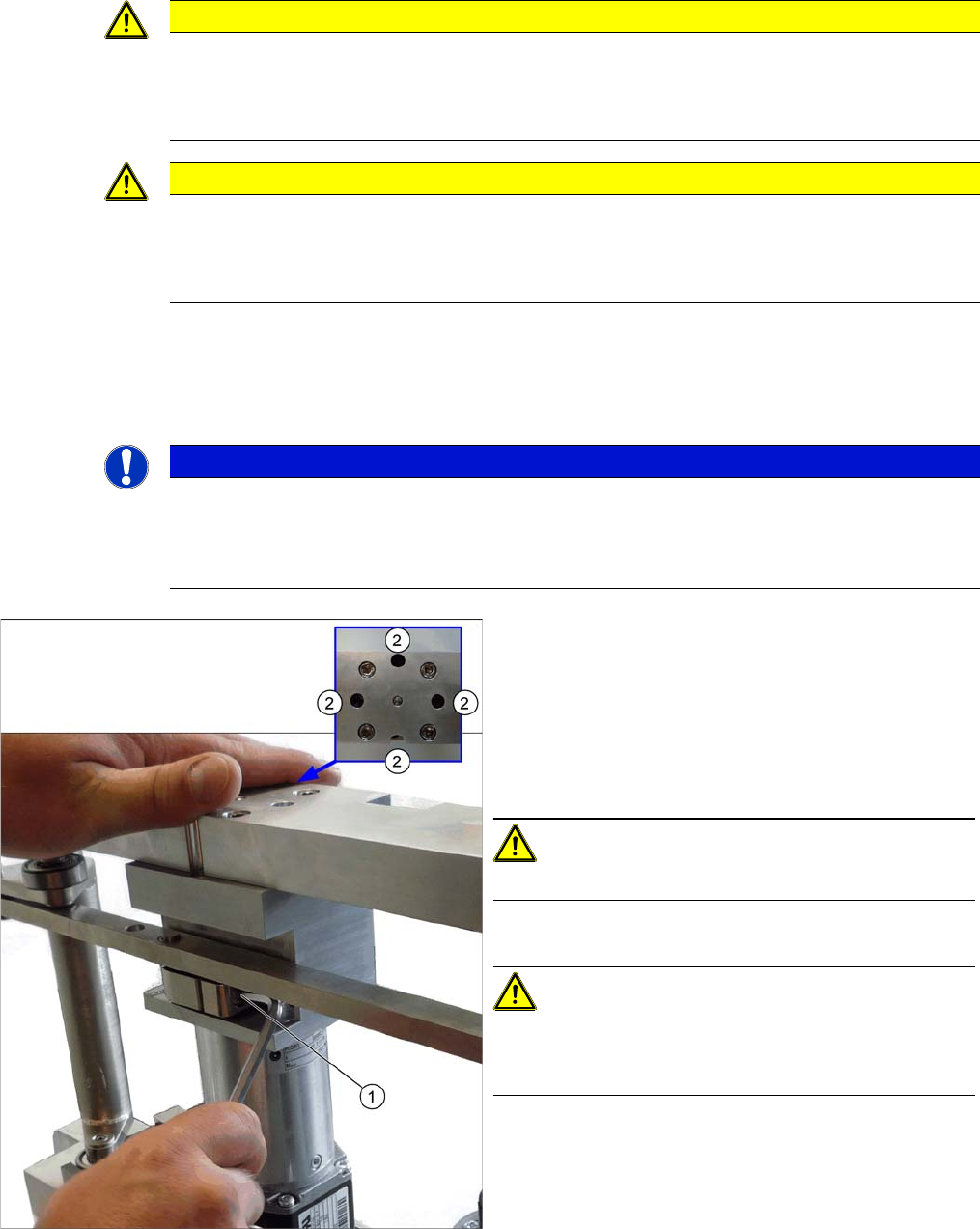
► Remove the lifting table from the machine. (See
"3.6.4 Replacing the Lifting Table Unit" [ ➙ 101])
► Unplug the connection between the motor and the
rods (1).
► Loosen the screws (2) fastening the motor. Some of
these are only accessible if you move the rods up-
wards (thereby turning the gear shaft by 90 degrees).
CAUTION!
Make sure that you do not loosen the other four screws!
► Remove the motor.
CAUTION!
There are several shims on the gear shaft. These need to
be taken over to the new motor and fitted there in the
same positions and quantities.