SIPLACE-SX4-DX4-用户手册.pdf - 第113页
Service Work 3.6.10 Replacing the Conveyor Drive Toothed Belt [03047677-xx] C onveyor Service Manual SIPLACE SX4/DX4 113 3.6.10 3 . 6 . 1 0 R e p la c in g t h e C o n v e y o r D r iv e T o o t h e d B e lt [ 0 3 0 4 7 …
Service Work
Conveyor 3.6.9 Replacing the Conveyor Drive [03075892-xx]
112 Service Manual SIPLACE SX4/DX4
Installation
► Follow the removal instructions in reverse order for installation. Also observe the following instruc-
tions:
See also
3.6.1 Loosening the Conveyor Side Clamps [ ➙ 95]
3.6.13 Replacing the Width Adjustment Drive [03078341-xx] [ ➙ 117]
3.6.14 Replacing the Width Adjustment Toothed Belt [03076223-xx] [ ➙ 118]
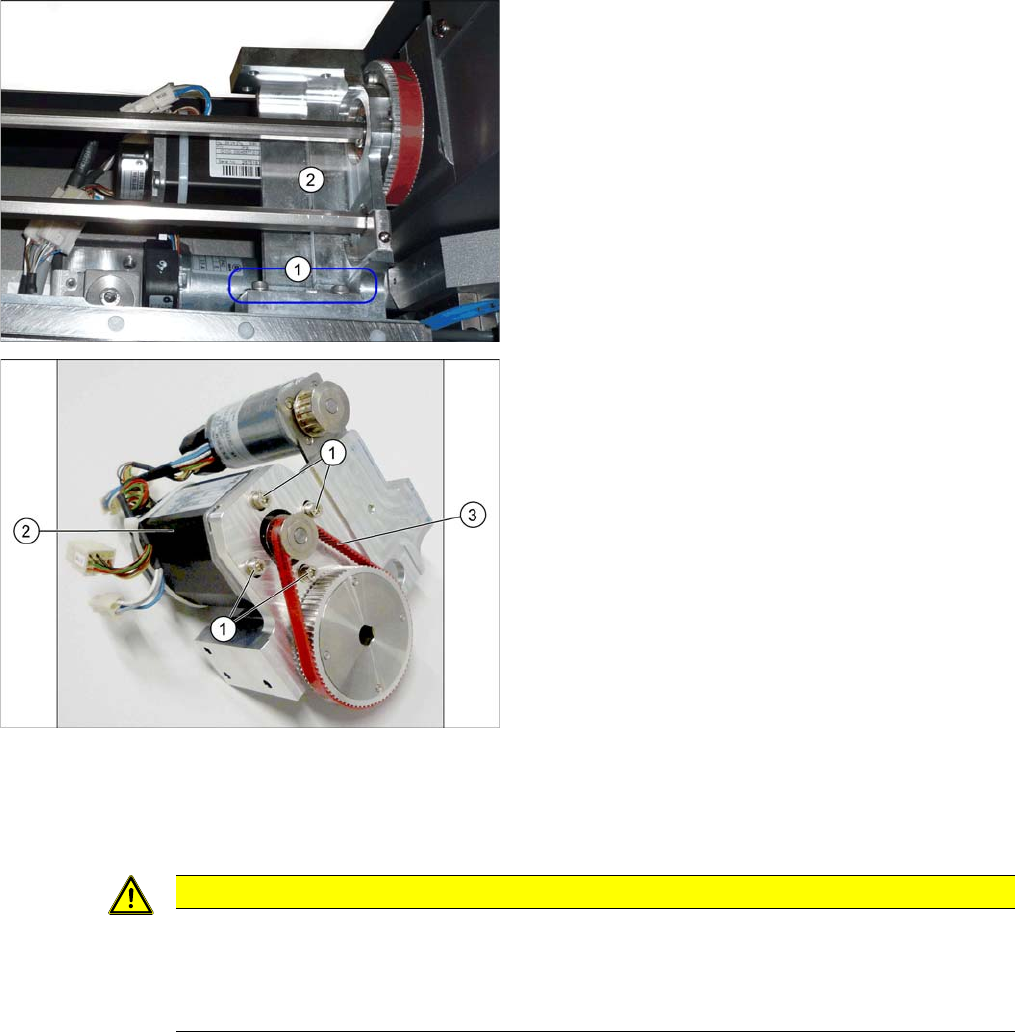
► Loosen the 3 screws (3) fastening the mount (4) and
then remove the mount and drive carefully from the
machine.
► Loose the 4 screws (1) fastening the conveyor drive
(2). While doing this, carefully unthread the conveyor
drive from the toothed belt (3) and take it off the
mount.
CAUTION
Installation instructions
► Make sure that the toothed belt is positioned accurately in the guidance on the motor shaft.
► While you tighten the screws fastening the conveyor drive, set the tension of the toothed
belt correctly to 250+/-20 Hz.
Service Work
3.6.10 Replacing the Conveyor Drive Toothed Belt [03047677-xx] Conveyor
Service Manual SIPLACE SX4/DX4 113
3.6.10
3.6.10 Replacing the Conveyor Drive Toothed Belt [03047677-xx]
Replacing the Conveyor Drive Toothed Belt [03047677-xx]
Parts, Equipment and Tools
▪ Toothed belt Syncroflex 10 AT3/300 GEN III [03047677-xx]
Overview
Removal
► Dismantle the conveyor drive (see "3.6.9 Replacing the Conveyor Drive [03075892-xx]" [ ➙ 110]).
► Carefully unthread the conveyor drive.
Installation
► Follow the removal instructions in reverse order for installation. Also observe the following instruc-
tions:
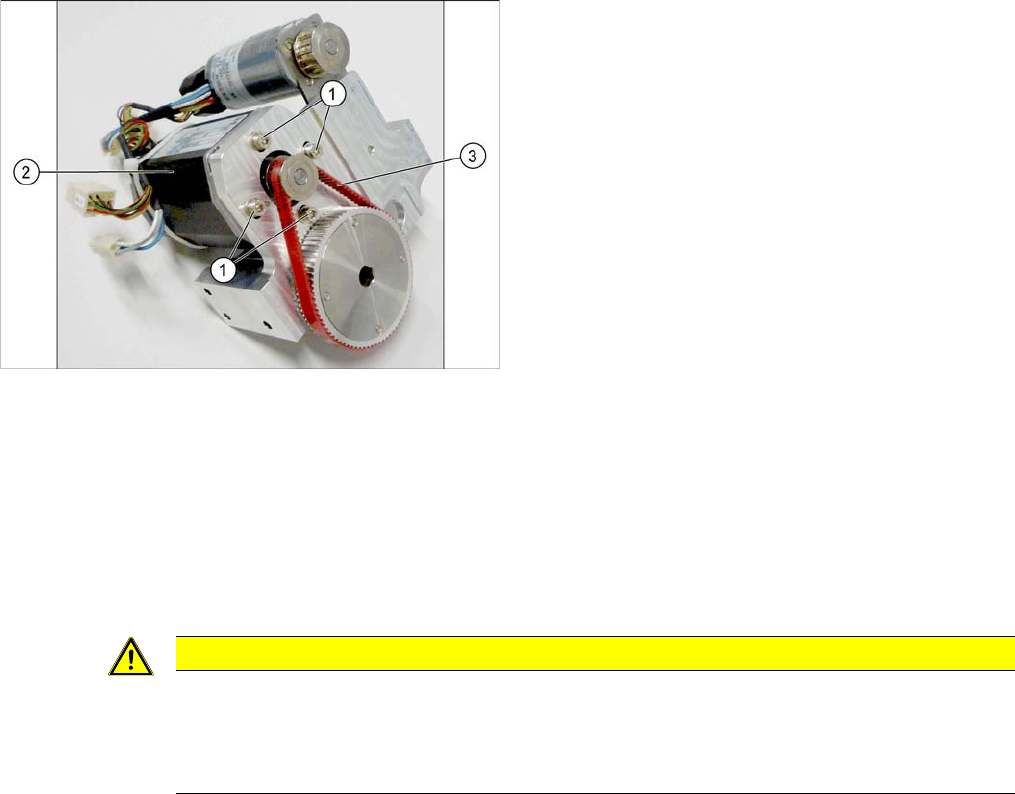
1. Fastening screws for conveyor drive
2. Conveyor drive
3. Toothed belt for conveyor drive
CAUTION
Installation instructions
► Make sure that the toothed belt is not folded or otherwise damaged.
► While you tighten the screws fastening the conveyor drive, set the tension of the toothed
belt correctly to 250+/-20 Hz.
Service Work
Conveyor 3.6.11 Replacing the Conveyor Toothed Belt [03075565-xx]
114 Service Manual SIPLACE SX4/DX4
3.6.11
3.6.11 Replacing the Conveyor Toothed Belt [03075565-xx]
Replacing the Conveyor Toothed Belt [03075565-xx]
Parts, equipment and tools
▪ Toothed belt Brecoflex 10 T5/2085 z=417 [03075565-xx]
Overview
Removal
► Use the software to move the conveyor sides into the position which allows you best access. As an
alternative, you can loosen the clamps for the relevant sides in dual conveyors.
► Switch off the machine, disconnect it from the power supply and secure it to prevent unauthorized
reactivation. Observe the instructions in section "1.2 Preparatory Work..." [ ➙ 12].
► Dismantle the clamping plate. Make sure that you do not lose the springs. (See "3.6.23 Replacing
the Clamping Plate [03081665-xx]" [ ➙ 132])
► Loosen the 3 screws fastening the belt guides and then remove the belt guide.
► Loosen the deflection pulley with slot.
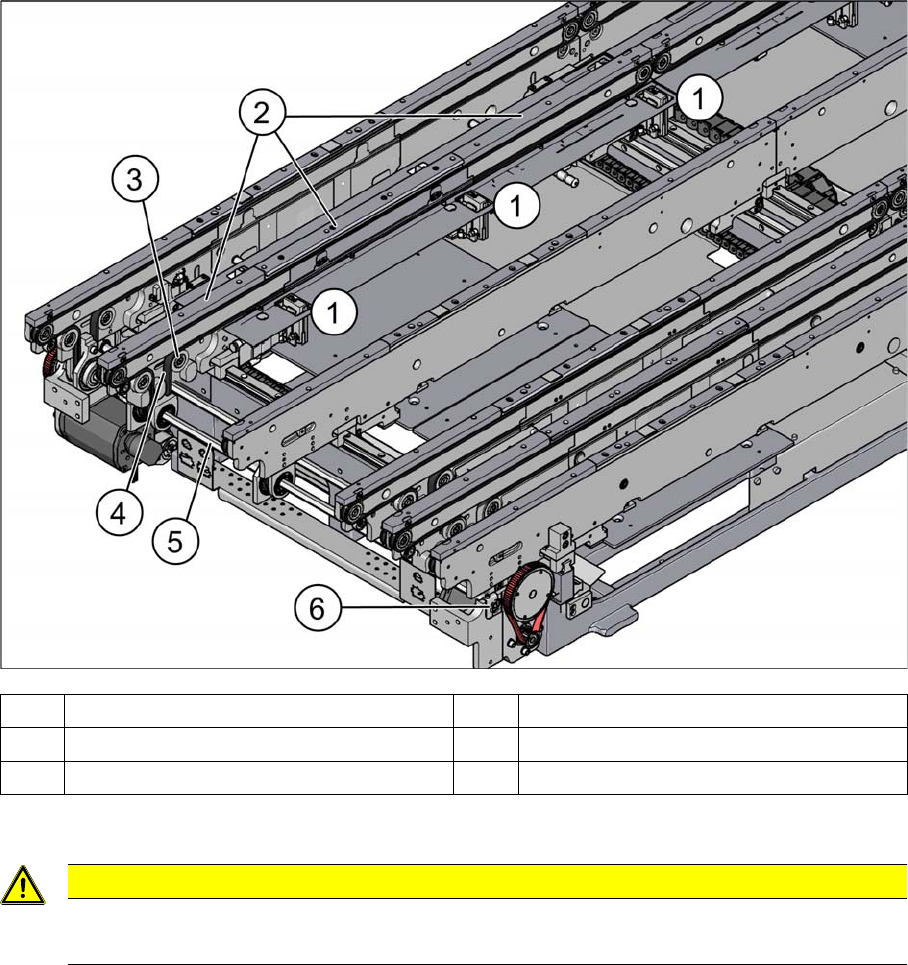
(1) Stopper (2) Belt guidance
(3) Deflection pulley with slot (4) Conveyor toothed belt (2x per side)
(5) Hexagonal shaft (6) Fixture for hexagonal shaft
CAUTION
Toothed belt
► Make sure that the toothed belt is not folded!