SIPLACE-SX4-DX4-用户手册.pdf - 第119页
Service Work 3.6.15 Replacing the Width Adjustment Deflection Pulley [003378 87- xx] Conveyor Service Manual SIPLACE SX4/DX4 119 3.6.15 3 . 6 . 1 5 R e p la c in g t h e W id t h A d ju s t m e n t D e f le c t io n P u …
Service Work
Conveyor 3.6.14 Replacing the Width Adjustment Toothed Belt [03076223-xx]
118 Service Manual SIPLACE SX4/DX4
3.6.14
3.6.14 Replacing the Width Adjustment Toothed Belt [03076223-xx]
Replacing the Width Adjustment Toothed Belt [03076223-xx]
Parts, equipment and tools
▪ Toothed belt Brecoflex 12 T5/3850 z=770 [03076223-xx]
▪ Belt tension device (00326015-xx)
▪ Help of second person, if needed
Overview
Removal
► Use the software to move the conveyor sides into the position which allows you best access. As an
alternative, you can loosen the clamps for the relevant sides in dual conveyors.
► Switch off the machine, disconnect it from the power supply and secure it to prevent unauthorized
reactivation. Observe the instructions in section "1.2 Preparatory Work..." [ ➙ 12].
► Move the adjustment units to one side (as far as location 3 and 4) and do not move from there if
possible. This makes refitting easier later on.
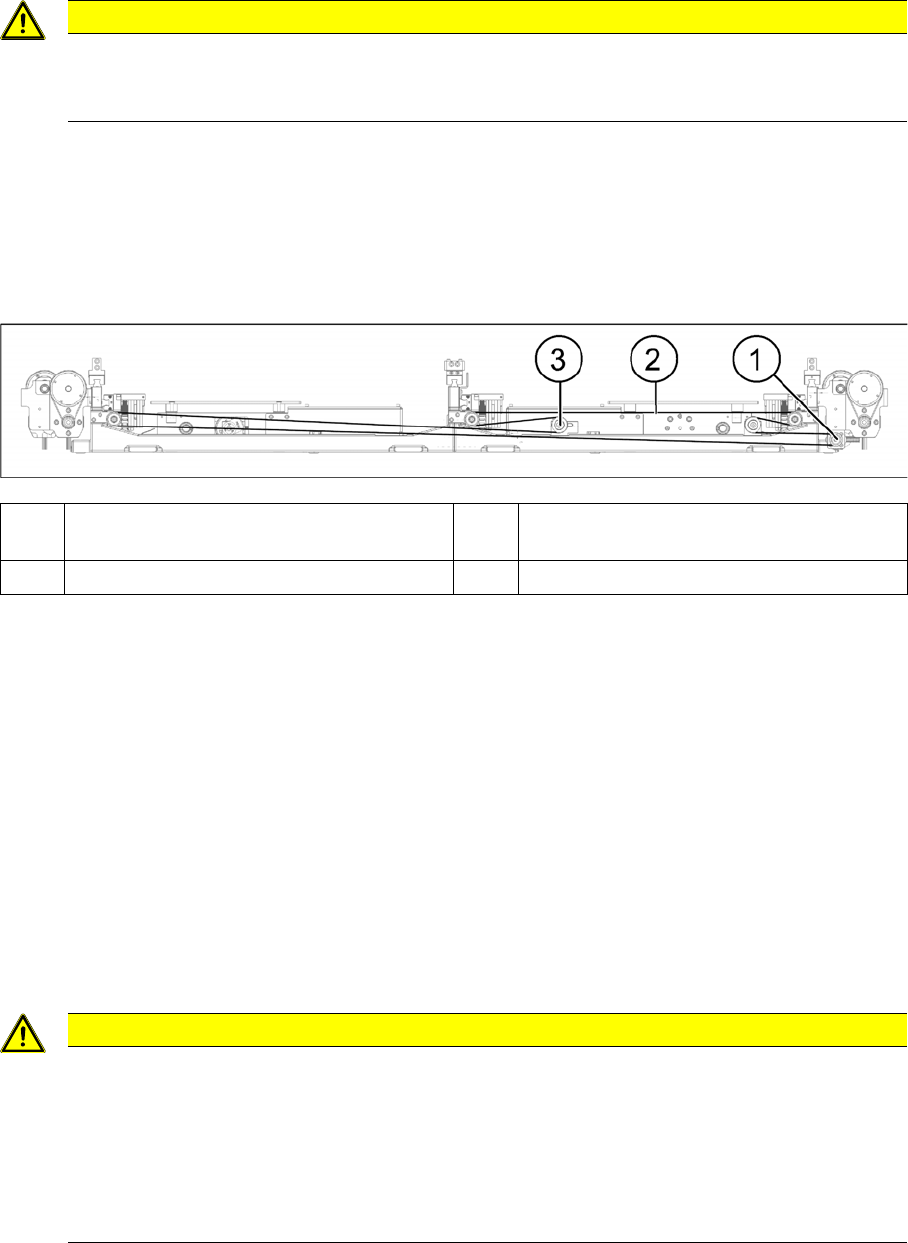
► Loosen the screw fastening the deflection pulley with slot.
► Unthread the toothed belt and take this out of the machine.
Installation
► Follow the removal instructions in reverse order for installation. Also observe the following instruc-
tions:
See also
3.6.1 Loosening the Conveyor Side Clamps [ ➙ 95]
CAUTION
Parallelism
This may affect the parallelism of the width adjustment unit. Bear in mind that this could then
affect the parallelism of the conveyor sides.
(1) Width adjustment drive (2) Measurement point on width adjustment
toothed belt
(3) Deflection pulley with slot
CAUTION
Installation instructions
► Make sure that the adjustment units run parallel to one another. To check this, move them
manually to the side, as far as the end stop. The adjustment units should all hit the side at
the same time. Pay close attention to the middle shaft. The distances of the guidance car-
riages to the end of the rail must be the same in all cases.
► Set the tension of the width adjustment toothed belt to 27+/-2 Hz. (See "5.5.1.2 Setting the
Width Adjustment Belt Tension" [ ➙ 252])
Service Work
3.6.15 Replacing the Width Adjustment Deflection Pulley [00337887-xx] Conveyor
Service Manual SIPLACE SX4/DX4 119
3.6.15
3.6.15 Replacing the Width Adjustment Deflection Pulley [00337887-xx]
Replacing the Width Adjustment Deflection Pulley [00337887-xx]
Parts, equipment and tools
▪ Deflection pulley assembly for width adjustment [00337887-xx]
Overview
Removal
► Use the software to move the conveyor sides into the position which allows you best access. As an
alternative, you can loosen the clamps for the relevant sides. (see "3.6.1 Loosening the Conveyor
Side Clamps" [ ➙ 95]).
► Switch off the machine and secure it to prevent unauthorized reactivation. Observe the instructions
in section "1.2 Preparatory Work..." [ ➙ 12].
► Move the adjustment units to one side (as far as location 3 and 4). This makes refitting easier later
on.
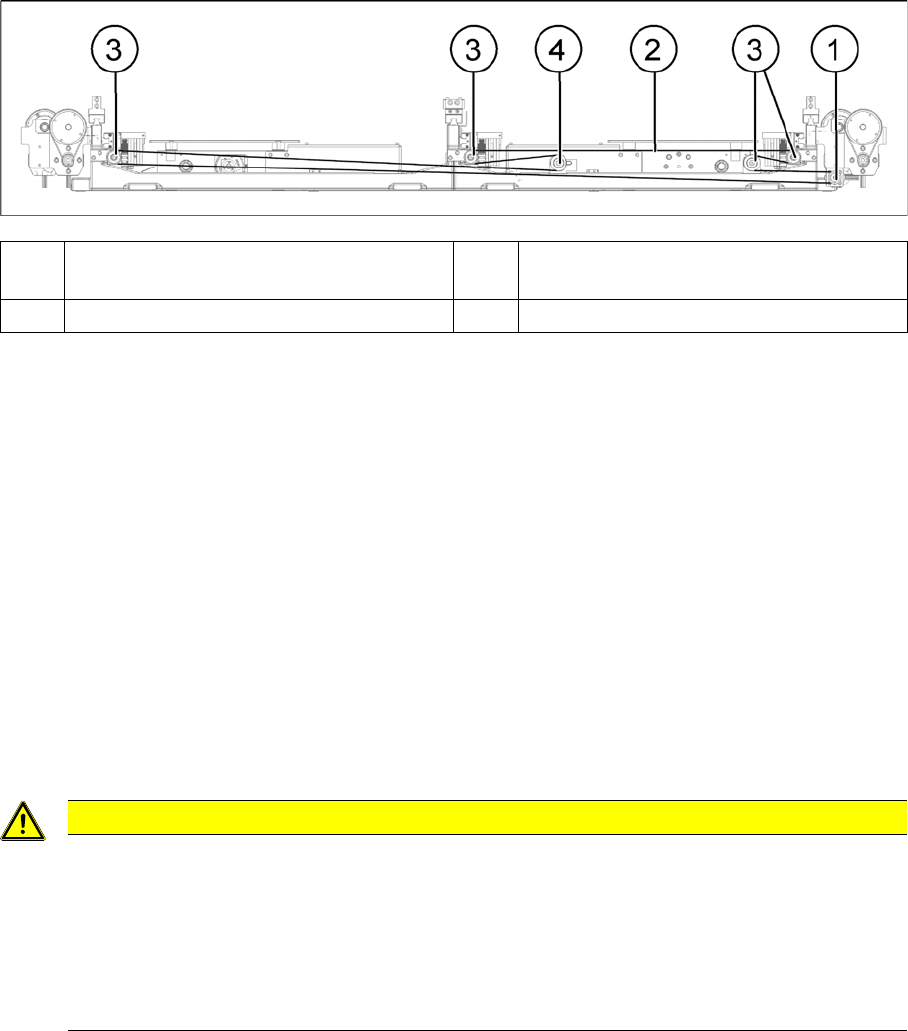
► Loosen the deflection pulley with slot. This toothed belt is now loose.
► Loosen the fastening screw on the deflection pulley to be replaced and take the deflection pulley out
of the machine.
Installation
► Follow the removal instructions in reverse order for installation. Also observe the following instruc-
tions:
See also
3.6.1 Loosening the Conveyor Side Clamps [ ➙ 95]
(1) Width adjustment drive (2) Measurement point on width adjustment
toothed belt
(3) Deflection pulleys (4) Deflection pulley with slot
CAUTION
Installation instructions
► Make sure that the adjustment units run parallel to one another. To check this, move them
manually to the side, as far as the end stop. The adjustment units should all hit the side at
the same time. Pay close attention to the middle shaft. The distances of the guidance car-
riages to the end of the rail must be the same in all cases.
► Set the tension of the width adjustment toothed belt to 27+/-2 Hz. (See "5.5.1.2 Setting the
Width Adjustment Belt Tension" [ ➙ 252])
Service Work
Conveyor 3.6.16 Replacing the Tape Drive [03056923-xx]
120 Service Manual SIPLACE SX4/DX4
3.6.16
3.6.16 Replacing the Tape Drive [03056923-xx]
Replacing the Tape Drive [03056923-xx]
Parts, equipment and tools
▪ Tape drive, decoupled [03056923-xx]
Removal
► Use the software to move the conveyor sides into the position which allows you best access. As an
alternative, you can loosen the clamps for the relevant sides in dual conveyors.
► Switch off the machine, disconnect it from the power supply and secure it to prevent unauthorized
reactivation. Observe the instructions in section "1.2 Preparatory Work..." [ ➙ 12].
Installation
► Follow the removal instructions in reverse order for installation. Also observe the following instruc-
tions:
See also
3.6.1 Loosening the Conveyor Side Clamps [ ➙ 95]
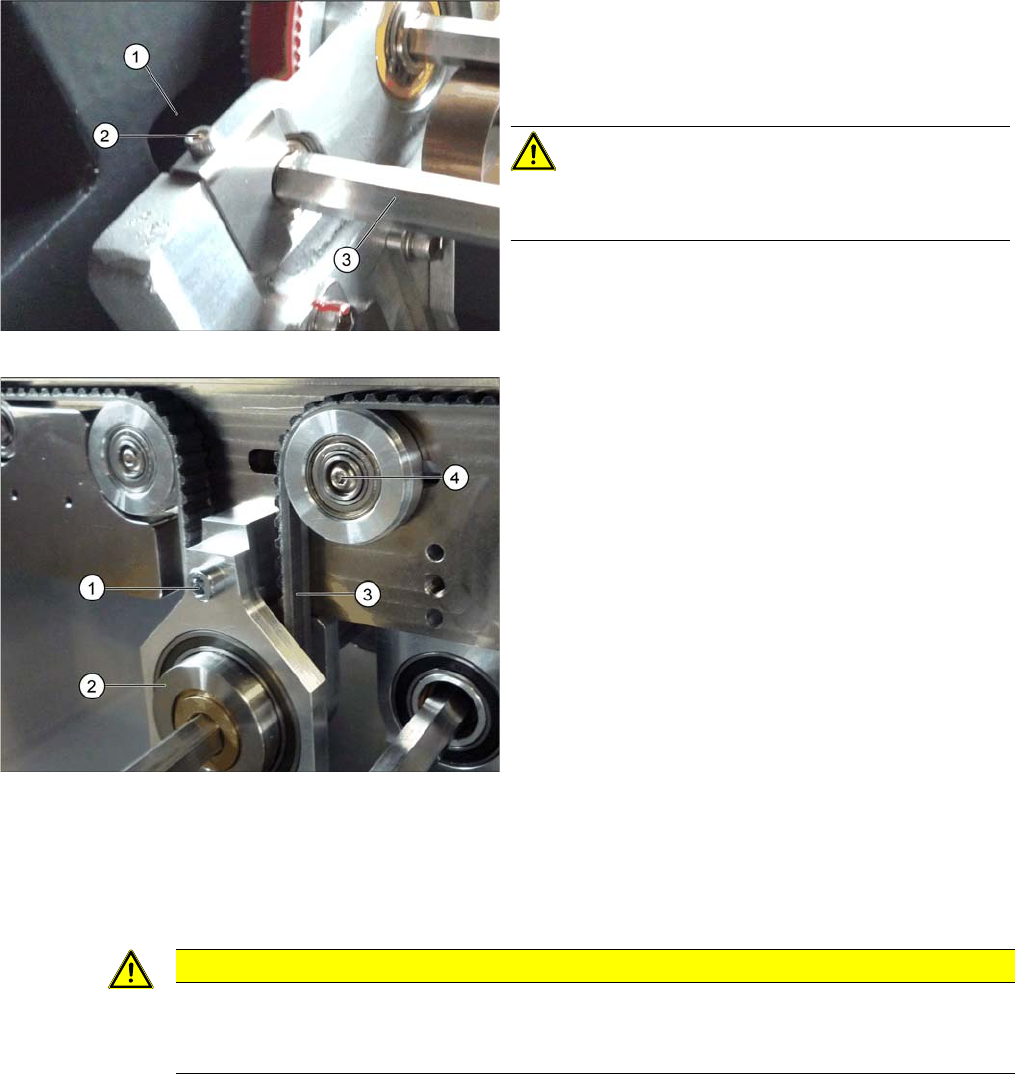
Loosening the hexagonal shaft (using example of SX1/2)
► Loosen the fixture (2) on the hexagonal shaft (3) of
the tape drive.
► Carefully push the hexagonal shaft into the hole
drilled in the machine frame (1).
CAUTION!
There are cables run inside the machine frame.
Make sure you do not damage these cables.
Tape drive (using the example of SX1/2)
► Loosen the deflection pulley with slot (4) to relax the
conveyor belt (3).
► Loosen the screw (1) fastening the tape drive (2).
► Unthread the hexagonal shaft from the tape drive and
remove it from the machine.
CAUTION
Installation instructions
► After fitting all parts, set the toothed belt tension (see "5.5.1.1 Setting the Conveyor Belt
Tension" [ ➙ 251]).