SIPLACE-SX4-DX4-用户手册.pdf - 第124页
Service Work Conveyor 3.6.19 Replacing the Sensor Rail (Stopper ) Valve [03077 072 - xx] 124 Service Manual SIPLACE SX4/DX4 Installation ► Follow the removal in structions in reverse order for installati o n. Also observ…
Service Work
3.6.19 Replacing the Sensor Rail (Stopper) Valve [03077072-xx] Conveyor
Service Manual SIPLACE SX4/DX4 123
3.6.19
3.6.19 Replacing the Sensor Rail (Stopper) Valve [03077072-xx]
Replacing the Sensor Rail (Stopper) Valve [03077072-xx]
Parts, equipment and tools
▪ Sensor rail (stopper) valve [03077072 xx]
Overview
Removal
► Use the software to move the conveyor sides into the position which allows you best access. As an
alternative, you can loosen the clamps for the relevant sides in dual conveyors.
► Switch off the machine, disconnect it from the power supply and secure it to prevent unauthorized
reactivation. Observe the instructions in section "1.2 Preparatory Work..." [ ➙ 12].
► Dismantle the cover plate on the sensor rail.
► Unplug the electrical and pneumatic connections to the solenoid valve. Mark their positions, to make
clear assignment easier later on.
► Loosen the screws holding the solenoid valve in place and remove the solenoid valve.
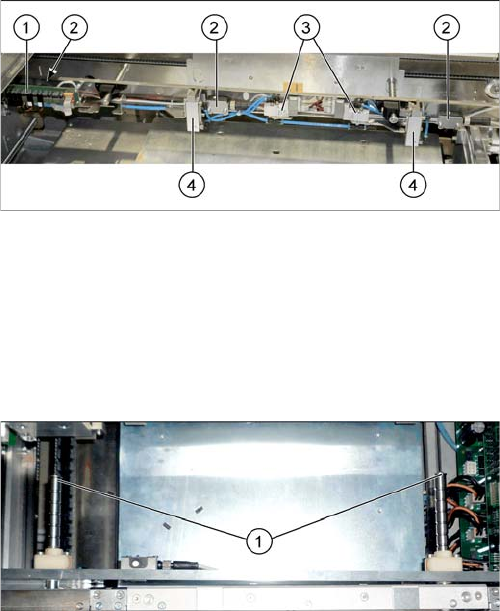
1. Conversion board
2. Ultrasonic sensors (3x)
3. Solenoid valves (2x)
4. Stoppers (2x)
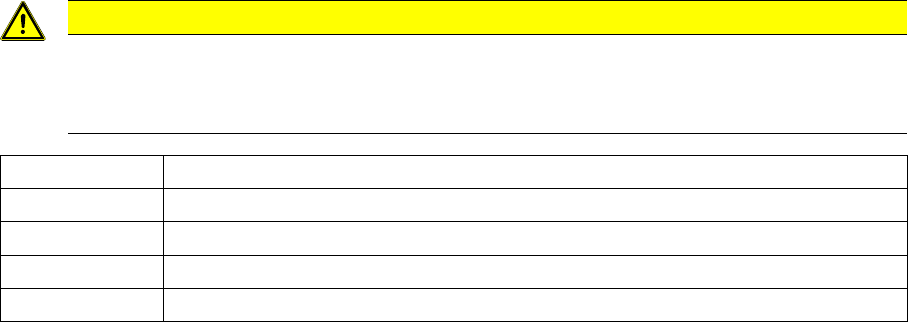
► If needed, the sensor rail can be removed to allow
better access. Simply loosen the two screws (1) on
the ends of both shafts.
Service Work
Conveyor 3.6.19 Replacing the Sensor Rail (Stopper) Valve [03077072-xx]
124 Service Manual SIPLACE SX4/DX4
Installation
► Follow the removal instructions in reverse order for installation. Also observe the following instruc-
tions:
See also
3.6.1 Loosening the Conveyor Side Clamps [ ➙ 95]
3.6.1 Loosening the Conveyor Side Clamps [ ➙ 95]
CAUTION
Installation instructions
► Replace any opened cable ties.
► Make sure that the connections are correct. (See the following table)
Connection 1 Compressed air supply (L-quick release fastening QSML-M3-4)
Connection 2 "Move in cylinder" blue hose (L-quick release fastening QSML-M3-3)
Connection 3 Silencer U-M3
Connection 4 "Move out cylinder" black hose (L quick release fastening QSML-M3-3)
Connection 5 Silencer U-M3
Service Work
3.6.20 Replacing the Stopper [03084034-xx] Conveyor
Service Manual SIPLACE SX4/DX4 125
3.6.20
3.6.20 Replacing the Stopper [03084034-xx]
Replacing the Stopper [03084034-xx]
Parts, equipment and tools
▪ Stopper 25 SX pneumatic assembly [03084034-xx]
Overview
Removal
► Use the software to move the conveyor sides into the position which allows you best access. As an
alternative, you can loosen the clamps for the relevant sides in dual conveyors.
► Switch off the machine, disconnect it from the power supply and secure it to prevent unauthorized
reactivation. Observe the instructions in section "1.2 Preparatory Work..." [ ➙ 12].
► Dismantle the cover plate on the sensor rail.
► Unplug the pneumatic connections to the stopper. You may want to mark the positions, to make clear
assignment easier later on.
► Loosen the two screws fastening the stopper and remove the stopper. Make sure that you do not
lose the angle plate. You may want to mark the position of the screws and plate, to make clear as-
signment easier later on.
1. Conversion board
2. Ultrasonic sensors (3x)
3. Solenoid valves (2x)
4. Stoppers (2x PA1, 3x PA2)
► If needed, the sensor rail can be removed to allow
better access. Simply loosen the two screws (1) on
the ends of both shafts.
NOTICE
Angle plate
The angle plate fitted between the stopper and sensor rail serves as a support plate in case a
long board (> 280 mm) moves backwards against the stopper. The angle plate is also used to
set the distance of the stoppers to one another. The angle plate can therefore have different
thicknesses and care should be taken not to confuse the individual angle plates.