SIPLACE-SX4-DX4-用户手册.pdf - 第141页
Service Work 3.7.2 Replacing the C&P20/A/M Head Placement heads Service Manual SIPLACE SX4/DX4 141 Installation ► Follow the removal in structions in reverse order for installati o n. Also observe the following instr…
Service Work
Placement heads 3.7.2 Replacing the C&P20/A/M Head
140 Service Manual SIPLACE SX4/DX4
Removal
► Switch off the machine, disconnect it from the power supply and secure it to prevent unauthorized
reactivation. Observe the instructions in section "1.2 Preparatory Work..." [ ➙ 12].
► Loosen all four M4 fastening screws with a long Torx key.
► Carefully lift the head out of the locating pins on the head plate.
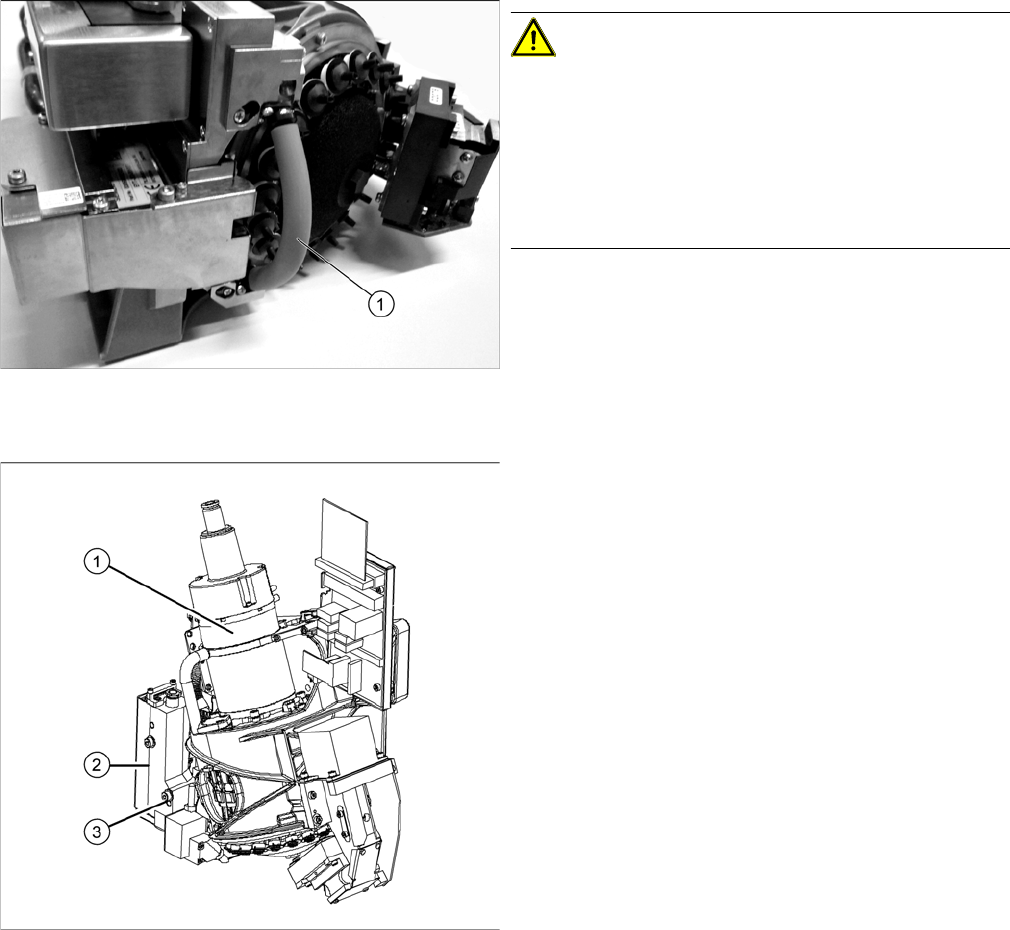
Hose on component sensor (example of C&P20 A
shown)
CAUTION!
The component sensor prisms, underneath the place-
ment head, are easily damaged. Take great care when
dismantling the head!
Protect the component sensor with a piece of hose (1).
This is delivered with the placement head or component
sensor and should be stored in the service box for the
machine, as it is required for dismantling the head.
► Disconnect the compressed air connection (1).
► Disconnect the flat ribbon cables from the C&P20A.
► Loosen the screws fastening the strain relief on the
component camera cables and carefully unplug the
cables. While unplugging the cables, press the
clamps on both sides of the connectors.
► Loosen the two screws on the pressure control valve
(2).
► Remove the screw (3) from the pressure control
valve and swing the pressure control valve to one
side.
The head fastening screw near the pressure control
valve is now accessible.

Service Work
3.7.2 Replacing the C&P20/A/M Head Placement heads
Service Manual SIPLACE SX4/DX4 141
Installation
► Follow the removal instructions in reverse order for installation. Also observe the following instruc-
tions:
See also
3.7.5 Installation Positions on the Head Plate [ ➙ 149]
3.7.3 Replacing the CPP Head [ ➙ 142]
3.7.4 Replacing the Twin/VHF Head [ ➙ 146]
3.7.5 Installation Positions on the Head Plate [ ➙ 149]
CAUTION
Installation instructions
► If you replace the head without the component camera, you will need to fit the old camera
into the new head. Read the service manual for your placement head for more information.
► In vacuum pump mode, you need to dismantle the silencer from the old head and fit it to the
new one. Refer to the appropriate vacuum pump assembly instructions for details.
► Make sure that the assembly position on the head plate is correct.
► Tighten the four head fastening screws (M4) with a torque of 2.7 Nm.
Service Work
Placement heads 3.7.3 Replacing the CPP Head
142 Service Manual SIPLACE SX4/DX4
3.7.3
3.7.3 Replacing the CPP Head
Replacing the CPP Head
Parts, equipment and tools
▪ CPP placement head with camera SST29 [03070108-xx] or
CPP placement head without camera [03053528-xx]
▪ Torque screwdriver 100-500 Ncm [03078400-xx]
▪ Extension/straight TX20 [03073256-xx]
▪ Bit holder for Torque Vario-S screwdriver [03078706-xx]
▪ Component sensor protective cap [03080984-xx]
▪ Torx Allen screwdriver TX8 [03080081-xx]
▪ Calibration tool version 3 [03010565-xx]
▪ Calibration tool version SST23 [03034148-xx]
▪ For additional work to the placement head:
Service manual "C&P head" [DE: 00197462-xx]. [EN: 00197463-xx]
Overview
Removal
► Switch off the machine, disconnect it from the power supply and secure it to prevent unauthorized
reactivation. Observe the instructions in section "1.2 Preparatory Work..." [ ➙ 12].
NOTICE
Fast Head Exchange (FHE)
► Observe the instructions in section "3.7.1 Fast Head Exchange" [➙134] when exchanging
a head.
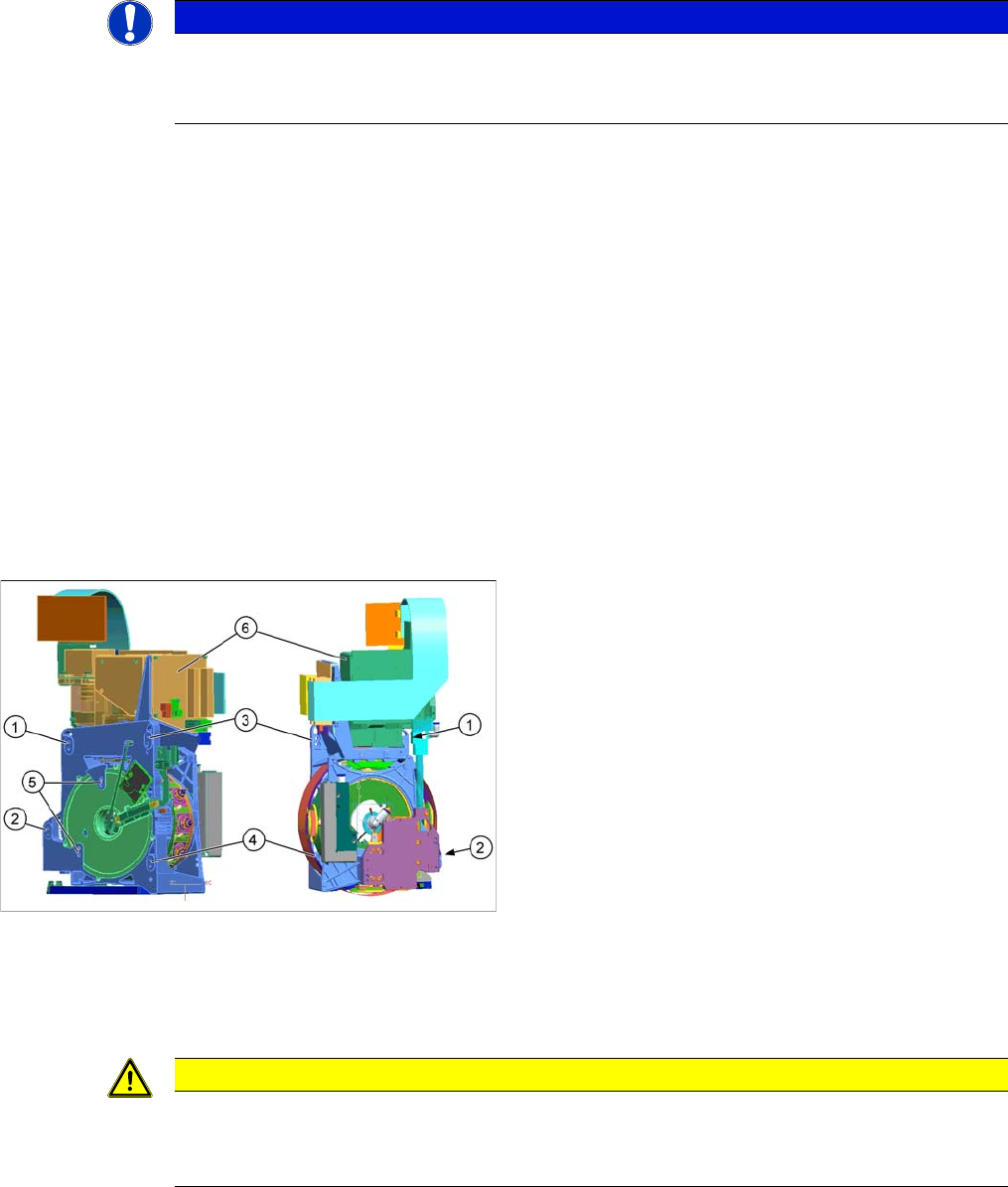
1 to 4: Fixture holes (two each, depends on installation
height).
5: Dowel holes for the index pins
6: Component camera
CAUTION
Take great care when dismantling the placement head!
The component sensor prisms, underneath the placement head, could be damaged.
► Never place the CPP head down on the component sensor.