SIPLACE-SX4-DX4-用户手册.pdf - 第151页
Service Work 3.7.6 Replacing Stationary Co mponent Camera Digital Type 25/33/ 36 Placement heads Service Manual SIPLACE SX4/DX4 151 3.7.6.1 3 . 7 . 6 . 1 I n s t a lla t io n H e ig h t o f t h e S t a t io n a r y C a m…
Service Work
Placement heads 3.7.6 Replacing Stationary Component Camera Digital Type 25/33/36
150 Service Manual SIPLACE SX4/DX4
3.7.6
3.7.6 Replacing Stationary Component Camera Digital Type 25/33/36
Replacing Stationary Component Camera Digital Type 25/33/36
Refer to the appropriate assembly instructions:
X series, SX series, D3 and D1:
▪ Assembly Instructions Stationary Camera 25 (FC) [00194554-xx] (German and English)
▪ Assembly Instructions Stationary Camera Type 33/36 (IC) [00196608-xx] (German and English)
X Series S:
▪ Assembly Instructions Stationary Camera type 25/33 [00197397-xx] (German and English)
See also
5.8.4 DIP Switch for Camera Types 25 and 33 [ ➙ 270]
CAUTION
Risk of injury with cameras of type 25
A heavy mark caul is mounted with the same fixture screws for cameras of type 25. This mark
caul is otherwise only held by the locating pins. If this mark caul falls down, it could cause inju-
ries.
► Make sure that this mark caul is not pulled off the locating pins.
NOTICE
Camera adaptor
You may need to fit an IC camera adaptor assembly. (See the assembly instructions)
► Location 1 to 3: IC camera adaptor assembly SX4a [03099054-xx]
► Location 4: IC camera adaptor assembly SP4 SX4a [03099004-xx]
Service Work
3.7.6 Replacing Stationary Component Camera Digital Type 25/33/36 Placement heads
Service Manual SIPLACE SX4/DX4 151
3.7.6.1
3.7.6.1 Installation Height of the Stationary Camera
Installation Height of the Stationary Camera
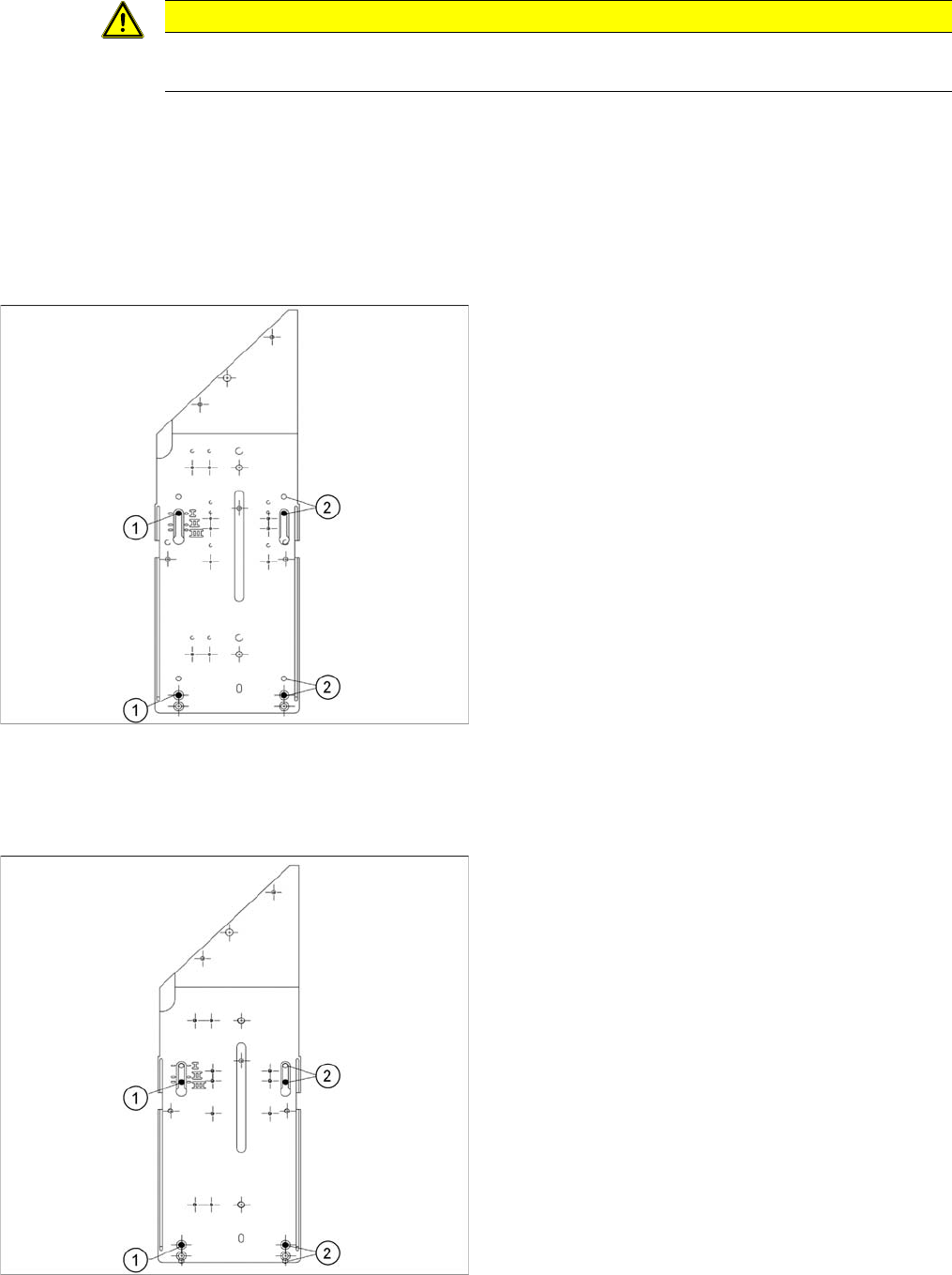
The installation height at which the camera can be installed depends on the camera version. You will
either only be able to use one specific height or will have the option of several installation heights. The
following description only applies for the following camera versions with three possible installation
heights:
▪ Stationary component camera P&P (type 33) 55x45 digit. [03016339-xx] from version -06
▪ Stationary component camera P&P (type 36) 32x32 digit. [03042491-xx] from version -04
Stationary Camera in Position 1
Stationary Camera in Position 2
Position 2 is not relevant for the SX and the X series.
Stationary Camera in Position 3
CAUTION
Head crash danger
An incorrect installation height can result in a head crash!
1. Screw
2. Thread in the machine frame
Position 1 has to be used in the following cases:
▪ SX1/SX2: always
▪ SX4, X series: If at least one DLM or CPP head is
used in the corresponding placement area.
1. Screw
2. Thread in the machine frame
Position 3 has to be used in the following cases:
▪ SX1/SX2: never.
▪ SX4, X series: If only TwinHeads are used in the cor-
responding placement area.
Service Work
CPP/C&P20 Nozzle Changer 3.8.1 Replacing the Nozzle Changer
152 Service Manual SIPLACE SX4/DX4
3.8
3.8 CPP/C&P20 Nozzle Changer
CPP/C&P20 Nozzle Changer
3.8.1
3.8.1 Replacing the Nozzle Changer
Replacing the Nozzle Changer
Parts, equipment and tools
Select the relevant nozzle changers:
▪ NC basic structure CPx/all assembly long [03103514-xx] (replaces [03070123-xx])
▪ NC basic structure CPx/all assembly short [03103649-xx] (replaces [03062463-xx])
▪ Nozzle changer CPP X-Series [00119741-xx]
▪ Nozzle changer 2 CPP X-Series [00119742-xx]
▪ Nozzle changer C&P20 SX4/DX4 [00519851-xx]
▪ Nozzle changer CPP SX-Series (short) [00519841-xx]
▪ Nozzle changer CPP SX-Series (short, pos. 3 or 4) [00519842-xx]
▪ Nozzle changer C&P20 SX1/SX2 [00519715-xx]
▪ Nozzle changer C&P20 SX1/SX2 (pos. 3 or 4) [00519843-xx]
▪ If required, NC adjusting plates [03021079-xx]
▪ Depth measuring gauge (300 mm) [03079617-xx]
▪ Plastic plate
Overview
Removal/installation
► Switch off the machine, disconnect it from the power supply and secure it to prevent unauthorized
reactivation. Observe the instructions in section "1.2 Preparatory Work..." [ ➙ 12].
► Loosen the four fastening screws (4).
► Unplug the nozzles changer from all electrical and pneumatic connections.
► Take care not to lose the support plates. Remember their exact positions, as they will need to be
returned to these original positions, during assembly.
► Fit the new nozzle changer with the support plates.
► Reconnect to the electrical and compressed air systems.
► Check the mechanical height of the nozzle changer (see "5.6.1 Setting the Nozzle Changer Height"
[ ➙ 263]).
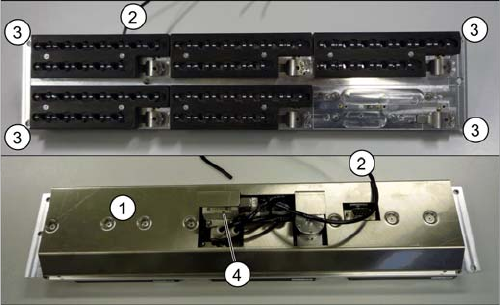
1. Cover (covering complete electronic and pneumatic
systems)
2. Compressed air connection
3. Four fastening screws
4. Valve