SIPLACE-SX4-DX4-用户手册.pdf - 第172页
Service Work COT insert 3.10.2 Replacing the Feeder Control Unit (F CU) [03059 623-xx] 172 Service Manual SIPLACE SX4/DX4 3.10.2 3 . 1 0 . 2 R e p la c in g t h e F e e d e r C o n t r o l U n it ( F C U ) [ 0 3 0 5 9 6 …
Service Work
3.10.1 Replacing the COT Insert Assembly [03080552-xx] COT insert
Service Manual SIPLACE SX4/DX4 171
Installation
► Attach the fit-up aid to the new COT insert and lift it into the machine, with the help of the lifting de-
vice.
► Reconnect all cables. If required, use the detailed circuit diagrams to help you.
► Move the COT insert into its final position (to the previously marked installation position).
Take care not to damage the cables and hoses.
► Loosely screw in the fitting screw and the fastening screws.
► Tighten the fitting screw first.
► Tighten the fastening screws.
► Fit the nozzle changer.
► Refit the side cover.
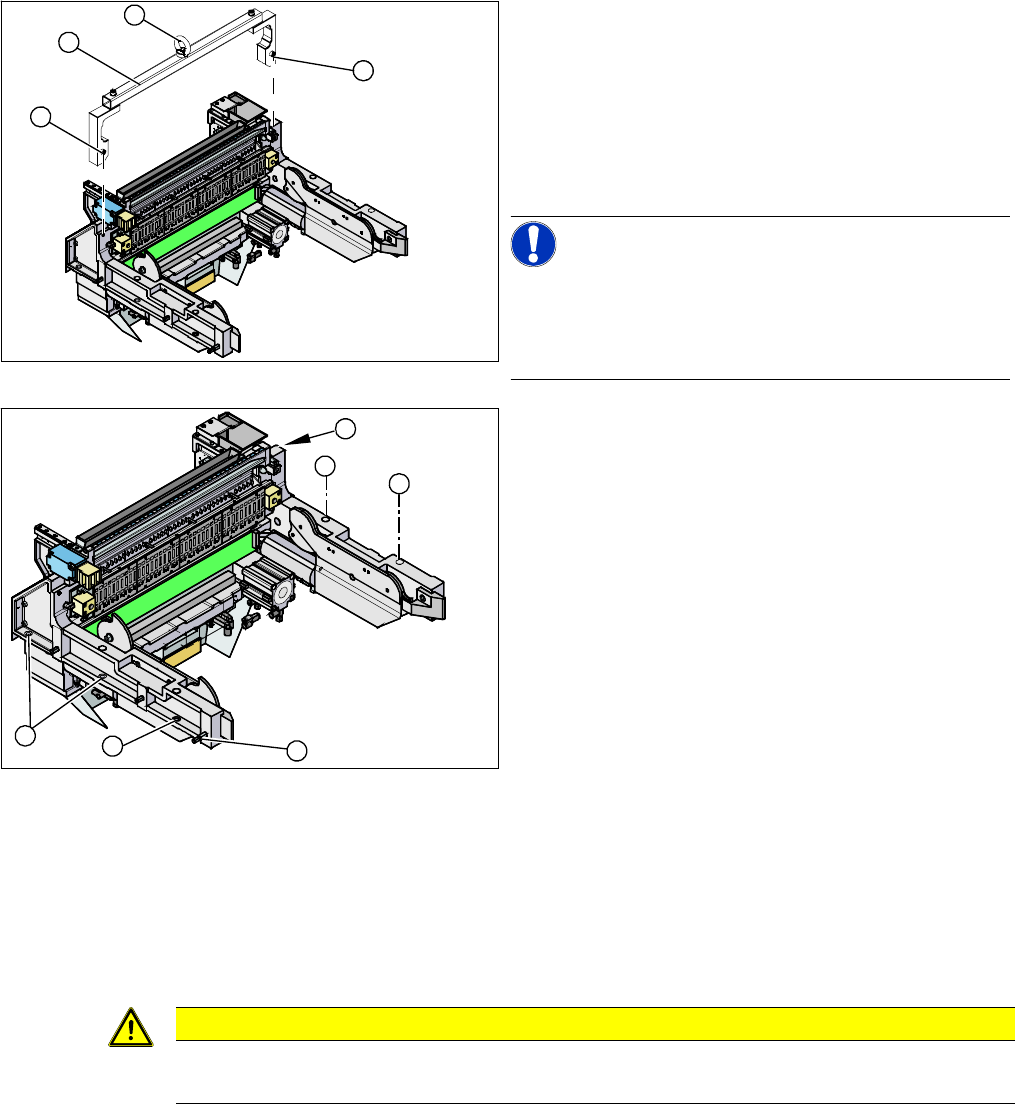
1. Fixtures
2. Fit-up aid
3. Eyelet
► Attach the fit-up aid (2) to the fixtures provided (1) on
the COT insert.
► Fix the lifting device to the eyelet (3) of the fit-up aid
(2).
NOTICE!
The COT insert can be installed at different positions in
the machine location. Mark the position of your COT in-
sert, to ensure that this is subsequently returned to its
original position.
► Loosen the screws fastening the COT insert (1).
► Loosen the fitting screw (2) on the inside of the ma-
chine.
► Lift the complete component trolley feed device out of
the machine and place it on a suitable surface (4
wooden blocks etc.).
► Make sure that you do not damage any valves, con-
nection cables, hoses etc.
1
1
3
2
1
1
1
1
2
1
CAUTION
Observe the specified order!
The fitting screw must be tightened first, before you tighten the other fastening screws.
Service Work
COT insert 3.10.2 Replacing the Feeder Control Unit (FCU) [03059623-xx]
172 Service Manual SIPLACE SX4/DX4
3.10.2
3.10.2 Replacing the Feeder Control Unit (FCU) [03059623-xx]
Replacing the Feeder Control Unit (FCU) [03059623-xx]
Parts, equipment and tools
▪ X-FCU/ X-Series [03059623-xx] (replaces: [03020068-xx])
Overview
Removal
Installation
► If necessary, adjust the jumper on the FCU (see "6.4.1 Connecting assy FCU [03059783-xx]"
[ ➙ 292]).
► Place the connection cable in the recess and carefully push in the new FCU. Make sure you do not
pinch any cables.
► Pull the ends of the cables out from under the terminal strip.
► Plug in all electrical connections as labeled on the terminal strip.
► Refit the cover plate and the FCU.
NOTICE
Replacing an old FCU with a new one
If you replace an old FCU [03020068-xx] with a new FCU [03059623-xx], also observe the tech-
nical information "Installing the New X-FCU / X-Series [03059623-xx] as Spare Part" [DE:
TI2010-08D01] [EN: TI2010-08E01].
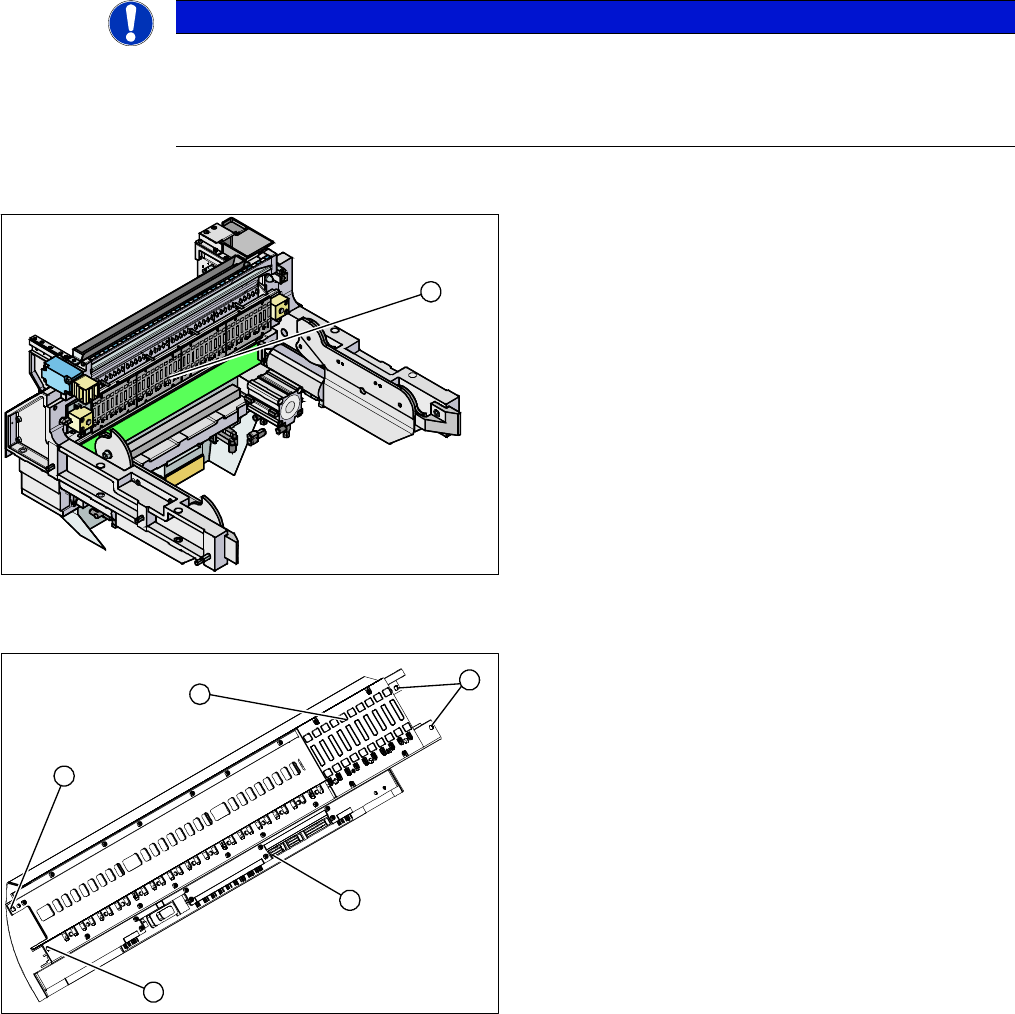
1. Feeder Control Unit
The feeder control unit is installed at the locations in the
COT insert.
1
1. Complete FCU
2. Terminal strip
3. 4 x fastening screws
► Dismantle the feeder unlocking rail.
► Loosen the 4 screws (3) holding the FCU in place.
► Dismantle the cover plate over the cables.
► Label all cables and the positions of the connectors
plugged into the terminal strip (2) of the FCU (1).
► Unplug all electrical connections from the terminal
strip (2) of the FCU (1).
► Carefully lever the FCU out of the locating pins.
► Remove the earth terminal.
3
3
1
3
2
Service Work
3.10.3 Replacing the 40-Fold Feeder Unlock Device [03011582-xx] COT insert
Service Manual SIPLACE SX4/DX4 173
3.10.3
3.10.3 Replacing the 40-Fold Feeder Unlock Device [03011582-xx]
Replacing the 40-Fold Feeder Unlock Device [03011582-xx]
Parts, equipment and tools
▪ Feeder unlocking device 40-fold [03011582-XX]
Overview
Removal
► Switch off the machine, disconnect it from the power supply and secure it to prevent unauthorized
reactivation. Observe the instructions in section "1.2 Preparatory Work..." [ ➙ 12].
► Unplug the flat ribbon cable from the connector.
► Loosen the two fastening screws.
► Pull the flat ribbon cable out of the side of the connector. You may have to lift the feeder unlocking
device slightly to do this.
► Lift the feeder unlocking device up and off and unplug the pneumatic connection.
CAUTION
Feeder unlocking device on the manual table
Replacement of the feeder unlocking device on the manual table is the same as that for the
COT insert. However, you need to first dismantle the front and back sections for the manual
table.
This section describes replacement using the example of the COT insert.
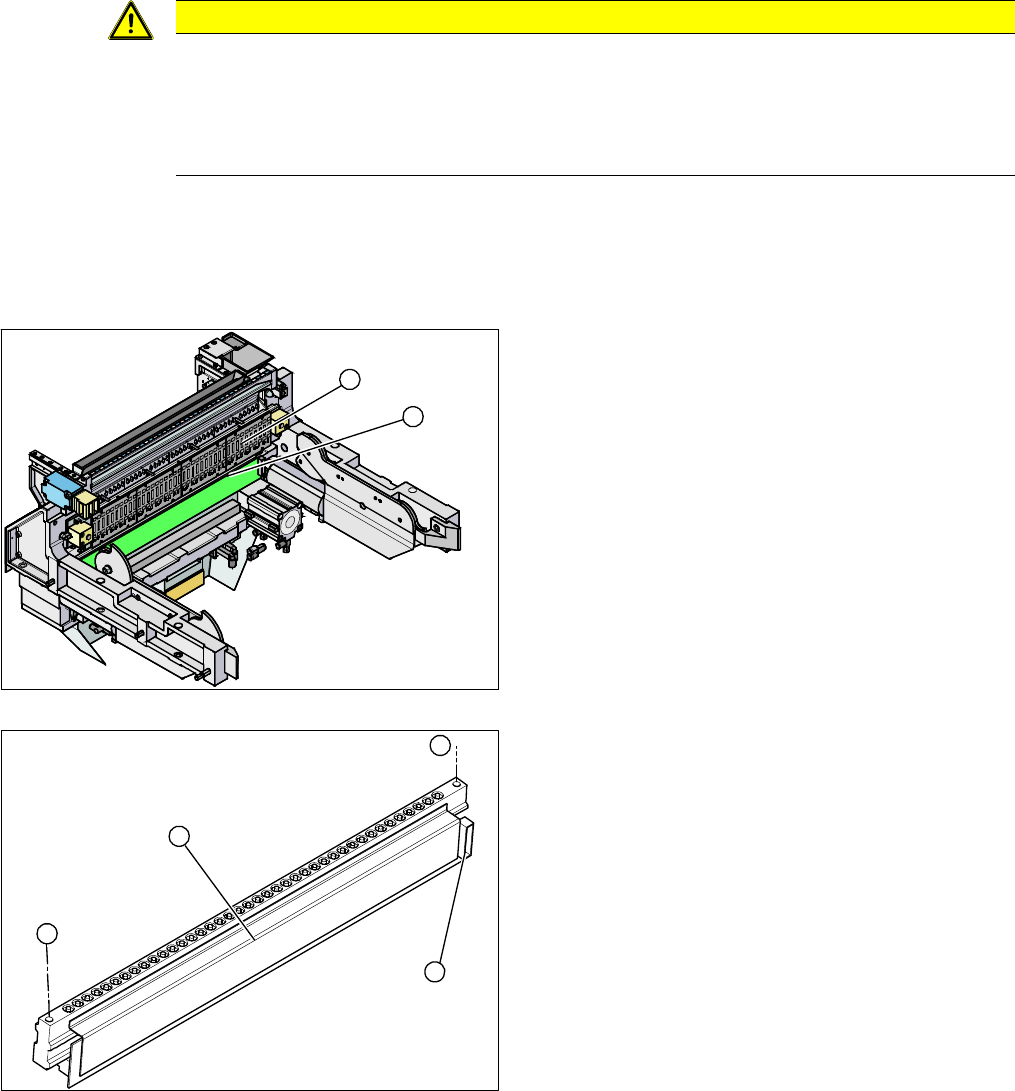
1. Feeder unlocking device (under the FCU)
2. Feeder control unit (FCU)
The feeder unlocking device is installed at the locations
in the COT insert.
1. Two fastening screws
2. Complete feeder unlocking device
3. Connector for flat ribbon cable
2
1
1
1
3
2