SIPLACE-SX4-DX4-用户手册.pdf - 第213页
Service Work 3.13.11 Replacing the Insert Feeder [03002898- xx] Manual T able (DX4) Service Manual SIPLACE SX4/DX4 213 3.13.11 3 . 1 3 . 1 1 R e p la c in g t h e I n s e r t F e e d e r [ 0 3 0 0 2 8 9 8 - x x ] Replaci…
Service Work
Manual Table (DX4) 3.13.10 Replacing the Used Tape Chute
212 Service Manual SIPLACE SX4/DX4
3.13.10
3.13.10 Replacing the Used Tape Chute
Replacing the Used Tape Chute
Parts, equipment and tools
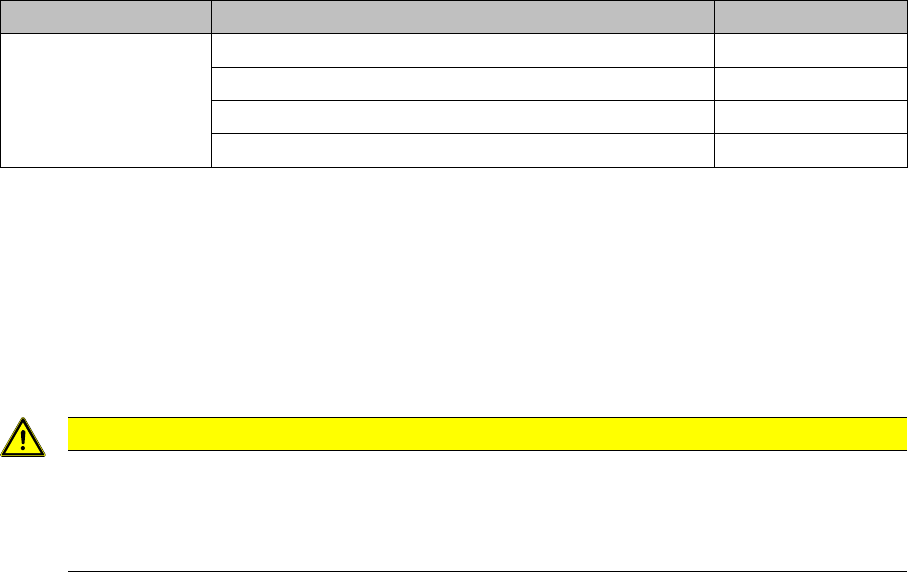
Select the correct spare part:
Removal
► Switch off the machine, disconnect it from the power supply and secure it to prevent unauthorized
reactivation. Observe the instructions in section "1.2 Preparatory Work..." [ ➙ 12].
► Loosen the two screws fastening the used tape chute fixtures. There are one screw on the left and
one on the right of the used tape chute.
► Loosen the screw fastening the used tape chute
► Take the used tape chute down and out of the machine.
Installation
► Follow the removal instructions in reverse order for installation.
Machine type Designation Item No.
DX1/DX2 Used tape chute 60 tracks 03064026-xx
Used tape chute 30 tracks 03073312-xx
If required, secure used tape chute DX1/DX2 left 03094519-xx
If required, secure used tape chute DX1/DX2 right 03094522-xx
CAUTION
Risk of cutting
The cutter is located under the tape channel. The blades there have very sharp edges.
► Do not reach into the cutter and make sure that it is never freely accessible for longer peri-
ods or without supervision.
Service Work
3.13.11 Replacing the Insert Feeder [03002898-xx] Manual Table (DX4)
Service Manual SIPLACE SX4/DX4 213
3.13.11
3.13.11 Replacing the Insert Feeder [03002898-xx]
Replacing the Insert Feeder [03002898-xx]
Parts, equipment and tools
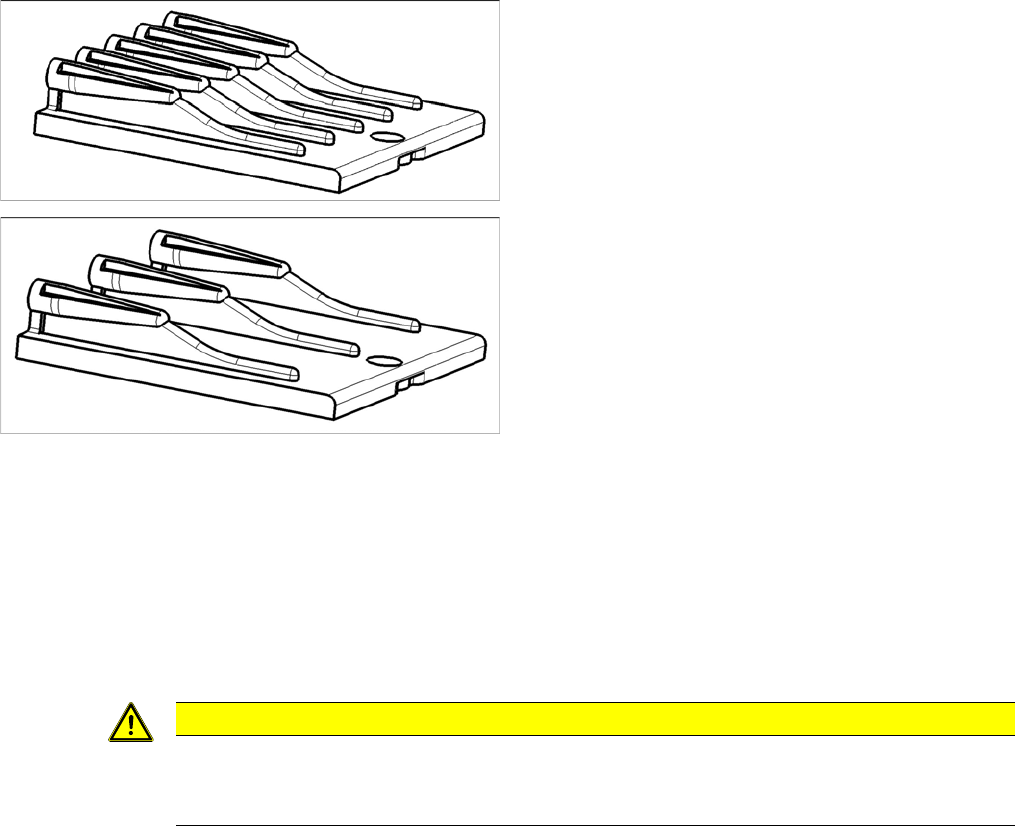
Select the right insert feeder:
Removal
► Move the component trolley out of the machine.
► Loosen the screw fastening the guide profile and remove the guide profile.
Installation
► Follow the removal instructions in reverse order for installation. Also observe the following instruc-
tions:
Insert feeder [03002898-xx]
Suitable for:
▪ X-Series component trolley
▪ Component trolley SX1/SX2 (30 or 60 tracks)
▪ Manual table X-Series S
Insert feeder [03085635-xx]
Suitable for:
▪ Manual table DX series
CAUTION
Installation instructions
► Make sure that the insert is aligned properly with the guidance behind it. You must be able
to push feeder modules into the feeder location without edge interference.
Service Work
Vacuum Pump 3.14.1 Replacing the Vacuum Pump [03069679-xx]
214 Service Manual SIPLACE SX4/DX4
3.14
3.14 Vacuum Pump
Vacuum Pump
3.14.1
3.14.1 Replacing the Vacuum Pump [03069679-xx]
Replacing the Vacuum Pump [03069679-xx]
Parts, equipment and tools
▪ Vacuum pump Becker VX4 25 [03069679-xx]
▪ Assembly instructions for vacuum pump SX4, X series S" [00196845-xx]
Removal/installation
► Also read the "Assembly instructions for the vacuum pump SX4, X series S" [00196845-xx].
See also
1.2 Preparatory Work... [ ➙ 12]
3.14.2
3.14.2 Replacing the Exhaust Tube [03087599-xx]
Replacing the Exhaust Tube [03087599-xx]
Parts, equipment and tools
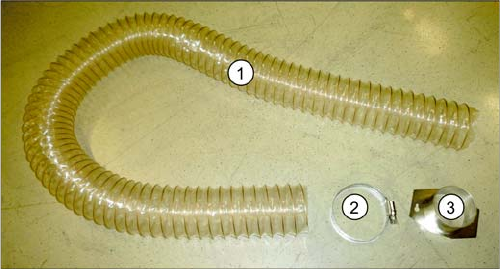
▪ Exhaust tube ID100 [03087599-xx]
Overview
Removal
► Switch off the machine, disconnect it from the power supply and secure it to prevent unauthorized
reactivation. Observe the instructions in section "1.2 Preparatory Work..." [ ➙ 12].
► Loosen the two screws fastening the hose holder. The hose holder has two keyholes. The fastening
screws do not need to be completely loosened.
► Turn the hose holder a little and remove it.
► Open the hose clamp and remove the hose.
Installation
► Follow the removal instructions in reverse order for installation.
1. Exhaust tube
2. Hose clamp
3. Hose holder
The exhaust tube is fixed to the underside of the ma-
chine.