SIPLACE-SX4-DX4-用户手册.pdf - 第75页
Service Work 3.5.2 Replacing the Y Axis In cremental Encode r [03017754-xx] Gantries Service Manual SIPLACE SX4/DX4 75 ► Reconnec t to the ele ctricity supply (connector X5 o r X6). CAUTION Make sure that the cables do n…
Service Work
Gantries 3.5.2 Replacing the Y Axis Incremental Encoder [03017754-xx]
74 Service Manual SIPLACE SX4/DX4
3.5.2
3.5.2 Replacing the Y Axis Incremental Encoder [03017754-xx]
Replacing the Y Axis Incremental Encoder [03017754-xx]
Parts, equipment and tools
▪ Read head MS22.74 X/Y 950mm [03090202-xx] (replaces: [03017754-xx])
Removal/installation
NOTICE
Head interface
The new read head for the X axis "Read head MS22.74 X/Y 950 mm" [03090201-xx] may only
be fitted with a "Gantry interface gantry 1 and 3" from FS03 [03059908-03] or "Gantry interface
gantry 2 and 4" [03059909-03].
The read head can only be fitted together with a new " Scale Siplace SX4 Y axis (2320 mm)"
[03093791-xx]. If an old read head is upgraded to the new version MS22, you will also need to
replace the scale.
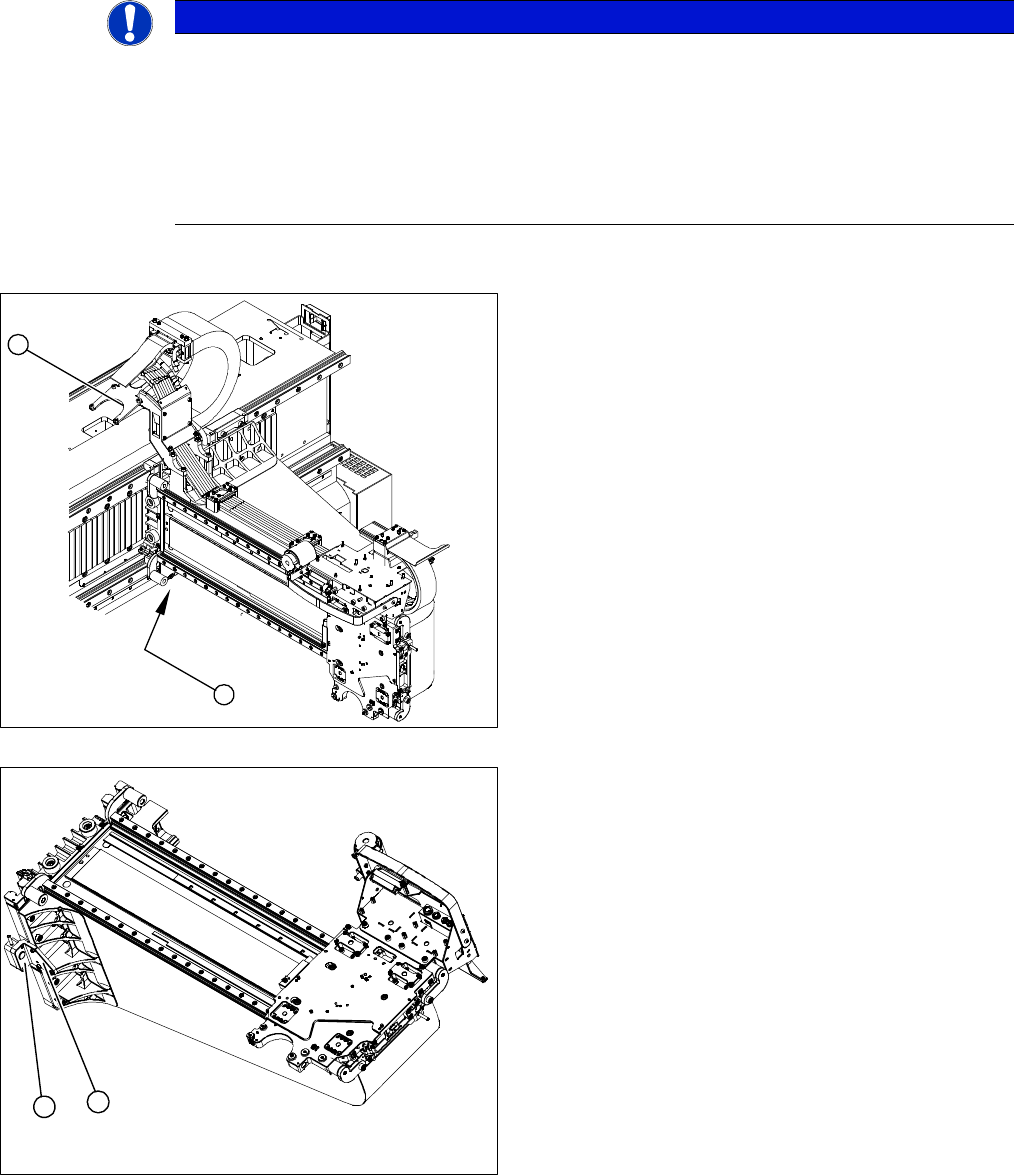
1. Position of the Y axis incremental encoder
2. Installation point for gantry interface
► Unplug the incremental encoder press-fit connection
from the gantry interface (2).
► Unthread the connection cable as far as the incre-
mental encoder.
► Loosen the three screws fastening (1) the incremen-
tal encoder (2) of the Y axis and carefully lift off the
incremental encoder (2).
► Clean the reading surface of the incremental encoder
with a cloth and ethanol or with a Q tip.
► Install the incremental encoder (2) with the three fas-
tening screws so that there is a gap of 0.75 mm be-
tween the incremental encoder (2) and the scale (for
old read head [03017754-xx]: 0.4 mm). Use the cor-
responding thickness gauge (plastic).
1
2
1
2

Service Work
3.5.2 Replacing the Y Axis Incremental Encoder [03017754-xx] Gantries
Service Manual SIPLACE SX4/DX4 75
► Reconnect to the electricity supply (connector X5 or X6).
CAUTION
Make sure that the cables do not rub against anything.
Make sure that the axes can be moved without damaging the cables.
► Fasten them with cable ties.
Service Work
Gantries 3.5.3 Replacing the Head Plate Sensors (Temperature Sensor) [03071974-xx]
76 Service Manual SIPLACE SX4/DX4
3.5.3
3.5.3 Replacing the Head Plate Sensors (Temperature Sensor) [03071974-xx]
Replacing the Head Plate Sensors (Temperature Sensor) [03071974-xx]
Parts, equipment and tools
▪ Gantry sensor module HCU [03071974-xx]
▪ Heat-conductive paste, if needed
Overview
Removal
► Switch off the machine, disconnect it from the power supply and secure it to prevent unauthorized
reactivation. Observe the instructions in section "1.2 Preparatory Work..." [ ➙ 12].
► Unplug the cable from the head interface, unthread it and loosen all cable ties.
► Undo and remove the two screws fastening the board.
Installation
► Fasten the board with the two screws provided.
SXDX4
► Insert the cable, thread through to the head interface and then connect. Replace the cable ties which
you removed.
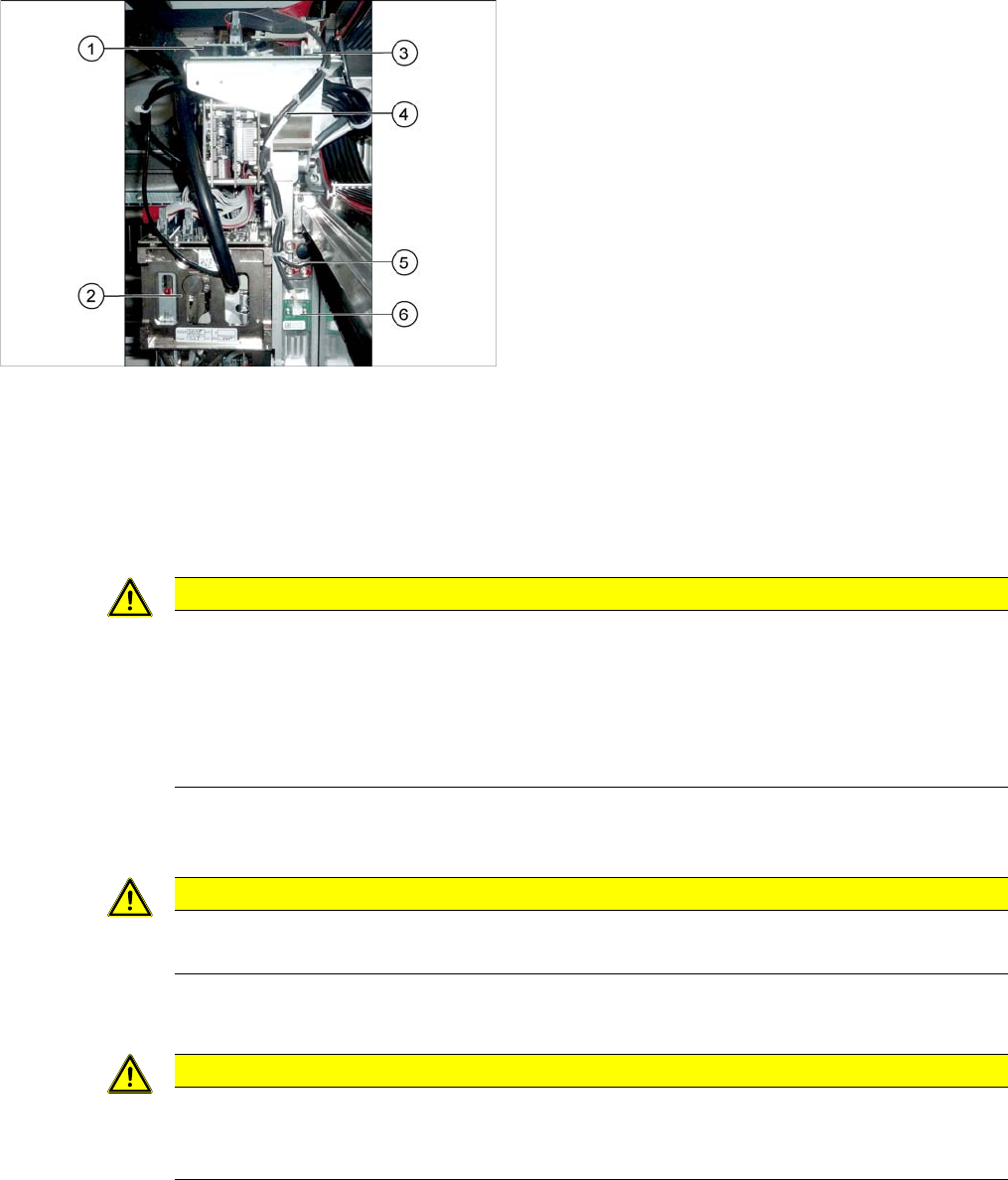
1. Vision board
2. Placement head on gantry
3. Head interface
4. Cable from temperature sensor and incremental en-
coder X axis to head interface
5. X axis incremental encoder
6. Temperature sensor
CAUTION
Rubber foam
Under this board there is heat-conductive rubber foam or heat-conductive paste (depends on
version).
► Do not remove the heat-conductive rubber foam.
► The heat-conductive paste needs to be replaced during refitting. You may need to remove
the old heat-conductive paste, if it is still present.
CAUTION
Board underneath
Make sure not to damage the contacts to the board located below.
CAUTION
Check how the cables are run!
Make sure that the end stops (red buffers) do not rub against the cable of the board.
Make sure that the cable for the board can not collide with the X axis end stopper.