00197674-01-UM-E-Series-EN-12-2014.pdf - 第136页
3 Technical data and assemblies User manual SIPLACE E 3.6 PCB conveyor system From software version SC 708.0 12/2014 E dition 136 3.6.3 Controlling and width adjustment 3.6.3.1 Controlling using the Single Functions menu…
User manual SIPLACE E 3 Technical data and assemblies
From software version SC 708.0 12/2014 Edition 3.6 PCB conveyor system
135
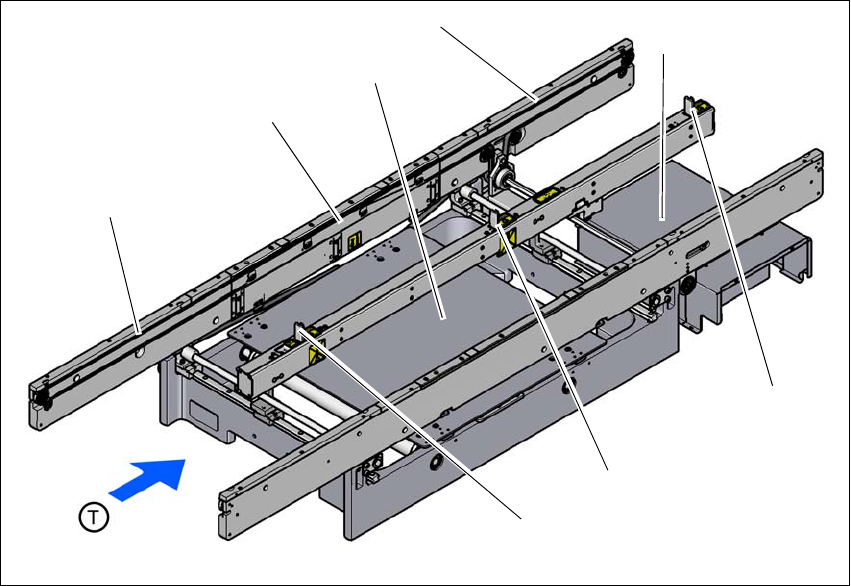
3.6.2 Design of the PCB single conveyor
3
Fig. 3.6 - 1 Design of the PCB single conveyor
(1) Input conveyor
(2) Processing conveyor
(3) Lifting table
(4) Output conveyor
(5) Conveyor control (under the cover)
(6) Output stopper
(7) Processing topper
(8) Input stopper
(1)
(3)
(4)
(2)
(5)
(7)
(8)
(6)
3 Technical data and assemblies User manual SIPLACE E
3.6 PCB conveyor system From software version SC 708.0 12/2014 Edition
136
3.6.3 Controlling and width adjustment
3.6.3.1 Controlling using the Single Functions menu
The online help contains information on controlling the PCB conveyor system and on the Single
Functions menu.
3.6.3.2 Automatic width adjustment
When the command is received, the conveyor belts are set to the desired width.
See the Online Help for detailed information about changing the conveyor track width.
User manual SIPLACE E 3 Technical data and assemblies
From software version SC 708.0 12/2014 Edition 3.6 PCB conveyor system
137
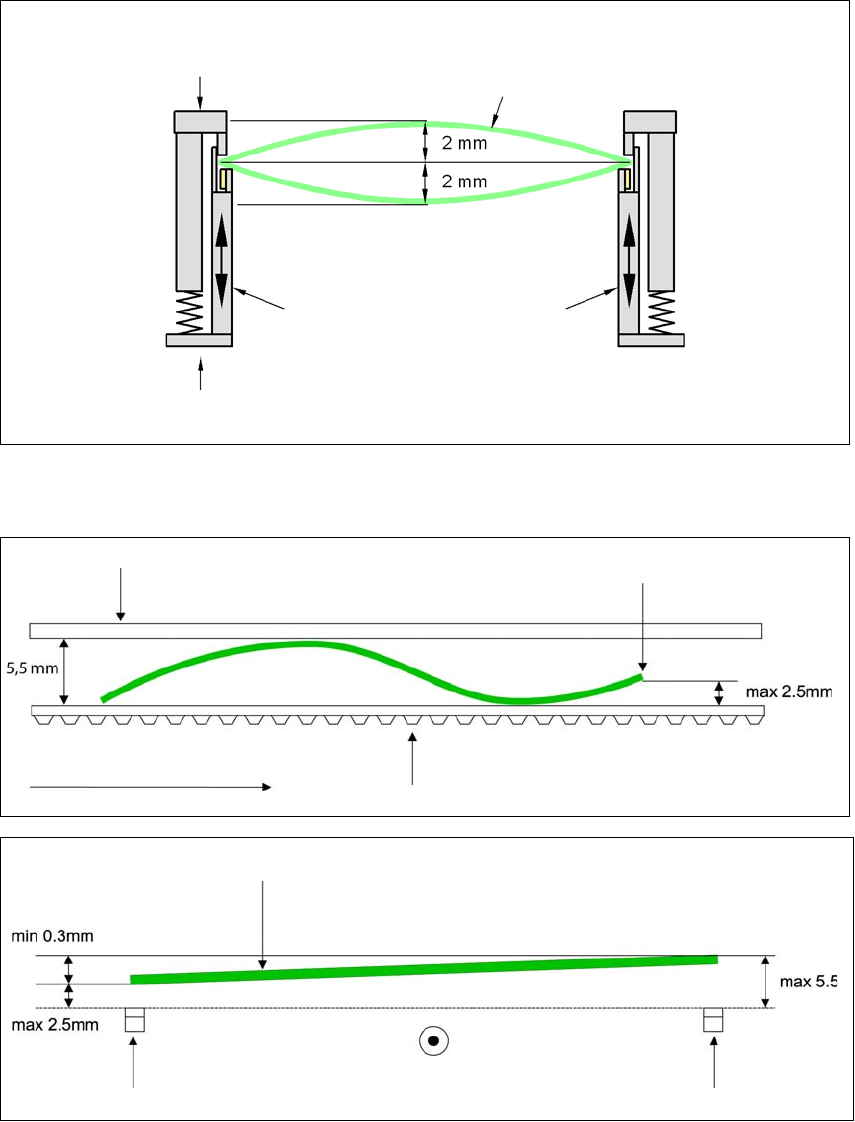
3.6.4 Definition of PCB warpage
3.6.4.1 PCB warpage on the conveyor
PCB warpage across the direction of travel max. 1% of the PCB diagonal, but not exceeding 2 mm
3
PCB warpage in the direction of transport + PCB thickness < 5.5 mm. Bending up of board edge
max. 2.5 mm.
3
3
Fixed clamped edge
Movable clamping device
Printed circuit board
Conveyor side wall
Fixed clamped edge
Conveyor belt
PCB transport direction
Front board edge
Front board edge
Left conveyor belt
Right conveyor belt
PCB transport direction