CX200-4(Maint).pdf - 第268页
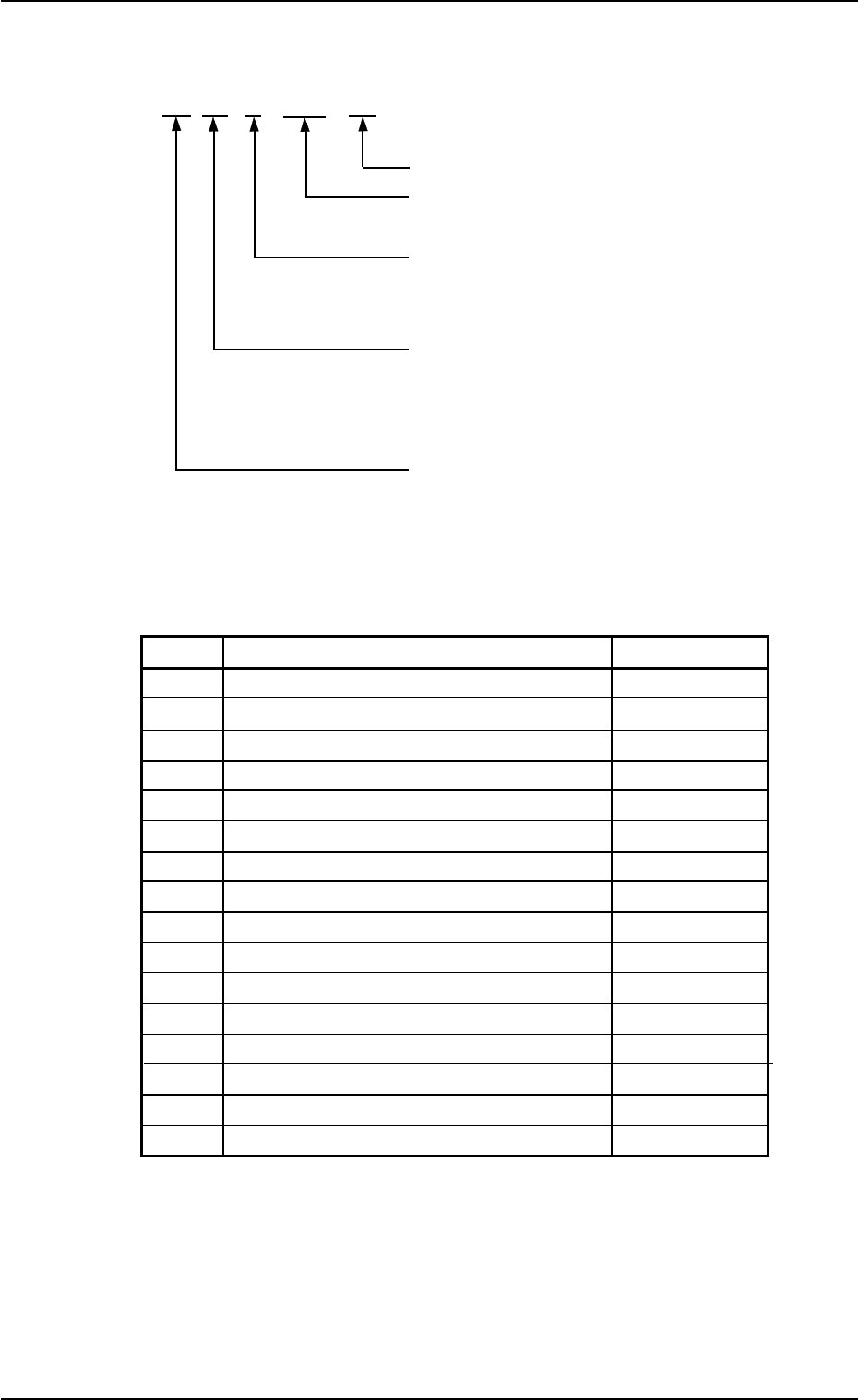
4.3.2 Component Recognition Errors AA BB C DDD EE Detail Code : Kinds of Errors (00 to 99) Detail Code : Kinds of Errors (000 to 999) Secondary Error Classification: Error Classification (1 to 9) Primary Error Classifica…
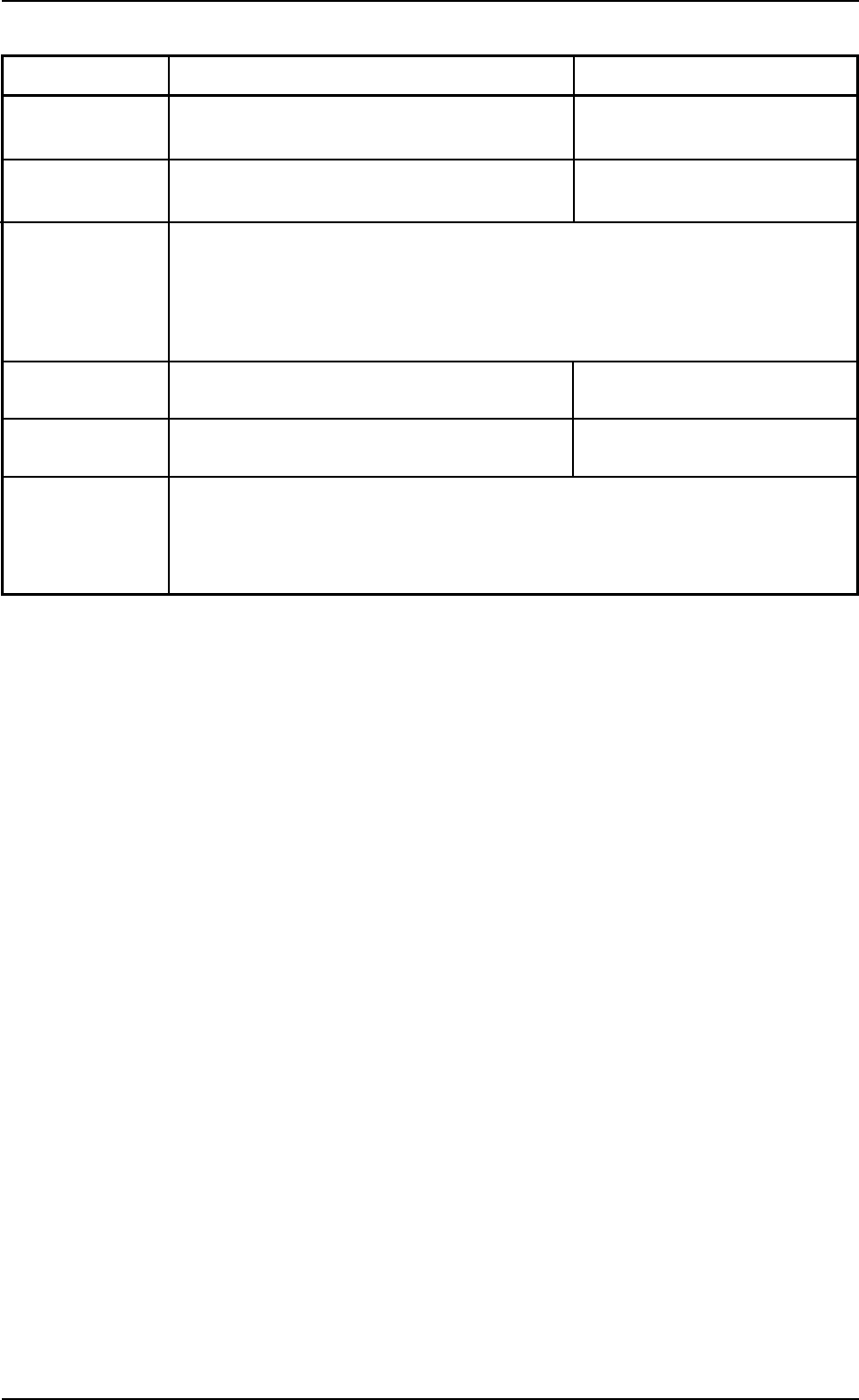
Recognition Error ID Item Description
01 62 2 00000 The specified error image is not saved. ----
01 90 0 XXXXX Recognition Communication Procedure Error ----
(Cause) Self-Diagnostics Error Message
(Remedy) Consult our service personnel for details.
01 91 * ***** Recognition Communication Error ----
01 92 * ***** Recognition Communication Error ----
(Cause) Self-Diagnostics Error Message
(Remedy) Consult our service personnel for details.
01 10-003 2-178 AFO01ETRP
4.3 Recognition Error IDs and Remedial Procedures
4.3.2 Component Recognition Errors
AA BB C DDD EE
Detail Code : Kinds of Errors (00 to 99)
Detail Code : Kinds of Errors
(000 to 999)
Secondary Error Classification:
Error Classification
(1 to 9)
Primary Error Classification:
Recognition Algorithms
(00 to 99)
Refer to Table 4B10.
Classification (02) of Recognition Func-
tions
Error Classification: Recognition Algorithms
Table 4B10
BB Recognition Algorithms Remarks
00 Others
01 Edge (Rectangle) Front Lighting
02 Corner Back Lighting
03 Corner Front Lighting
04 Edge (General Purpose) Back Lighting
05 Edge (General Purpose) Front Lighting
06 Center of Gravity (Angle Detected ) Back Lighting
07 Center of Gravity (Angle Detected ) Front Lighting
08 Center of Gravity (Angle Not Detected) Back Lighting
09 Center of Gravity (Angle Not Detected) Front Lighting
31 Lead Back Lighting
32 Lead Front Lighting
33 Multiple Pins (Standard) Back Lighting
34 Multiple Pins (Standard) Front Lighting
35 Multiple Pins (General Purpose) Back Lighting
36 Multiple Pins (General Purpose) Front Lighting
01 10-003 2-179 AFO01ETRP
4.3 Recognition Error IDs and Remedial Procedures
(a) Error IDs “*” will be filled with primary error classification
and detail codes.
(b) When an error ID other than the described ones is issued,
contact our service personnel for some advice.
Table 4B11
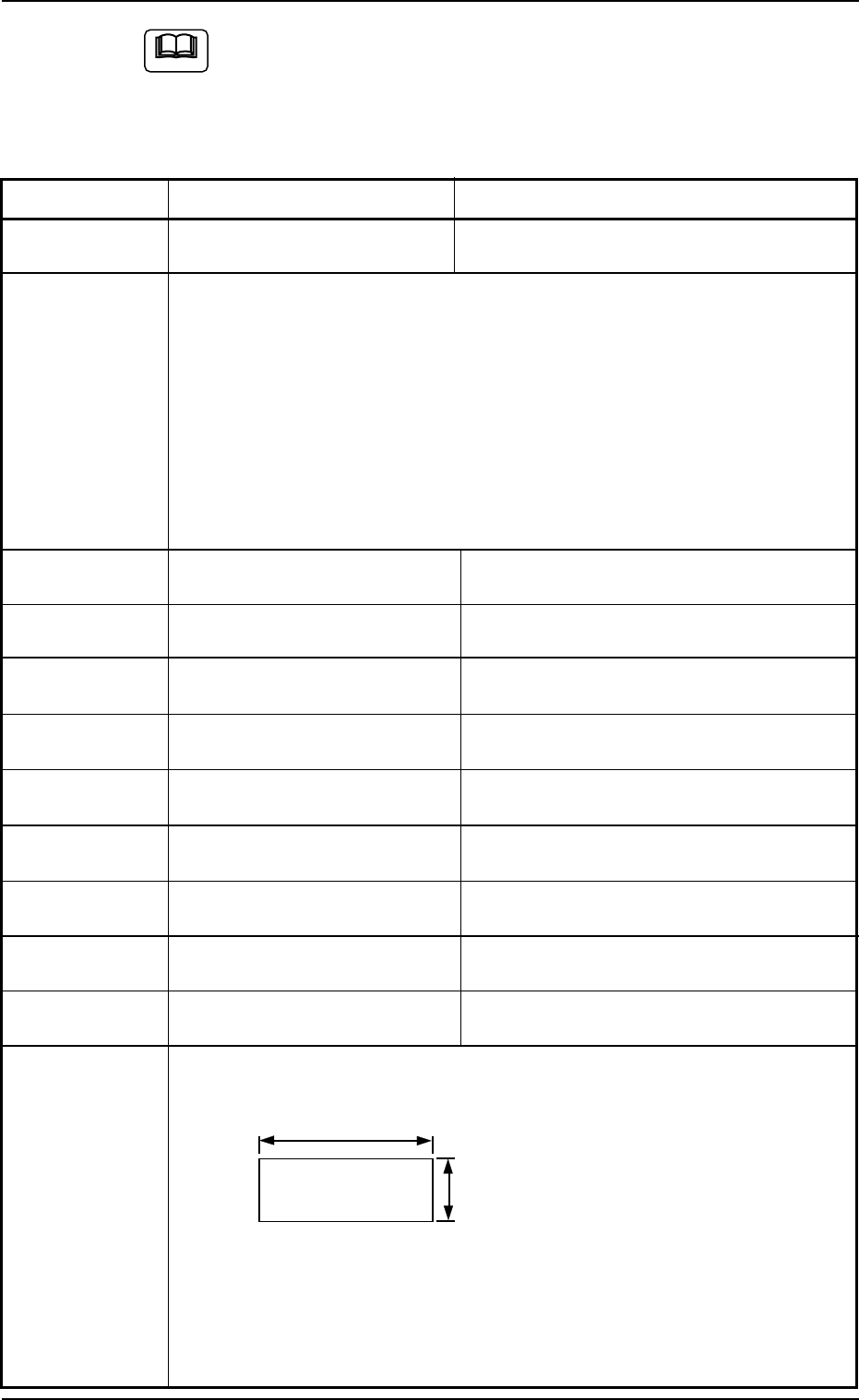
Recognition Error ID Item Description
02 ** 1000 ** Component Missing Component was not found.
(Cause 1)The feeder carriage is loaded with a feeder that contains components
different from the specified ones.
(Cause 2)The vacuum suction force is too weak.
(Cause 3)An improper nozzle is selected for the components or vice versa.
Mismatching parameters are set in the nozzle type data and the compo-
nent library data.
(Remedy 1) Check if proper components are used.
(Remedy 2) Check the vacuum pressure.
(Remedy 3) Check the parameters in the nozzle type data and the component li-
brary data.
02 ** 2101 ** Error in Outward Length Inspection Cmponent Outward Length X is incorrect.
02 ** 2102 ** Error in Outward Length Inspection Component Outward Length X is shorter than
the tolerance.
02 ** 2103 ** Error in Outward Length Inspection Component Outward Length X is longer than the
tolerance.
02 ** 2104 ** Error in Outward Length Inspection Component Outward Length Y is incorrect.
02 ** 2105 ** Error in Outward Length Inspection Component Outward Length Y is shorter than
the tolerance.
02 ** 2106 ** Error in Outward Length Inspection Component Outward Length Y is longer than the
tolerance.
02 ** 2107 ** Error in Outward Length Inspection Component Outward Length X or Y is incorrect.
02 ** 2108 ** Error in Outward Length Inspection Component Outward Length X or Y is shorter
than the tolerance.
02 ** 2109 ** Error in Outward Length Inspection Component Outward Length X or Y is longer
than the tolerance.
(Cause 1) Wrong parameters are set in the “X [mm]” and “Y [mm]” text boxes of
“Mold size” and the “Mold size tolerance X [mm]” and “Mold size tolerance
Y [mm]” text boxes for the selected components.
(Remedy 1) Check the selected components and the parameters set in the “X [mm]”
and “Y [mm]” text boxes of “Mold size” and the “Mold size tolerance X
[mm]” and “Mold size tolerance Y [mm]” text boxes for the selected
components in the component library data.
Correct wrong parameters if they are set in the component library data.
X
Y
01 10-003 2-180 AFO01ETRP
Note
4.3 Recognition Error IDs and Remedial Procedures
Fig. 4B20