CX200-4(Maint).pdf - 第280页
Recognition Error ID Item Description 10 03 0 1 1002 ---- Error in Lighting System (Back Lighting) Failed in T eaching Operation for Assumed Bright- ness. (Cause 1) The lighting system may be abnormal. (Remedy 1) Contact…
4.3.5 Various Teach Errors
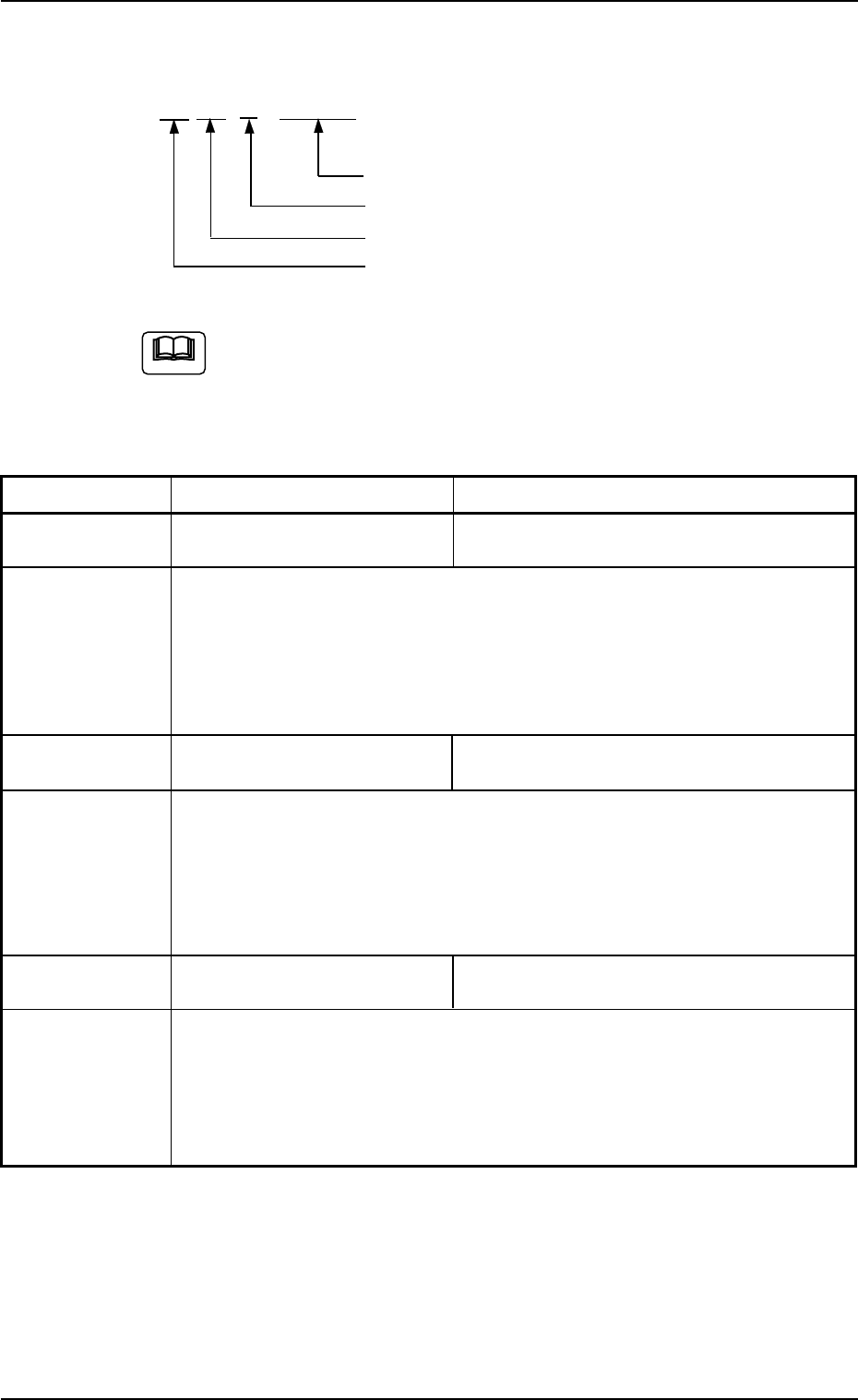
AA BB C DDDDD
Detail Code
Secondary Error Classification (0)
Primary Error Classification (0 to 5)
Classification (10) of Recognition Functions
(a) Error IDs “*” will be filled with detail codes.
(b) When an error ID other than the described ones is issued,
contact our service personnel for some advice.
Table 4B14
Recognition Error ID Item Description
10 01 0 ***** ---- Failed in Detection of Camera Position during
Camera Offset Teaching Operation.
(Cause 1) Set the jig correctly.
(Remedy 1) Set the jig correctly.
Or, contact our service personnel for some advice.
10 02 0 11001 ---- Error in Camera Sensitivity Check Operation
The brightness is not suitable for the adjustment.
(Cause 1) The camera sensitivity may be abnormal.
(Remedy 1) Contact our service personnel for details.
10 03 0 11001 ---- Error in Lighting Intensity Data (Back Lighting)
The data has exceeded the specified range.
(Cause 1) The longevity of the lamp might have ended.
(Remedy 1) Replace the lamp with a new one.
Or, contact our service personnel for some advice.
01 10-003 2-190 AFO01ETRP
Note
4.3 Recognition Error IDs and Remedial Procedures
Recognition Error ID Item Description
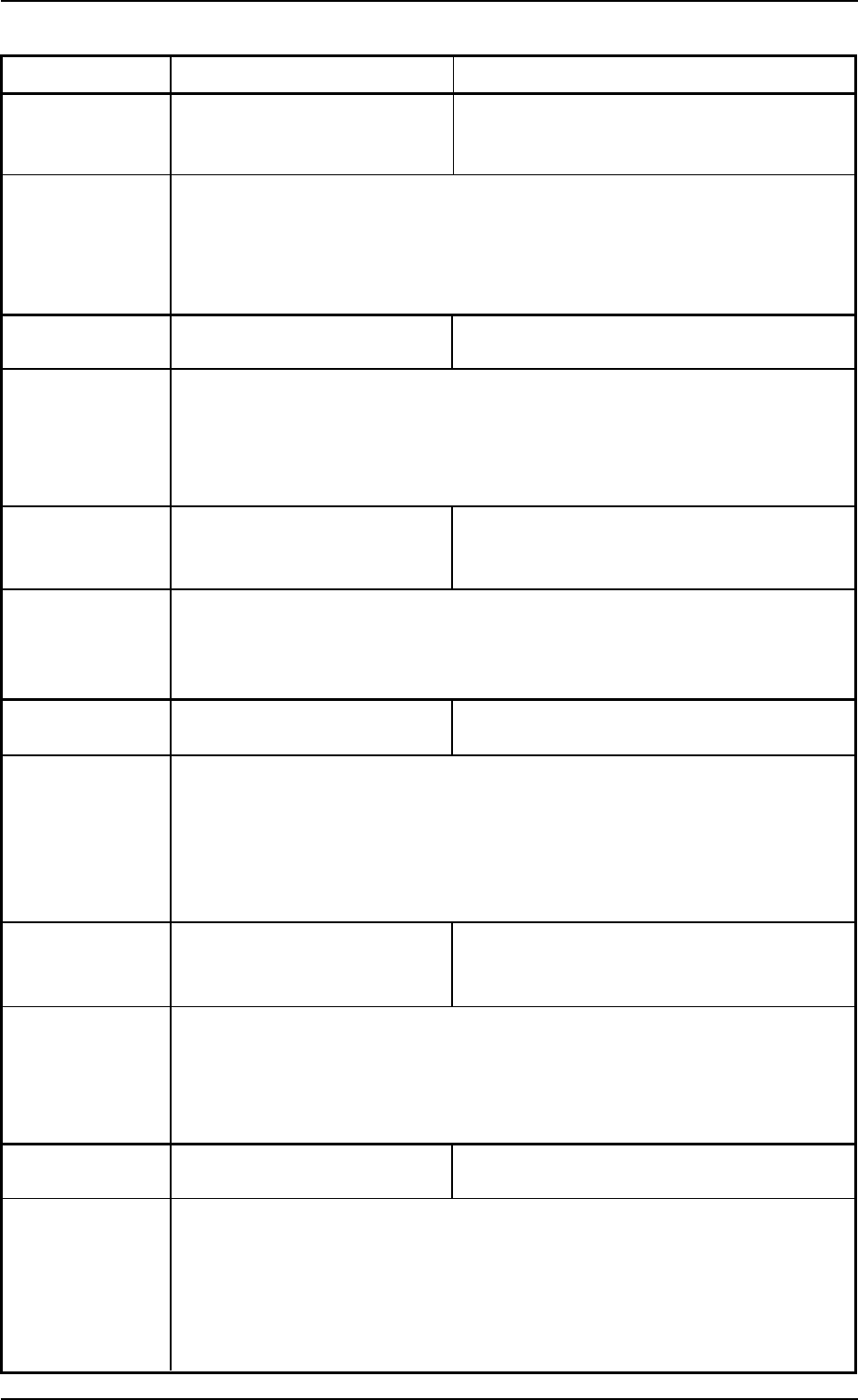
10 03 0 11002 ---- Error in Lighting System (Back Lighting)
Failed in Teaching Operation for Assumed Bright-
ness.
(Cause 1) The lighting system may be abnormal.
(Remedy 1) Contact our service personnel for details.
10 03 0 12001 ---- Error in Lighting Intensity Data (Front Lighting 1)
The data has exceeded the specified range.
(Cause 1) The longevity of the lamp might have ended.
(Remedy 1) Replace the lamp with a new one.
Or, contact our service personnel for some advice.
10 03 0 12002 ---- Error in Lighting System (Front Lighting 1)
Failed in Teaching Operation for Assumed Bright-
ness.
(Cause 1) The lighting system may be abnormal.
(Remedy 1) Contact our service personnel for details.
10 03 0 13001 ----- Error in Lighting Intensity Data (Front Lighting 2)
The data has exceeded the specified range.
(Cause 1) The longevity of the lamp might have ended.
(Remedy 1) Replace the lamp with a new one.
Or, contact our service personnel for some advice.
10 03 0 13002 ---- Error in Lighting System (Front Lighting 2)
Failed in Teaching Operation for Assumed Bright-
ness.
(Cause 1) The lighting system may be abnormal.
(Remedy 1) Contact our service personnel for details.
10 03 0 14001 ---- Error in Lighting Intensity Data (Front Lighting 3)
The data has exceeded the specified range.
(Cause 1) The longevity of the lamp might have ended.
(Remedy 1) Replace the lamp with a new one.
Or, contact our service personnel for some advice.
01 10-003 2-191 AFO01ETRP
4.3 Recognition Error IDs and Remedial Procedures
Recognition Error ID Item Description
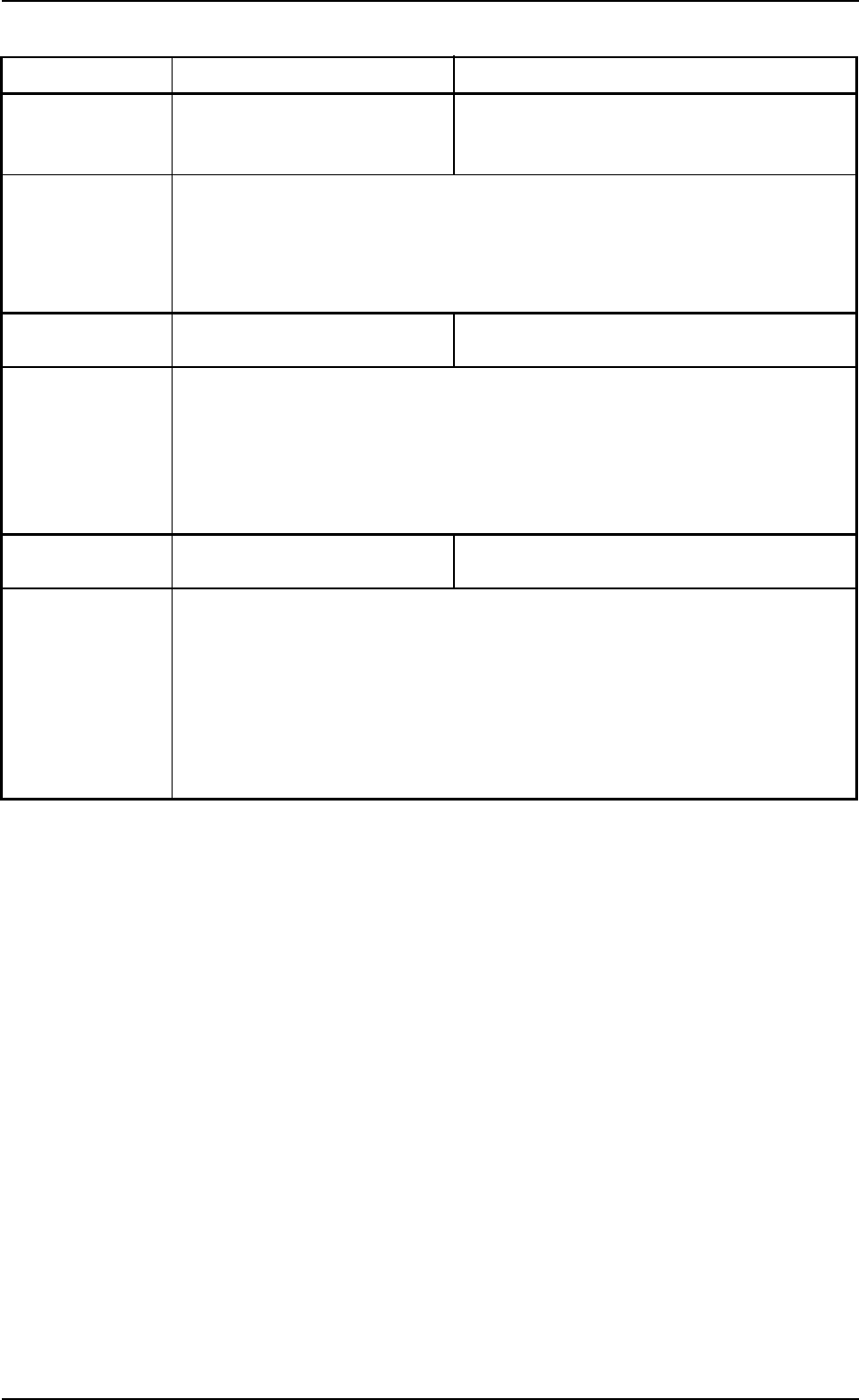
10 03 0 14002 ---- Error in Lighting System (Front Lighting 3)
Failed in Teaching Operation for Assumed Bright-
ness.
(Cause 1) The lighting system may be abnormal.
(Remedy 1) Contact our service personnel for details.
10 04 0 ***** ---- Error in Gain and Level Teaching Operation.
(Cause 1) The vacuum nozzle or the diffusion board is dirty.
(Remedy 1) Wipe the vacuum nozzle end or the tapered area with a soft cloth.
10 05 0 12001 ---- Specified Number of Dots Not Found during Cam-
era Angle Teaching Operation.
(Cause 1) The jig is not correctly set.
(Cause 2) A foreign substance adheres to the jig.
(Remedy 1) Set the jig correctly.
(Remedy 2) Wipe the jig surface with a soft cloth.
01 10-003 2-192 AFO01ETRP
4.3 Recognition Error IDs and Remedial Procedures