CX200-4(Maint).pdf - 第97页
Check Code Display Section A Display Section B 0b0136 Feeder Carriage Not Press the [F1B READY] button to set feeder carriage #1 in ready Ready Switch mode. 0b0201 Operation Area Feeder Close saf. guard at crg. home pos.…
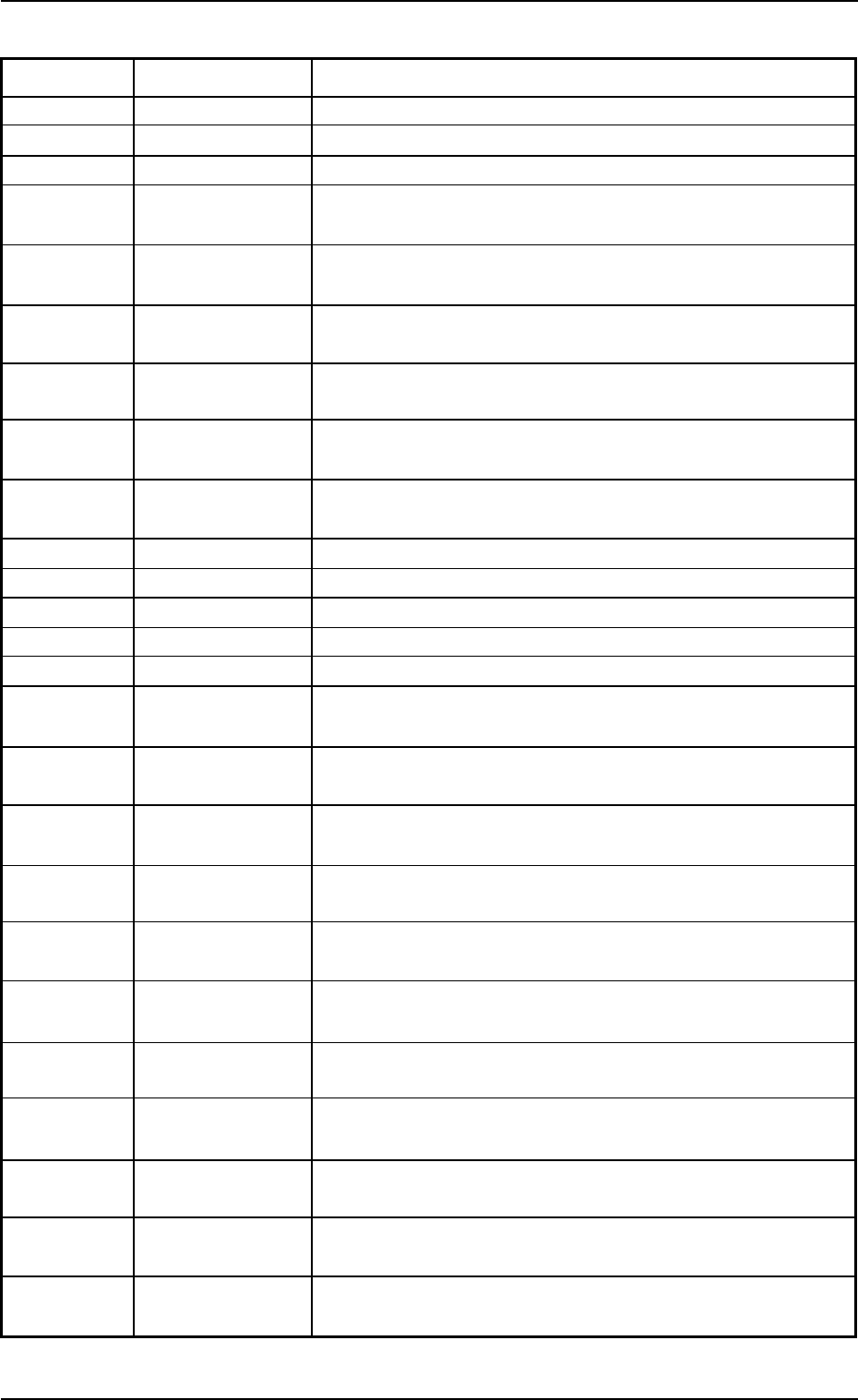
Check Code Display Section A Display Section B
090401 Cam Phase Check the cam positioner.
090402 Cam Phase Re-adjust or repair the cam shaft if necessary.
090501 Out Of Limit Zero all device with the [ZERO] button.
090601 Linear Measure Alarm Press the [POWER OFF] button once and press the [POWER
ON] button.
090701 Out Of Feeder Axis Zero all device in manual mode or with the [ZERO] button.
Stationary Position
090702 Out Of Feeder Axis Check the feeder.
Stationary Position
090703 Out Of Feeder Axis Check feeder motor 1 & 2.
Stationary Position
090704 Out Of Feeder Axis Please check area around feeder carriage located at its home
Stationary Position position #1.
090705 Out Of Feeder Axis Please check area around feeder carriage located at its home
Stationary Position position #2.
090801 Rotary Turret Origin Adjust rotary turret angle to 0° or 360°.
090901 Furnace Signal Check the furnace signal.
090a01 Oil Cooler Alarm Check the cooling oil.
090b01 Cooling FAN Alarm Check the cooling FAN.
091001 Recognition Ready Wait until recognition unit is ready to work.
0b0101 Feeder Carriage Not Press the [F1 READY] button to set feeder carriage #1 in ready
Ready Switch mode.
0b0102 Feeder Carriage Not Press the [F2A READY] button to set feeder carriage #2 in ready
Ready Switch mode.
0b0103 Feeder Carriage Not Press the [F3B READY] button to set feeder carriage #3 in ready
Ready Switch mode.
0b0104 Feeder Carriage Not Press the [F2B READY] button to set feeder carriage #2 in ready
Ready Switch mode.
0b0105 Feeder Carriage Not Press the [F3A READY] button to set feeder carriage #3 in ready
Ready Switch mode.
0b0106 Feeder Carriage Not Press the [F4 READY] button to set feeder carriage #4 in ready
Ready Switch mode.
0b0111 Feeder Carriage Not Press the [F1 READY] button to set feeder carriage #1 in ready
Ready Switch mode.
0b0116 Feeder Carriage Not Press the [F2 READY] button to set feeder carriage #2 in ready
Ready Switch mode.
0b0121 Feeder Carriage Not Press the [F12 READY] button to set feeder carriage #12 in ready
Ready Switch mode.
0b0126 Feeder Carriage Not Press the [F34 READY] button to set feeder carriage #34 in ready
Ready Switch mode.
0b0131 Feeder Carriage Not Press the [F1A READY] button to set feeder carriage #1 in ready
Ready Switch mode.
01 10-003 2-7 AFO01ETRP
1.2 “CHECK” Windows
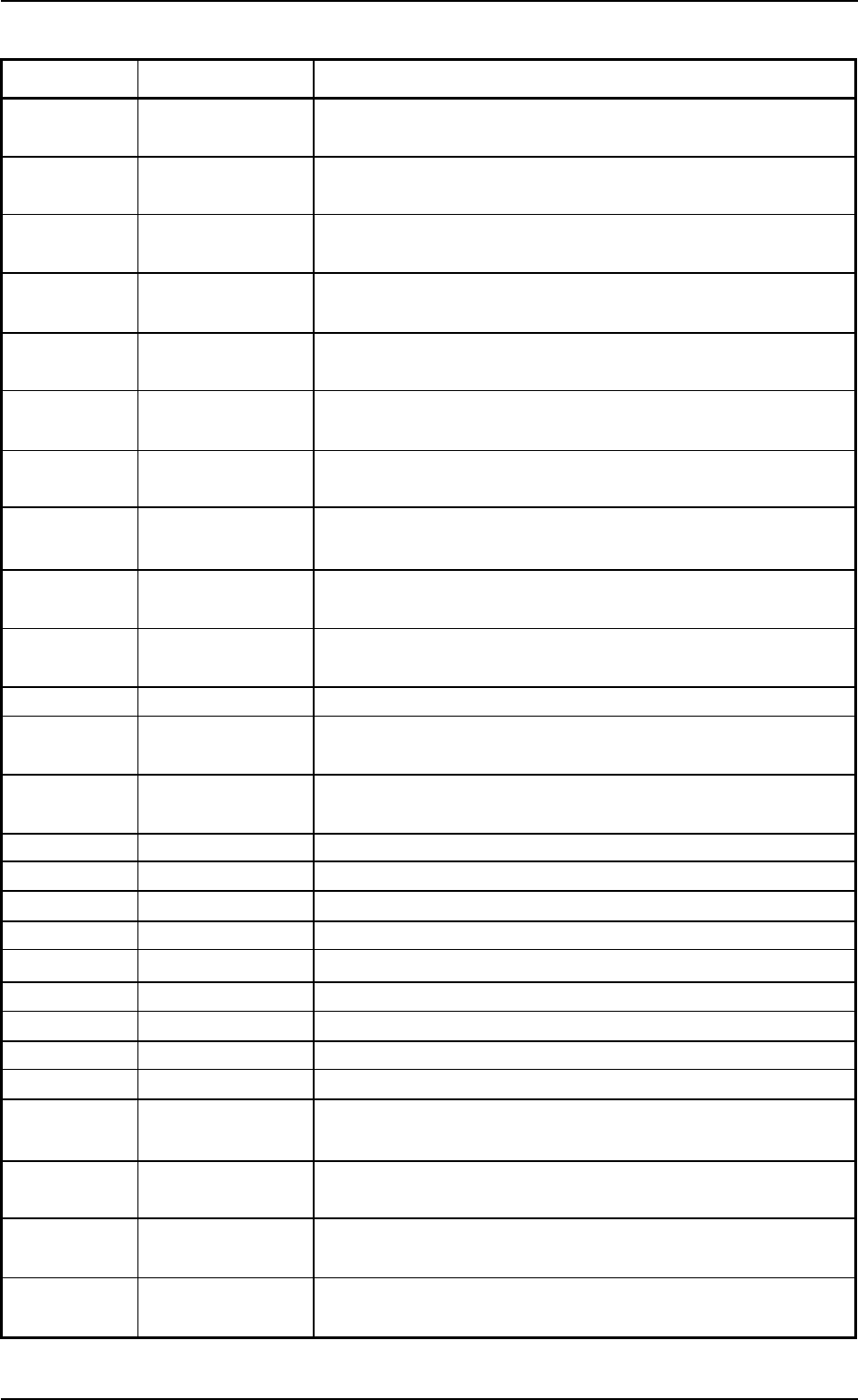
Check Code Display Section A Display Section B
0b0136 Feeder Carriage Not Press the [F1B READY] button to set feeder carriage #1 in ready
Ready Switch mode.
0b0201 Operation Area Feeder Close saf. guard at crg. home pos. 1.
Axis Safety Guard
0b0202 Operation Area Feeder Close saf. guard at crg. home pos. 2A.
Axis Safety Guard
0b0203 Operation Area Feeder Close saf. guard at crg. home pos. 3B.
Axis Safety Guard
0b0204 Operation Area Feeder Close saf. guard at crg. home pos. 2B.
Axis Safety Guard
0b0205 Operation Area Feeder Close saf. guard at crg. home pos. 3A.
Axis Safety Guard
0b0206 Operation Area Feeder Close saf. guard at crg. home pos. 4.
Axis Safety Guard
0b0211 Operation Area Feeder Close saf. guard at crg. home pos. 1.
Axis Safety Guard
0b0216 Operation Area Feeder Close saf. guard at crg. home pos. 2.
Axis Safety Guard
0b0221 Operation Area Feeder Close saf. guard at crg. home pos. 12.
Axis Safety Guard
0b0226 Axis Safety Guard Close saf. guard at crg. home pos. 34.
0b0231 Operation Area Feeder Close saf. guard at crg. home pos. 1A.
Axis Safety Guard
0b0236 Operation Area Feeder Close saf. guard at crg. home pos. 1B.
Axis Safety Guard
0d0101 Out Of Origin Zero X/Y chute width.
0d0102 Out Of Origin Zero L conveyor width.
0d0103 Out Of Origin Zero R conveyor width.
0d0104 Out Of Origin Zero conveyor width.
0d0105 Out Of Origin Zero all devices with the [ZERO] button.
0d0106 Out Of Origin Zero PCB support pins up/down.
0d0107 Out Of Origin Zero PCB locate lever.
0d0108 Out Of Origin Zero X/Y table axis.
0d0109 Out Of Origin Zero camera X/Y axis.
0d0201 Feeder Axis Servo Check F1 saf. guard if open/close.
Down
0d0202 Feeder Axis Servo Check F2 saf. guard if open/close.
Down
0d0203 Feeder Axis Servo Check F3 saf. guard if open/close.
Down
0d0204 Feeder Axis Servo Check F4 saf. guard if open/close.
Down
01 10-003 2-8 AFO01ETRP
1.2 “CHECK” Windows
1.3 Machine lnformation
01 10-003 2-9 AFO01ETRP
1.3 Machine Information
1.3.1 “Machine Information” Window
••
••
•
Window Layout
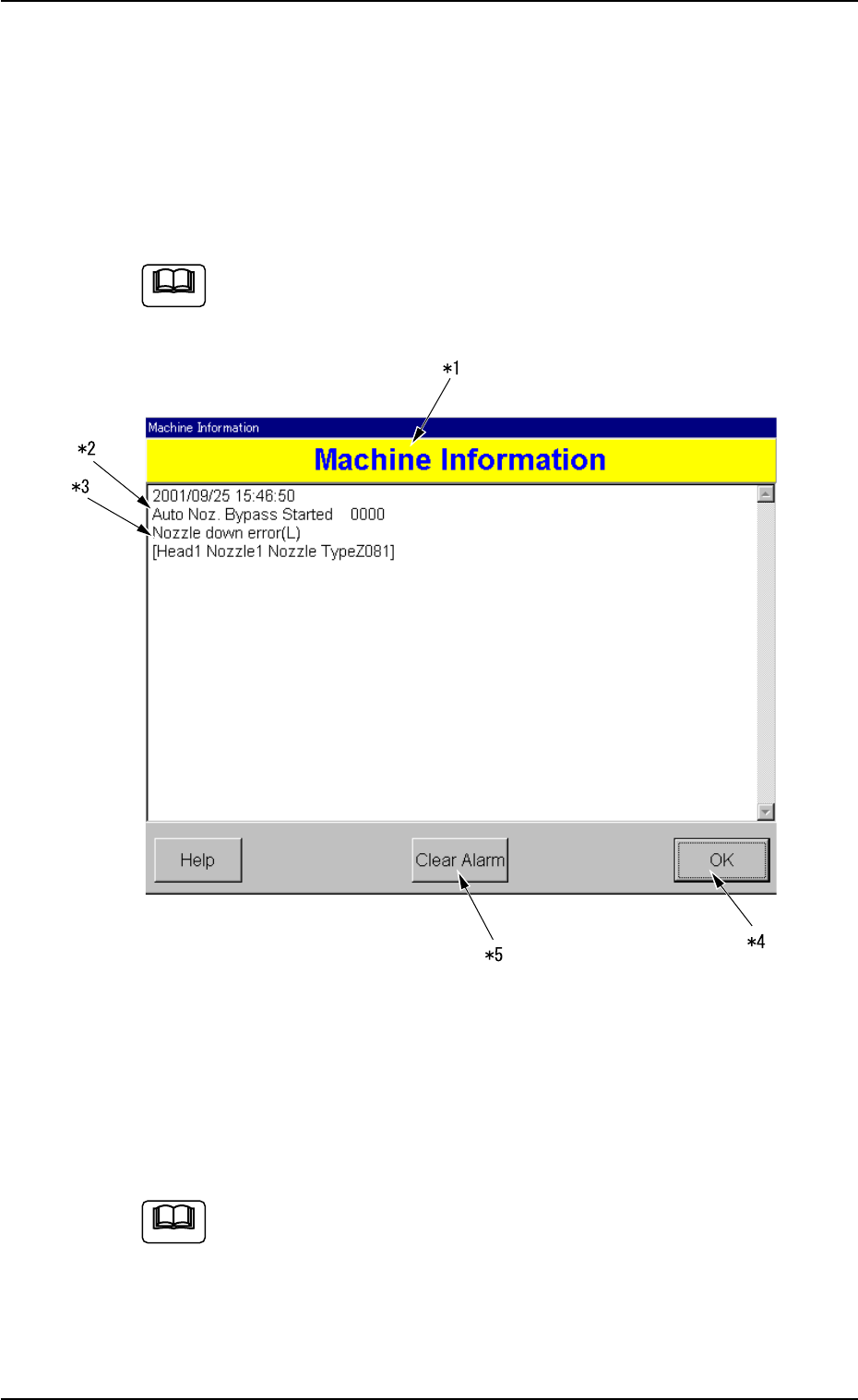
Various machine information is displayed while the machine is running.
While the “Machine Information” window is active, the machine
keeps on running.
Note
Fig. 4B2-1 Example of “Machine Information”
••
••
•
Window Composition
*1 Machine Information
The machine information is displayed.
Refer to “1.3.2 List of Check Messages” for details.
Note