00198376-01_UM_TouchlessPlacement-R17-1_DE_EN - 第29页
Programming in SIPLACE Pro Defining Height Measurement Points Touchless Placement (R17-1) Ber ührungsloses Bestücken (R17-1 ) 29 Touchless placement, Z distance This value defines the distan ce to the calculated placemen…
Programming in SIPLACE Pro
Component Shape with Placement Process "Touchless"
28 Touchless Placement (R17-1) Berührungsloses Bestücken (R17-1)
3.1.1
3.1.1 Distance between Component Lower Edge and Calculated Placement Level
Distance between Component Lower Edge and Calculated Placement Level
The Touchless placement, Z distance value is the distance between the board upper edge and the com-
ponent lower edge. This value defines the distance between the placement level and the board upper
edge in Z direction. The distance depends on the process used in the respective application and is usu-
ally defined depending on the thickness of the paste and fluxing agent.
The default value is 0.05 mm.
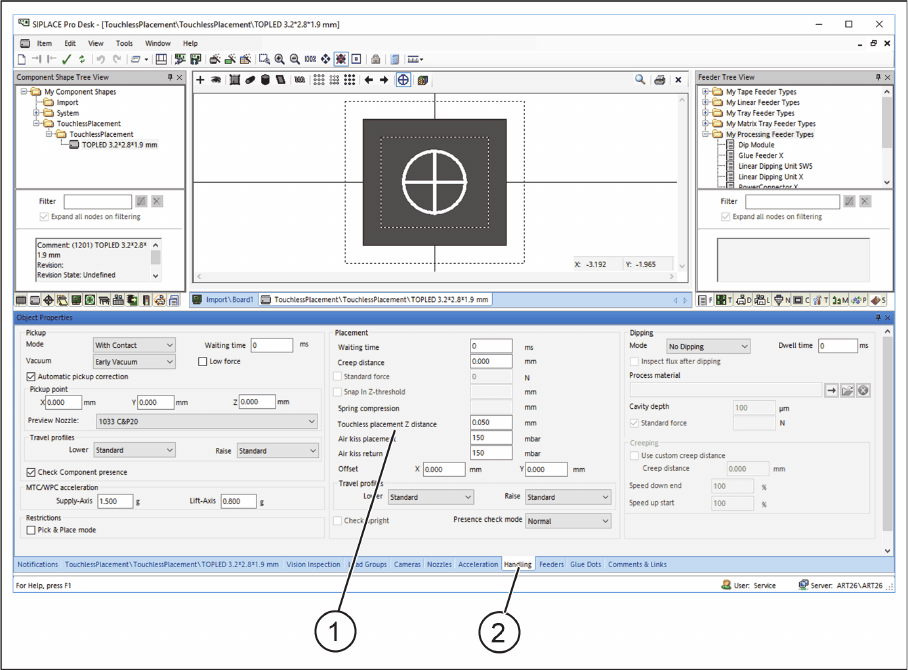
On the Handling tab, the distance between the component lower edge and the placement level to be
calculated can be entered in the Touchless placement, Z distance field.
► In the Component Shape Editor in SIPLACE Pro, open the required component shape.
Component Shape Editor – Distance between component lower edge and calculated placement level
► Select the Handling (2) tab.
► In the Touchless placement, Z distance (1) input field, enter the distance between the component
lower edge and the calculated placement level.
Programming in SIPLACE Pro
Defining Height Measurement Points
Touchless Placement (R17-1) Berührungsloses Bestücken (R17-1) 29
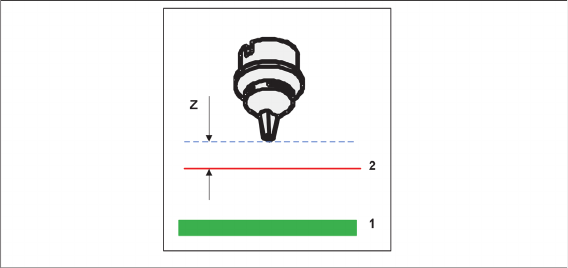
Touchless placement, Z distance
This value defines the distance to the calculated placement level.
1. Board
2. Calculated placement level (in accordance with height measurement)
3. Z distance (distance between the component lower edge and the calculated placement level)
3.2
3.2 Defining Height Measurement Points
Defining Height Measurement Points
If components are placed on a board or grid board using the Touchless placement process, height meas-
urement points must be defined around the placement position on the board or grid board. Height meas-
urement points are necessary for a correct calculation of the respective placement levels. At least three
height measurement points must be defined and active for the relevant board side or panel.
Rules for height measurement points
Observe the following rules:
▪ The more height measurement points are selected (more than three height measurement points),
the higher the process reliability will be.
▪ The greater the distance between the height measurement points, the better.
▪ The shorter the distance between the placement positions to their connected height measurement
points, the better the calculation of the board height.
▪ The area spanned between the three height measurement points should be as large as possible.
▪ Avoid (almost) collinear positions for height measurement points.
▪ The spanned area should not be an obtuse-angled triangle.
Programming in SIPLACE Pro
Defining Height Measurement Points
30 Touchless Placement (R17-1) Berührungsloses Bestücken (R17-1)
Height Measurement Points for Boards
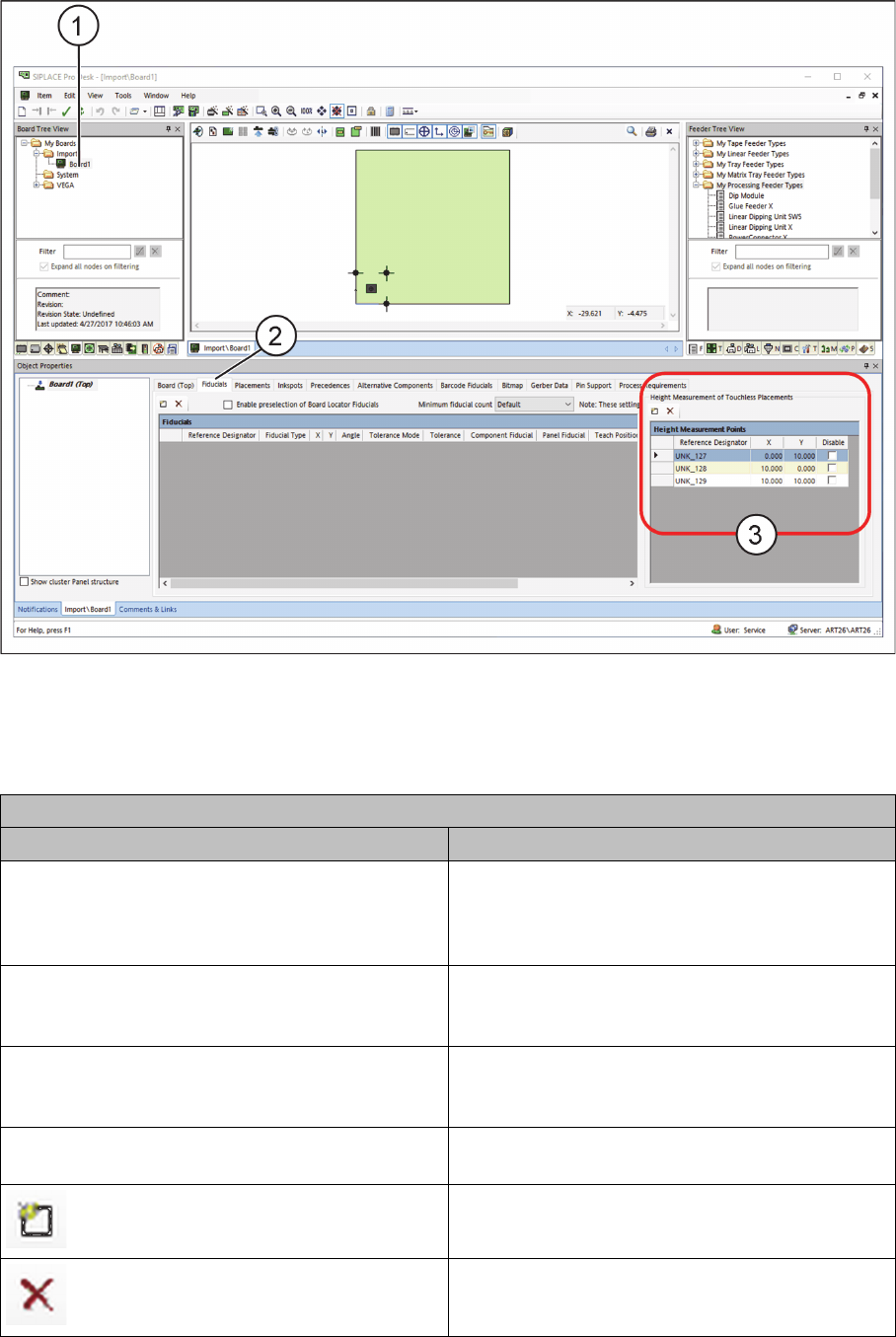
► Open the required board (1) in the SIPLACE Pro Board Editor.
Board Editor – Defining Height Measurement Points
► Select the Fiducials tab (2) on the board side or panel.
► In the Height Measurement Points table (3), define at least three height measurement points to
measure the height for contactless component placement.
Table: Height Measurement Points
Field Value/Meaning
Reference designator Enter the unique designator for the height meas-
urement point here. This designator is to represent
the position of the height measurement point on
the board.
X Position of the height measurement point in X di-
rection with regards to the position of the current
panel or board.
Y Position of the height measurement point in Y di-
rection with regards to the position of the current
panel or board.
Disable Disables this height measurement point for meas-
urement.
Adds a new line to the table.
Removes a selected line from the table.