00198376-01_UM_TouchlessPlacement-R17-1_DE_EN - 第35页
Tips Touchless Placement (R17-1) Ber ührungsloses Bestücken (R17-1 ) 35 5 5 T ip s Tips Head steps for the measuremen t of height measurement points ▪ Head steps for the measurement of height measurement points ar e only…
Placement Process at the Station
Possible Errors and Corrections
34 Touchless Placement (R17-1) Berührungsloses Bestücken (R17-1)
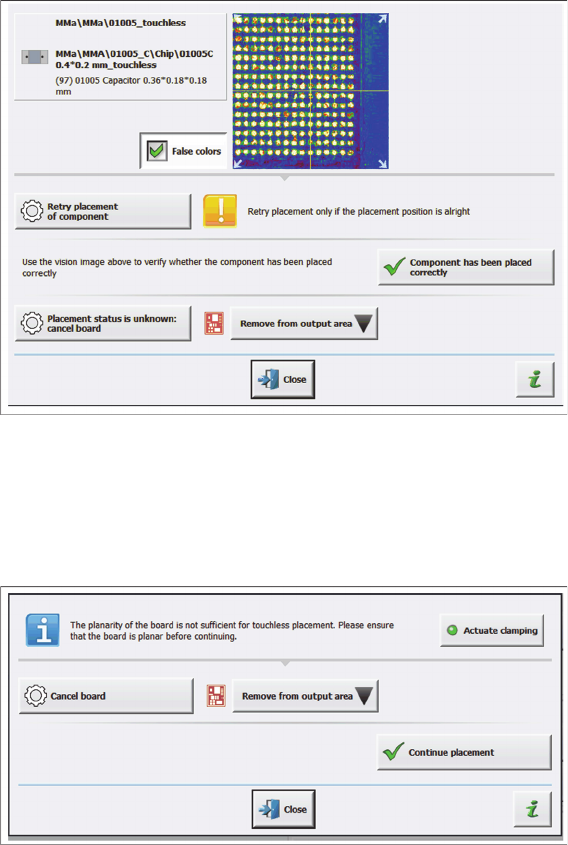
► Check the component for damage.
► If the component is flawless, confirm with the Component has been placed correctly button.
► If a damage exists, the operator must manually remove the board from the output conveyor after
completion.
⇨ The following message on checking the placement position is displayed:
▪Correction
– Click the Actuate clamping button. The clamping of the board is released or the clamping of the
board is engaged.
– After releasing the clamping, try to align the board properly and then click the Actuate clamping
button again.
– Click the Continue placement button and the measurement points for the height check are ap-
proached and measured again to check the planarity of the board.
– In case there is still an error and the placement process is not to be continued for the entire
board, click the Cancel board button.
Tips
Touchless Placement (R17-1) Berührungsloses Bestücken (R17-1) 35
5
5 Tips
Tips
Head steps for the measurement of height measurement points
▪ Head steps for the measurement of height measurement points are only generated by the SIPLACE
Pro optimization process if components with the Touchless placement process are available on the
board. Otherwise, the defined height measurement points will be ignored.
▪ Generated head steps for measuring the height measurement points are listed with the
"HEIGHT_MEASURE" type on the Head Steps tab in the Recipe Analyzer tool of the SIPLACE Pro
Optimizer Toolkit.
Tips
36 Touchless Placement (R17-1) Berührungsloses Bestücken (R17-1)