YS24X_Ope_E.pdf - 第148页
3-16 3 Starting and ending pr oduction • Cycle Time (sec/chip) Shows the time (seconds) to mount one component on the board. T his is the time obtained by dividing the time for one sequence from pickup to mounting b y th…
3-15
3
Starting and ending production
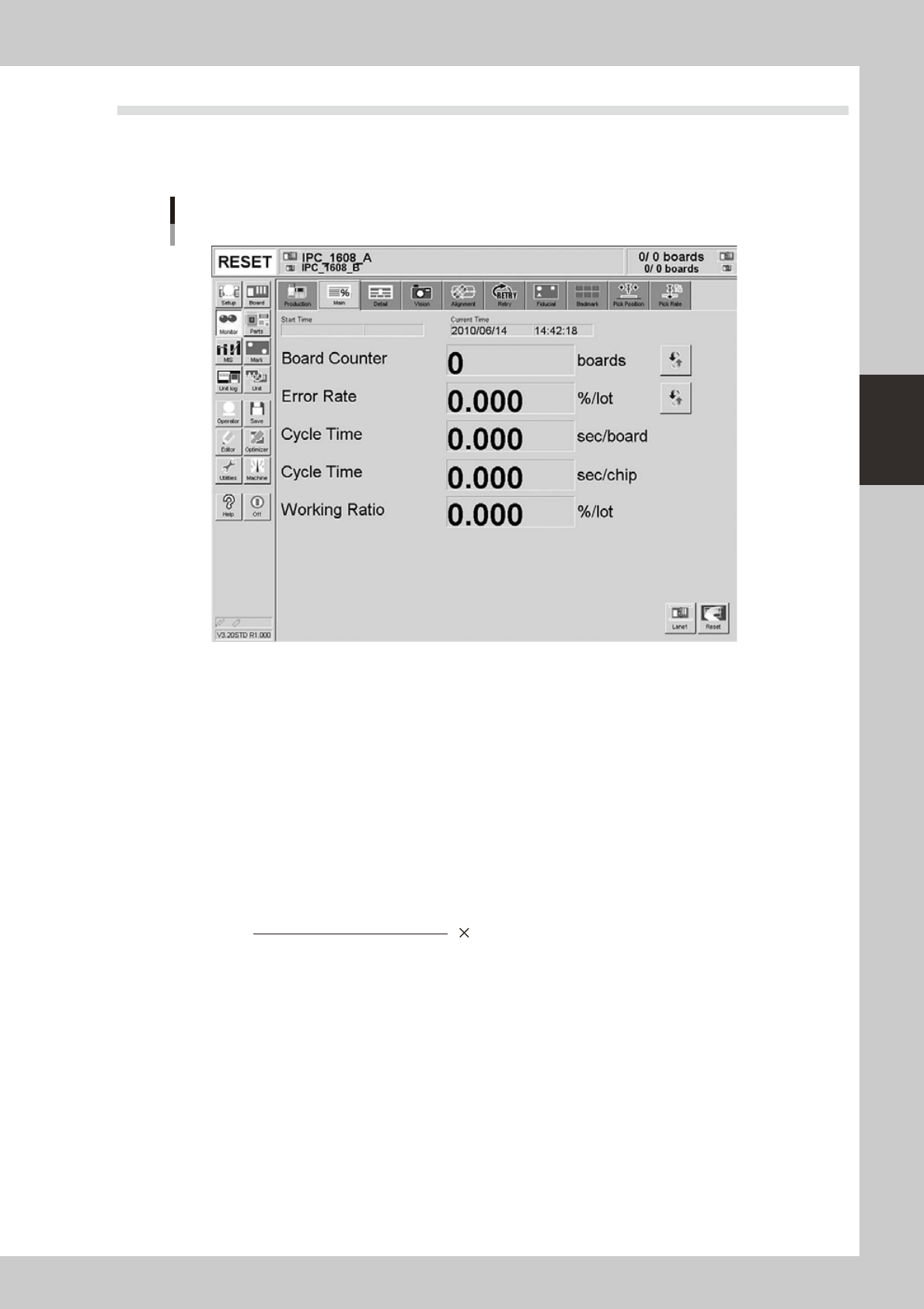
3.2 Main
The [Monitor]-[Main] tab screen shows you the real-time production status such as the board count and cycle
time. Displaying this screen during production is handy. All information will be cleared when the board type is
changed.
Monitor: Main
Example of Dual-lane
24310-L4-10
• Start Time
Displays the date and time that the board data currently being produced was changed.
• Current Time
Displays the current date and time (system clock time in the machine).
• Board Counter
Displays the number of boards produced after changing to the current board data. The board data that was reset before
component mounting is complete is not counted unless the component mounting is resumed and completed.
• Error Rate
Displays the rate of discarded components due to pickup or recognition errors with respect to all components that have
been consumed after changing to the current production board data. This data is updated when the production of one
board is completed.
Number of discarded components
Total component consumption
Error rate (%) = 100
• Cycle Time (sec/board)
Shows the average (seconds/board) of the mounting time per board. The data is updated when component mounting on
each board is completed. The cycle time includes the mark (including fiducial and bad marks) recognition time,
component pickup time, component recognition time, mounting time, retry operation time, component dump time and
nozzle change time.
The board transfer time and stop time (time stopped with error or [STOP] button) is not included.

3-16
3
Starting and ending production
• Cycle Time (sec/chip)
Shows the time (seconds) to mount one component on the board. This is the time obtained by dividing the time for one
sequence from pickup to mounting by the number of components mounted in that sequence.
The display may vary depending on the number of stages to be used, one stage or two stages.
When you use two stages, you can change three kinds of displays, "Overall Cycle Time (sec/chip)", "Cycle Time (sec/chip)
of Stage 1", and "Cycle Time (sec/chip) of Stage 2".
n
NOTE
The "Overall Cycle Time (sec/chip)" display shows "Cycle Time (sec/chip) of Stage 1" or "Cycle Time (sec/chip) of
Stage 2", whichever is slower.
• Working Ratio
This is the machine unit's working ratio. This ratio is not affected by the status of the upstream and downstream
machines, and is calculated with the following expression. Generally, the mounter working ratio is 40 to 70%.
Cumulative mounting time + cumulative transfer time
[
(Production completion time - setup completion time) - cumulative standby time
]
s 100
Working ratio (%)
=
• Cumulative mounting time : Total time that head is operating
• Cumulative transfer time : Total transfer time (board loading/unloading)
• Cumulative standby time : Total standby time due to upstream or downstream machine
• Production completion time : Time changed to next production board
• Setup completion time : Time [START] button was pressed and operation started
• [Reset] button
Resets the production control information, including each data and current production quantity, current unloader
quantity, scheduled production quantity and scheduled unloader quantity. The "Board Counter" value on the Setup
screen is also reset when this production data is reset.
3-17
3
Starting and ending production
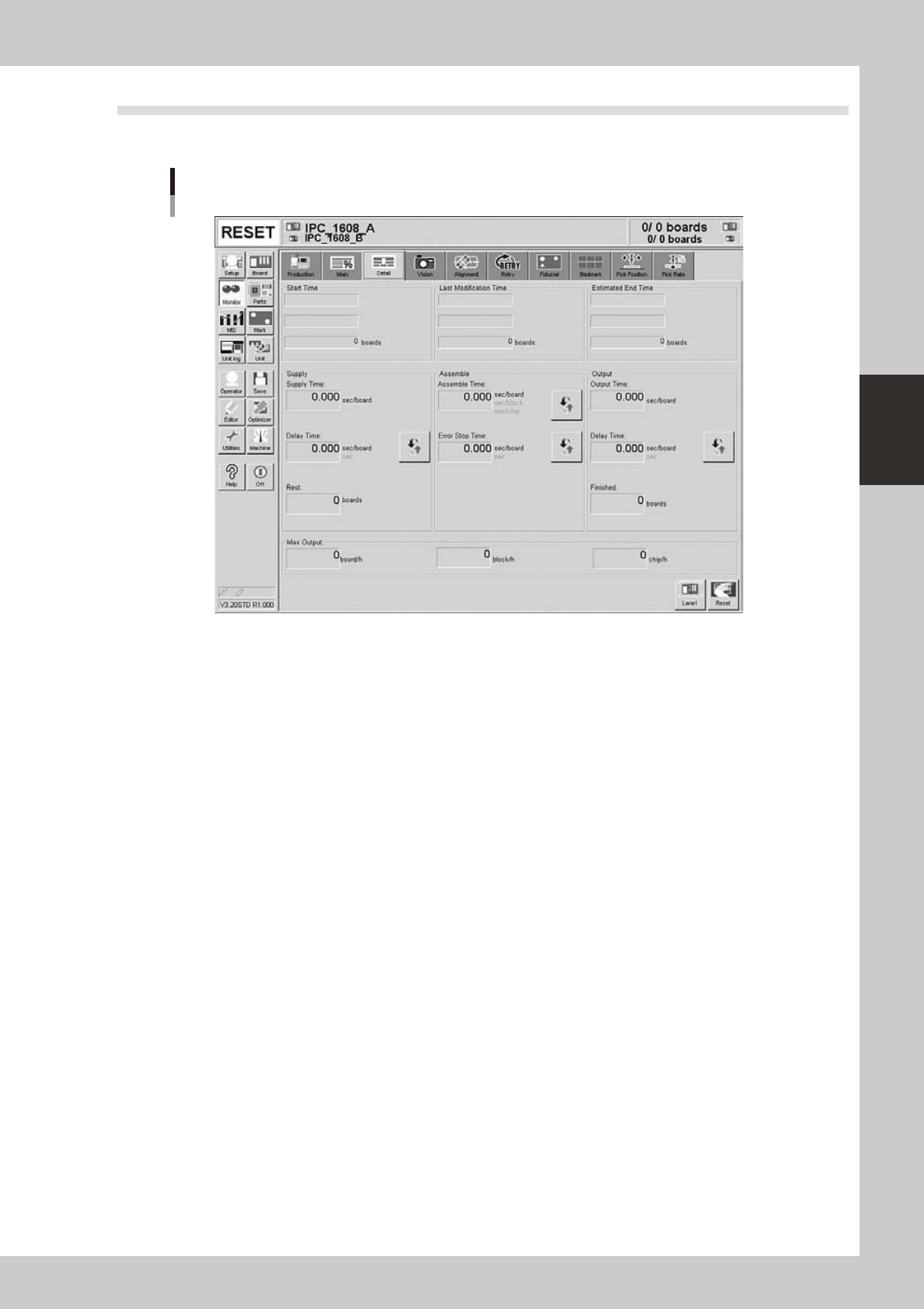
3.3 Detail
The [Monitor]-[Detail] tab screen shows the detailed production status of the current production board data.
Monitor: Detail
Example of Dual-lane
24311-L4-10
• Start Time
Shows the time that production was started (time that board selection was completed). The quantity is normally zero
boards.
• Last Modification Time
Shows the display data update time. The quantity is the number of boards produced up to the present time.
• Estimated End Time
Shows the estimated production end time. The quantity is the scheduled production quantity entered on the Setup
screen. Note that this will be blank if the scheduled production quantity has not been entered.
• Supply Time (sec/board)
Shows the average loading time per board.
• Supply: Delay Time (sec/board)
Shows the time that the machine has waited for board loading. Note that when the machine is mounting components, the
delay time will not be counted even if the board is standing by. The average delay time per board or the cumulative
delay time can be displayed by pressing the [Unit Change] button.
• Rest (boards)
This is the value obtained by subtracting the production completed board quantity from the scheduled production
quantity.
• Assemble Time (sec/board, sec/block, sec/chip)
Shows the time for mounting components on a board. This time includes the mark recognition (fiducial, bad mark, etc.),
component pickup, component recognition, mounting, dispensing, retry operation, nozzle change and component dump
time, etc. The average time per board, average time per block or the average time per chip can be displayed by pressing
the [Unit Change] button.
• Error Stop Time (sec/board, sec)
Shows the time that the machine has been stopped with an error, and is the total time from when the error occurs to
when the [CLEAR] button is pressed. Note that the time for recovery is not included. The average error stop time per
board or the cumulative error stop time can be displayed by pressing the [Unit Change] button.