YS24X_Ope_E.pdf - 第72页
1-35 1 Part names and functions 9.3 Recover y pallet T he recovery pallet retrieves defecti ve parts detected by the recognition camer a without damaging them. T he recovery pallet is set at a specified position in the s…
1-34
1
Part names and functions
9.2 QFP dump station
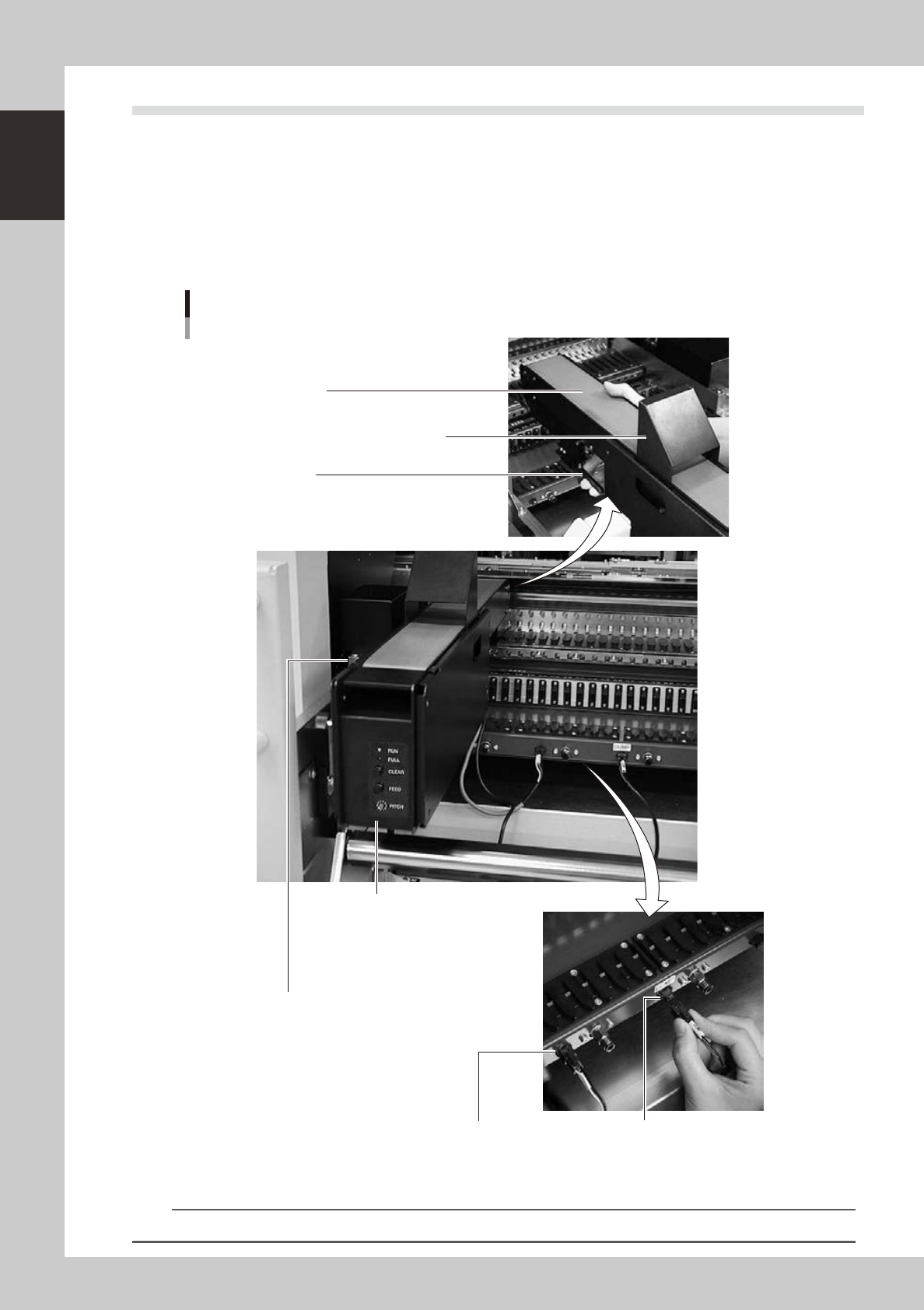
The QFP dump station (hereafter called dump station) is a QFP recovery conveyor designed to attach to the
feeder plate of a YAMAHA surface mounter. If a QFP is judged defective by vision camera recognition, that
QFP is temporarily placed on this dump station without being damaged. The QFP placed on the dump station
is then conveyed back at a specified feed pitch. When the dump station becomes full, the memory counter or
overflow sensor detects it and displays an error message before the next defective QFP is returned to the dump
station.
Photographs below show major parts and functions of the dump station.
Clamp lever
Use this lever to lock or unlock the dump station to
the feeder plate.
DUMP harness (signal cable)
Used to interface between the dump station
and the mounter for exchanging signals.
FEEDER harness (power supply cable)
Supplies power to the dump station from
the mounter.
Manual operation panel
Use the switches on this operation panel
to set the feed pitch, move the belt at the
specified pitch and clear the count.
The LED lamps also show the
operation status.
Overflow sensor (option)
QFPs placed on the dump station
are carried back by the belt conveyor.
When a QFP arrives at the end of
the dump station, this overflow sensor
detects it and displays an error message.
Conveyor belt
Conveys QFPs placed on the dump station at a
specified feed pitch.
Safety cover
Major parts and functions
23129-L4-00
n
NOTE
For how to use the QFP dump station, refer to the option manual "QFP dump station".

1-35
1
Part names and functions
9.3 Recovery pallet
The recovery pallet retrieves defective parts detected by the recognition camera without damaging them. The
recovery pallet is set at a specified position in the sATS
II
(called sATS from now on) and is used exclusively to
collect the defective parts.
Recovery pallet
Sticky transparent sheet
is attached here
Higher than on
standard pallet
Yellow sticker (front and rear)
23132-L4-00
n
Recovery pallet position
• The recovery pallet position is set in the 15th shelf of magazine 1 (or in the 30th shelf if magazine 2) as the default
position when shipped from the factory. You can shift this position to where needed by changing the machine setting.
• A yellow sticker is attached to the recovery pallet to help identify it from other pallets. Before starting work, open the
sATS door and make sure that the pallet with the yellow sticker is placed in its specified position.
n
Operating limits
• The recovery pallet is only used on the B table. If the A table stops operating due to some problem, then the disposal
position or disposal station serves as the recovery point.
• Parts are only discarded into the recovery pallet during automatic operation. During adjust mode or reset operation,
the parts are discarded into the disposal position (dump box) even if “Recovery Unit” was specified in the data.
n
Part sizes
• Maximum part sizes (XY) the recovery pallet can handle are set in the machine data. Maximum part sizes usable by the
machine are already set as default values.
• Part heights up to 8.5mm can be stored to a pallet pitch of 12.5mm, and to 15mm at a pallet pitch of 25mm.
The spacing between parts and the number of parts that can be placed in the recovery pallet are automatically calculated
from the maximum size. Parts are placed at an equal spacing regardless of their size. If you want to change the maximum
number of parts to be placed in the recovery pallet, you must change the maximum part size (XY) in the machine
settings.
n
Parts requiring special precautions during recovery
• Parts such as transformers, PGA, EPROMS and quartz oscillators might shift around on the pallet surface.
• Parts whose center of gravity is higher than the edge of the pallet might drop off the pallet if they are moved.
• Parts that have only a small contact surface with the sticky pallet surface or parts having irregular contact surfaces
such as aluminum capacitors might shift around on the pallet surface.
• Wafers or similar parts having an even, flat surface making close contact with the adhesive surface on the pallet might
be damaged when peeled from the pallet due to the adhesive force.
1-36
1
Part names and functions
n
Error messages and troubleshooting during operation
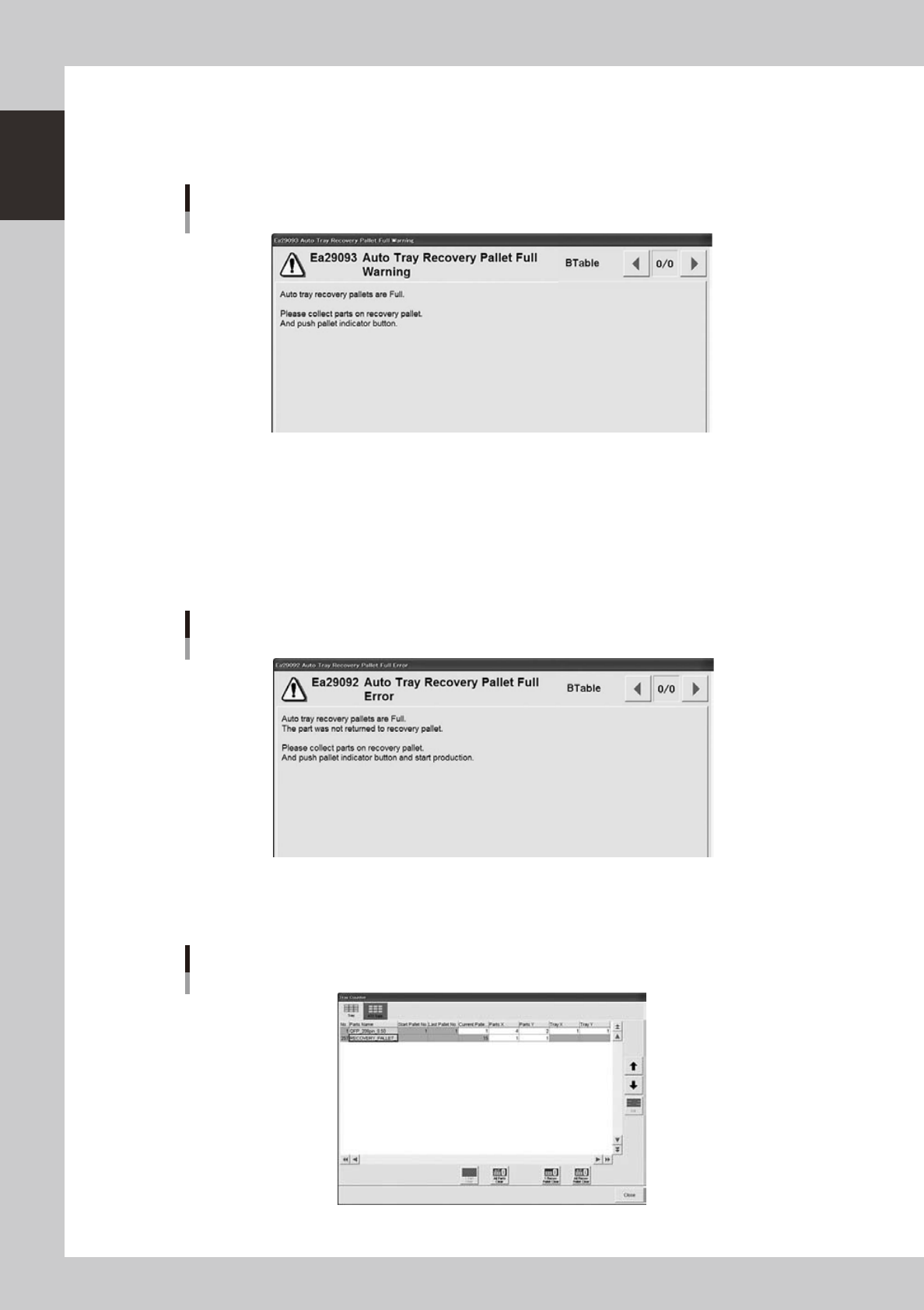
Ea29093: Auto Tray Recovery Pallet Full Warning
This error warning appears when all recovery pallets are full. Operation continues until the next disposal step.
Auto tray recovery pallet FULL warning
24106-L4-00
Ea29092: Auto Tray Recovery Pallet Full Error
The following error message appears when all recovery pallets are full and parts can no longer be placed in the recovery
pallets. The machine will come to a stop, so restore operation by using the procedure below.
1. Pull out the recovery pallets, remove all the parts, and set the pallets back in position.
2. Press the flashing indicator buttons to clear the counter. (You can also clear them on the screen below.)
3. Cancel emergency stop and press the [RUN] button to start operation.
Auto tray recovery pallet FULL error
24105-L4-00
Besides using the indicator buttons to clear the recovery pallet counter as described above, you can also clear it with the
[Tray Counter] on the Setup screen.
Clearing the recovery pallet
24107-L4-00