Printer 600 Machine Programming.pdf - 第106页
0$&+,1( 352*5$00 ,1* 0(183$5$ 0(7(56 1.106 User Manual Software Ve rsion 07SP04 operation s: Clean Af ter The automatic screen cl ean after downtime process chosen in th e above menu pa rameter is car ried out af t…
0$&+,1(352*5$00,1*
0(183$5$0(7(56
Software Version 07SP04 User Manual 1.105
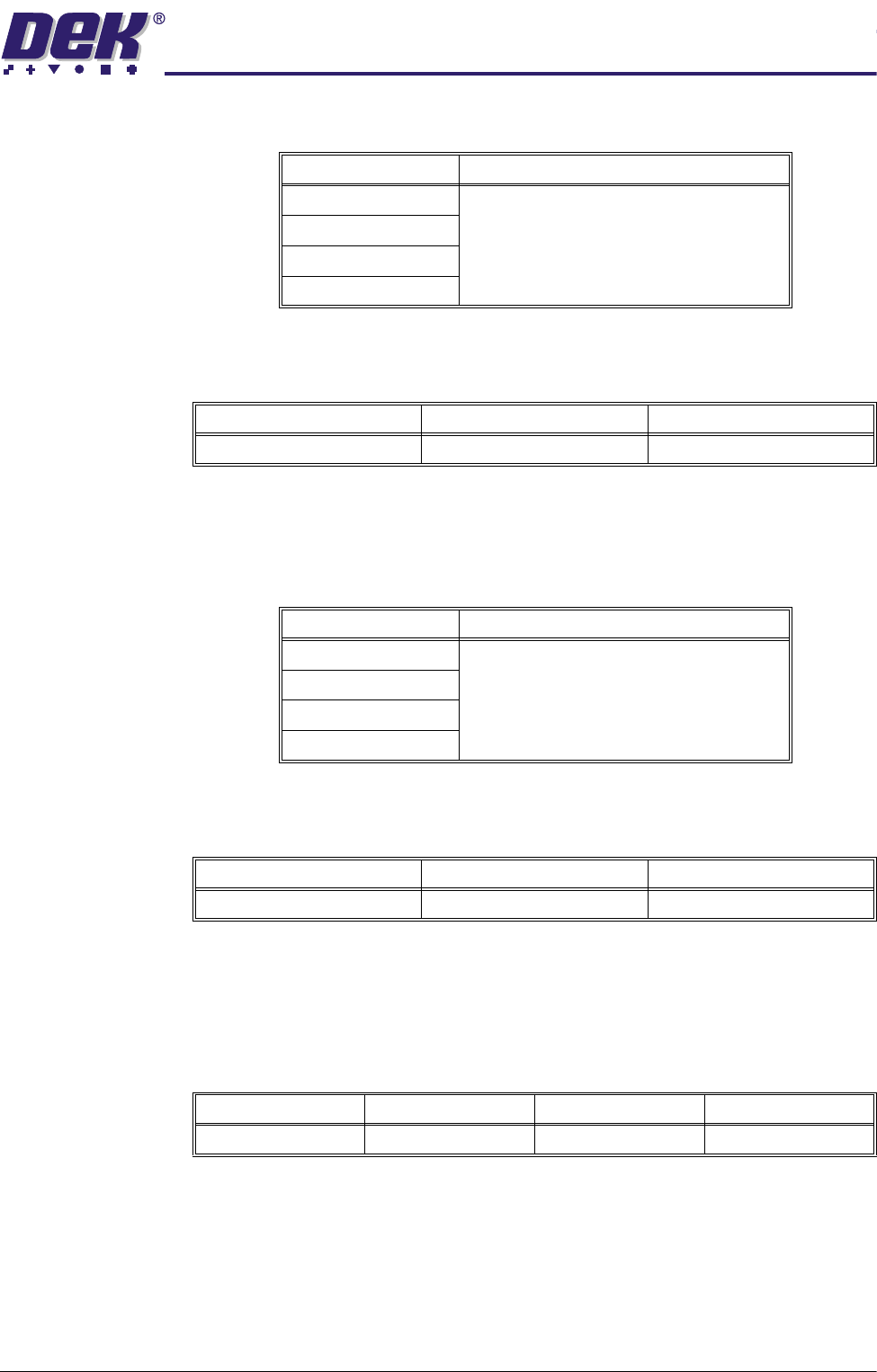
each of which may be one of the following cleaning operations:
Screen Clean
Rate 1
This parameter sets the number of print cycles between the cycling of the
screen cleaner for the first screen clean rate.
Screen Clean
Mode 2 (including
Vacuum)
This parameter sets the mode of operation of the screen cleaner for the second
clean mode. When selected this parameter opens a window that allows a
screen clean option sequence to be chosen. The sequence includes six stages,
each of which may be one of the following cleaning operations:
Screen Clean
Rate 2
This parameter sets the number of print cycles between the cycling of the
screen cleaner for the second screen clean rate.
Vacuum Clean
Start Time
This parameter sets the time in seconds the vacuum is applied for before the
screen clean stroke begins.
NOTE
This parameter is only displayed with a Blue USC fitted and the Under Screen
Cleaner parameter in Set Preferences set to Vacuum.
Clean After
Downtime
This function provides the facility for the stencil to be cleaned automatically with
a preprogrammed clean after a preprogrammed idle time. Clean After Down-
time only becomes active after the machine has performed at least one print
after it is powered up. When selected this parameter opens a window that
allows a clean after knead option sequence to be chosen. The sequence
includes six stages, each of which may be one of the following cleaning
Cleaning Operation Note
Wet A warning is given if the end stroke is wet.
Dry
Vac
None
Minimum Maximum Increment
0 (Screen Cleaner off) 200 1
Cleaning Operation Note
Wet A warning is given if the end stroke is wet.
Dry
Vac
None
Minimum Maximum Increment
0 (Screen Cleaner off) 200 1
Minimum Maximum Increment Default
0.0 sec 5.0 secs 0.5 sec 1.0 secs
0$&+,1(352*5$00,1*
0(183$5$0(7(56
1.106 User Manual Software Version 07SP04
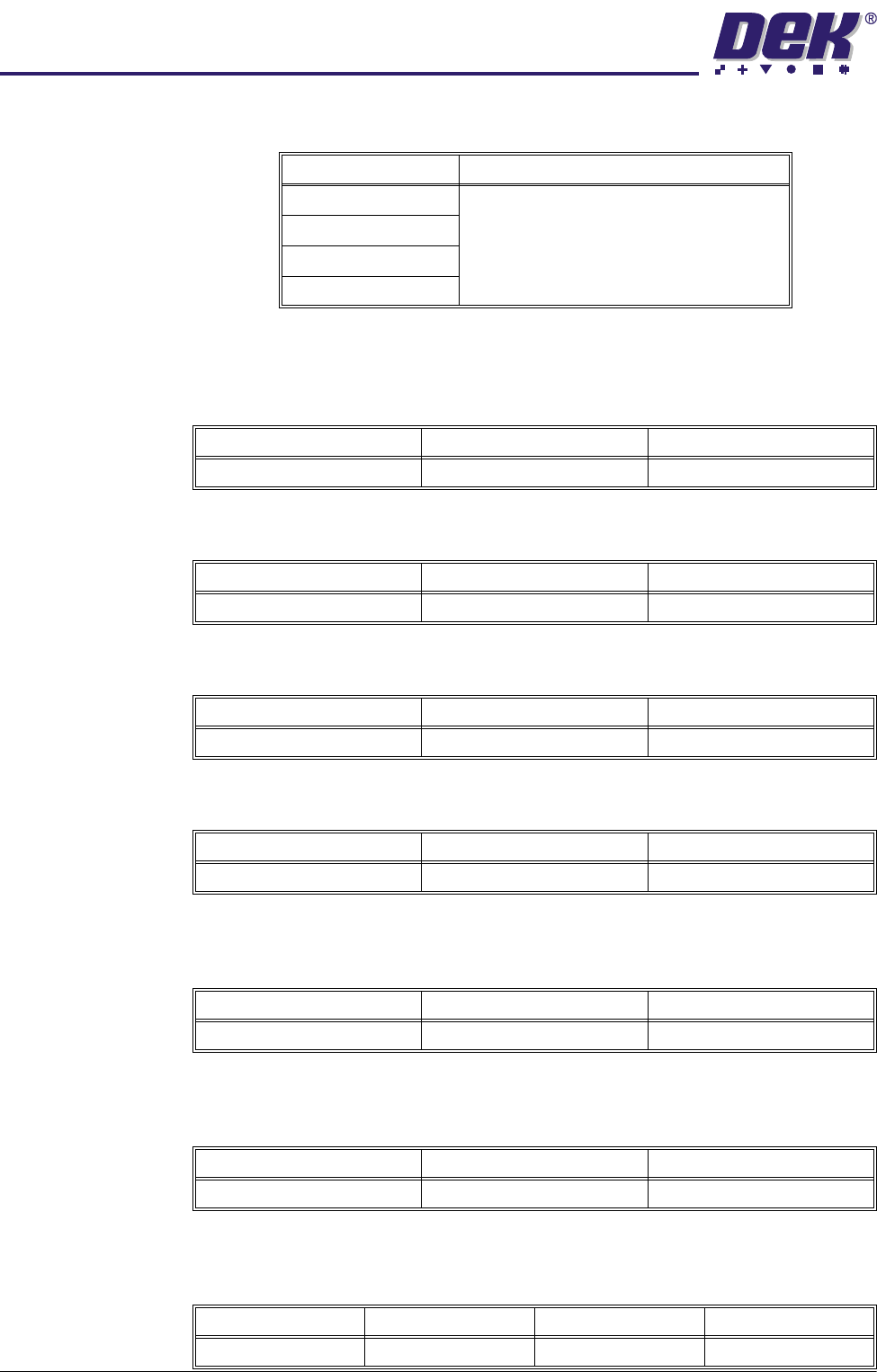
operations:
Clean After The automatic screen clean after downtime process chosen in the above menu
parameter is carried out after a countdown of the number of minutes set in this
parameter.
Dry Clean Speed This parameter sets the speed of the screen clean dry wipe for optimization.
Wet Clean Speed This parameter sets the speed of the screen clean wet wipe for optimization.
Vac Clean Speed This parameter sets the speed of the screen clean vacuum for optimization.
Front Start Offset
(Blue USC)
This parameter determines the distance from the front edge of the board that
the cleaning stroke must start.
Rear Start Offset
(Blue USC)
This parameter determines the distance from the rear edge of the board that
cleaning must complete.
Vortex Cassette
Life
This parameter sets the number of cleaning strokes that are applied before a
cleaning cassette is replaced.
Cleaning Operation Note
Wet A warning is given if the end stroke is wet.
Dry
Vac
None
Minimum Maximum Increment
5.0 mins 120.0 mins 1.0 min
Minimum Maximum Increment
10.0mm/sec 120.0mm/sec 1.0mm/sec steps
Minimum Maximum Increment
10.0mm/sec 100.0mm/sec 1.0mm/sec steps
Minimum Maximum Increment
10.0mm/sec 100.0mm/sec 1.0mm/sec steps
Minimum Maximum Increment
0.0mm 60.0mm 1.0mm
Minimum Maximum Increment
0.0mm 60.0mm 1.0mm
Minimum Maximum Increment Default
0.0 200.0 1.0 20.0
0$&+,1(352*5$00,1*
0(183$5$0(7(56
Software Version 07SP04 User Manual 1.107
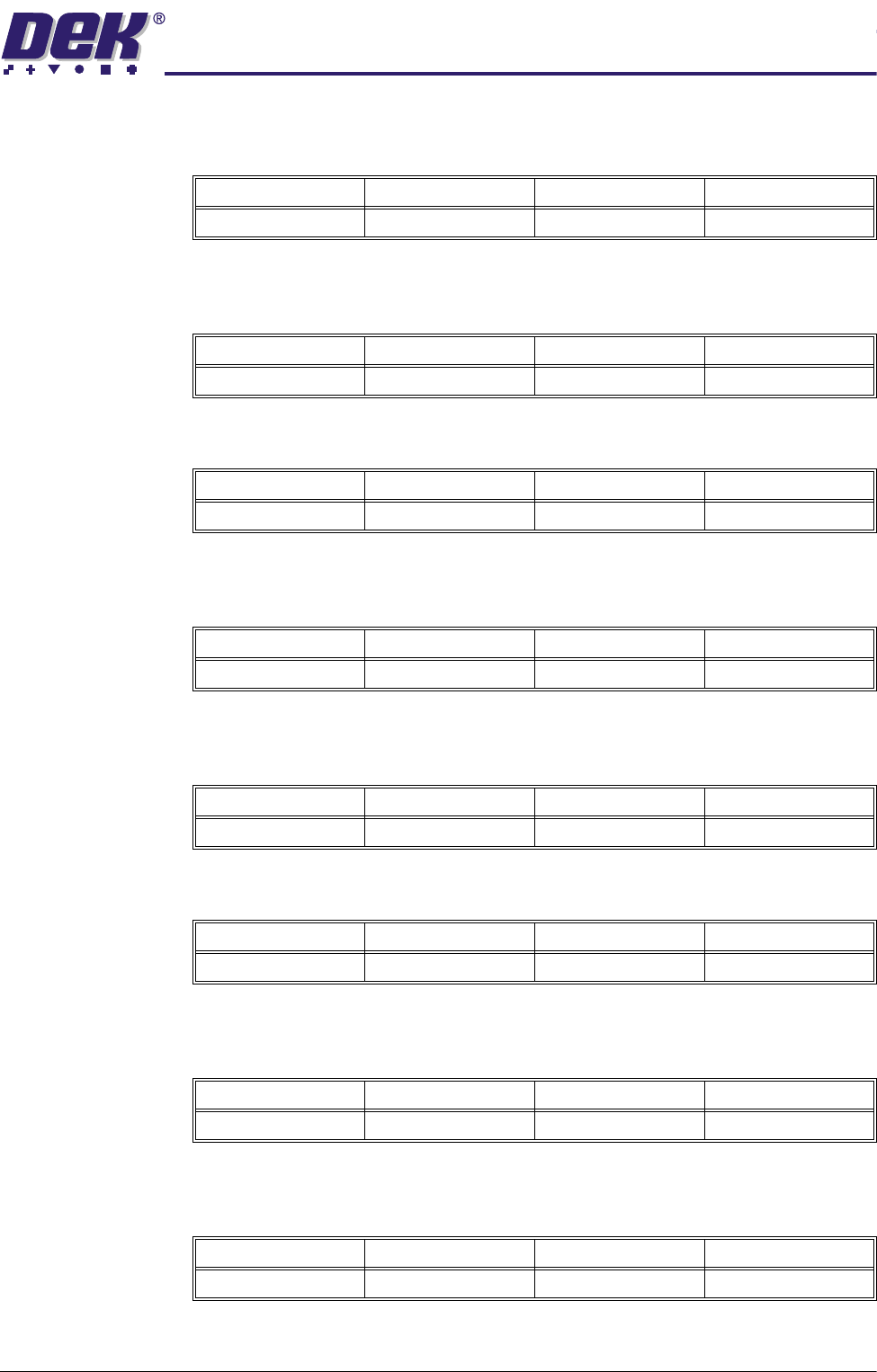
Vortex Clean Rate This parameter sets the frequency (in print cycles) at which screen cleaning
occurs.
Vortex Solvent
Rate
This parameter sets the frequency (in cleaning cycles) at which solvent is
dispensed.
Vortex Vac Start The distance, in from the front edge of the board, where vacuum is applied.
Vortex Vac Stop The distance, in from the front edge of the board, where vacuum application is
stopped.
Vortex Vacuum
Rate
This parameter sets the frequency (in cleaning cycles) at which vacuum is
applied.
Vaccum On Period This parameter sets the period for which vacuum is applied.
Front Start Offset
(Vortex USC)
This parameter determines the distance from the front edge of the board that
the cleaning stroke must finish.
Rear Start Offset
(Vortex USC)
This parameter determines the distance from the rear edge of the board that
cleaning must start.
Stop After Idle This parameter when enabled sets the time the product is held in contact with
Minimum Maximum Increment Default
0.0 200.0 1.0 0.0
Minimum Maximum Increment Default
1.0 10.0 1.0 1.0
Minimum Maximum Increment Default
Vacuum Stop Board Width 1.0 0.0
Minimum Maximum Increment Default
-100.0mm Vacuum Stop 1.0mm 0.0mm
Minimum Maximum Increment Default
1.0 10.0 1.0 1.0
Minimum Maximum Increment Default
0.0 sec 10.0 secs 1.0 sec 5.0 secs
Minimum Maximum Increment Default
-60.0mm 60.0mm 1.0mm 30.0mm
Minimum Maximum Increment Default
-60.0mm 60.0mm 1.0mm 30.0mm