00193687-06_Installation SIPLACE Explorer2.1_DE.pdf - 第24页
2 Systemkomponenten und -Konfigurationen Installati ons- und Konfigurationsanleitung SIPLACE Explor er 2.3 Standard-Installations-Varianten des SIPLACE Explorer Ausgabe 11/2006 DE 24
Installations- und Konfigurationsanleitung SIPLACE Explorer 2 Systemkomponenten und -Konfigurationen
Ausgabe 11/2006 DE 2.3 Standard-Installations-Varianten des SIPLACE Explorer
23
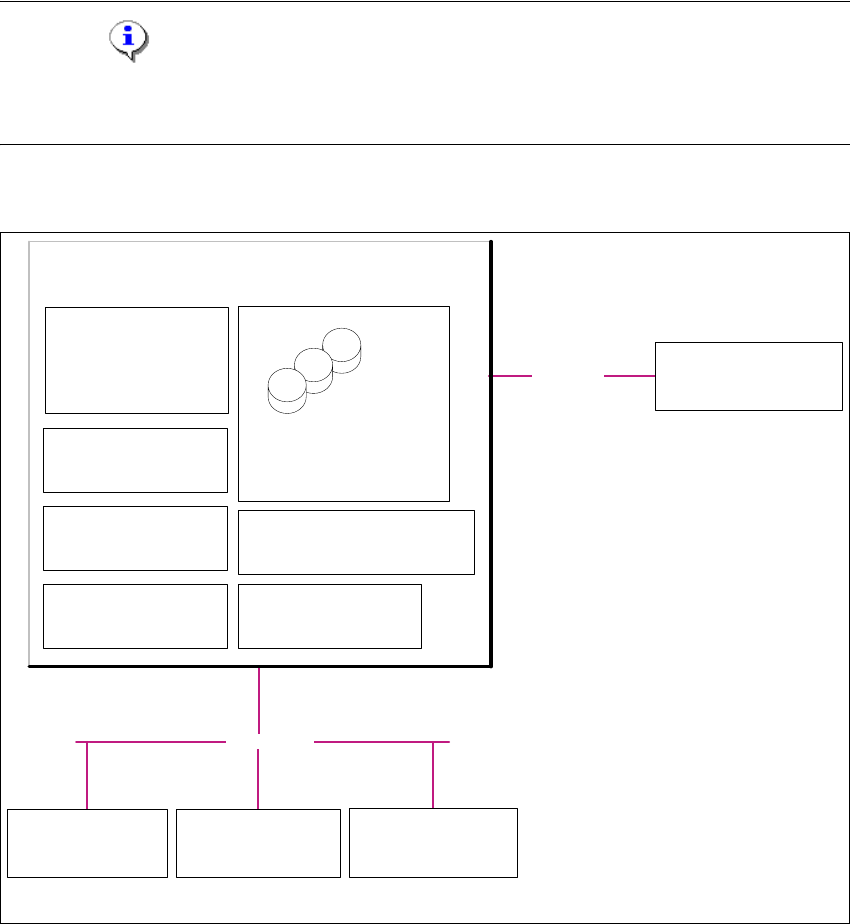
2.3.3 Single-Line-Layout
Die Installations-Variante Singel-Line-Layout unterstützt genau eine Multi Line. 2
Dabei wird SIPLACE Explorer komplett mit allen Systemkomponenten auf dem vorhandenenden
SIPLACE Linien-Server installiert. SIPLACE Pro und OIS/SIS sind ebenfalls auf diesem SIPLACE
Linien-Server installiert. 2
HINWEIS
Achten Sie darauf, dass mit dieser Installations-Variante nur eine Applikation mit bis zu 7
Maschinen überwacht werden kann. 2
Die folgende Übersicht stellt ein Beispiel für die Installations-Variante "Single-Line-Layout" dar: 2
2
Abb. 2.3 - 3 Installations-Variante: Single-Line-Layout
2
Kunden-LAN
- SIPLACE Pro Server
- SIPLACE Pro Desk
- Line Control Server /GUI
- OIS Server / OIS Client
- SIS Server
SIPLACE Explorer
Webpages:
- MS internet Explorer
- SIPLACE Pro-DB
- SIPLACE Explorer-DB
- SIPLACE Explorer Factory-DB
-OIS-DB
-SIS-DB
SIPLACE Line Server
(schon vorhanden)
SIPLACE Explorer
Factory Host
SIPLACE Explorer Webserver:
-Tomcat
- Java 2SE
Berichts-Generierung :
-MSXM
- Excel
SQL-Server
Kunden-Computer
SIPLACE Explorer Websites:
- MS Internet Explorer
SIPLACE Explorer
Runtime Environment
SIPLACE-LAN
Stations-Computer:
- OIS Client
- SW Software, Plattform I
Multi-Linie
Stations-Computer:
- OIS Client
- SW Software, Plattform II
Stations-Computer:
- OIS Client
- SW Software, Plattform III
2 Systemkomponenten und -Konfigurationen Installations- und Konfigurationsanleitung SIPLACE Explorer
2.3 Standard-Installations-Varianten des SIPLACE Explorer Ausgabe 11/2006 DE
24

Installations- und Konfigurationsanleitung SIPLACE Explorer 3 Installation des SIPLACE Explorer
Ausgabe 11/2006 DE 3.1 Erstinstallation von SIPLACE Explorer 2.1
25
3 Installation des SIPLACE Explorer
Bei der Installation von SIPLACE Explorer 2.1 gibt es zwei Möglichkeiten: 3
– Erstinstallation von SIPLACE Explorer 2.1
Sie haben noch keine Version von SIPLACE Explorer in Ihrem System installiert. Dazu
gehen Sie vor, wie unter “Erstinstallation von SIPLACE Explorer 2.1” auf Seite 25
beschrieben.
– Update-Installation von SIPLACE Explorer 2.1
Sie haben schon eine lauffähige Version von SIPLACE Explorer 1.2, 2.0 oder 2.0 SP1 auf
Ihrem System. Dazu gehen Sie vor, wie unter “Update-Installation von SIPLACE Explorer
2.1” auf Seite 56 beschrieben.
HINWEIS
Für eine zuverlässige Datenqualität aus SIPLACE Explorer müssen die Versionen der
unterstützten Datenquellen zu der Version des installierten SIPLACE Explorers passen. Daher
kann durch eine Erst- oder eine Upgrade-Installation von SIPLACE Explorer eine Anpassung der
unterstützten Datenquellen erforderlich sein. 3
3.1 Erstinstallation von SIPLACE Explorer 2.1
Sie können aus folgenden Installationsvorgängen wählen: 3
– SIPLACE Explorer 2.1 (siehe Seite 34)
Für SIPLACE Explorer 2.1 gibt es drei Installationsoptionen: 3
– SIPLACE Explorer V.2.1 Runtime Environment
– SIPLACE Explorer V.2.1 Factory Configuration Utility
– SIPLACE Explorer V.2.1 Development Environment