00193687-06_Installation SIPLACE Explorer2.1_DE.pdf - 第35页
Installations- und Konfigurationsanleitung SIPLAC E Explorer 3 Installation des SIPLACE Explorer Ausgabe 11/2006 DE 3.1 Erstinstallation von SIPLACE Explorer 2.1 35 → Die benutzergeführte Installation v on SIPLACE Explor…
3 Installation des SIPLACE Explorer Installations- und Konfigurationsanleitung SIPLACE Explorer
3.1 Erstinstallation von SIPLACE Explorer 2.1 Ausgabe 11/2006 DE
34
3.1.2 Installationsvorgang SIPLACE Explorer 2.1 - Erstinstallation
HINWEIS
Sie müssen über Windows Administrator-Rechte verfügen, um die Installation ausführen zu
können. 3
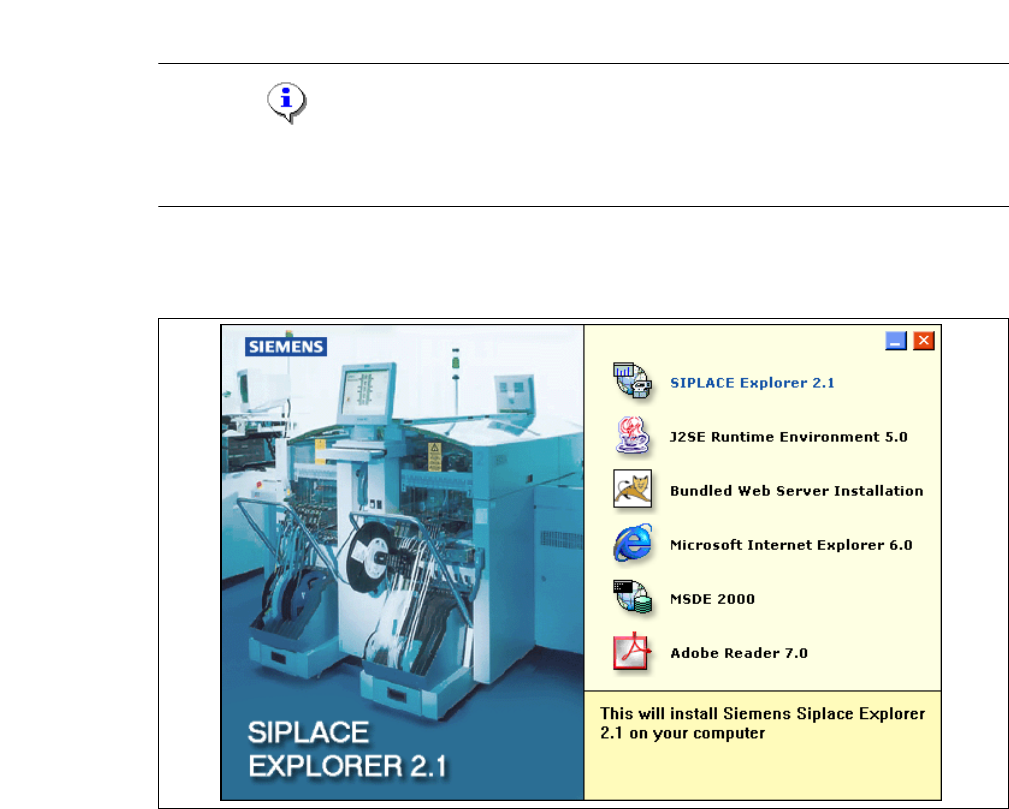
→ Legen Sie die SIPLACE Explorer CD in Ihr CD-Rom-Laufwerk ein. Es erscheint der Start
Screen.
3
Abb. 3 - 10 SIPLACE Explorer setup - Start Screen
→ Wählen Sie SIPLACE Explorer 2.1 aus.
Installations- und Konfigurationsanleitung SIPLACE Explorer 3 Installation des SIPLACE Explorer
Ausgabe 11/2006 DE 3.1 Erstinstallation von SIPLACE Explorer 2.1
35
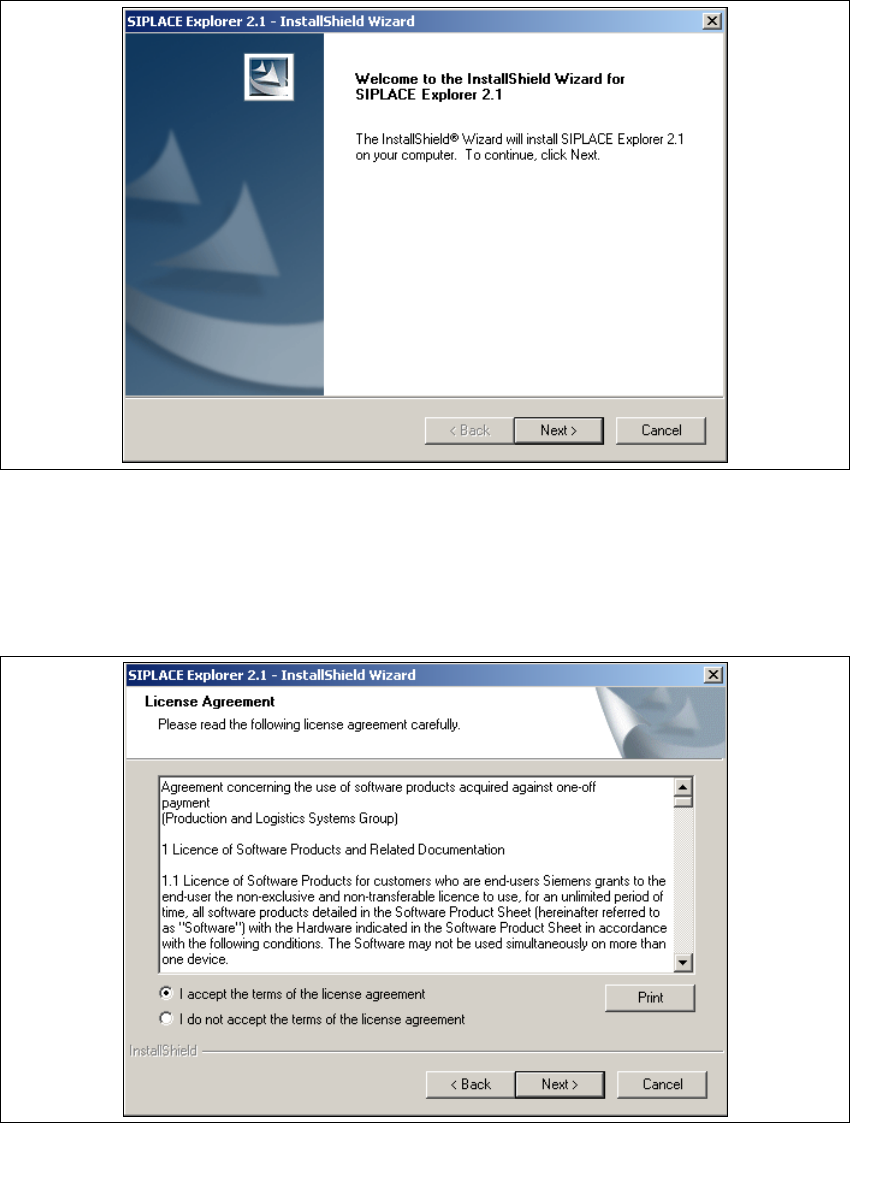
→ Die benutzergeführte Installation von SIPLACE Explorer wird gestartet.
3
Abb. 3 - 11 SIPLACE Explorer setup - Willkommen im SIPLACE Explorer
→ Beenden Sie alle anderen Programme und klicken Sie dann auf Next (Weiter). Das
Dialogfenster License Agreement wird geöffnet.
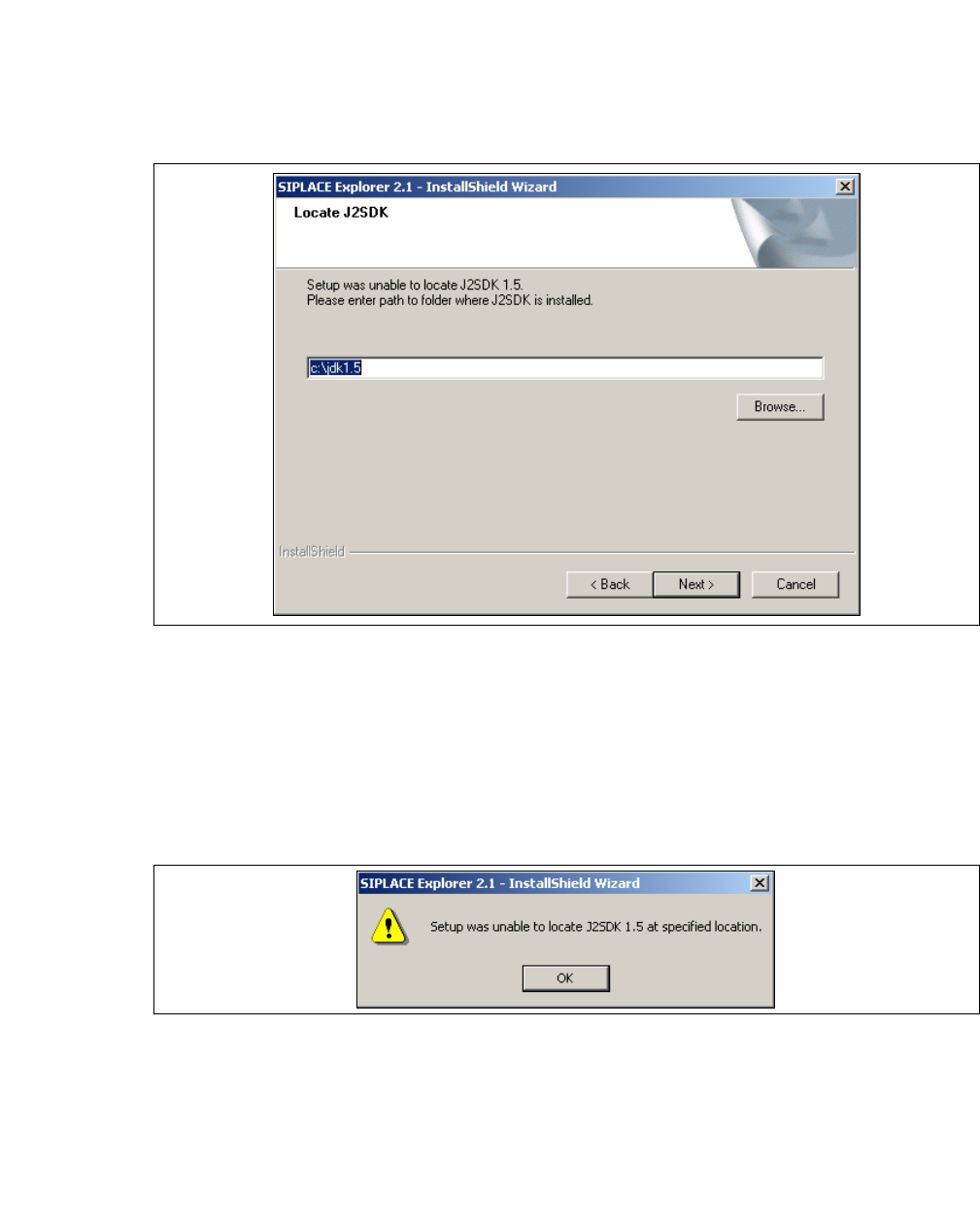
→ Lesen Sie die Lizenzbestimmungen. Wenn Sie zustimmen, I accept ... anklicken, ansonsten I
do not accept .... Wenn Sie I do not accept ... anklicken, wird die Installation beendet.
3
Abb. 3 - 12 SIPLACE Explorer Setup - Lizenzvereinbarungen
→ Bestätigen Sie Ihre Auswahl mit Next (Weiter).
3 Installation des SIPLACE Explorer Installations- und Konfigurationsanleitung SIPLACE Explorer
3.1 Erstinstallation von SIPLACE Explorer 2.1 Ausgabe 11/2006 DE
36
→ Damit SIPLACE Explorer lauffähig ist, muss J2SE Runtime Environment 5.0. Update 7 auf
Ihrem PC installiert sein. Wenn es bereits installiert ist beginnt die Installation des SIPLACE
Explorer automatisch.
→ Wenn beim Installationsversuch J2SE RTE 5.0.07 nicht gefunden wird, erscheint auf Ihrem
Bildschirm das Fenster Locate J2SDK (Finden).
3
Abb. 3 - 13 SIPLACE Explorer Setup - JAVA 2SDK finden
→ In diesem Fall können Sie entweder den Pfad des Ordners J2SE Runtime Environment 5.0
direkt im Textfeld eingeben oder die Schaltfläche Browse (Durchsuchen) anklicken und mit
Hilfe des Dialogfensters Open File (Datei öffnen) den Ordner J2SE Runtime Environment 5.0
suchen.
→ Wenn Sie den Ordner nicht korrekt angegeben haben, in dem J2SE Runtime Environment 5.0
installiert ist, erhalten Sie nachfolgende Meldung.
3
Abb. 3 - 14 SIPLACE Explorer Setup - J2SE kann nicht gefunden werden
→ Klicken Sie OK, um zum vorangegangenen Dialogfenster zurückzukehren. SIPLACE Explorer
erfordert vor der Installation von SIPLACE Explorer, dass J2SE Runtime Environment 5.0
installiert wurde.
→ An dieser Stelle können Sie entweder den J2SE Runtime Environment 5.0 Ordner nochmals
eingeben oder Cancel (Abbrechen) anklicken, um die Installation des SIPLACE Explorer
abzubrechen.