00198505-01_SM_SIPLACE_SmartFeeder_EN.pdf - 第16页
2 General 2.3 Equipment Required 16 Service Manual SIPLACE SmartFeeder 4 - 104 mm X 11/2017 2.3 Equipment Required Tools You need the following tools to remove and fasten the spare parts described in this manual: Torque …

2 General
2.1 Requirements
Service Manual SIPLACE SmartFeeder 4 - 104 mm X 11/2017 15
2 General
X Feeder Care is a package of tools, testing equipment and documents, such as manuals, de-
signed to help your service staff independently perform inspection and cleaning work, plus the most
frequent repair tasks to X feeder modules.
X Feeder Care is used in the production and maintenance environment (repair shop). Furthermore,
the X Feeder Test Station can be used, for example, at the pre-setup unit (setup area), to rapidly
check the functionality of feeders e.g. before these are stored away.
The areas in which the X Feeder Test Station and the tools provided with it are used are ESD-com-
patible. This ensures that neither that equipment itself or the components in the feeder are at risk.
The X Feeder Care [00140113-01] product consists of:
●
X Feeder Test Station [03076685-xx]
●
Job Guide "X Feeder Test Station" (German [00196352‑xx], English [00196353‑xx]
Other languages on request.
●
Job Guide "X Feeder Inspection and Maintenance" (German [00196358-xx], English
[00196359‑xx]
Other languages on request.
●
Service manual "X Feeder Care" for SmartFeeder X (German [00198504‑xx], English
[00198505-xx])
●
X Feeder Care tools (included in package and not available for individual order)
The X Feeder Care processes differ as follows:
●
Inspection
Tasks to check and assess the current state of the feeder modules
●
Service
Regular tasks as detailed in the service manual for inspection and cleaning, lubrication and
replacement of consumables and wear parts.
●
Repair
Tasks, for resetting defective feeders back to their original, functional state
NOTICE
Area of application
The tasks described in this manual apply for the following areas:
- SmartFeeder 2x8mmX
- SmartFeeder 4mmX - 104mmX
2.1 Requirements
To correctly repair X feeder modules, you require an ESD-compatible workplace with a stable, level
and clean surface.
2.2 Warranty
CAUTION
Observe the clauses in the warranty agreements for your feeder.
On the bottom right side of the tape drive, you will find a warranty seal. If you still have a
valid warranty claim for the feeder module, this will be violated if you break the warranty
seal.
2 General
2.3 Equipment Required
16 Service Manual SIPLACE SmartFeeder 4 - 104 mm X 11/2017
2.3 Equipment Required
Tools
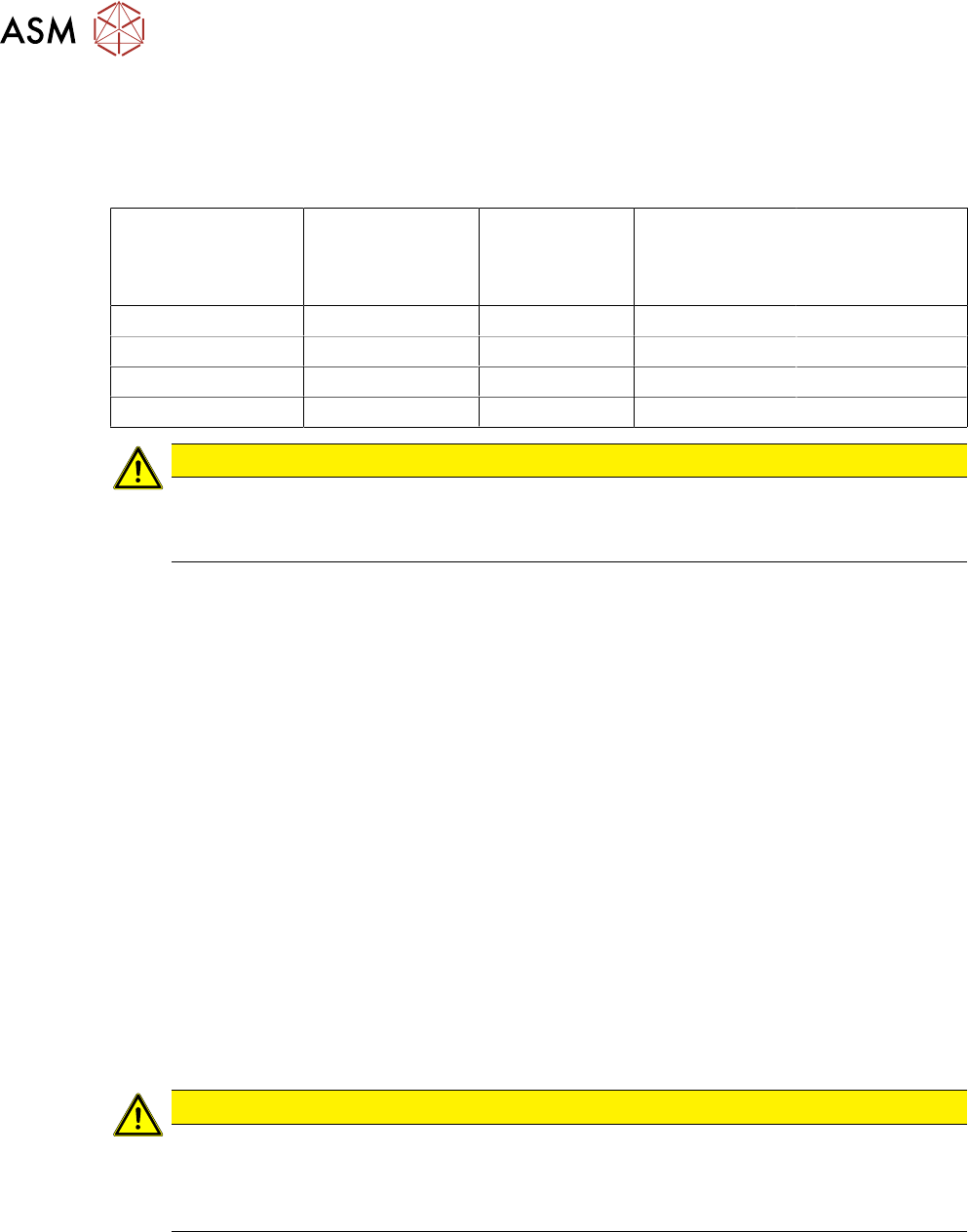
You need the following tools to remove and fasten the spare parts described in this manual:
Torque screwdriver Phillips inter-
changeable bit
Interchangeable
bit for slotted-
head screws
Interchangeable
bit for hexagon
screws
size 2
TORX
interchangeable
bit
size T8
0.2 Nm X
0.35 Nm X
0.6 Nm X X X
0.9 Nm X
CAUTION
Observe the torque
The torque screwdriver and interchangeable bits are delivered separately.
Make sure that the bits are assigned correctly during assembly work.
●
Flat-bladed (slotted) screwdriver size 1
●
Phillips screwdriver
●
Allen key size 3
●
Tweezers
●
Split pin punch size 1.4
●
Circlip pliers for outer rings 3-10 mm
●
Long clamping wrench item no. 03076659-xx
●
Sliding foil remover item no. 03075421-xx
●
Gauge for tape drive motor /X12-16 V2, item no. 03085120-xx
●
Gauge for foil disposal motor /X12-16 V2, item no. 03085119-xx
Consumables
●
Polylub GLY 801 (grease)
●
Ethanol
●
Double-sided adhesive tape
2.4 Safety Instructions
CAUTION
Observe the ESD regulations!
When working on the feeder module, pay attention to ESD safety.
Before you open the side cover, make sure you are wearing the ESD protection wristband,
to prevent damage to the highly sensitive boards inside the feeder.
2 General
2.5 Creating new labels for feeder modules
Service Manual SIPLACE SmartFeeder 4 - 104 mm X 11/2017 17
2.5 Creating new labels for feeder modules
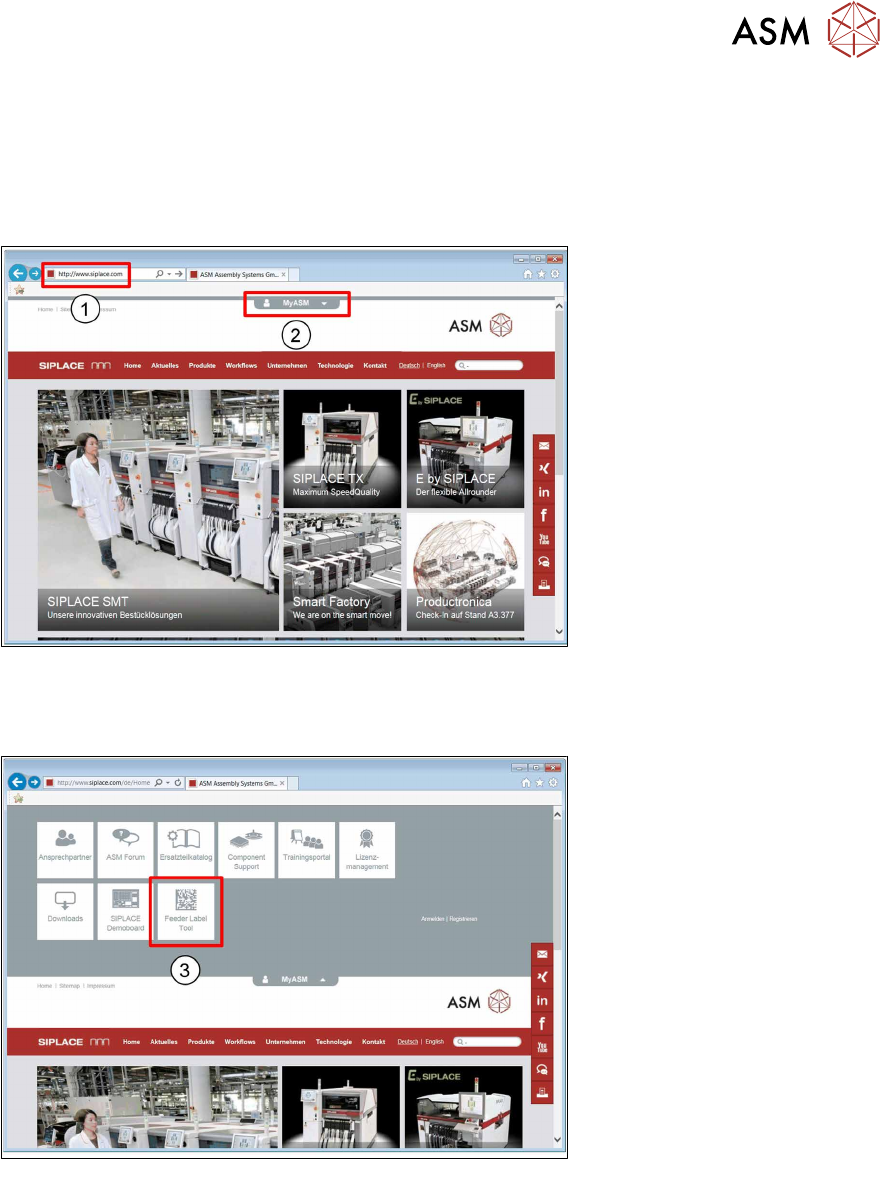
If you need replacement labels for your feeder modules, you can create these online, at the
SIPLACE website. Simply enter the serial number and the feeder ID of the SIPLACE feeder mod-
ule and the SIPLACE Feeder Label Tool will generate a new label for you to download.
► Start your internet browser.
1. Enter the URL www.SIPLACE.com in the address line.
2. In the website header, click on the MYSPACEicon .
3. Click on the Feeder Label Toolicon .