00198505-01_SM_SIPLACE_SmartFeeder_EN.pdf - 第125页
7 Repairs to SmartFeeder 8 mm X 7.14 Handle with control panel Service Manual SIPLACE SmartFeeder 4 - 104 mm X 11/2017 125 7.14.2 Other spare parts on the handle Required spare parts Fig.39: Spare parts for handle Smart…
7 Repairs to SmartFeeder 8 mm X
7.14 Handle with control panel
124 Service Manual SIPLACE SmartFeeder 4 - 104 mm X 11/2017
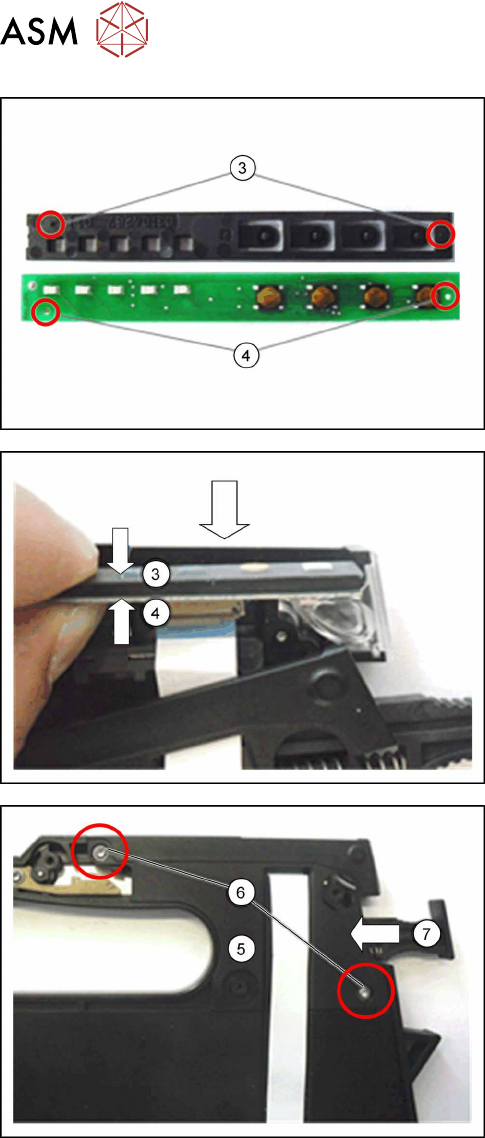
► Insert the control panel(3) with the marked pins
into the marked holes(4) on the board.
► Push the control panel(3) together with the
board(4) sideways into the feeder module guid-
ance provided.
► Make sure that the flat ribbon cable is not
pinched or pulled out of the connection on the
board.
► Carefully life the cap on the foil stuffing unit(5)
into the position shown on the feeder module
base. Make sure that the flat ribbon cable hangs
out of the cap as shown.
► Fasten the cap on the foil stuffing unit at the
marked points(6) with 2 screws. Use a size 8
TORX screwdriver and 0.6 Nm for this.
► Make sure that the lock(7) on the feeder module
moves easily and that no components are
trapped or pinched.
► Fasten the left side cover (see 7.3.2 "Fitting the
left side cover" [}83]).
7 Repairs to SmartFeeder 8 mm X
7.14 Handle with control panel
Service Manual SIPLACE SmartFeeder 4 - 104 mm X 11/2017 125
7.14.2 Other spare parts on the handle
Required spare parts
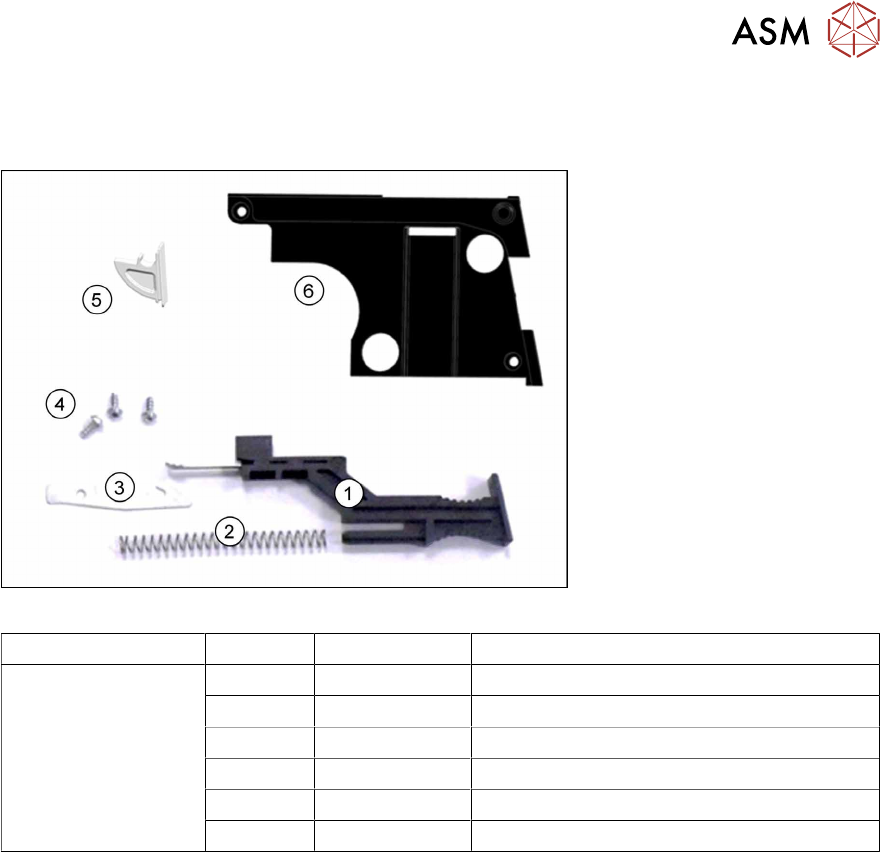
Fig.39: Spare parts for handle SmartFeeder 8 mm X
Feeder module Position Item no. Designation
SmartFeeder 8mmX 1 03108403Sxx Slide for foil stuffing unit assy. X8Smart
2 03009150Sxx Pressure spring VD-090V
3 03113828Sxx Spring hook for slide X8Smart
4 03033796-xx RF-SN75-2.5 x 6-9.8
5 03101437Sxx Window for operating panel X8Smart
6 03101508Sxx Cover for foil stuffing unit X8Smart
Required tools
●
Phillips screwdriver 0.9Nm
●
TORX screwdriver 0.6Nm, size T8
●
Tweezers or flat pliers
7 Repairs to SmartFeeder 8 mm X
7.14 Handle with control panel
126 Service Manual SIPLACE SmartFeeder 4 - 104 mm X 11/2017
7.14.2.1 Removing other spare parts
► Carefully place the feeder module with the right side down on a stable, level and clean sur-
face.
► Remove the left side cover (see 7.3.1 "Removing the Left Side Cover" [}83]).
► Remove the operating panel (see 7.14.1.1 "Removing the Control Panel and Board" [}122]).
If you have removed the operating panel, the cover on the foil stuffing unit will be accessible and
can be replaced if necessary.
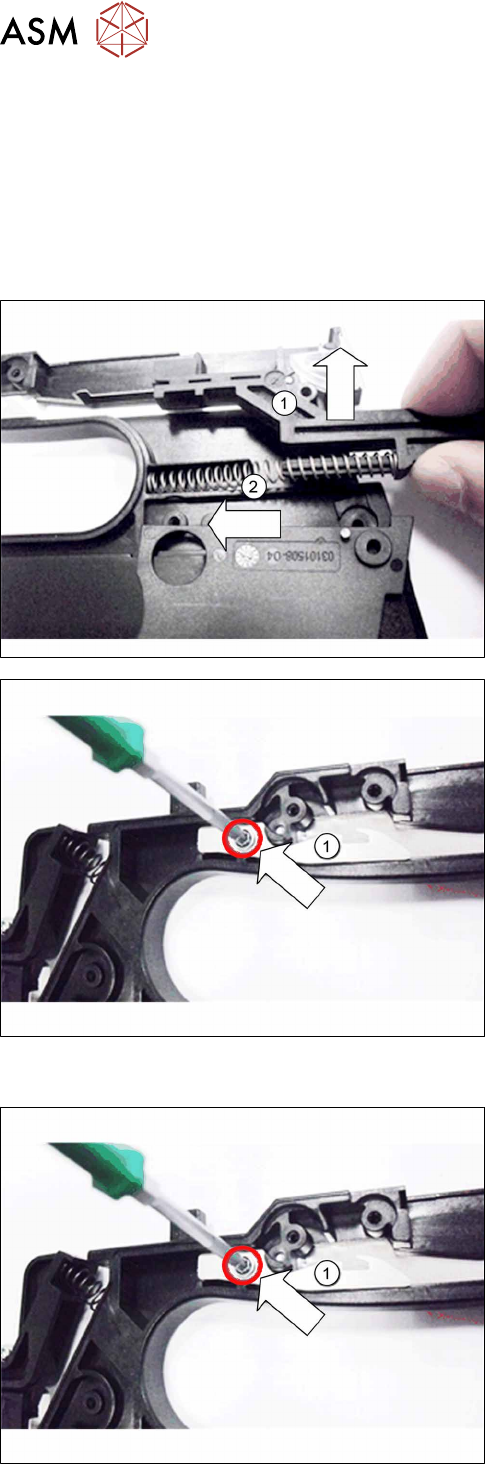
► Pull the slide up and out of the handle. (1)
► Remove the pressure spring. (2)
► Remove the screw which fastens the spring
hook(1) to the handle.
► Remove the spring hook.
7.14.2.2 Fitting other spare parts
► Hold the spring hook as shown(1) by the handle,
so that you can look through the opening and see
the hole for the screw.
► Screw the spring hook to the handle. Use a size
T8 TORX screwdriver with 0.6 Nm for this.