00198505-01_SM_SIPLACE_SmartFeeder_EN.pdf - 第138页
8 Repairs to SmartFeeder 2x8 mm X 8.4 EDIF 138 Service Manual SIPLACE SmartFeeder 4 - 104 mm X 11/2017 8.4.1 Removing the EDIF secondary assembly / X Smart ► Place the feeder on a stable, level and clean sur- face. ► Rem…
8 Repairs to SmartFeeder 2x8 mm X
8.4 EDIF
Service Manual SIPLACE SmartFeeder 4 - 104 mm X 11/2017 137
8.3.4 Fitting the Right Side Cover
► Carefully place the feeder module with the left-
hand side down on a stable, level and clean sur-
face.
► Ensure the foil disposal cover is in place.
► Place the side cover onto the feeder.
► Make sure that the side cover is aligned flush
with the operating panel.
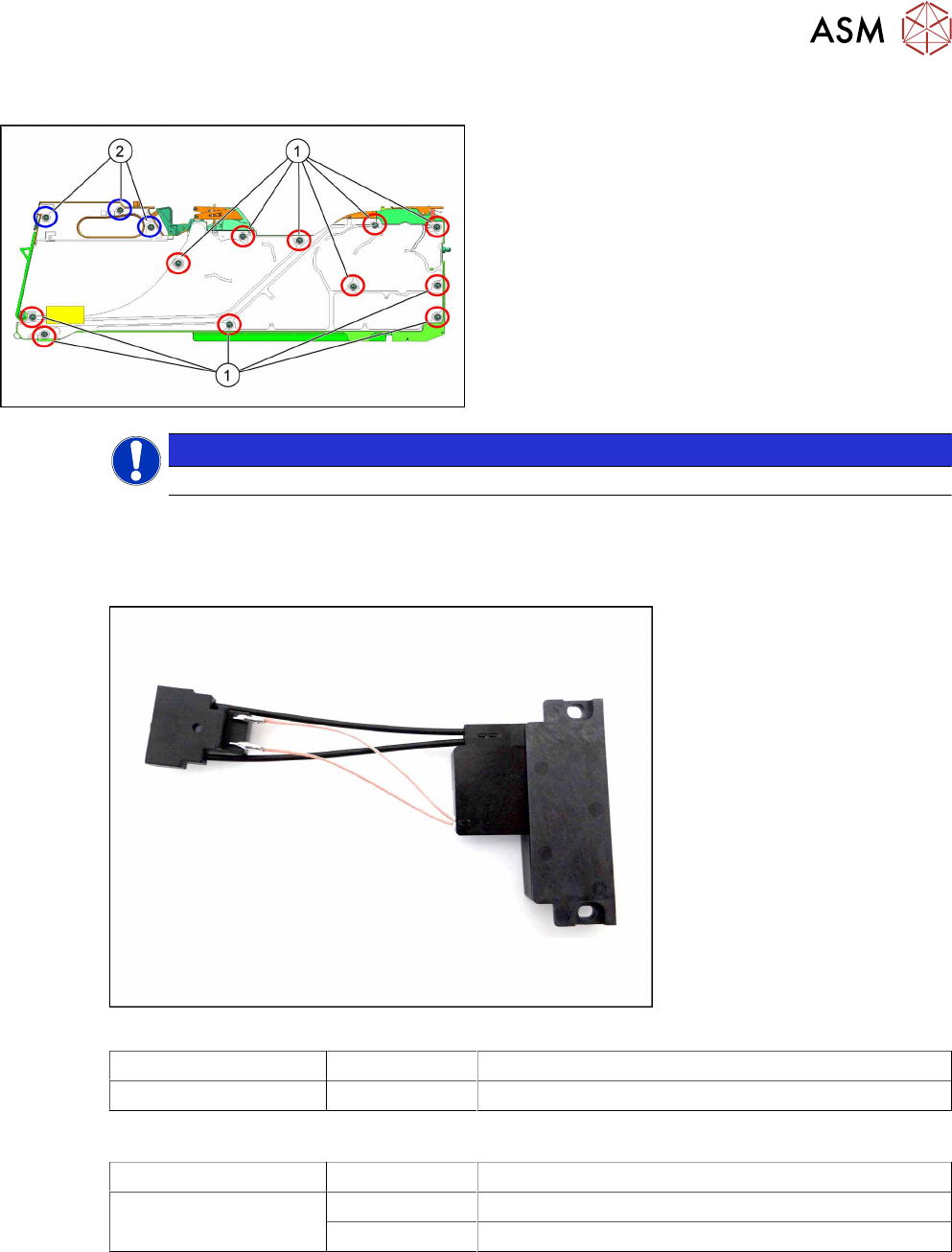
1. Blue circles show screws for which you need a
TORX screwdriver with a torque of 0.6Nm.
2. Red circles show screws, for which you need a
Phillips screwdriver with a torque of 0.6Nm.
NOTICE
When you tighten the screws, make sure that these are NOT distorted.
8.4 EDIF
Required spare part
Fig.44: EDIF secondary assembly X Smart
Feeder module Item no. Designation
SmartFeeder 2x8mmX 03125222Sxx EDIF secondary assembly X Smart
Spare parts also available
Feeder module Item no. Designation
SmartFeeder 2x8 mm X 03012683-xx Pressure spring D-027
03068667-xx Collar screw ø4x4.5 M3 /X2x8
Required tools
●
Flat-bladed screwdriver
●
Phillips screwdriver
8 Repairs to SmartFeeder 2x8 mm X
8.4 EDIF
138 Service Manual SIPLACE SmartFeeder 4 - 104 mm X 11/2017
8.4.1 Removing the EDIF secondary assembly / X Smart
► Place the feeder on a stable, level and clean sur-
face.
► Remove the left side cover (see 8.3.1 "Removing
the Left Side Cover" [}135]).
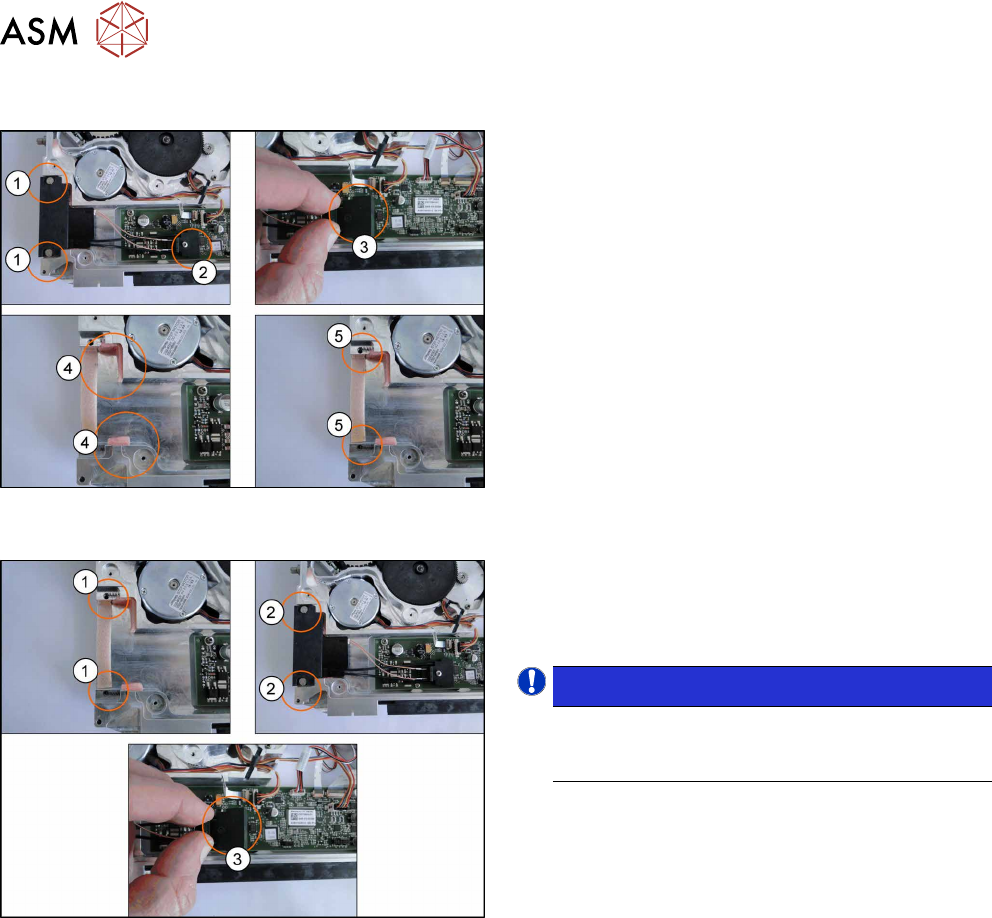
► Loosen and remove the two collar screws(1).
► Loosen and remove the Phillips screw(2).
► Carefully lift the connector from the main
board(3).
► Remove any foam seals present (4).
► Check the pressure springs for damage and re-
place where necessary(5).
8.4.2 Fitting the EDIF secondary assembly X Smart
► Insert the two pressure springs(1) into the ducts
provided.
If the pressure springs are bent, these will need
to be replaced.
NOTICE!
During insertion, make sure that the two
pressure spring point forwards, to the EDIF
and are not distorted.
.
► Push the EDIF(2) into the recess at the front of
the feeder module.
► Fasten the EDIF with the two collar screws.
► Check whether the EDIF springs back to the front
if slight pressure is applied to it.
If the EDIF does not spring back, loosen the two collar
screws(2) and make sure that the two pressure
springs(see 1 previous figure) are aligned towards the
front and are not bent.
► Place the connector on the main board, ensuring
the alignment pins are centered(3).
► Fix the connector to the board with the Phillips
screw and carefully tighten.
► Fit the left side cover (see 8.3.2 "Fitting the Left
Side Cover" [}136]).
8 Repairs to SmartFeeder 2x8 mm X
8.5 Pickup window
Service Manual SIPLACE SmartFeeder 4 - 104 mm X 11/2017 139
8.5 Pickup window
Required spare part
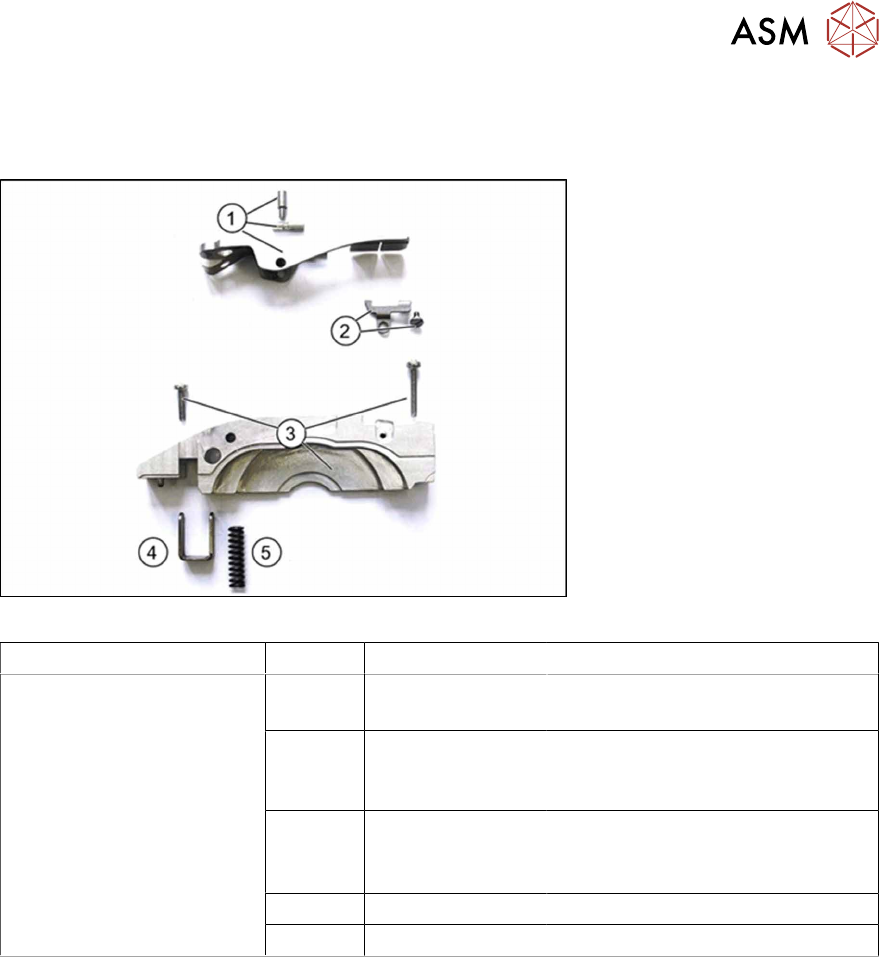
Fig.45: Pickup window assy. /X2x8
Feeder module Position Item no. Designation
SmartFeeder 2x8mm X 1 03078710-xx
03077394-0102
Pickup window assy. /X2x8
Axis pickup window /X2x8
2 03053708Sxx
03077823-xx
Rocker lever /X2x8
(with collar screw)
Collar screws /X2x8
3 03077354-xx
03010210-xx
03010214-xx
Tape duct /X2x8
ISO 7045 - M2.5 x 8-A2-50-H
ISO 7045 - M2.5 x 16-A2-50-H
4 03077381-xx Pressure bracket /X2x8
5 03077928-xx Pressure spring 0.85x5.1x18.3
Required tools
●
Phillips screwdriver
●
Tweezers
●
Allen key 1.5