00198505-01_SM_SIPLACE_SmartFeeder_EN.pdf - 第162页
8 Repairs to SmartFeeder 2x8 mm X 8.7 Drives 162 Service Manual SIPLACE SmartFeeder 4 - 104 mm X 11/2017 8.7.3 Hybrid stepping motor assembly left / right Required spare part Fig.50: Hybrid stepping motor assembly Feede…
8 Repairs to SmartFeeder 2x8 mm X
8.7 Drives
Service Manual SIPLACE SmartFeeder 4 - 104 mm X 11/2017 161
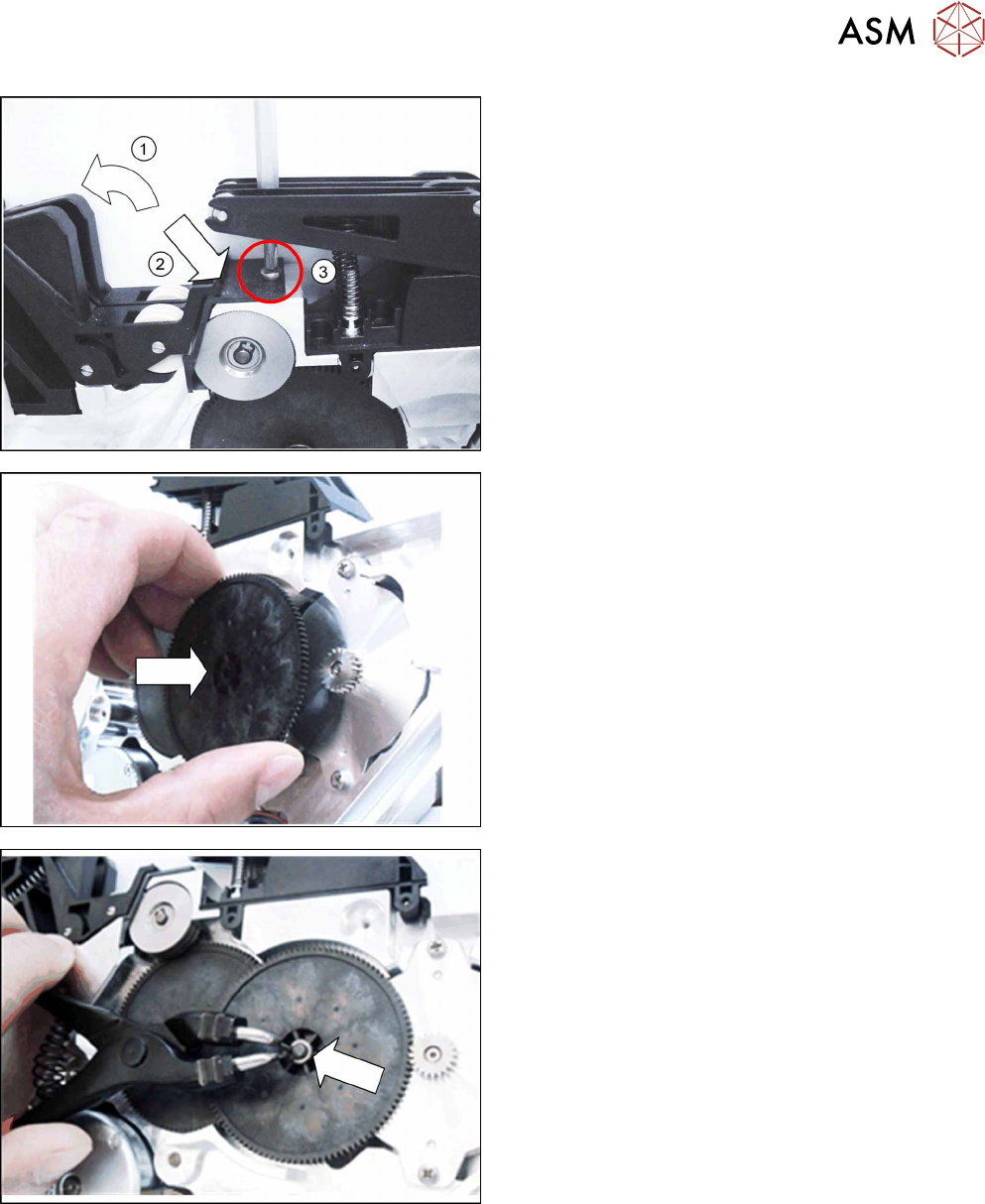
► Press the two rockers towards the back.(1)
► Push the wiper plate to the position shown so
that you can see the hole for the screw through
it.(2)
► Screw the wiper plate into place.(3)
► Push the shifted gear1 as far as the stop onto
the axis.
Make sure that the teeth in the shifted gear1 cor-
rectly engage with the teeth of the drive.
► Place the washer onto the axis of shifted gear 1.
► Fasten the circlip to the axis.
Use the relevant circlip pliers for this.
► Fasten the right side cover (see8.3.4 "Fitting the
Right Side Cover" [}137] ).
8 Repairs to SmartFeeder 2x8 mm X
8.7 Drives
162 Service Manual SIPLACE SmartFeeder 4 - 104 mm X 11/2017
8.7.3 Hybrid stepping motor assembly left / right
Required spare part
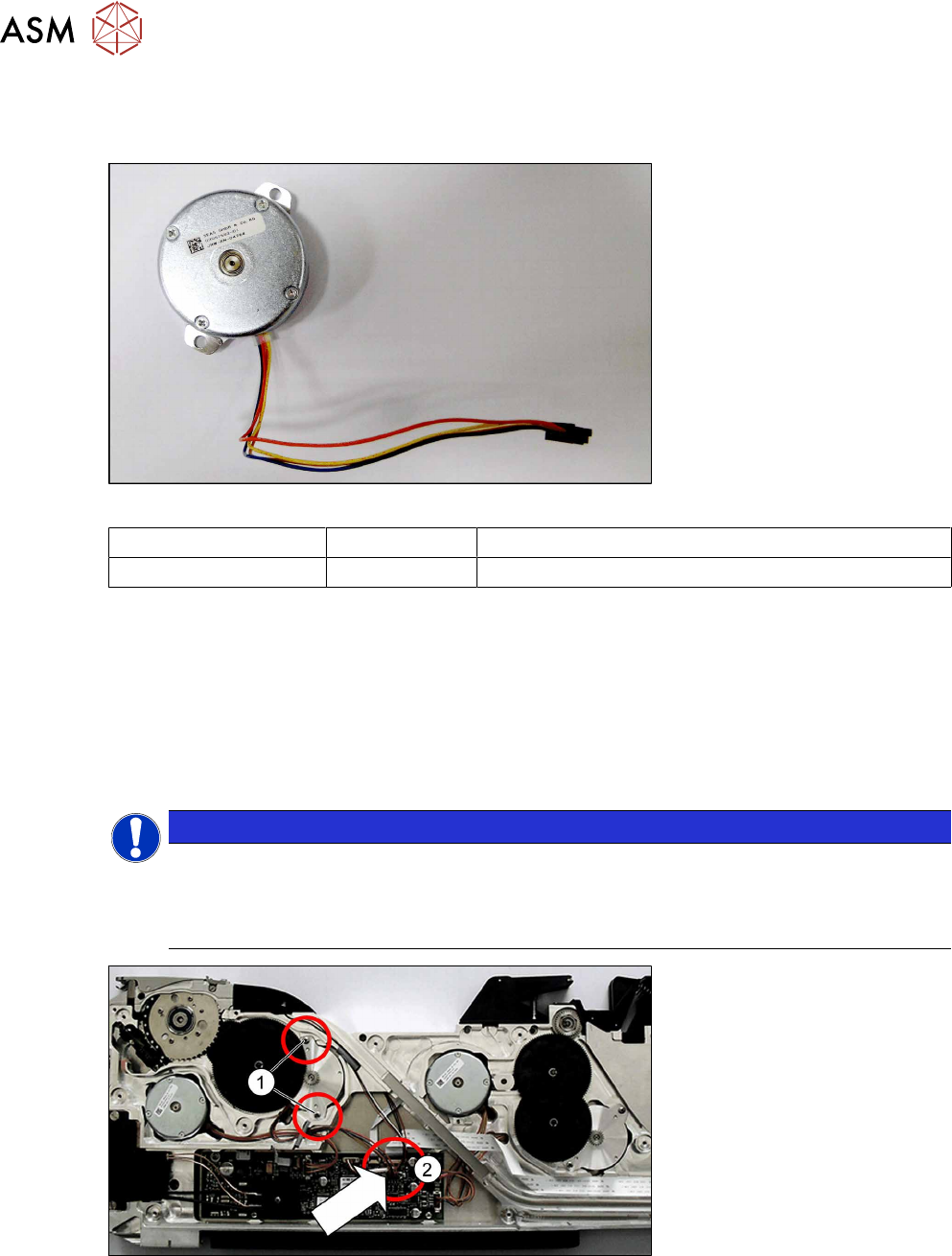
Fig.50: Hybrid stepping motor assembly
Feeder module Item no. Designation
SmartFeeder 2x8mmX 03057582-xx Hybrid stepping motor assembly
Required tools
●
TORX screwdriver 0.6Nm, size T8
●
Phillips screwdriver 0.9Nm
●
Gauge for tape drive motor /X2x8, item no. 03080225-xx
●
Gauge for foil drive /X2x8, item no. 03080235-xx
8.7.3.1 Removing the hybrid stepping motor assy.
NOTICE
The removal procedure is the same for the left and right lane.
This section describes the removal of the hybrid stepping motor on the left side (lane 1).
The removal procedure for the hybrid stepping motor on the right side (lane 2) is the same,
except that it is laterally reversed.
► Place the feeder module with the right side down on a stable, level and clean surface.
► Remove the left side cover (see 8.3.1 "Removing the Left Side Cover" [}135]).
► Remove the shifted gear tape (see 8.7.1.1 "Removing the shifted gear 1 tape left/right" [}151]).
► Remove the two screws marked in the diagram.(1)
► Remove the plug of the motor cable from the main board.(2)
► Remove the motor and cable.
8 Repairs to SmartFeeder 2x8 mm X
8.7 Drives
Service Manual SIPLACE SmartFeeder 4 - 104 mm X 11/2017 163
8.7.3.2 Fitting the hybrid stepping motor assembly
NOTICE
The installation procedure is the same for the left and right lane.
This section describes the installation of the hybrid stepping motor on the left side (lane 1).
The installation procedure for the hybrid stepping motor on the right side (lane 2) is the
same, except that it is laterally reversed.
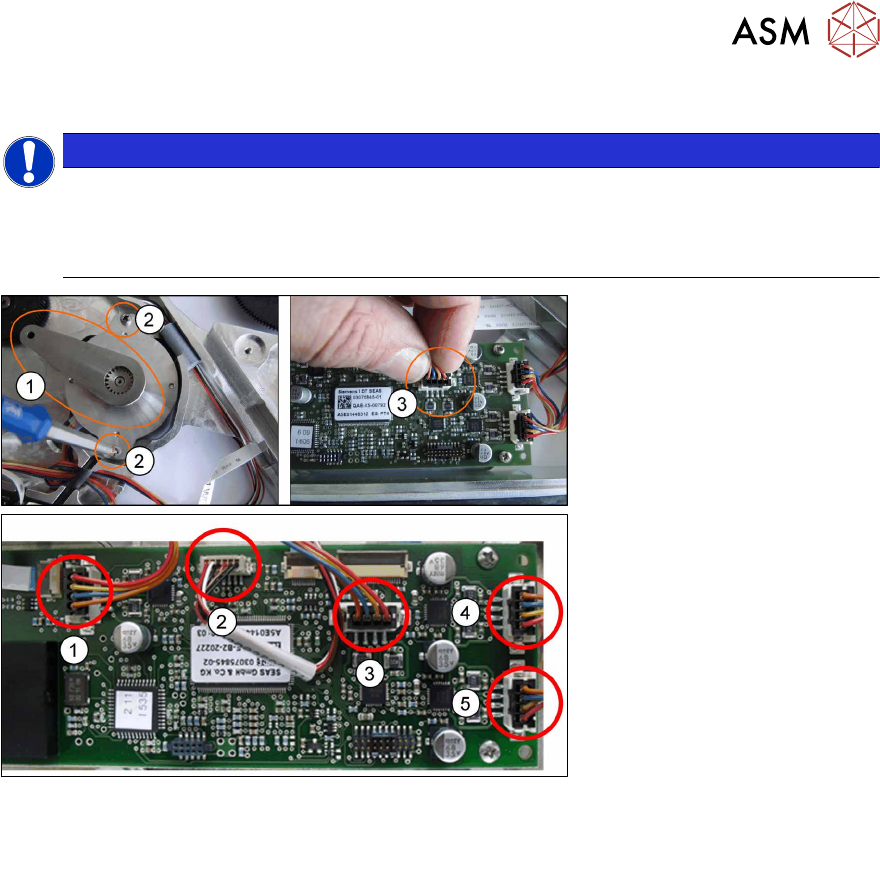
Fig.51: Overview of connections on the control board
1. Tape drive left lane (lane 1) 3. Foil drive left lane (lane 1)
2. Tape drive right lane (lane 2) 4. Foil drive right lane (lane 2)
► Place the hybrid stepping motor in position and run the cable through the housing.
► Fit the gauge for the tape motor(1).
► Use the two Phillips screws marked in the diagram to fasten the motor to 0.9Nm. (2)
► Remove the gauge.
► Plug the motor cable connector into the relevant connection on the control board e.g. for the
foil drive of the left lane (lane 1).(3)
Select the connection which matches the motor from the "Overview of connections on the
control board" shown above.
► Refit the shifted gear (see 8.7.1.2 "Fitting the shifted gear 1 left / right tape" [}151]).
► Fasten the left side covers (see 8.3.2 "Fitting the Left Side Cover" [}136]).