00198505-01_SM_SIPLACE_SmartFeeder_EN.pdf - 第189页
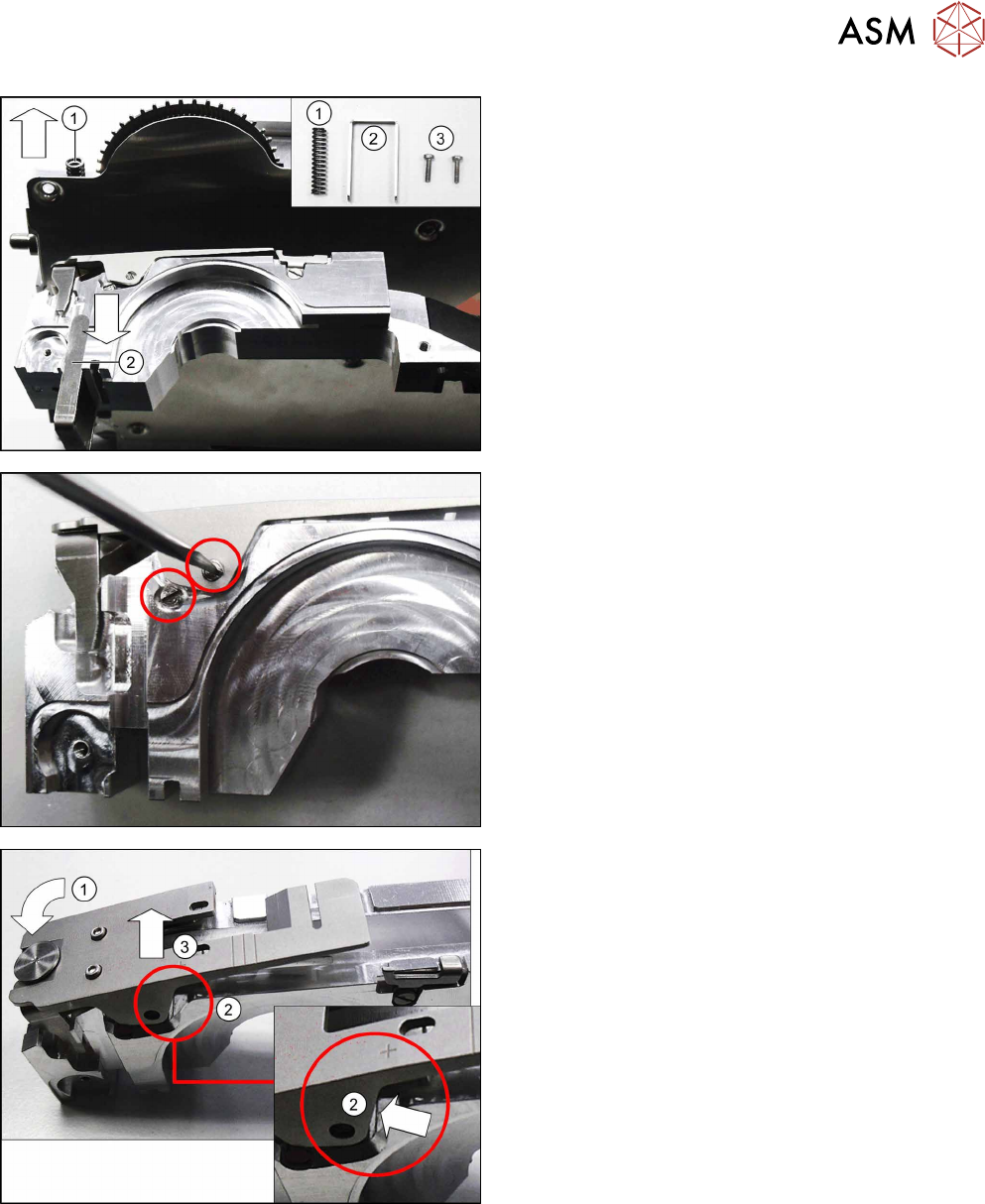
9 Repairs to SmartFeeder 12 mm X / 16 mm X 9.5 Pickup window Service Manual SIPLACE SmartFeeder 4 - 104 mm X 11/2017 189 ► Remove the compression spring (1) , the pressure fork (2) and the two screws (3) , so that the…
9 Repairs to SmartFeeder 12 mm X / 16 mm X
9.5 Pickup window
188 Service Manual SIPLACE SmartFeeder 4 - 104 mm X 11/2017
9.5.1 Removing the Pickup Window
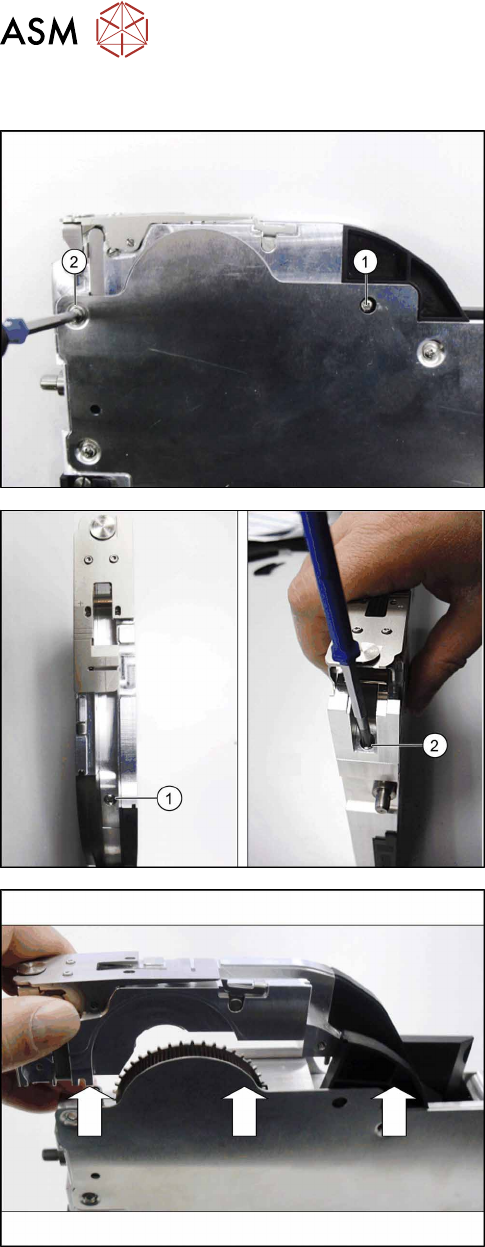
► Carefully place the feeder module with the right
side down on a stable, level and clean surface.
► Remove the screw from the splice sensor.(1)
► Remove the top left screw from the side
cover.(2)
► Stand the feeder module up.
► Remove the back screw on the tape duct.(1)
► Hold the pickup window and tape duct with one
hand (as shown) to counteract the spring force of
the compression spring.
► Remove the front screw of the tape duct.(2)
► Lift the tape duct with pickup window and ramp
out of the feeder module.
9 Repairs to SmartFeeder 12 mm X / 16 mm X
9.5 Pickup window
Service Manual SIPLACE SmartFeeder 4 - 104 mm X 11/2017 189
► Remove the compression spring(1), the pressure
fork(2) and the two screws(3), so that these are
not lost.
► Place the feeder module carefully down on a
stable, level and clean surface.
► Place the tape duct carefully down on its right
side, onto a stable, level and clean surface.
► Remove the two marked screwed axes.
► Press the front of the pickup window down as far
as the stop.(1)
Make sure that the pickup window is pressed into
the recess on the tape duct.(2)
► Press the pickup window into the recess on the
tape duct.(3)
Make sure that the pickup window is pushed out
of the snap tab on the right side of the tape duct.
9 Repairs to SmartFeeder 12 mm X / 16 mm X
9.5 Pickup window
190 Service Manual SIPLACE SmartFeeder 4 - 104 mm X 11/2017
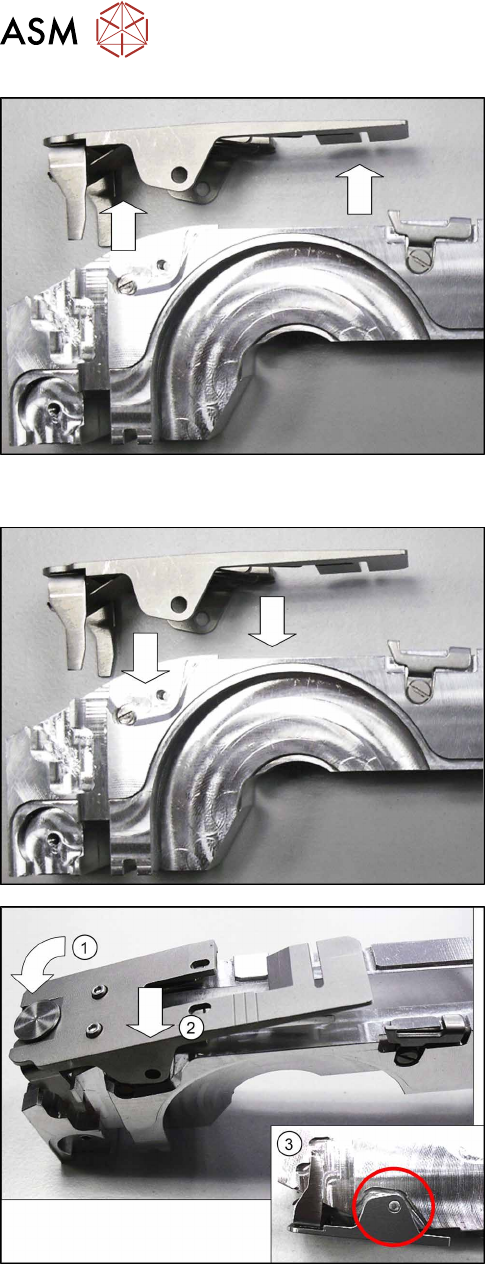
► Lift the pickup window up and off the tape duct.
9.5.2 Fitting the Pickup Window
► Fit the pickup window onto the tape duct from
above.
► Press the front of the pickup window down.(1)
► Push the pickup window sideways into the posi-
tion shown.(2)
Make sure that the pickup window engages in the
snap tab on the right-hand side of the tape
duct.(3)