00198505-01_SM_SIPLACE_SmartFeeder_EN.pdf - 第71页
6 Repairs to SmartFeeder 4 mm X 6.15 Handle with control panel Service Manual SIPLACE SmartFeeder 4 - 104 mm X 11/2017 71 6.15.1.1 Removing the Control Panel and Board ► Carefully place the feeder module with the right s…
6 Repairs to SmartFeeder 4 mm X
6.15 Handle with control panel
70 Service Manual SIPLACE SmartFeeder 4 - 104 mm X 11/2017
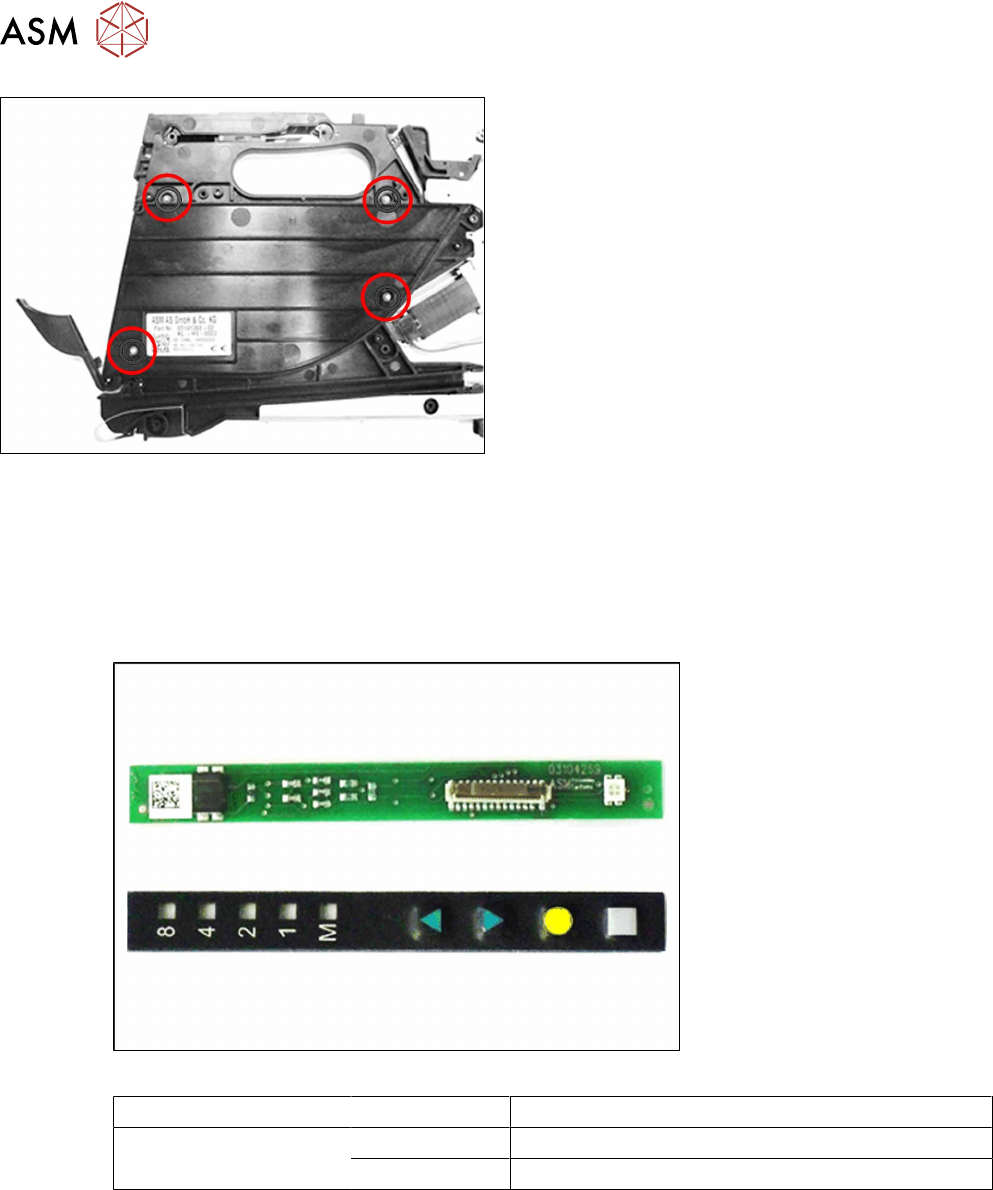
► Remove the 4 screws marked in the diagram.
Use a size 8 TORX screwdriver for this.
► Carefully remove the insertion foil container.
► Clean the foil container thoroughly and remove
all foil and adhesive residues.
► Insert the insertion foil container again.
► Fix the foil container with the 4 screws marked in
the diagram. Use a size 8 (0.6 Nm) TORX screw-
driver for this.
► Fit the right side cover (see 6.3.4 "Fitting the Right Side Cover" [}33]).
6.15 Handle with control panel
6.15.1 Control Panel Assembly
Required spare part
Fig.19: Board assy. control panel (top), control panel assy. (bottom)
Feeder module Item no. Designation
SmartFeeder 4mm X 03104269-xx Board assy. control panel X8Smart
03102428 -xx Control panel assy. X8Smart
Required tools
●
Phillips screwdriver 0.9Nm
●
TORX screwdriver size T8, 0.6Nm
●
Tweezers or small screwdriver
6 Repairs to SmartFeeder 4 mm X
6.15 Handle with control panel
Service Manual SIPLACE SmartFeeder 4 - 104 mm X 11/2017 71
6.15.1.1 Removing the Control Panel and Board
► Carefully place the feeder module with the right
side down on a stable, level and clean surface.
► Remove the left side cover (see 6.3.1 "Removing
the Left Side Cover" [}31]).
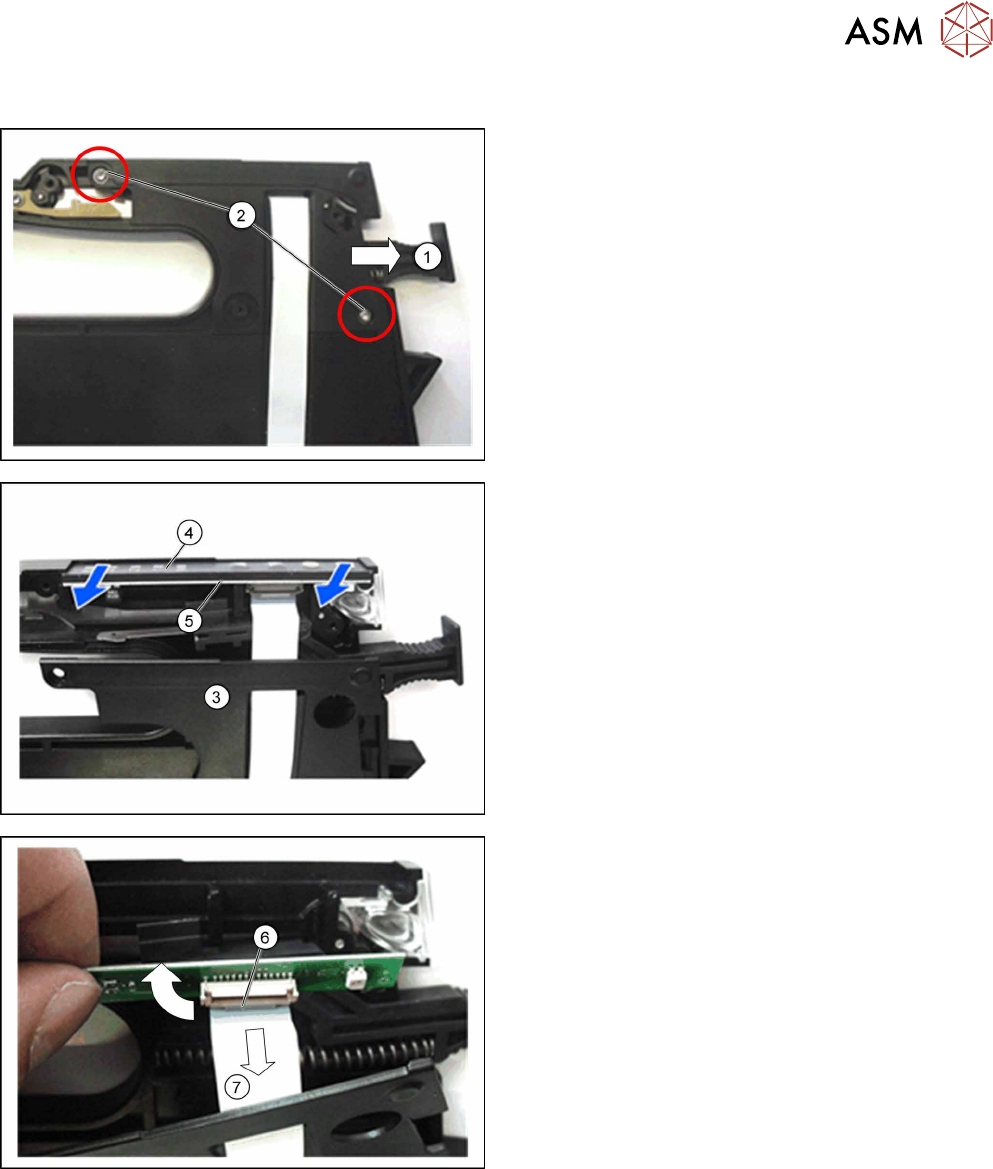
► Loosen the lock(1) in the position "unlocked".
► Open the two marked TORX screws(2), with
which the cap on the foil stuffing unit is fixed.
► Carefully lift the cap on the foil stuffing unit(3) a
little from the base of the feeder module. Make
sure that the flat ribbon cable is still fastened to
the control panel board.
► Pull the control panel(4) out of the guidance, to-
gether with the board(5).
► Open the bracket on the flat ribbon cable connec-
tion(6) at the board.
► Pull the flat ribbon cable(7) out of the flat ribbon
cable connection.
► Pull the flat ribbon cable out of the foil stuffing
unit cap.
6 Repairs to SmartFeeder 4 mm X
6.15 Handle with control panel
72 Service Manual SIPLACE SmartFeeder 4 - 104 mm X 11/2017
6.15.1.2 Fitting the Control Panel and Board
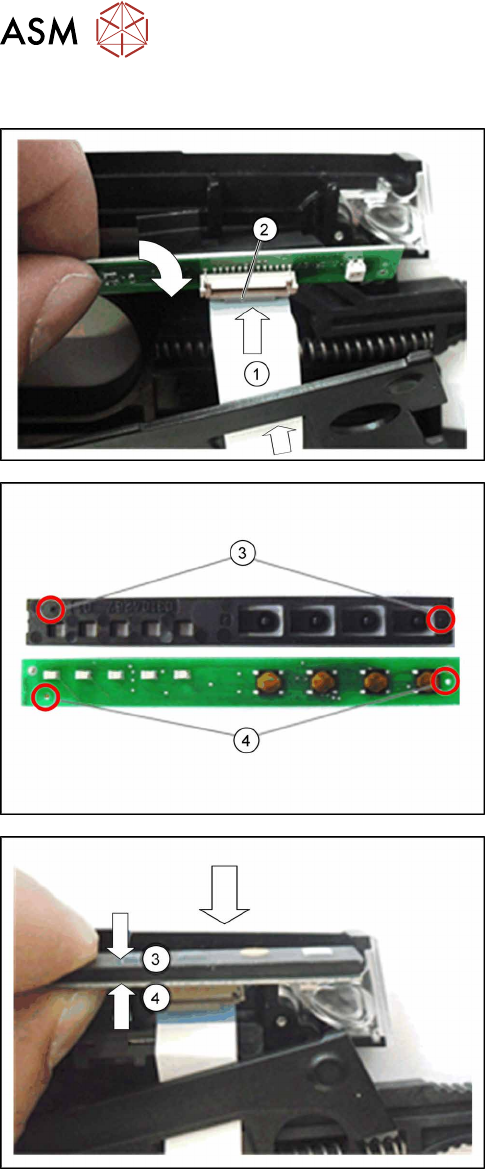
► If this is not open, swing the bracket on the flat
ribbon connection(2) on the board upwards.
► Push the flat ribbon cable(1) through the foil
stuffing unit cap, as shown, with the blue side
pointing upwards.
► Push the flat ribbon cable(1), with the blue side
pointing upwards, further into the flat ribbon cable
connection(2), on the board.
► Make sure that the flat ribbon cable contacts lie
against the contacts on the connection.
► Swing the bracket on the flat ribbon connection
down(2).
► Insert the control panel(3) with the marked pins
into the marked holes(4) on the board.
► Push the control panel(3) together with the
board(4) sideways into the feeder module guid-
ance provided.
► Make sure that the flat ribbon cable is not
pinched or pulled out of the connection on the
board.