00191474-02.pdf - 第23页
Retrofit instructions HS -50 Cable mounting plate on the head board 1 1/99 edition 23 6 Fig. 6 - 1 Additional V elcro fasteners on the revolver head (1) V elcro fastener for the ribb on ca ble of the ‘ Discar d’ valv e p…

Cable mounting plate on the head board Retrofit instructions HS -50
11/99 edition
22
6 Attaching the Velcro fasteners and round cable
holder to the component vision module
Å Clean the adhesive surfaces of the revolver head identified by item 7 in Fig. 5 - 1 and item 1 –
4 in Fig. 6 - 1 using a clean, lint-free cloth moistened with ethyl alcohol.
PLEASE NOTE: 6
The adhesive surface must be free of oil and grease. 6
Å Remove the protective film from the adhesive surfaces of the Velcro fasteners.
Å Place the Velcro fasteners at the indicated points on the revolver head (item 7 in Fig. 5 - 1 and
item 1 – 3 in Fig. 6 - 1) and press down lightly.
Å Remove the protective film from the side of the Velcro fastener facing the ribbon cable.
CAUTION 6
Use your index finger and press the ribbon cable only lightly against the adhesive surfaces.
Otherwise you may break the cable, which would cause faults in the revolver head. 6
Å Remove the protective film from the adhesive surface of the round cable holder and press
down lightly to fix it to item 4 in Fig. 6 - 1.
Å Snap the vacuum hose into the clip of the round cable holder.
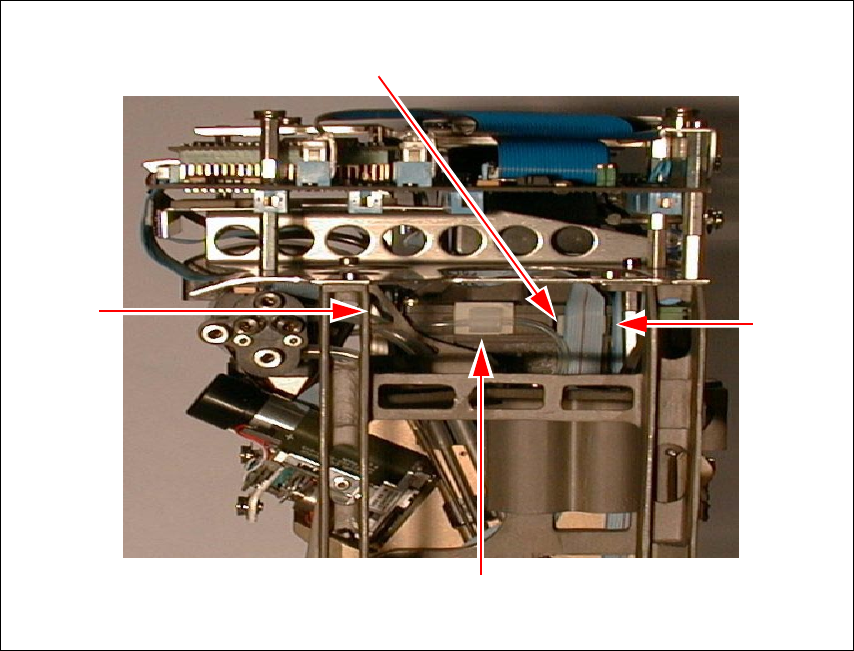
Retrofit instructions HS -50 Cable mounting plate on the head board
11/99 edition
23
6
Fig. 6 - 1 Additional Velcro fasteners on the revolver head
(1) Velcro fastener for the ribbon cable of the ‘Discard’ valve positioning drive
(2) Velcro fastener for the ribbon cable of the ‘Pick up/Insert’ valve positioning drive
(3) Velcro fastener for the ribbon cable of the turning station/DLM1
(4) Round cable holder for the vacuum hose
(1)
(2)
(3)
(4)
Cable mounting plate on the head board Retrofit instructions HS -50
11/99 edition
24
7 Fitting the new fixing parts, cable mounting plate
and head board
Fit the following fixing parts in the order described below (see Fig. 7 - 1): 7
– At pos. I:
M3x5 fillister head screw, item 7
2x M3x18 spacer bolts (internal thread/external thread), item 9
– At pos. III:
M3x5 fillister head screw, item 7
2x M3x18 spacer bolts (internal thread/external thread), item 9
– At pos. IV:
M3x5 fillister head screw, item 7
M3x15 spacer bolt, (internal thread/internal thread), item 11
M3x14 spacer bolt (internal thread/external thread), item 12
– At pos. II:
M3x20 fillister head screw, item 8
Spacer sleeve, Ø 3.2x6x4, item 10
Cable mounting plate, item 1
M3 washer, item 13
M3x5 spacer bolt, (internal thread/internal thread), item 14
Å Tighten the spacer bolts.
– At pos. IV:
M3 washer, item 13
M3x5 spacer bolt, (external thread/external thread), item 15
Å Tighten the spacer bolts.
Å Place the holes in the head board (item 2) over the threaded pins of the spacer bolts.
Å Check that the head board is lying flat on all the spacer bolts.
– At pos. II:
Å Screw the M3x15 spacer bolt (internal thread/internal thread), item 16 onto the threaded
pin.
Å Tighten the bolt. Make sure that you do not damage the head board.