MV-9_Chapter 5. Teaching.pdf - 第128页
MV -9 Use r Manual 5- 128 - Binarization Set bi nar i zation type (auto/m anu al ), binarizat ion level and binari zat ion condition (High- Low /Low-Hi gh). If auto is select ed , l um inan ce adj ust m ent o f lead …
错误!使用“开始”选项卡将 제목 2 应用于要在此处显示的文字。错误!使用“开始”选项卡将 제목 2 应用
于要在此处显示的文字。 .
5-127
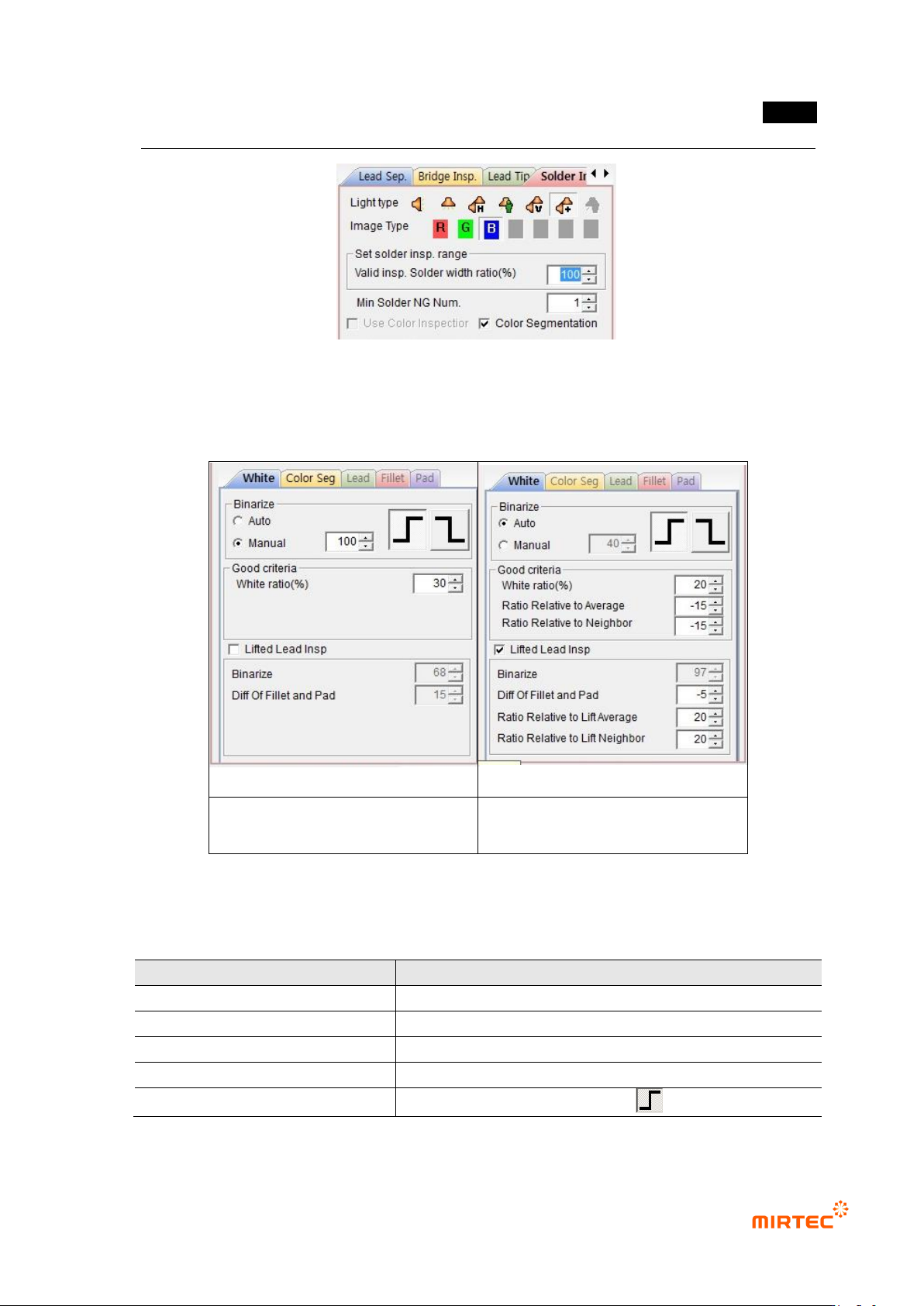
[Figure 5-142 common parameter for solder amount inspection]
White parameter
When comparison inspection is not
selected
When comparison inspection is
selected
[Figure 5-143 solder amount inspection setting_white]
[Table 5-13 Solder inspection area setting value]
Item
Recommended setting value
light
horizontal + vertical light (Sometimes horizontal - vertical)
image type
B (L for horizontal - vertical)
binarization type
manual
binarization level
90 ~ 170 (Differ from samples)
binarization condition
High – Low ( )
MV-9 User Manual
5-128
- Binarization
Set binarization type (auto/manual), binarization level and binarization condition (High-
Low/Low-High).
If auto is selected, luminance adjustment of lead and pad is ignored on color tap, and
auto calculated value is used for binarization value for lead and pad.
If manual is selected, luminance adjustment-application of each of lead and pad is
possible on color tap. Displayed value is luminance adjustment value of lead on color
tap.
- Normal criteria
White pixel ratio (%): This is to set white ratio of solder at fillet part of lead end. If result
value is larger than setting value, judge as good.
Average value comparison lowest limit: activated when comparison inspection is
checked. This function is to compare with average value of amount (white pixel ratio) of
all lead in inspection window and amount of individual lead. Set min value of difference
with average value to judge as good.
Normal condition: (lead amount – average value) > = (– average value comparison lowest limit)
Adjacent lead comparison lowest limit: activated when comparison inspection is
checked. This function is to compare with amount (white pixel ratio) of adjacent lead.
Set min value of lead amount difference between lead to judge as good.
Normal condition: (lead amount – adjacent lead amount) > = (– adjacent lead comparison lowest
limit)
Comparison inspection will be conducted for lead of which white pixel ratio is defect. If
both of average value comparison and adjacent lead comparison are all normal, judge
as good.
- Lifted inspection
Check at this option to use lifted inspection, and normal criteria item of lifted inspection
will be activated. Added to that, if comparison inspection is checked, normal criteria item
for lifted comparison inspection will be activated.
Binarization: set binarization value for pad area. Binarization method must be manually
set. And color tap –value that adjusted luminance on pad will be displayed.
Difference between fillet and pad: set min value of white pixel ratio of fillet and
difference of white pixel ratio of pad to detect lifted defect
Lifted average value comparison lowest limit: activated when comparison inspection is
checked. This is function to compare average value of amount (white pixel ratio) of all
lead in inspection window with amount of individual lead. set min value of difference with
average value to judge as good.
错误!使用“开始”选项卡将 제목 2 应用于要在此处显示的文字。错误!使用“开始”选项卡将 제목 2 应用
于要在此处显示的文字。 .
5-129
Normal condition: lead amount – average value > – average value comparison lowest limit
Adjacent lead comparison lowest limit: activated when comparison inspection is
checked. This function is to compare with amount of adjacent lead (white pixel ratio).
Set min value of lead amount difference between lead to judge as good.
Normal condition: lead amount – adjacent lead amount > – adjacent lead comparison lowest limit
Comparison inspection will be conducted for difference between lead fillet and lead of
which pad is defect. If both of average value comparison and adjacent lead comparison
are all normal, judge as good.
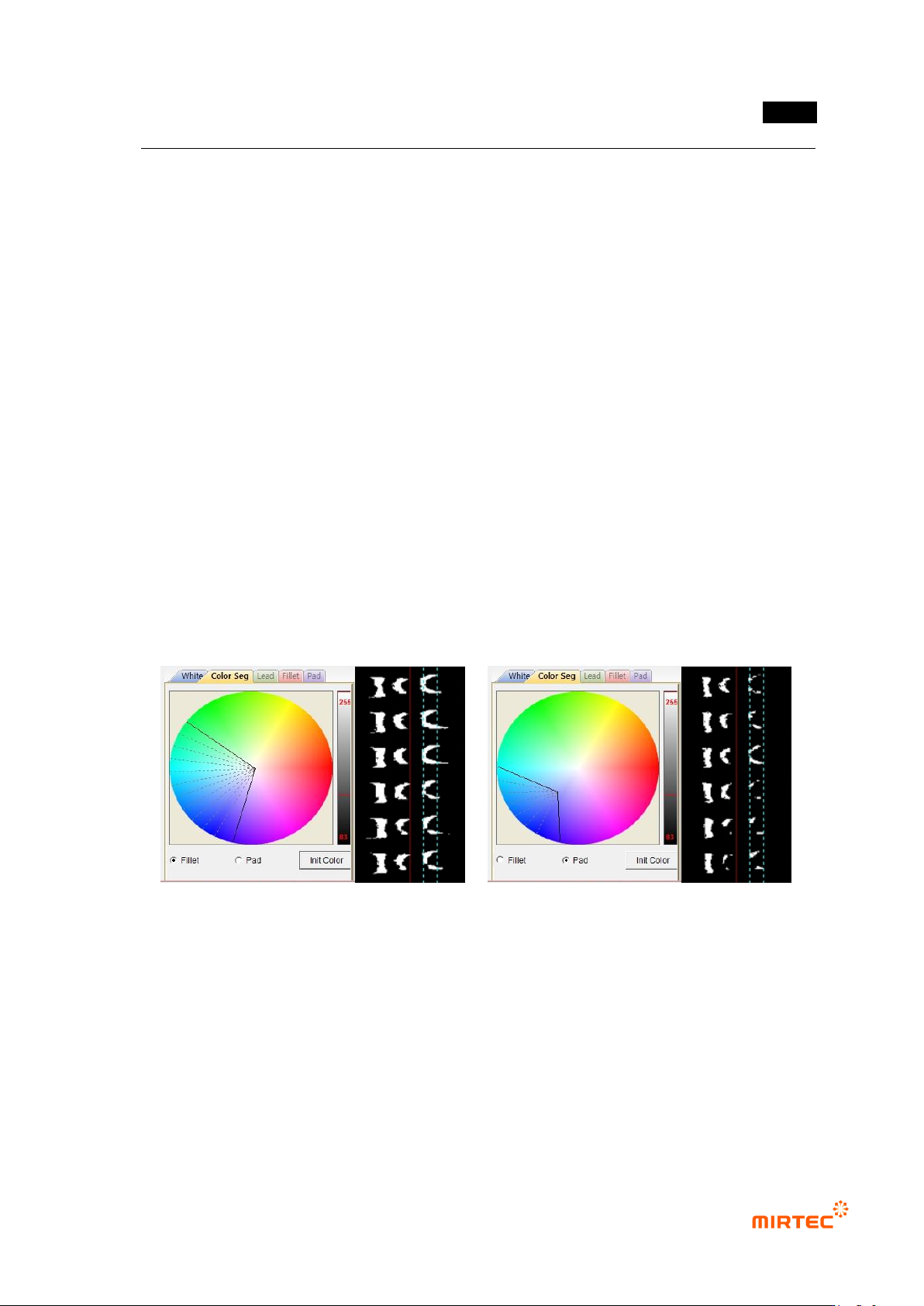
Color parameter
- Check at color binarization to activate this function. Color map and binarization for fillet
and pad can be adjusted.
- If lifted inspection is not selected, set only color map for fillet. To conduct lifted inspection,
adjust color map for both of fillet and pad.
- Color map adjustment adjusts color, saturation and luminance for good solder separation.
To adjust luminance, manually select binarization method for white parameter.
- Preview image displayed in the screen is preview image of fillet or pad selected on color
tap.
[Figure 5-144 color parameter setting]
14) Parameter of solder amount inspection (advanced inspection)
- Solder amount inspection (advanced inspection) inspects insufficient solder/no solder,
lifted inspection of each area by separating to lead, fillet and pad through color inspection.
- For solder amount inspection (advanced inspection), use lead tap, fillet tap, and pad tap.
Use horizontal + vertical light image.