MV-9_Chapter 5. Teaching.pdf - 第160页
MV -9 Use r Manual 5- 160 This option i s to com pensate angle of rotat ion structure of laser sensor . T op : 0 degree , lef t: 90 degree , bottom: 180 degree , right: 270 degree S can speed Scan speed can be set to „…

错误!使用“开始”选项卡将 제목 2 应用于要在此处显示的文字。错误!使用“开始”选项卡将 제목 2 应用
于要在此处显示的文字。 .
5-159
5.3.10 Lifted inspection window
This is used to inspect solder window lifted of IC Bridge.
[Figure 5-192 lifted inspection window creation screen]
Reference name
Refer to „reference name‟ in „5.3.1 mounting inspection window‟ excepting shape.
Name will be created in „_LCA_1_‟ format. „LCA‟ mean lifted and the number means creation
order of lifted inspection window.
Component name
Refer to „component name‟ in „5.3.1 mounting inspection window‟.
Rotation angle
Refer to „rotation angle‟ in „5.3.1 mounting inspection window‟
Max/average/min height
Peak/average/min value of data from section scanned by laser will be display.
Measurement
collect data from section scanned by laser.
Refer to self height
set this option to compensate height value of start or end position to „0‟.
Reference position
This will be activated only when self height reference setting is released. Set this option to
refer to Height of specific position. (height inspection window is used as reference position.)
End window ID
This function must be set for lifted inspection algorithm teaching. Directly enter reference
name of end window or click the button to set end window.
Move average section
Average achieved by moving section to know trend change.
Middle value filter
Align surrounding of peak and peak value of itself in order, and find middle value to change
original peak value to the middle value.
Window size
Set data collection section of move average or middle value filter
Angle compensation
MV-9 User Manual
5-160
This option is to compensate angle of rotation structure of laser sensor.
Top: 0 degree, left: 90 degree, bottom: 180 degree, right: 270 degree
Scan speed
Scan speed can be set to „1 ~ 5‟, and has same function with low speed 1, low speed 2,
middle speed, high speed 1, high speed 2 set in „laser calibration‟ in „Config.‟.
Average value
Set to detect lifted defect of package by scanning upper package side.
Max/min
Set this item to detect lifted defect by scanning lead tip. In general, set min value to −5000 not
to give influence on inspection. In case of much noise during measurement, increase window
size and remove noise by using middle value filter.
Min height and max height
Click „measure‟ to collect data and set it to proper value.
Effective range auto setting
Value set in „laser auto range setting ratio‟ will be applied in „teaching‟ setting screen of „4.2.1
operation setting‟ in „Chapter 4 Config.‟ to automatically set min/max height.
Teaching method
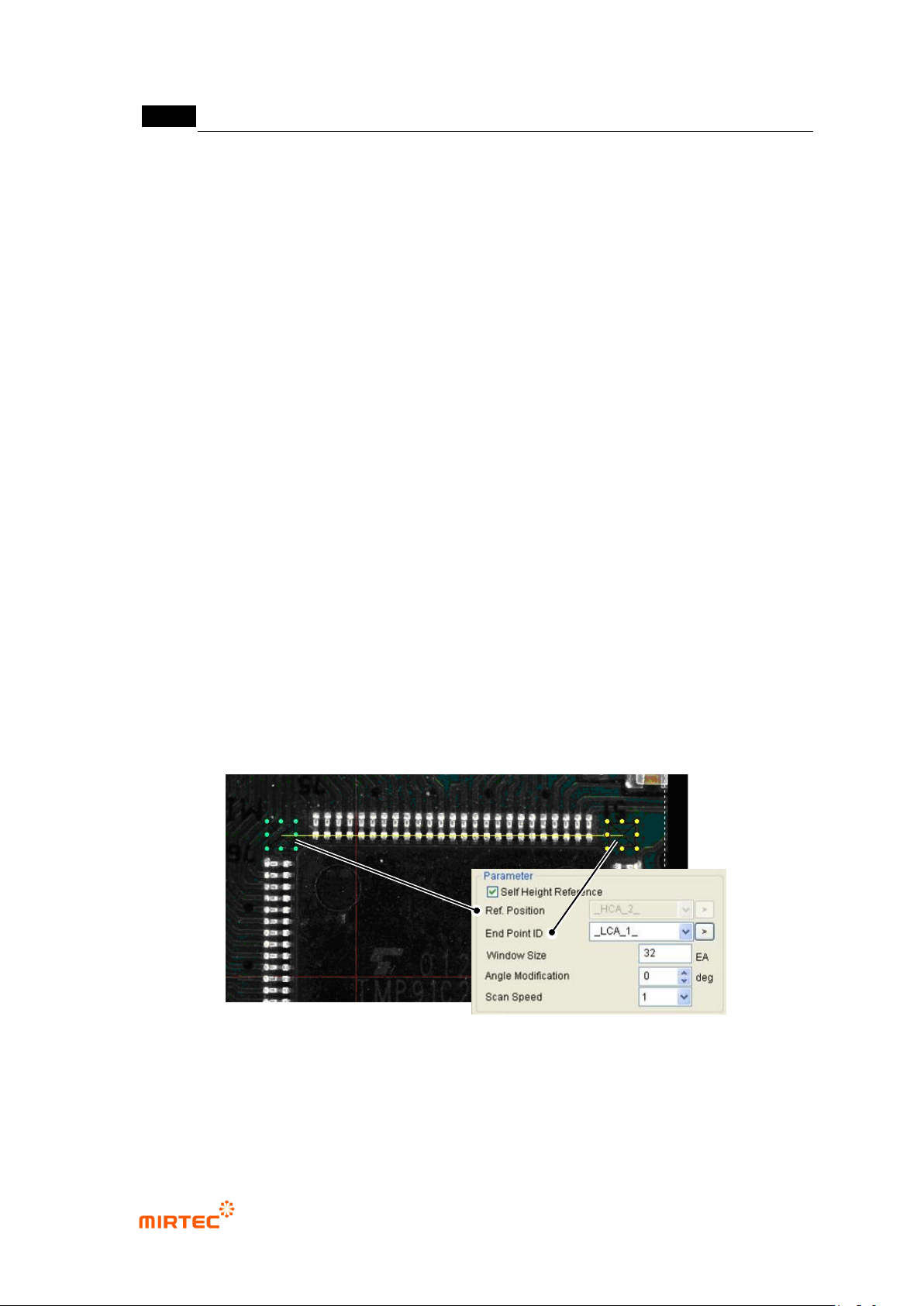
① Click <lifted inspection window> button among „operating buttons‟. Drag from beginning to
end of IC Bridge desired for teaching to create 2 lifted inspection windows at start point and
end point, and automatically set end window ID.
[Figure 5-193. lifted inspection window reference position and end position setting]
② Position setting: set each of „reference position window‟ and „end window‟.
③ Start position (reference position): set „angle compensate‟ of „lifted inspection window‟. laser
that is used for the machine measures height using the laser reflected from the measuring
错误!使用“开始”选项卡将 제목 2 应用于要在此处显示的文字。错误!使用“开始”选项卡将 제목 2 应用
于要在此处显示的文字。 .
5-161
component through triangulation method. In case of component with high height, it interrupts
laser reflection. Hence, solve the problem using angle compensation of laser device.
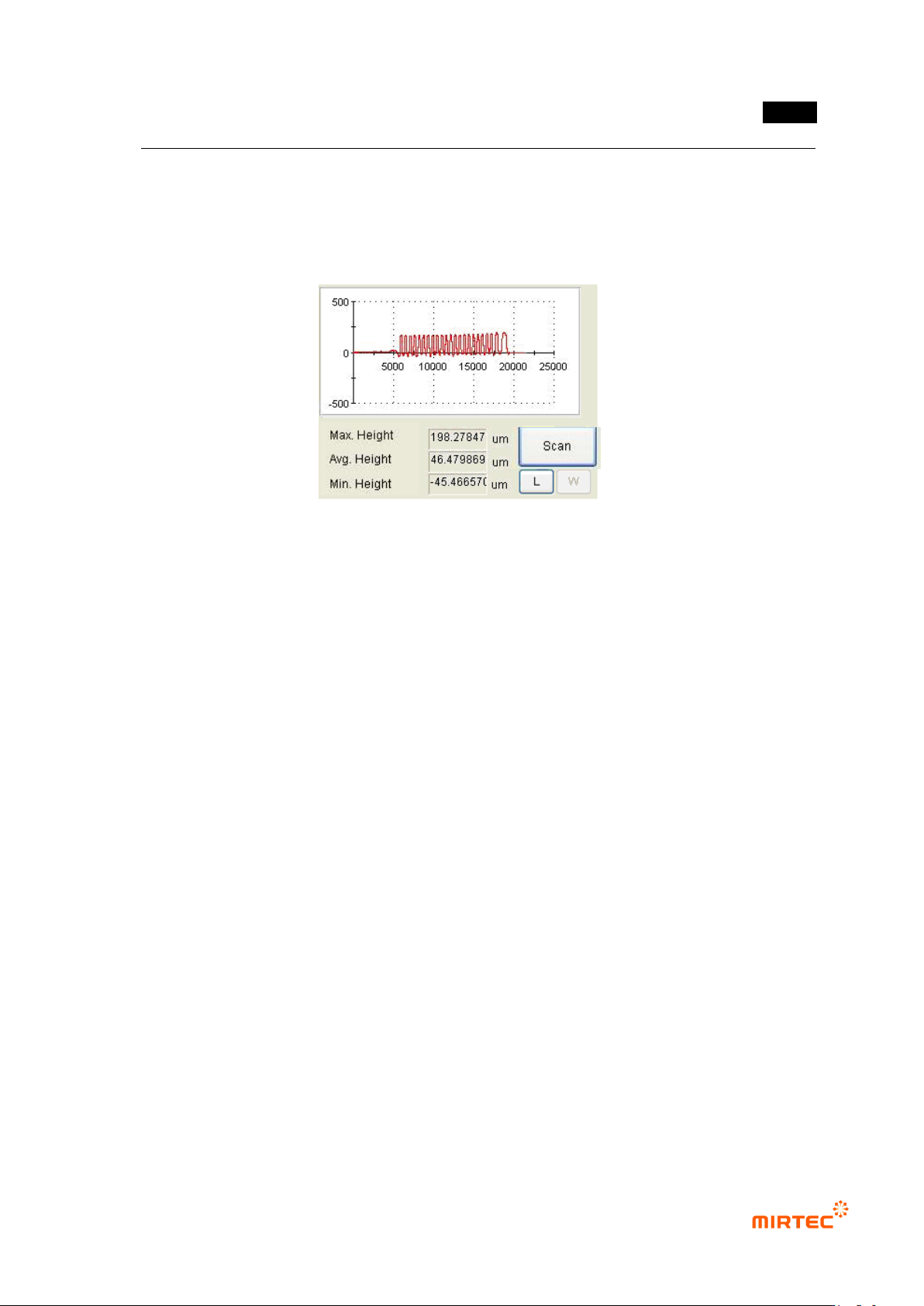
④ Click <Measure> button to get height of part desired to be measured comparing to reference
height.
[Figure 5-194 lifted inspection window reference height measurement]
⑤ Set min height and max height that will be used for measurement. If solder window of IC
Bridge exceeds min/max value, it will be detected das defect during measurement.
5.3.11 Resistance color band inspection window
Resistance color band inspection window is to inspect wrong mounting of component by
inspecting the color of color band of axial type resistance (Resistor) mounted on PCB.
1) Parameter of resistance color band inspection window