MV-9_Chapter 5. Teaching.pdf - 第240页
MV -9 Use r Manual 5- 240 ② T o return frame rotation value to initial stat us , cli ck <default va l ue> button to return to initial status. ③ or c l ick m ouse i n frame im age scre en to rot ate fram e i m age a…
错误!使用“开始”选项卡将 제목 2 应用于要在此处显示的文字。错误!使用“开始”选项卡将 제목 2 应用
于要在此处显示的文字。 .
5-239
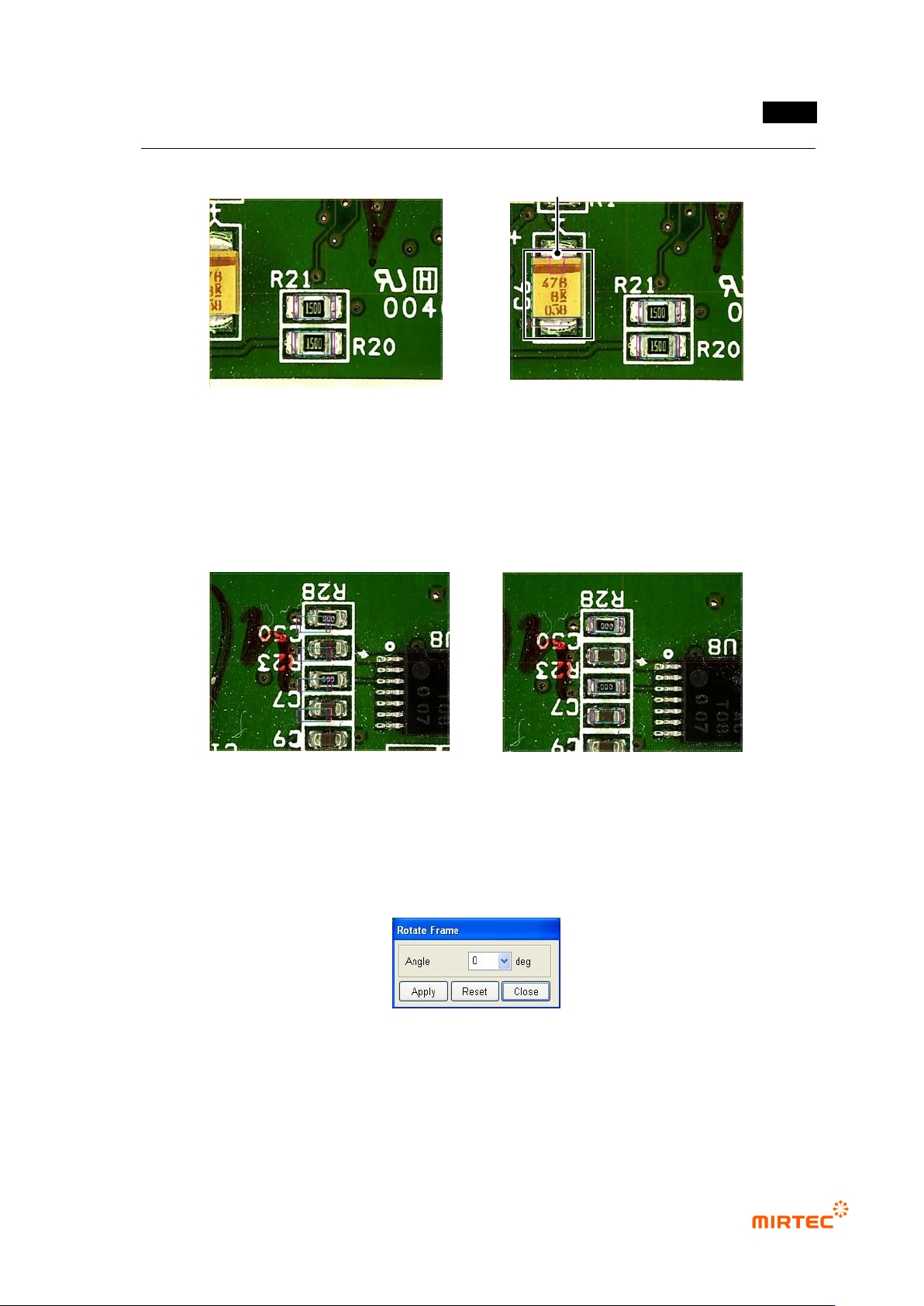
[Figure 5-313 Frame move after fixing inspection window]
If „Include inspection object‟ is selected, inspection window is included during move
In case of occurrence of interval difference between component and inspection window in
frame, this is used to compensation this and frame and components in the frame moves
together.
[Figure 5-314 frame move after including inspection window]
Frame rotation
This is used for teaching of component that is not mounted in 90° unit.
[Figure 5-315 Frame rotation]
① Enter angle value in angle input box in frame rotation screen and click <Apply> button to
rotate frame. Rotation will be made counterclockwise, and absolute angle for original frame
image 로 rotate.
Before frame move
After frame move
Before frame move
After frame move
Added inspection window

MV-9 User Manual
5-240
② To return frame rotation value to initial status, click <default value> button to return to initial
status.
③ or click mouse in frame image screen to rotate frame image as much as rotation angle and
click <Close> button in frame rotation screen.
To new frame
Not like component that completes teaching in the current frame, this is used to insert
component newly completed teaching into a new frame.
Frame enlarge/reduce
This will be activated when HD camera is mounted in the machine. If HD camera is used,
basically, image displayed in frame image screen shows circle image reduced by half. At this
point, when image is enlarged or reduced to see the relevant frame at the size of circle image,
use Digital Zoom function. Use <enlarge> button in operating buttons, space bar on the
keyboard or mouse wheel to enlarge/reduce frame.
Frame save
This function is used to save image of the currently selected frame as a BMP file.
Frame delete
This function is used to delete the currently selected frame. At this point, inspection window
created inside frame will be deleted together.
Cancel
Use this option to return add, delete, and/or move of inspection windows in frame to the status
before the relevant operation
Repeat
Use this option to return work done by „cancel‟ back to previous status
Paste
This option is used to paste window of inspection window in PCB model that is copied or cut
into the current frame
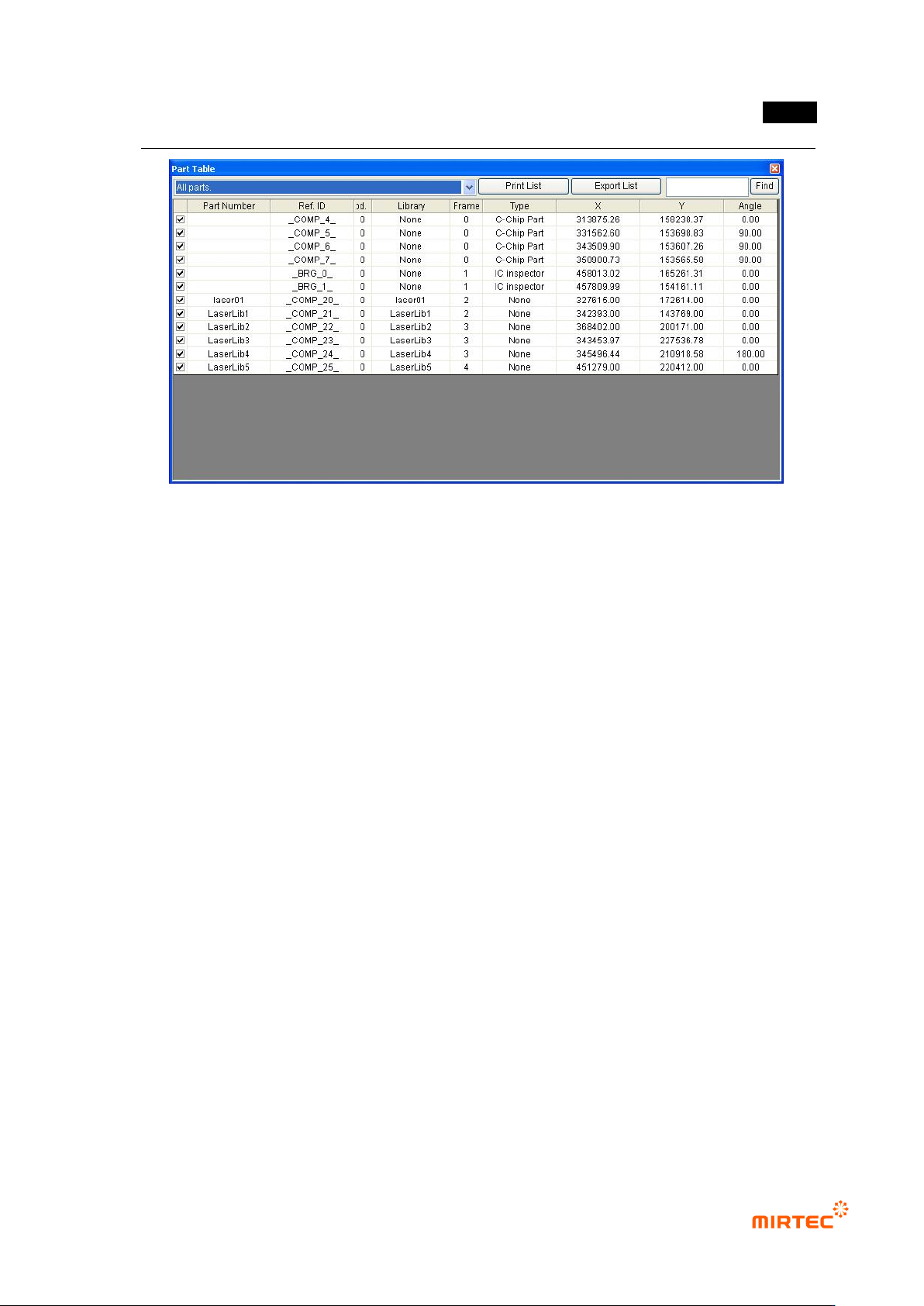
Component list
Basically, information of each component that completed like component name, reference
name, library, frame, type, X/Y coordinate, angle, quantification can be checked.
错误!使用“开始”选项卡将 제목 2 应用于要在此处显示的文字。错误!使用“开始”选项卡将 제목 2 应用
于要在此处显示的文字。 .
5-241
[Figure 5-316 component list]
Component name: component name used for PCB.
Reference name: reference name recorded in PCB
Module: module No.
Library: library name used for teaching
Frame: frame No.
Type: inspection type.
X: X-axis coordinates.
Y: Y-axis coordinates.
Angle: component angle.
Window hid
This is to hide window that completed teaching in frame.
Delete defect information
This is to delete information of defect windows that completed teaching in frame. Only
information will be deleted. defect information will not be judged as normal.