MV-9_Chapter 5. Teaching.pdf - 第93页
错误 ! 使用“开始” 选项卡将 제목 2 应用于要在此处显示的文字。 错误 ! 使用“开始”选项卡将 제목 2 应用 于要在此处显示的 文字。 . 5- 93 8) E cc entricity inspection - T his inspection algorithm is to inspect position of pin located in the center on com ponen t shaped like a …
MV-9 User Manual
5-92
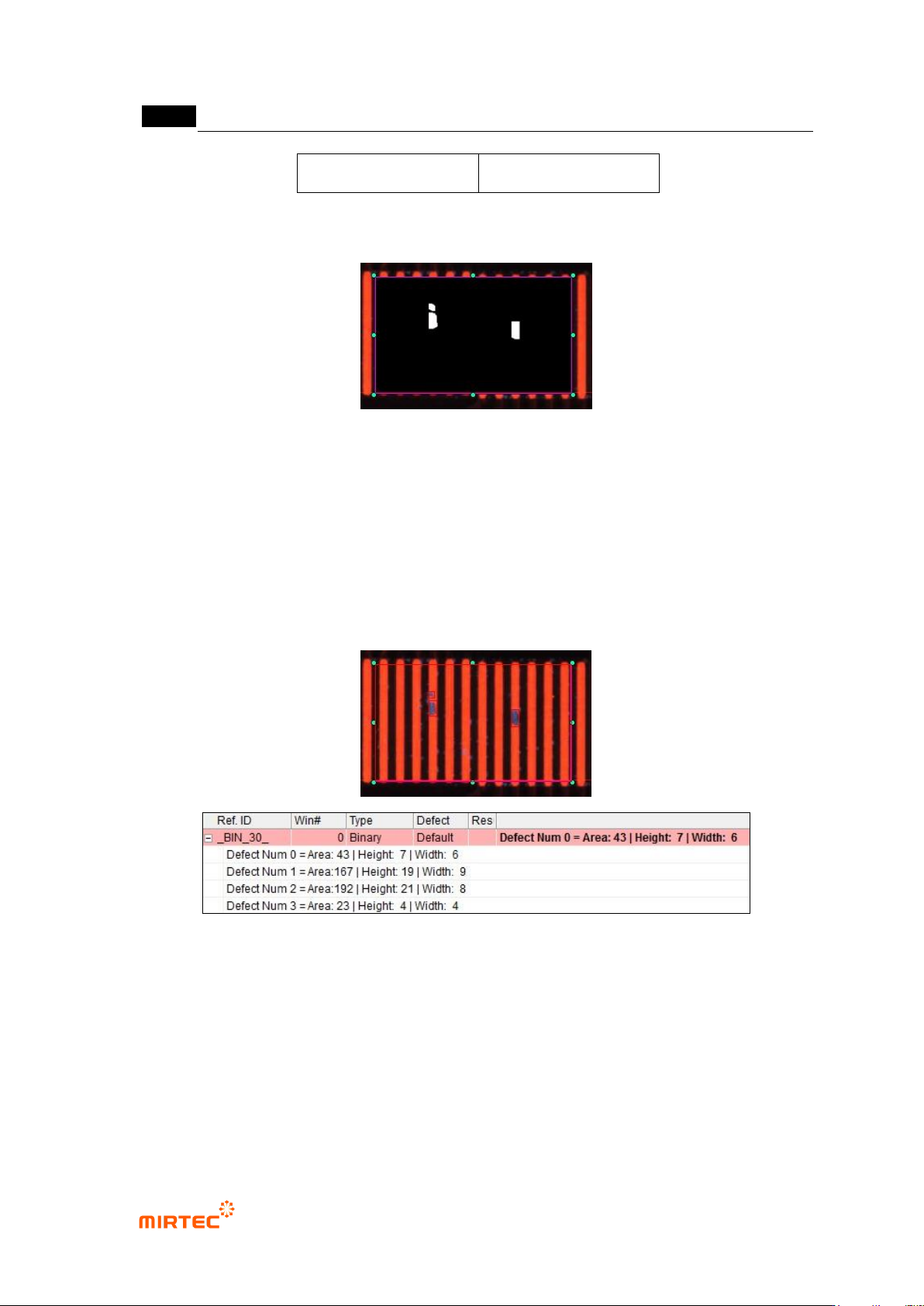
After boundary noise
removal
After min area limit
[Figure 5-98 Normal criteria application example]
[Figure 5-99 Preview image for tap inspection]
② Inspection result in status screen
- Defect Num X: No allotted to white area detected as defect.
- Area: number of pixel (area) of white area detected as defect.
- Height: height of rectangle drawn in white area detected as defect.
- Width: width of rectangle drawn in white area detected as defect.
[Figure 5-100 Multiple tap inspection result]

错误!使用“开始”选项卡将 제목 2 应用于要在此处显示的文字。错误!使用“开始”选项卡将 제목 2 应用
于要在此处显示的文字。 .
5-93
8) Eccentricity inspection
- This inspection algorithm is to inspect position of pin located in the center on component
shaped like a BNC connector based on outer circle. calculate the distance after searching
center position of outer circle and inner circle.
① Teaching method
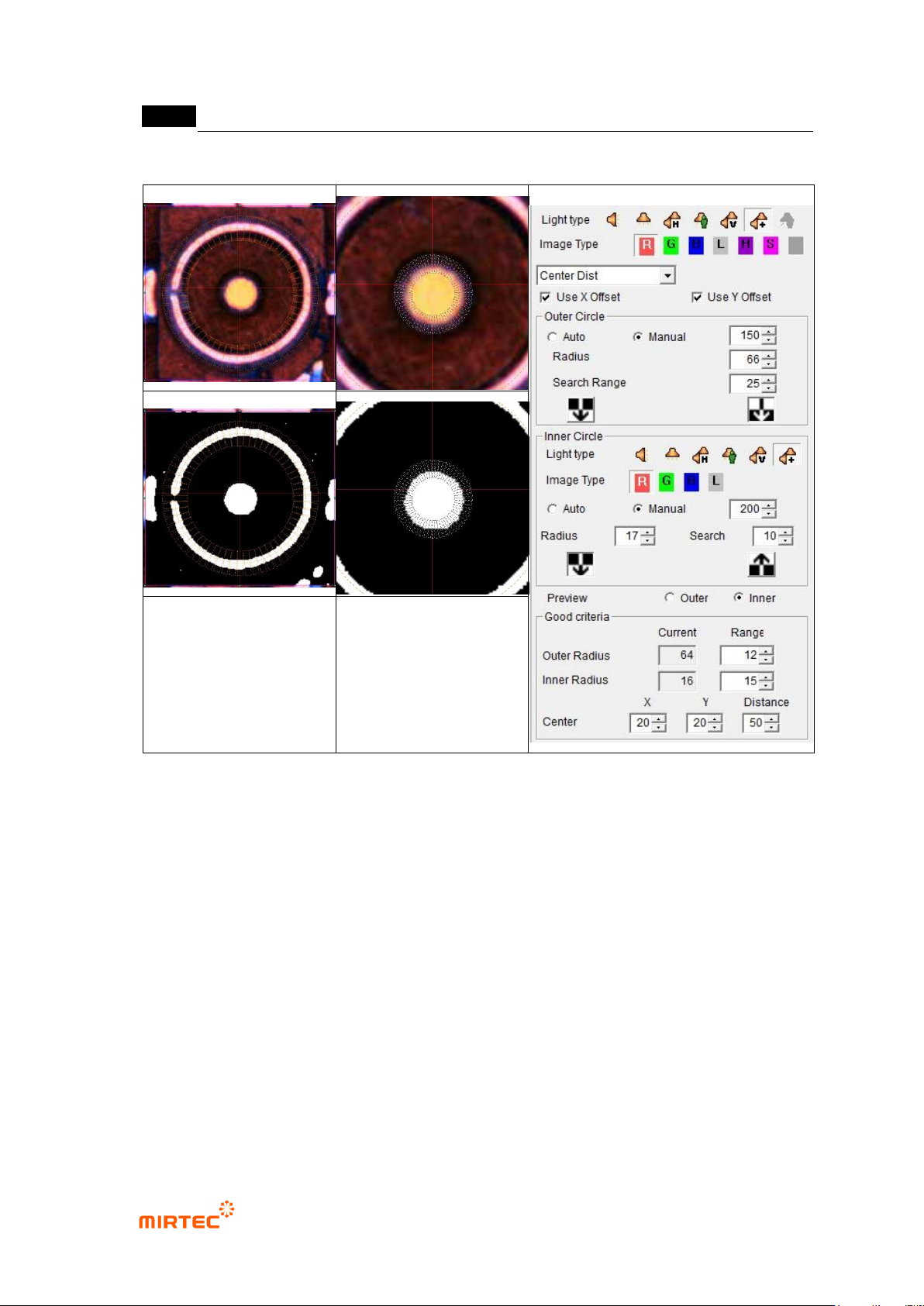
(a) Select preview in operation window, and select preview-outside among eccentricity
inspection parameter.
(b) Select light type and image type to detect outer circle.
(c) Manually select binarization method in outer circle, and set binarization value for good
separation of outer circle to be detected
(d) Adjust radius according to outer circle to be detected, and adjust search range.
(e) Select type of boundary line to be detected in each search range of outer circle.
(f) Select preview-inside, and light type and select image type to detect inner circle.
(g) Manually select binarization method in inner circle, and set binarization value for good
separation of inner circle to be detected
(h) Adjust radius according to inner circle to be detected, and adjust search range.
(i) Select type of boundary line to be detected in each search range of inner circle.
(j) Conduct trial inspection to display radius of detected outer circle and inner circle in
current. Set allowable range of radius of detected circle in the range.
(k) Enter normal criteria in pixel unit for distance between detected outer circle and outer
circle center.
MV-9 User Manual
5-94
outer circle teaching status
inner circle teaching status
[Figure 5-101 Teaching example of eccentricity inspection window]
② Parameter description
Outer circle
- Light type and image type
Select light type and image type to detect outer circle. use light type and image
type on the top of inspection type.
Basically, select horizontal + vertical light and R or L type. In case of white light,
select vertical light and L type.
- Binarization method and binarization value
Select auto or manual binarization method, and adjust binarization value for good
separation of outer circle during manual selection.
- Radius: adjust radius to be close to outer circle to be detected.